


You’re at the Fair Price Shop, the dealer scans your card, and the ePoS machine flashes a red message — eKYC pending, or Aadhaar not seeded. You have no idea where to check this, let alone fix it. That’s the gap the Mera Ration 2.0 app fills. It lets you verify your entitlement, your eKYC status, and your transaction history from your phone, so you walk into the shop knowing exactly where you stand. This guide covers downloading the app, logging in, and using the features that actually solve problems — plus the mistakes that leave people stuck.
What the App Does, and Who It’s For
Mera Ration 2.0 is built by the National Informatics Centre for ration card holders covered under the National Food Security Act (NFSA). Its real purpose is to support One Nation One Ration Card (ONORC) — the scheme that lets you lift your monthly food grains from any Fair Price Shop (FPS) in the country, not just the one in your home district.
For migrant workers, this matters enormously. A family that moves from Bihar to Kerala for work no longer has to travel back every month or forfeit its share. Authentication happens through an electronic Point of Sale (ePoS) device at the shop, using Aadhaar or biometrics, and your entitlement follows you.
The app is the window into that system. It shows what you’re entitled to, what you’ve already collected, and whether anything is blocking your collection.
Discover More About:👇
Ration Card Status: How to Check Rice Card Status with Aadhaar Number in AP & Telangana
Smart Card Status Check 2026: TNPDS, Aadhaar & Ammavodi
Aadhaar Status Check – How to Check Enrolment & Update Status Online
Key Features Worth Knowing
Digital Ration Card and Family Details
Your full card — member list, assigned FPS, card category — sits inside the app. You can download a digital copy, which is handy when the physical card is lost, damaged, or simply at home while you’re at the shop.
Entitlement and Transaction History
The dashboard shows your monthly quota. Under the NFSA, central issue prices are ₹3 per kg for rice, ₹2 per kg for wheat, and ₹1 per kg for coarse grains, though states sometimes add their own top-ups. Your transaction history shows what you’ve actually lifted and when — useful when you suspect a dealer has recorded a sale you never made.
Fair Price Shop Locator
A GPS-based search lists nearby FPSs with shop details and directions. If you’ve just relocated, this saves you from asking around.
eKYC Status Per Member
This is the feature that prevents the most trouble. eKYC (Aadhaar-based verification of identity) confirms each person on the card is a real, verified individual. Many states now require it for continued benefits. The app shows each member’s status as completed or pending — so you find out before the dealer tells you.
Grievance Redressal
Discrepancies — wrong entitlement, a failed transaction, a pending eKYC that won’t clear — can be filed as a grievance and tracked within the app.
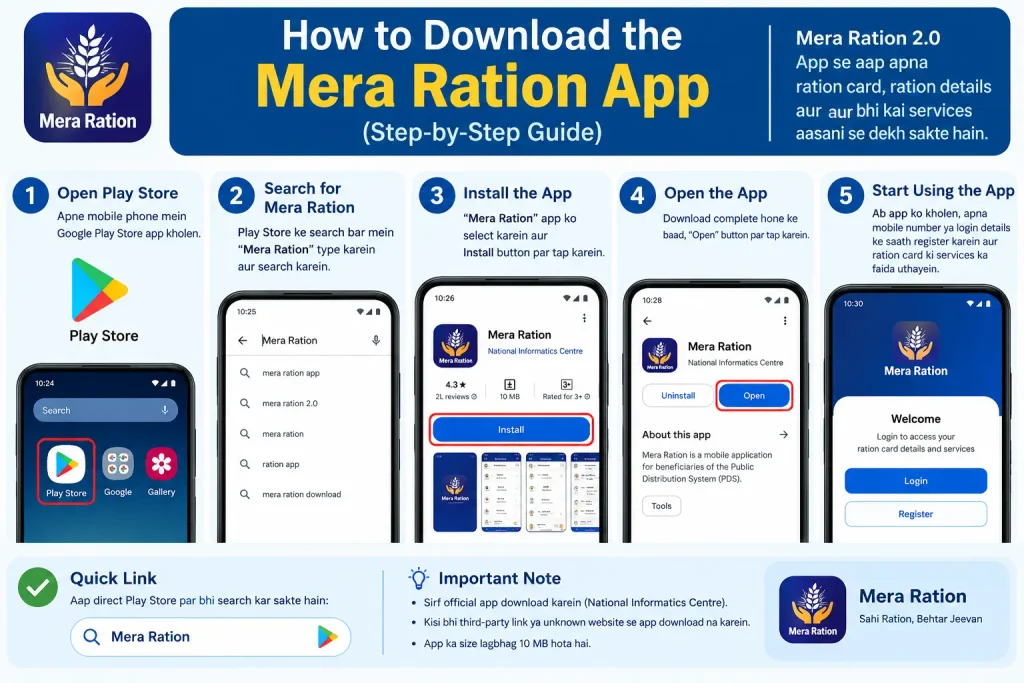
How to Download the Mera Ration App
Both Android and iOS versions exist, and both come from official stores only.
Android: Open the Google Play Store, search for “Mera Ration 2.0,” and confirm the publisher reads National Informatics Centre before tapping Install. The app needs Android 4.4 or later and roughly 77 MB of free space.
iOS: Open the App Store, search the same name, and tap Get.
A caution that bears repeating: skip any website offering a mera ration apk file. Sideloaded builds are a common route for malware and credential theft, and there is no version of this app that requires you to go outside the official stores.
How to Log In — Step by Step
Login runs on Aadhaar authentication. The flow is short, but a few things trip people up.
- Open the app and tap the login or registration option on the home screen.
- Select your state from the dropdown.
- Enter your Aadhaar number and the captcha shown.
- Tap “Login with OTP.” The OTP goes to the mobile number registered against your Aadhaar — not necessarily the number in your hand.
- Enter the OTP and verify. You may be prompted to set a password at this point.
Pitfalls to watch for:
- OTP never arrives. Nine times out of ten, the mobile number linked to your Aadhaar is an old one. You’ll need to update it through the UIDAI portal (uidai.gov.in) or at an Aadhaar Seva Kendra before the app will work for you. This is the single most common reason people give up on the login screen.
- Wrong Aadhaar digit. A single transposed digit produces a generic “authentication failed” message rather than telling you the number is wrong. Retype carefully.
- Session timeout. If you leave the app mid-login to fetch the OTP from your messages, the session can expire. Have your phone ready to copy the OTP quickly, or note it down before switching apps.
Once you’re in, your card details and entitlement load on the dashboard, and the digital card is available to show at the FPS.
Linking Your Ration Card to Aadhaar
If your card isn’t yet associated with your Aadhaar in government records, the app offers a linking option. Tap “Link Ration Card,” enter your ration card number, select your state, and supply your Aadhaar number for verification. Review the details before submitting — a mismatch in name spelling or date of birth between the two records is a frequent cause of rejection. The Aadhaar number you enter must be the one already attached to your ration card in state records; entering a different one won’t force a link.
Common Mistakes That Cost People Their Ration
Letting eKYC slide. If a member’s status shows pending, act on it. Face authentication through the companion Mera eKYC app (which relies on the Aadhaar FaceRD app) or biometric verification at the FPS are the usual routes. Deadlines vary by state and shift without much notice.
Sharing OTPs with callers. Anyone phoning to say your ration card will be cancelled unless you share an OTP, Aadhaar number, or bank details is running a scam. No genuine official needs those from you over a call.
Expecting instant updates. Member additions, mobile number changes, and eKYC approvals move at the speed of your state’s PDS database, not the app. If something stays pending for an unusual stretch, file a grievance rather than re-submitting the same request repeatedly.
Assuming the app and the card are the same record. The app displays what your state’s PDS system holds. If the underlying record is wrong, the app will faithfully show the wrong thing — the fix happens at the state level.
Frequently Asked Questions
Is this an official government app?
Yes. It’s published by the National Informatics Centre for NFSA beneficiaries.
Can I use it without Aadhaar linked to my ration card?
Practically, no. Login itself is Aadhaar-based, and your ration details are keyed to the linked Aadhaar.
What’s different in Mera Ration 2.0 compared with the older app?
It has a redesigned interface, expanded family detail management, and eKYC status checking. Some users found the earlier version smoother in places, but only 2.0 is actively maintained.
Is Mera Ration available inside UMANG?
Yes — UMANG carries a Mera Ration feature covering eligibility, monthly quota, nearby FPSs, and distribution history.
Where do I check eKYC status?
Log in, go to “My Profile,” then “Manage Family Details.” Each member shows as completed or pending, and pending ones can be initiated from there.
Can I add or remove family members in the app?
Yes, along with contact detail updates. Document requirements for these changes vary by state.
A Closing Note on Timelines
Fees, eKYC deadlines, and state-specific rules change periodically, and there’s no single all-India deadline to rely on. Check your state PDS portal or nfsa.gov.in for current requirements. One practical habit: after submitting an eKYC or linking request, give it a few working days before re-checking, since the app only reflects what your state’s database has processed. If the status hasn’t moved after that window, file a grievance through the app rather than submitting again — duplicate requests tend to slow things down rather than speed them up.

1 Comment
Pingback: Ration Card Download by Mobile Number