

The instalment stopped, or it never started. You hold a valid ration card, your bank account exists, and yet the Orunodoi payment is missing from your passbook — or your name simply does not appear when you search the portal. In most cases the cause is ordinary: a spelling mismatch between your Aadhaar and bank records, an account that was never seeded with Aadhaar, or a district list that has not been refreshed since the last verification drive. This guide explains how to check your orunodoi beneficiary status on the official Assam portals, where the district-wise beneficiary list is published, how registration under Orunodoi 3.0 works, and which documents genuinely decide whether your application moves forward.
What Is the Orunodoi Scheme?
Launched by the Government of Assam in 2020, Orunodoi (also written Arunodoi) is a monthly cash-assistance programme for economically weaker households. The transfer is made in the name of a woman member of the household — a deliberate design choice, since she typically manages spending on food, medicines, and school expenses. The scheme is administered by the state Finance Department and runs through the Aadhaar-linked Direct Benefit Transfer (DBT) system, which means the money moves directly into a bank account seeded with Aadhaar. No intermediary, no cash counter.
The benefit amount has changed across phases. It began at ₹830 per month, was revised to ₹1,250 from April 2022, and has continued at that figure under the current Orunodoi 3.0 phase. Public announcements about further increases have appeared from time to time, but any revision takes effect only through an official notification — so treat the figure you see on the portal as the one that applies to you. What matters more for eligibility is that enrolment under the National Food Security Act (NFSA) is a basic precondition for Orunodoi 3.0. In practice, the scheme draws heavily on ration-card data alongside Aadhaar and bank-account records.
Discover More About:👇
DBT Status Check with Mobile Number (2026 Guide)
Aadhaar Bank Seeding Status for DBT: How to Check Aadhaar Bank Link Status
Who Qualifies for Orunodoi 3.0
Applicants must be permanent residents of Assam and belong to an economically weaker household. The scheme prioritises women — widows, divorced or separated women, unmarried women heading households, and differently abled women among them. Under Orunodoi 3.0, families holding a valid NFSA ration card form the primary target group, and applicants in that group are generally not asked to produce a separate income certificate.
Exclusions matter just as much, because they are the reason many applications stall. Households with a government employee, families that pay income tax, those owning a motorised four-wheeler, and families holding agricultural land above the prescribed limit are typically kept out. The ₹2 lakh annual income threshold is commonly cited as the outer boundary for the scheme. Verification rules do get revised, so confirm your specific position with your Gaon Panchayat office or on the official Orunodoi portal before assuming you are in or out.
Checking Your Orunodoi Beneficiary Status: Step by Step
Two official routes exist, and they draw on different databases. Running both is the fastest way to spot where the problem actually sits.
Route 1: The Orunodoi Portal
- Open the official Orunodoi portal (
orunodoi.assam.gov.in) — this is the state’s Orunodoi home, sometimes reached through the Finance Department’s scheme page. - Find the link for beneficiary status or status check.
- Enter your Aadhaar number or the mobile number registered with the scheme. Type the Aadhaar digits without spaces or hyphens.
- Select your district if a dropdown appears.
- Submit and read the status shown against your name.
Route 2: The RCMS Assam Portal
- Go to the RCMS Assam portal (
rcms.assam.gov.in), which hosts ration-card-linked records. - Choose “Ration Card Details” from the ration card menu.
- Enter the captcha and click verify. Captchas expire quickly — if the page sits open while you fetch a document, reload and enter a fresh one.
- Select your district, DFSO, and FPS, then pick “AAY” as the scheme name and set status to “A (Verified and Approved).”
- Click “View Report” to see the beneficiary record.
Pitfalls worth knowing. The RCMS report reflects data as of the last district verification drive, not live data — so a blank result does not automatically mean rejection. And if you select the wrong FPS or DFSO, the report will come back empty even when your record exists. A third snag: bank seeding. If your account was opened years ago and never linked to Aadhaar, DBT credits will fail silently and the portal may still show you as approved. Ask your bank to confirm the seeding status in writing.
If your name is missing or the status looks wrong, contact the Orunodoi helpdesk number listed on the official portal, or visit your Gaon Panchayat or ward office in person.
Finding the Arunodoi Beneficiary List
The arunodoi beneficiary list is maintained district-wise, and it is essentially an extract of verified AAY families from the NFSA database. That is why the RCMS portal tends to be more reliable than a general web search for the orunodoi.in assam list — the list you find through official state web addresses is refreshed periodically as each district completes its verification round, not continuously.
Practically, this means you should not judge your case on a single check. If you updated your Aadhaar, bank, or ration-card details recently, allow a few weeks for the next district-level refresh before concluding anything. Checking once and giving up is the most common reason people assume they have been removed when they have not.
Applying or Updating Your Details Under Orunodoi 3.0
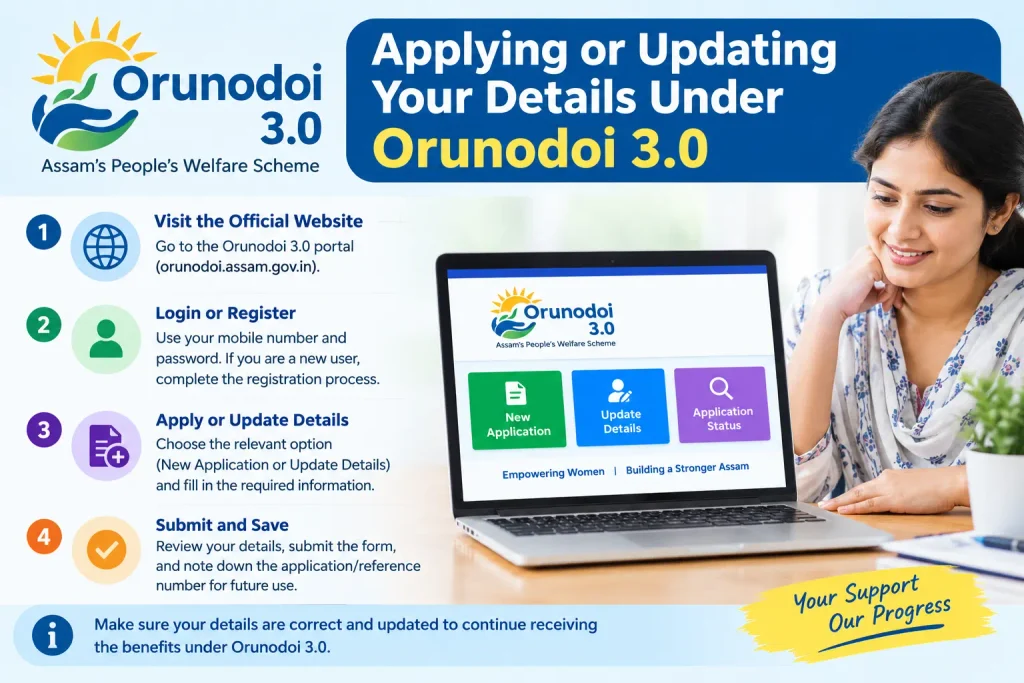
Registration is driven largely through local administrative bodies rather than a fully self-service online form, because the beneficiary pool is built from existing NFSA records. Many eligible women are identified automatically. If you need to register or correct your details, the process generally runs like this:
- Check the official Orunodoi scheme page on the Assam government site to see whether online registration is currently open.
- If it is, fill in your Aadhaar number, ration-card number, bank-account details, and contact number, then save the reference number you receive.
- If it is not, collect an application form from your Gaon Panchayat, Village Council Development Committee, or Urban Local Body office.
- Submit the completed form with copies of the required documents to that office.
- Keep the acknowledgement slip. Preliminary selection and ineligibility screening happen at the Gaon Panchayat, VCDC, or ULB level against the published guidelines.
The old Orunodoi 2.0 exercise, if you were part of it, does not need to be repeated — but your records do need to stay consistent across Aadhaar, ration card, and bank.
Documents Required — and Mistakes That Hold Applications Back
Keep the following ready. All of them are commonly required, though your local office may ask for fewer:
- Aadhaar card of the applicant, linked to the bank account receiving the transfer
- Bank passbook or a cancelled cheque showing account number and IFSC
- Ration card, preferably the NFSA card
- Residence proof establishing permanent residency in Assam
- Recent passport-size photograph
- Active mobile number, since alerts and verification messages arrive by SMS
Category-specific papers — a widowhood certificate, disability documentation, or a divorce certificate — may be needed depending on your situation.
Two mistakes account for a large share of stalled cases. The first is a name mismatch: your Aadhaar says one spelling, your bank account or ration card says another, and the DBT system cannot reconcile them. Fix the records, not the application. The second is assuming an income certificate is always mandatory. Under Orunodoi 3.0, NFSA ration-card holders are generally exempt from producing one, and official guidance has indicated that certification from a village head or mouzadar is not required either. Applicants who spend weeks chasing documents they never needed are simply losing time.
Frequently Asked Questions
What is the current monthly amount under the Orunodoi scheme?
The notified assistance under Orunodoi 3.0 is ₹1,250 per eligible beneficiary, transferred by DBT into an Aadhaar-linked account. Any change would come through an official notification, so check the portal rather than relying on forwarded messages.
How do I check my Orunodoi beneficiary status?
Use orunodoi.assam.gov.in and enter your Aadhaar or registered mobile number, or use the RCMS Assam portal to view ration-card-linked records. Cross-checking both gives the clearest picture.
Is there an income limit?
Households earning below roughly ₹2 lakh a year are the general target, but under Orunodoi 3.0 the operative filter is NFSA ration-card enrolment, and an income certificate is typically not required for card holders.
Can two women from the same household receive the benefit?
A provision introduced in 2025 allows two women per household to receive Orunodoi assistance, each credited separately.
What if my name is missing from the beneficiary list?
Approach the Orunodoi helpdesk, your Gaon Panchayat or ward office, or file a representation with the District Commissioner. Grievance options are also listed on the official portal.
Is Arunodoi the same as Orunodoi?
Yes. “Arunodoi” is an alternative spelling of the same Government of Assam scheme.
Closing Thoughts
If you updated your Aadhaar, bank, or ration-card details recently, wait through at least one full district verification cycle before treating a blank portal result as a rejection — these lists are refreshed in batches, not in real time. The one thing worth doing immediately is confirming Aadhaar seeding at your bank, because that single step causes more missing payments than any eligibility dispute. And if a payment fails across two consecutive cycles despite correct seeding, put it in writing to your District Commissioner’s office with a copy of your passbook page and Aadhaar — a paper trail moves these cases far faster than repeated portal checks.
