


Four apps for one train journey. That was the reality until recently: the UTS app for your monthly suburban pass, IRCTC Rail Connect for your sleeper ticket, a third app to check PNR, and the IRCTC website if you wanted a meal delivered to your seat. Each one wanted its own password, and at least one was always logged out when you needed it most.
The rail one app is Indian Railways’ attempt to end that juggling act. Built by the Centre for Railway Information Systems (CRIS) with IRCTC, it folds reserved ticketing, unreserved ticketing, platform tickets, PNR enquiry, live train tracking, food ordering, grievances, and refunds under a single login. This guide covers what the app genuinely does well, how to install it without picking up a counterfeit copy, the three ways to log in, and the small traps that catch first-time users.
What Rail One Actually Consolidates
RailOne is not a travel aggregator. It is the official railways application, published by the railway’s own IT wing, and that distinction matters the moment you type in payment details or personal information.
The headline change is account consolidation. Earlier, an unreserved travel account lived on UTS and a reserved booking account lived on IRCTC. RailOne uses single sign-on (SSO) — one set of credentials that unlocks ticketing, wallet, and complaint services. The app supports English and several Indian languages, and it is free on both the Google Play Store and the Apple App Store.
One practical point: RailOne is the successor to the UTS mobile app for unreserved travel. If you still hold a valid season pass or monthly ticket issued through UTS, that ticket typically remains valid until it expires — the transition does not invalidate what you already paid for.
How to Download RailOne (and Spot a Fake Listing)
Five minutes of care here saves a lot of trouble later, because lookalike apps with similar names have circulated on app stores.
- Open the official store only. Google Play Store on Android, Apple App Store on iPhone or iPad. Avoid APK files from third-party websites — they may be outdated or modified.
- Search for “RailOne” and read the developer field before tapping anything. The genuine listing is associated with CRIS or Indian Railways.
- Scan the listing for oddities. The app is free. If a listing charges a fee, demands permissions unrelated to ticketing or payments, or lists an unfamiliar developer, close it.
- Install, then open. First launch shows either a login screen or a registration option.
- Check compatibility if installation fails. The store listing states the minimum Android version, which on recent releases has been Android 8.1 or later.
Pitfall to watch: a listing that looks right but shows a slightly different developer name. That is the single most reliable warning sign.
Logging In: Three Routes, and What Trips People Up
Route 1 — Existing UTS or IRCTC credentials
If you have a working username and password on UTS or IRCTC Rail Connect, enter them on the RailOne login screen. No fresh registration needed. This is the fastest path for regular passengers.
The trap: those credentials are tied to the mobile number registered at the time of signup. If you have changed your SIM since, the OTP may never arrive. The fix is not to create a duplicate account — it is to update the registered mobile number through the railway’s account-recovery route first. Two accounts under your name cause real confusion later, especially with refunds.
Route 2 — Fresh registration
First-time users register with a mobile number or an email address, verified by OTP. Keep the number active for the life of the account; it becomes your recovery channel.
Route 3 — Browsing without an account
Train schedules and PNR status can often be checked without signing in. Booking tickets, using the wallet, or filing a complaint requires a registered account.
Forgot your password? The “Forgot Password” link sends an OTP to your registered mobile or email. On compatible phones, RailOne also supports biometric login — fingerprint or face — so you stop typing passwords entirely.
Discover More About:👇
Aadhaar Verification Online: How to Verify & Check Aadhaar Card Validity
Features That Matter Day to Day
Booking and passes
One interface handles reserved tickets (sleeper, AC classes), unreserved tickets for short and local travel, and platform tickets. The “My Bookings” section lists active and cancelled tickets with filters by period and transaction type. For suburban commuters, monthly and season passes for unreserved travel are supported — arguably the feature that matters most if you travel the same route twice a day.
Live tracking, PNR, and coach position
Real-time running status shows delays, expected arrival times, and platform numbers. A coach position finder tells you where your coach will halt, which is the difference between boarding calmly and sprinting down the platform. PNR enquiry sits inside the same app, so checking whether a waitlisted ticket has moved needs no second download.
Food, grievances, and refunds
Meal ordering runs through IRCTC’s e-catering network, with delivery to your seat at participating stations. Complaints go through the Rail Madad section, where you can report cleanliness, catering, staff conduct, or technical issues and receive a tracking number. Refund requests for cancelled or missed journeys can be raised in-app, with status visible under your bookings.
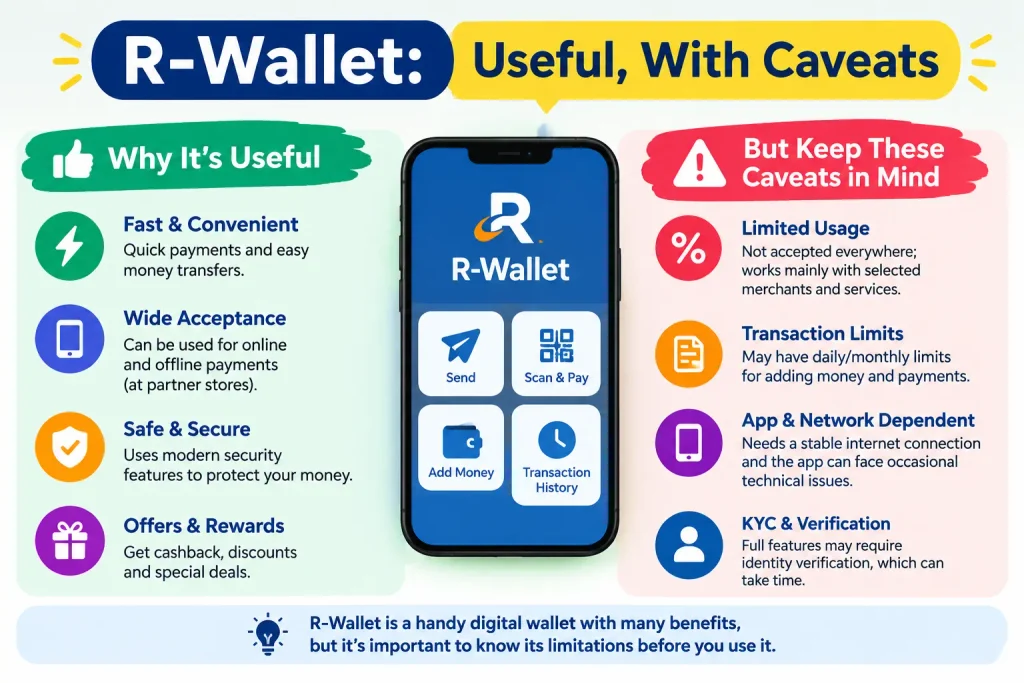
R-Wallet: Useful, With Caveats
R-Wallet is the in-app digital wallet. Load a balance, pay for tickets from it, and skip entering card details each time. Indian Railways has periodically offered small cashback or discounts on digital unreserved bookings, including wallet payments, to push adoption.
Two things to keep in mind. First, wallet limits and any Know Your Customer requirements are set by the railway and can change — check the current terms inside the app rather than relying on an old blog post. Second, offers come and go. Do not top up a large balance purely to chase a discount that may have lapsed.
Common Mistakes and How to Fix Them
Sideloading an APK. Unofficial builds may lag behind the official version and can carry security risks. Stick to the stores.
Creating a second account. If UTS or IRCTC Rail Connect already works for you, log in with it. Duplicate accounts fragment your booking history.
Panicking when the app crashes. Update from the store first, then restart the phone, then reinstall. A weak connection causes more “app not working” complaints than actual bugs do. Persistent problems belong in the in-app support option.
Entering payment details on an unfamiliar screen. RailOne payments route through standard railway gateways. If a screen asks for more than the booking requires, back out and verify.
Frequently Asked Questions
Do I need a new account to use Rail One?
No. Existing UTS and IRCTC Rail Connect credentials generally work. New users register with a mobile number or email.
Can I book reserved and unreserved tickets in the same app?
Yes — reserved, unreserved, and platform tickets are all handled from one interface, along with season passes.
Is Aadhaar mandatory for Rail One?
No, linking Aadhaar is optional. It comes into play for identity verification in certain contexts, such as Tatkal bookings. For current Aadhaar-linking rules, check the official UIDAI portal (uidai.gov.in) or the latest railway notification.
Can I use Rail One without logging in?
Partly. Schedules and PNR status are often accessible without an account; booking and wallet services are not.
What if my OTP never arrives?
Check that your registered mobile number is still active and that DND settings are not blocking service messages. If the number itself has changed, update it through the railway’s recovery process rather than registering again.
A Final Word
If you hold an active UTS season pass, keep the old app installed until that pass runs out — deleting it early buys you nothing and costs you a working ticket. And because railway features, wallet terms, and supported devices shift with each release, treat the in-app Help section as your first source and third-party articles as a rough map. Railway services change faster than search results do.
