


One form. 181 colleges. A single merit rank that decides where you spend the next three years. That is the promise — and the pressure — of TNGASA 2026, the unified admission system for Tamil Nadu government arts and science colleges. Every year, thousands of students lose seats not because their marks were low, but because they mistyped a register number, skipped choice filling, or assumed the college would call them after the rank list came out. None of that happens automatically. This guide walks you through the application on tngasa.in, the login and password process, how the rank list actually works, and the documents that can make or break your counselling slot.
Discover More About:👇
Aadhaar Status Check – How to Check Enrolment & Update Status Online
What TNGASA Changes for Applicants
TNGASA — Tamil Nadu Government Arts and Science Colleges Admissions — is run by the Directorate of Collegiate Education. Before it existed, a student applying to five government colleges filled five separate forms and paid five separate fees. Now one registration covers all of them.
For 2026–27, roughly 1.26 lakh undergraduate seats are spread across 159 courses in 181 government arts and science colleges. Admission is purely merit-based: Class 12 marks for UG, undergraduate marks for PG. Students unfamiliar with online forms — particularly from rural areas — can get hands-on help at Admission Facilitation Centres set up in every government arts and science college. That option exists; use it if typing on a shared computer feels risky.
TNGASA 2026: Important Dates
| Event | Date |
|---|---|
| Online application opens | 7 May 2026 |
| UG application closes | 29 May 2026 |
| UG and PG rank lists released | Early June 2026 |
| Special quota counselling | 5–6 June 2026 |
| General counselling | 8–18 June 2026 |
| B.Ed / M.Ed application window | 19 June – 21 July 2026 |
Schedules can shift. Before you act on any date here, confirm it on the official portal — the Directorate has revised timelines in past cycles.
How to Apply on tngasa.in: Step-by-Step
The application is a linear, ten-step process. Nothing can be skipped, and later steps lock in earlier ones.
- Open the official site. Go to www.tngasa.in. The portal itself carries a warning against similarly named websites. If the URL does not match exactly, close the tab.
- Register as a new user. You need a working mobile number and an email ID. That email becomes your permanent username, so use one you check daily — not a parent’s address you rarely open.
- Log in and fill personal details. Name, date of birth, gender, category. Enter these exactly as they appear on your Class 10 certificate. Spelling variants cause verification delays later.
- Mark special reservation and scholarship details. Sports quota, differently abled, ex-servicemen, NCC — if any apply, flag them here. This step is easy to skim past; missing it means losing weightage you are entitled to.
- Enter school and academic information. Provide your school details and Class 10 and Class 12 marks. This is the single most error-prone step. The rank list is generated directly from these numbers. A transposed digit in your maths mark can drop you hundreds of ranks.
- Preview everything. Read the summary screen slowly. Once you confirm, corrections usually require a fresh application or a facilitation centre visit.
- Fill college and course choices. Rank your preferred colleges and courses in priority order. The portal lets you select multiple options across the 181 colleges. Do not leave this blank — a high rank with no choices filled results in no allotment.
- Pay the fee. As per the official portal, the application and registration fee is ₹2 for SC/SCA/ST candidates and ₹50 for others. Some reports mention an additional component, so check the payment screen for the exact amount before you proceed.
- Download and print your application. Keep at least three copies. You will need one at counselling, one for your own file, and one as backup.
- Upload certificates. Scanned copies must be clear and within the stated size limits. Blurred or oversized files are a common cause of rejected applications.
Two pitfalls worth flagging: the portal can time out during long form-filling sessions, so save your progress whenever the option appears; and if the fee payment page hangs after debiting your account, do not pay twice — wait for the transaction to reflect, then check your application status.
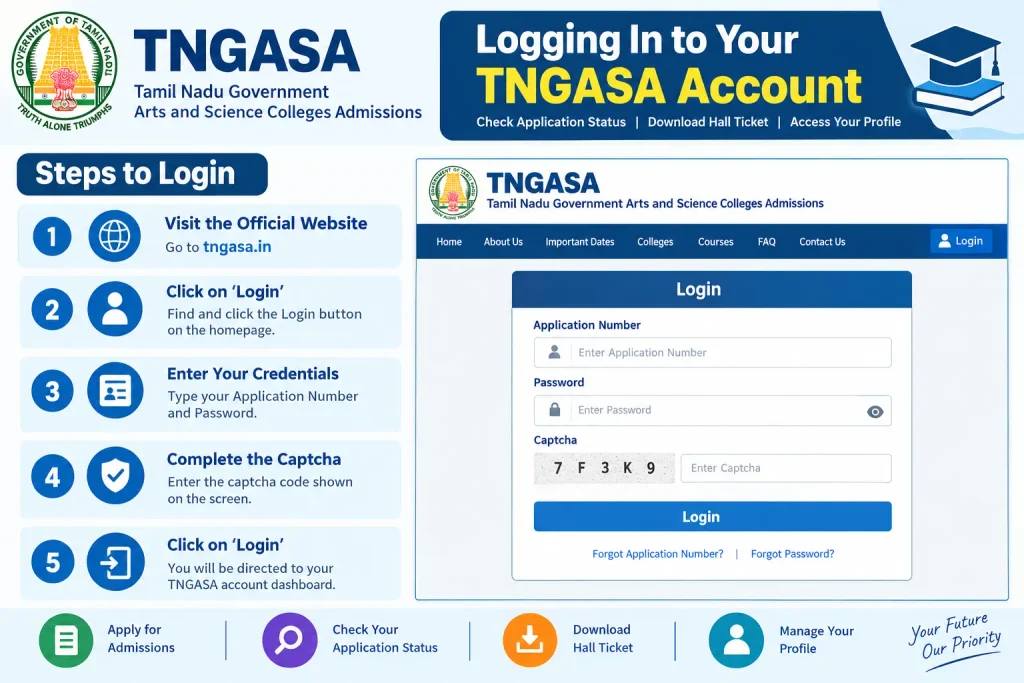
Logging In to Your TNGASA Account
Login is simple once you are registered. Visit tngasa.in, click the login option, and enter your registered email as the username plus your password. Forgotten passwords reset through a link sent to your registered email or mobile.
A password that meets the portal’s rule — at least one alphabet, one number, one special character — is mandatory. Something like Tngasa@26 works; 123456 does not.
Your dashboard is where application status, rank list links, and counselling updates appear. For PG admissions, some individual colleges (Alagappa Government Arts College, for instance) also publish rank lists on their own websites, and you may need to log in there separately. Check both.
TNGASA Rank List 2026: How to Read It
The rank list is the merit list that decides who gets called for counselling. It is published separately for UG and PG, and often split further by special quota and general category. Reports indicate the UG and PG rank lists were released on 2 June 2026, with individual colleges publishing their own versions around the same time.
To check yours:
- Go to tngasa.in and look for the “UG Rank List 2026” or “PG Rank List 2026” link.
- Pick your category and medium (English or Tamil).
- Open the PDF and use Ctrl + F to search your registration number or name.
- Note your rank, category rank, and any course or college indicated.
- Download and print it.
Rank is calculated from Class 12 marks for UG, with reservation weightage applied per government norms. Finding your name on the list is not the end of the process — it is the start of counselling, which involves choice filling, document verification, and seat confirmation within fixed windows.
Documents Required for Counselling
Shortlisted candidates need originals plus photocopies of:
- Class 10 and Class 12 mark sheets
- Transfer Certificate from the last institution attended
- Community Certificate (if applicable)
- Income or EWS Certificate (if applicable)
- Differently Abled Certificate (if applicable)
- Nativity Certificate (if required)
- Passport-sized photographs
- Aadhaar Card for identity verification
- TNGASA application printout and rank list copy
Assemble this file the day the rank list is published. Counselling slots move fast, and a missing certificate can cost you the seat you ranked first.
Common Mistakes That Cost Seats
- Registering with a defunct email. It becomes your username and your only channel for updates.
- Weak passwords. Rejected or compromised at the worst possible moment.
- Wrong academic marks. Mismatch with mark sheets can trigger disqualification.
- Leaving choice filling incomplete. No choices means no allotment, no matter the rank.
- Assuming the fee went through. An unpaid application is not processed.
- Waiting to be contacted. Nobody calls you. You check the rank list and report to counselling yourself.
FAQs
What is the official TNGASA website?
www.tngasa.in — the portal explicitly warns against lookalike sites.
Can one application cover multiple colleges?
Yes. One registration and fee covers all 181 government arts and science colleges.
How is the rank list prepared?
Merit-based, from Class 12 marks for UG, with reservation and special-category weightage applied per Tamil Nadu government rules.
What is the application fee?
₹2 for SC/SCA/ST candidates and ₹50 for others, as stated on the official portal. Verify any additional component on the payment screen.
I forgot my password. What now?
Use the “Forgot Password” link. A reset goes to your registered email or mobile. If that fails, visit an Admission Facilitation Centre.
Can I apply from outside Tamil Nadu?
Eligible candidates from across India can apply, though domicile may matter for certain categories. Read the eligibility criteria on the portal before registering.
Final Thoughts
The one habit that separates a smooth TNGASA experience from a stressful one is checking your application status the day after you submit — not the week the rank list is due. Errors caught early can be fixed; errors caught late usually cannot. And if a payment or upload fails, resist the urge to start a second application immediately. Wait for the first to reflect, then decide.
