

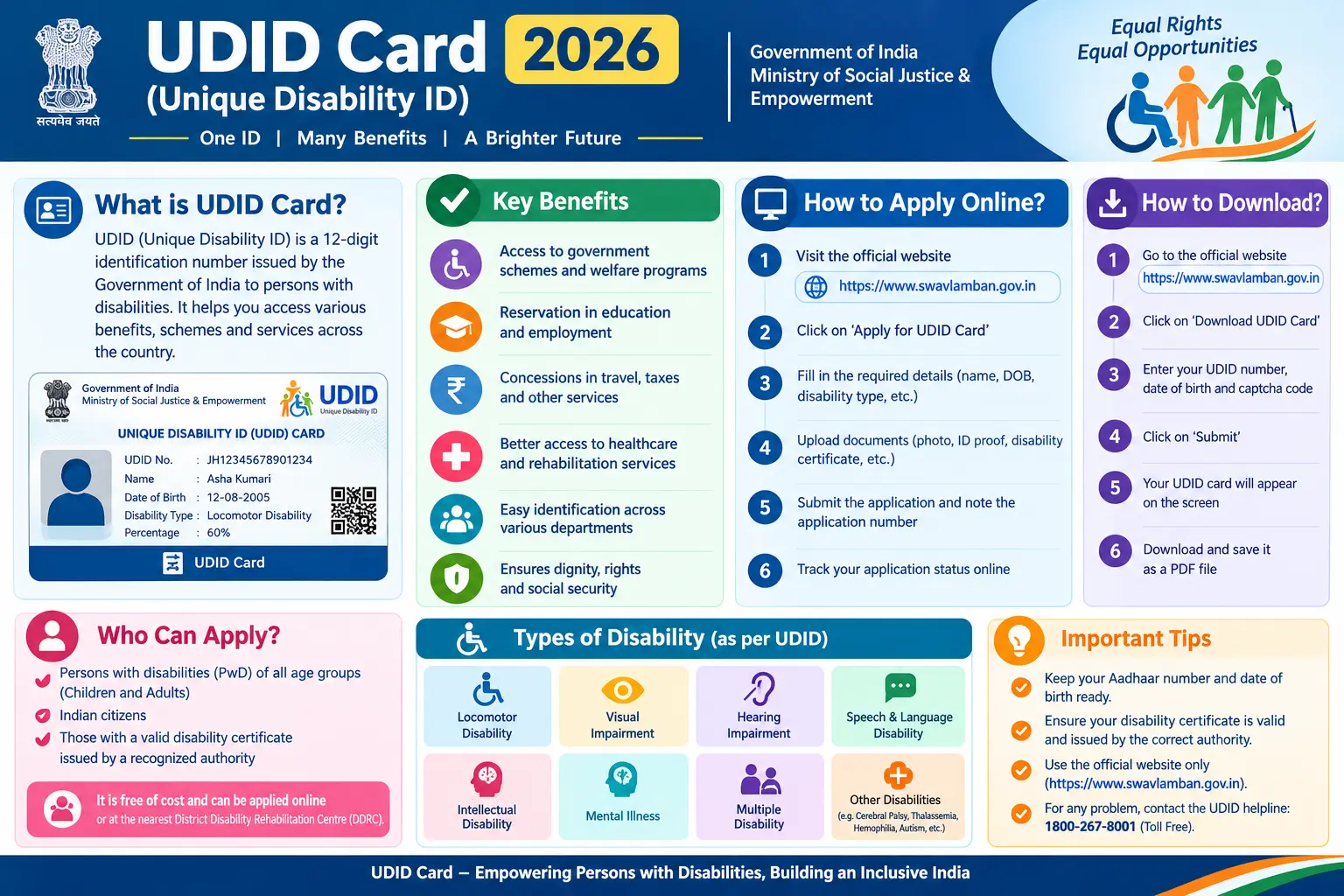
If you have ever carried a thick folder of medical papers, old certificates, and photocopies just to prove your disability at a railway counter or a scholarship office, you already know why the Unique Disability ID (UDID) card exists. Issued under a project run by the Department of Empowerment of Persons with Disabilities (DEPwD), this single card consolidates your disability certificate and identity proof into one document that is valid across India. This article walks through the UDID card benefits, the 21 recognised disability types, how to apply and download your card, and the renewal process — with the practical details that usually get left out.
What Is a UDID Card and Who Can Apply?
A UDID card is a Unique Disability Identity card that carries your disability certificate details alongside your personal information. It is issued only after a medical assessment by a notified medical authority, and once issued, it remains valid across states — so you no longer need separate state-level paperwork for most purposes.
Any Indian citizen with a full or partial disability can apply. If the applicant is a minor, or unable to apply on their own because of the nature of their disability, a legal guardian can complete the process on their behalf through the UDID portal.
The UDID scheme itself has a broader aim: building a national database of persons with disabilities so that benefits can be delivered without duplication and without applicants running between offices.
Discover More About:👇
Aadhaar Status Check – How to Check Enrolment & Update Status Online
Aadhaar Verification Online: How to Verify & Check Aadhaar Card Validity
Types of Disability Covered Under UDID
The Rights of Persons with Disabilities (RPwD) Act, 2016 recognises 21 specified disabilities. Your application is assessed against this list. Commonly known categories include:
- Blindness
- Low vision
- Leprosy cured persons
- Hearing impairment, covering deaf and hard-of-hearing conditions
- Locomotor disability — generally, a person’s inability to carry out activities linked to movement of self and objects because of a musculoskeletal or nervous system condition
- Dwarfism
- Intellectual disability
- Mental illness
- Cerebral palsy
- Muscular dystrophy
- Chronic neurological conditions
- Multiple disabilities
Searches for locomotor disability in Hindi or types of disability in Hindi usually come from people trying to match their medical condition to the official category before applying. Each category has its own assessment criteria, and the medical board decides which one — and what percentage — applies to your case. The same official list is used in types of disabilities in inclusive education settings, which is why the UDID card is accepted for school and college admissions as well as employment-related benefits.
What “Benchmark Disability” Means
Government notifications frequently use the term benchmark disability. Under the RPwD Act, a person with benchmark disability generally means someone with not less than 40 per cent of a specified disability, certified by the competent authority. If you have looked up benchmark disability meaning in hindi, it refers to this 40 per cent threshold — the level that determines eligibility for reservation and several other entitlements.
How to Apply for a UDID Card Online: Step-by-Step
Applications are handled through the official UDID portal at swavlambancard.gov.in. The steps below describe the general flow; screens and options do change, so rely on what the portal currently shows.
- Register on the UDID portal. Create an account with a mobile number and email address you can access immediately. The OTP is time-bound, and a number you cannot reach will stall the application at step one.
- Select the application option. Choose the route for a Disability Certificate and UDID Card. New users select the Person with Disability registration option.
- Fill in the application form. Enter personal details, address, education, employment, and family income, along with information about your disability. If a guardian is applying, their details go in the same form.
- Choose a disability assessment centre. Pick a hospital or medical centre where the assessment can be done. Availability depends on your location and the type of disability — some centres handle only specific categories.
- Upload supporting documents. This typically includes proof of identity, address, a recent photograph, and any prior medical records that support your claim.
- Submit and note your enrolment number. The portal generates an enrolment number after submission. Save it somewhere you will not lose it — it is needed for tracking and for every future login.
- Visit the assessment centre. Attend the appointment or follow the centre’s process. A medical authority examines you and records the assessment. Carry original documents; photocopies alone are often not accepted.
- Wait for approval and card generation. Once the medical authority completes the assessment and the competent authority approves it, the UDID card and disability certificate are generated on the portal.
A common pitfall: people enter the wrong enrolment number or date of birth while tracking status, then assume the application is stuck. Double-check both fields before concluding there is a problem. Another frequent issue is the portal timing out during a long form — save your progress where the option exists, or keep your documents ready before you start so you can move quickly.
Key UDID Card Benefits and Uses
The UDID card benefits reach across transport, education, employment, and welfare schemes. The most commonly used ones:
- Pan-India validity. One card works across the country without separate state certificates.
- Railway travel in Divyangjan coaches. Indian Railways permits UDID card holders to travel in unreserved Divyangjan coaches in Mail and Express trains. Such passengers are treated as bona fide travellers, and the facility connects to concessional fare provisions and station assistance such as wheelchairs and battery-operated vehicles.
- Government schemes and subsidies. The card is often the primary document for disability pension schemes, financial assistance programmes, and concessions offered by central and state governments.
- Education and employment entitlements. It serves as proof of disability for admissions, scholarship applications, and reservation-related benefits where benchmark disability is required.
- Direct benefit transfer and tracking. Because the system is linked to a centralised database, benefits can be routed more transparently and applications tracked online.
- Identity proof. In many settings, the card functions as a recognised identity document, reducing the need to repeatedly produce separate medical certificates.
The card also reduces duplication in disability data, which makes planning and delivery of services more efficient.
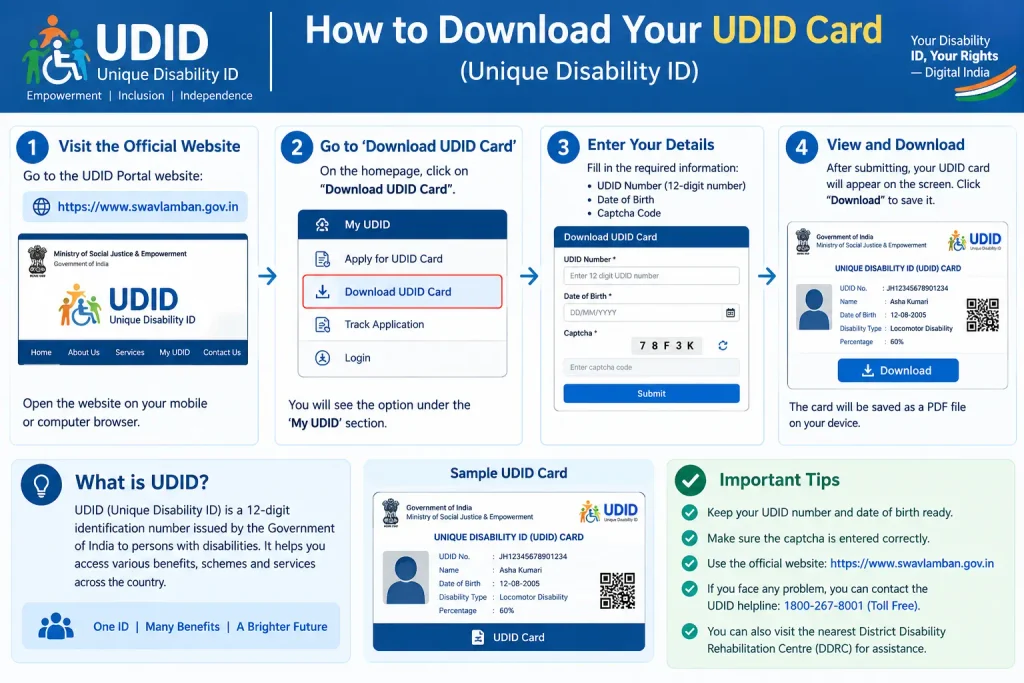
How to Download Your UDID Card
Once your card is generated, download it from the same portal where you applied:
- Go to the PwD login page on swavlambancard.gov.in.
- Log in with your enrolment number and date of birth, or the credentials you created during registration.
- Open the download UDID card or print disability certificate section.
- Download the e-UDID card and, if needed, the disability certificate.
- Save a digital copy and print a physical one for everyday use.
The UDID mobile app also lets users download the e-UDID card and e-disability certificate, manage personal details, and handle some card-related requests. If you lose your card, the portal and app generally provide a way to request a replacement or duplicate.
Renewal and Updates: What to Know
UDID cards are typically issued for a certain validity period, and some temporary cards require renewal. The process runs through the PwD Dashboard on the UDID portal.
- Log in to your PwD account.
- Find the renewal of UDID card or disability certificate option.
- Submit the renewal request and follow any instructions about medical re-assessment, if applicable.
- Once approved, download the updated card.
If your address or contact details change, you can generally update your profile through the same dashboard. For a lost card, the portal allows you to raise a replacement request. Validity periods and rules can change, so check the current instructions on the official portal for your specific case.
Documents Required and Common Mistakes to Avoid
Having the right documents ready before you start saves considerable back-and-forth. The exact list varies by state and disability type, but these are commonly required:
- Proof of identity — Aadhaar card, voter ID, or passport
- Proof of address
- Recent passport-size photograph
- Existing medical records, diagnosis reports, or prior disability certificates
- Guardian details, if applying on behalf of a person with disability
- An active mobile number and email address for OTP verification
Mistakes that delay applications:
- Using a mobile number or email you cannot access immediately, which blocks OTP verification.
- Uploading blurred or unreadable document copies.
- Selecting the wrong assessment centre, or not confirming the centre’s requirements before visiting.
- Missing the appointment or not carrying original documents to the medical assessment.
- Forgetting the enrolment number, which is needed for tracking and future logins.
- Assuming an old disability certificate from a different authority will automatically be accepted without UDID registration.
Frequently Asked Questions
Q1: Is the UDID card the same as a disability certificate?
They are linked but not identical. The UDID card is the identity document that carries your disability certificate details. When you apply through the UDID portal, the disability certificate is generated as part of the same process, and both can be downloaded.
Q2: Can I use my UDID card for railway concession and travel in reserved coaches?
Indian Railways permits UDID card holders to travel in unreserved Divyangjan coaches in Mail and Express trains. Concessional fare facilities and station assistance are separate entitlements governed by current railway rules. For the latest concessions, check the railway authorities’ notifications.
Q3: What does “benchmark disability” mean, and why does it matter?
It generally refers to a specified disability of not less than 40 per cent, certified by the competent authority. Several reservation and benefit schemes are linked to this threshold. If your certificate does not meet it, you may not be eligible for those specific provisions.
Q4: Can I apply for a UDID card for my child?
Yes. A legal guardian can apply on behalf of a minor or a person unable to apply on their own due to disability. The guardian’s details are entered in the application, and the medical assessment process applies the same way.
Q5: What should I do if my UDID card is lost?
Raise a request for a replacement or duplicate through the UDID portal or the UDID mobile app. Log in to your account and look for the lost or replacement card option. Keep a digital copy saved as a backup.
Q6: How do I check the status of my UDID application?
Use the track application status feature on the official UDID portal. Enter your enrolment number and date of birth, and the portal shows the current stage. You can also log in to your dashboard for a more detailed view.
Final Thoughts
The UDID card works best when you treat it as a long-term document, not a one-time application. If your card is due for renewal, start the process well before the expiry date — a lapsed card can interrupt access to benefits that depend on it. And if your application seems stuck after the medical assessment, check the portal once more before assuming the worst: in many cases the status has simply not refreshed, or a document needs re-uploading. For anything specific to your case, the official UDID portal and DEPwD channels remain the most reliable sources.
