

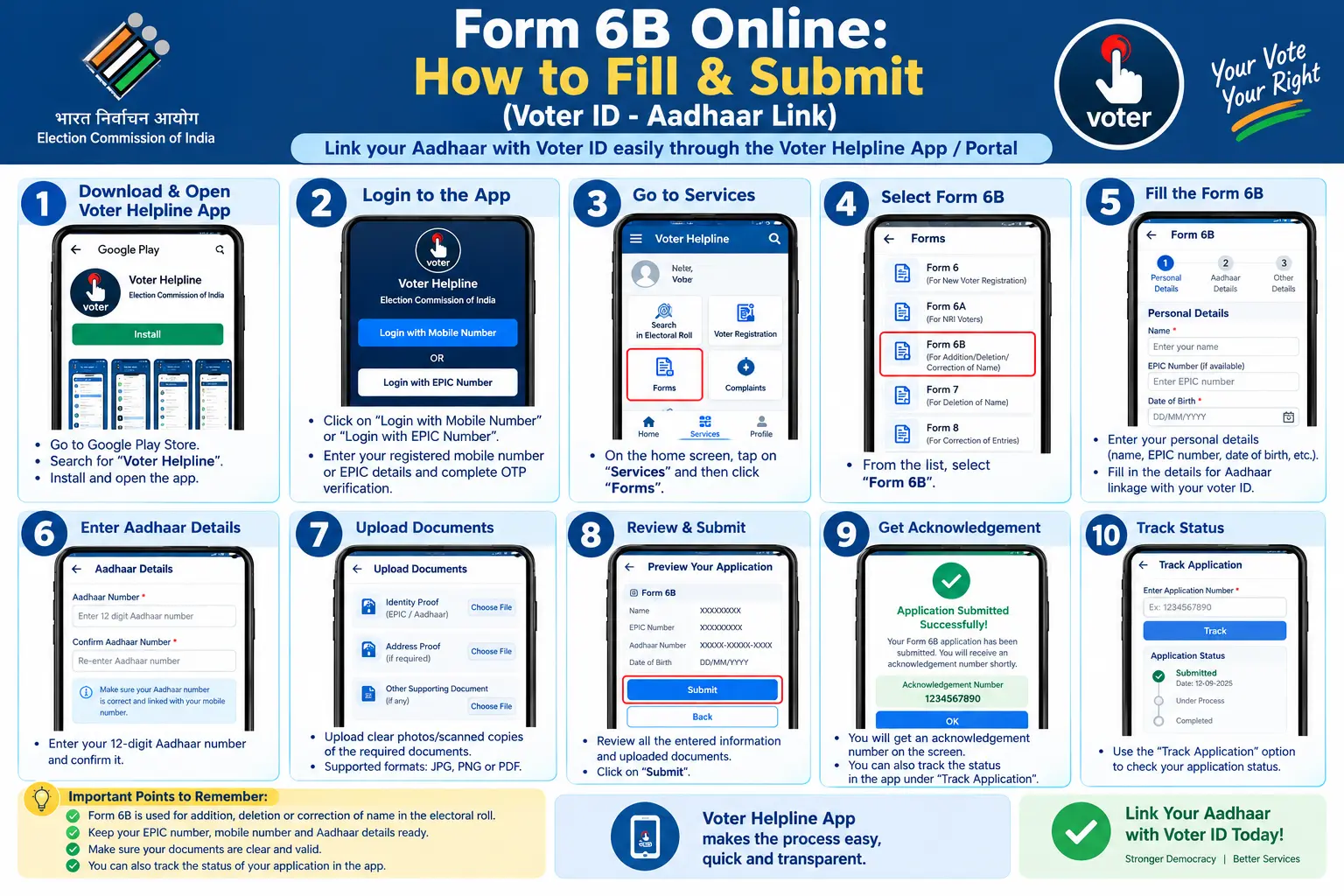
You sit down to link your Aadhaar with your Voter ID, open the portal, and then it hits you — you don’t know which form to use, where to find it, or what happens after you hit submit. Or worse, you’ve already submitted Form 6B voter ID online and your application has vanished into a status page that tells you nothing. This guide walks through the full process: what Form 6B actually does, how to fill it on the Voters’ Service Portal and the Voter Helpline App, the errors that cause most rejections, and how to track whether your Aadhaar and Voter ID are linked yet.
What is Form 6B in Voter ID?
Form 6B is the prescribed form for an existing elector to share their Aadhaar number with the Electoral Registration Officer. Its formal title — “Letter of Information of Aadhaar number for the purpose of electoral roll authentication” — explains the intent: the Election Commission uses the Aadhaar number to authenticate your entry in the electoral roll, not to replace your Voter ID.
That distinction matters, because a lot of confusion around what is Form 6B in voter ID comes from assuming it’s a correction or re-registration form. It isn’t. You use Form 6B only to link an Aadhaar number to a Voter ID that already exists and is already correct. If your name, address, or date of birth on the roll is wrong, you fix that first with Form 8, then link Aadhaar.
The linking is voluntary. No rule currently removes your name from the voter list for skipping it, and there is no official deadline. If someone tells you your voter ID will be cancelled without it, that claim is false.
Discover More About:👇
Aadhaar Voter Link Status: How to Check Voter ID Aadhaar Link Status Online
Voter Card Aadhaar Card Link: How to Submit Form 6B and Verify Your Voter ID
Address Proof Documents List for Aadhaar: What Documents Are Accepted?
Where to Submit Form 6B for Voter ID
There are four recognised routes, and where to submit form 6b for voter id depends on how comfortable you are with the online flow:
- Voters’ Service Portal (voters.eci.gov.in) — works on any browser, desktop or mobile
- Voter Helpline App — Android and iOS, useful when the portal is slow
- Booth Level Officer (BLO) — may collect details during door-to-door verification drives
- Voters’ Help Centre / ERO office — for in-person submission if you prefer paper
The online route is generally faster because the authentication happens instantly and you get a reference number on the spot. The offline route depends on when your BLO visits or when the office processes the physical form, so it can take longer without giving you any more certainty.
How to Fill Form 6B Online Through the Voters’ Service Portal
Step 1: Create or log in to your account. Go to voters.eci.gov.in and sign up with your mobile number and email if you haven’t already. Existing users log in with mobile number, password, and captcha, then verify with an OTP.
Step 2: Find Form 6B. On the dashboard, look for “Electoral Authentication Form (Form 6B)” or “Letter of Information of Aadhaar number.” If you don’t see it, check that you’re logged in — the option appears only inside an authenticated session.
Step 3: Enter your EPIC number and constituency. The EPIC number is the alphanumeric code printed on your Voter ID card. Enter your state and assembly constituency, then let the system fetch your voter record. Read what it pulls up before moving on — if the fetched name or date of birth is wrong, stop here and file a Form 8 correction first.
Step 4: Enter your Aadhaar number. Type all 12 digits, no spaces. The name and details should match your Aadhaar records closely; a mismatch is one of the most common reasons a submission gets flagged during verification.
Step 5: Authenticate. You have two paths:
- With self-authentication: an OTP goes to the mobile number registered with UIDAI. Enter it and you’re done.
- Without self-authentication: if no mobile is linked to your Aadhaar, or the OTP never arrives, upload a copy of your Aadhaar card instead.
Step 6: Submit and record your reference number. This is the step people regret skipping. The reference number is the only way to track your application later — screenshot it, or write it somewhere you’ll find it in three weeks.
Two pitfalls worth knowing before you start. First, the OTP often fails silently if your Aadhaar-linked mobile number is outdated or if you’re on a weak connection; if it doesn’t arrive within a couple of minutes, don’t keep hammering the button — switch to the upload route. Second, the portal session can time out mid-form. Keep your EPIC number, Aadhaar number, and Aadhaar-linked mobile handy before you begin so you’re not hunting for them while the clock runs.
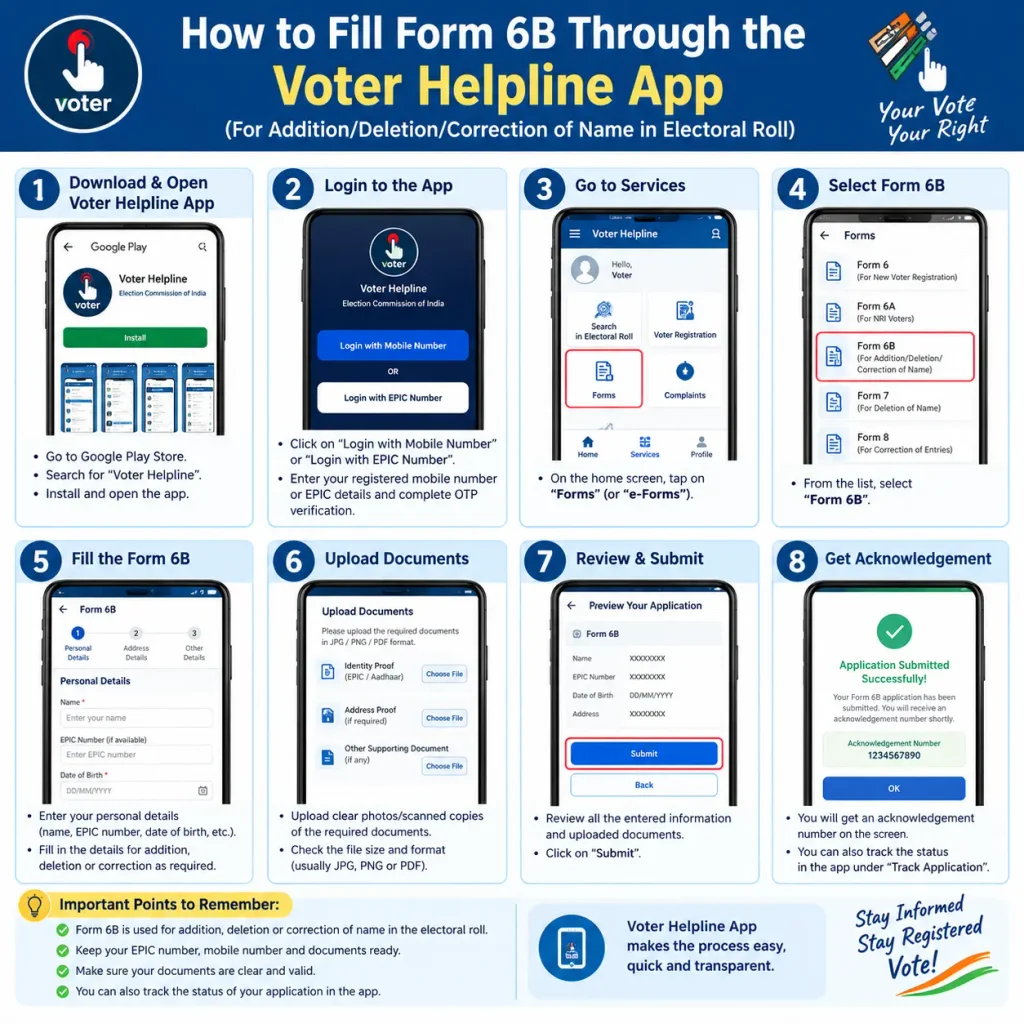
How to Fill Form 6B Through the Voter Helpline App
The app follows the same logic in fewer taps:
- Install the Voter Helpline App and log in with your mobile number
- Tap “Voter Registration” → “Electoral Authentication Form (Form 6B)”
- Verify your mobile number with the OTP
- Select “Yes, I have Voter ID number” and enter your EPIC number
- Fetch your voter details and check them against your card
- Enter your Aadhaar number, the mobile number registered with it, and your place
- Review and confirm
The app generates a reference number on submission. Save it the same way you would from the portal.
Why the Aadhaar–Voter ID Link Matters
The linking serves two practical goals. It helps the Commission identify duplicate registrations — the same person enrolled in two constituencies, or a name that reappears under a slightly different spelling. And it makes impersonation harder, since Aadhaar-based authentication ties a vote to a verified identity rather than a card that can be borrowed.
There’s a privacy point worth stating plainly, because it circulates as a rumour: the Election Commission does not store your Aadhaar number in its own database. The number is used for authentication, and handling follows UIDAI regulations. If you’re uneasy about sharing it, the process remains optional.
Common Mistakes That Delay Form 6B
A wrong EPIC character. One mistyped digit or letter and the record won’t match. Copy it from the card, don’t type from memory.
Details that don’t match the roll. Form 6B assumes your electoral roll entry is already accurate. If it isn’t, correct it with Form 8 first.
An inactive Aadhaar-linked mobile. This is the single biggest cause of failed self-authentication. If the number is dead, go straight to the upload option.
Losing the reference number. Without it, tracking becomes guesswork and you may end up resubmitting unnecessarily.
Using unofficial websites or agents. Only voters.eci.gov.in and the Voter Helpline App are official. Never hand your Aadhaar or EPIC number to a third-party site promising faster linking.
How to Check Aadhaar Voter Link Status
Once submitted, your application moves through stages: submitted, under process, accepted, or rejected. Four ways to check where it stands:
- Voters’ Service Portal: log in → “Track Application Status” → enter reference number and state
- Voter Helpline App: log in → “Track Status” or “Application History” → enter reference number
- Helpline 1950: call from your registered mobile number and follow the IVR or speak to a representative on working days
- Your BLO or electoral office: carry copies of both your Aadhaar and Voter ID
For voter ID Aadhaar card link status AP and every other state, the tracking method is identical — but the actual verification happens at your local Electoral Registration Officer’s office, so the pace depends on that office’s workload, not on which portal you used.
FAQs About Form 6B Voter ID Aadhaar Link
Is linking Aadhaar with Voter ID mandatory?
No. It’s voluntary, and your registration stays valid without it.
What if Form 6B not showing on the portal?
Confirm you’re logged in first — the option appears only inside a session. If it still doesn’t show, try the Voter Helpline App, then your BLO or helpline 1950.
Can I link more than one Voter ID to a single Aadhaar?
No. Each Aadhaar should link to one Voter ID only.
What do I need to submit Form 6B?
For self-authentication: your Aadhaar number and access to the mobile registered with UIDAI. For the non-authenticated route: a copy of your Aadhaar card. Offline: copies of both your EPIC and Aadhaar.
How long does linking take?
It varies by constituency and depends on ERO verification. Track it with your reference number rather than assuming a fixed timeline.
One Last Thing
If your application sits at “under process” for weeks, resist the urge to file a second Form 6B — duplicate submissions can complicate verification rather than speed it up. Give the ERO’s office reasonable time, check the status once a week, and if nothing changes after a month, follow up through your BLO or helpline 1950 with your reference number in hand. That single number, kept safe at submission, is what turns a stalled application back into a solvable problem.
