

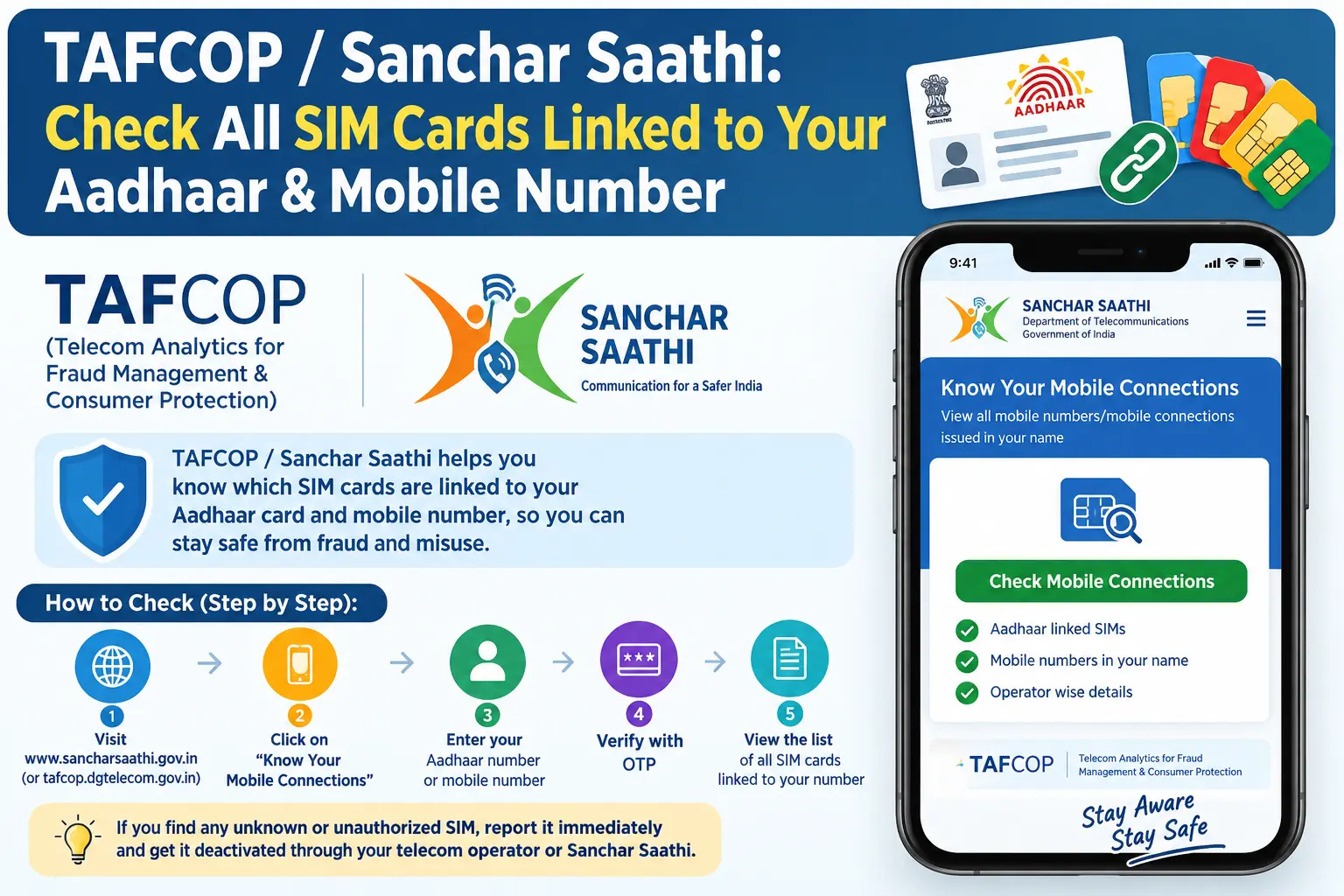
You try to open a new bank account, and the SMS never arrives. Or a UPI app refuses to verify your number. Sometimes the problem isn’t your phone — it’s that your Aadhaar has more mobile connections attached to it than you realise, and one of them may not be yours. A SIM card issued in your name can be used to receive your OTPs, impersonate you, or commit fraud that investigators will trace back to your identity. The TAFCOP Sanchar Saathi service, run by the Department of Telecommunications (DoT), lets you pull up that list yourself — every mobile number registered against your Aadhaar — and flag anything that shouldn’t be there.
What Is TAFCOP on Sanchar Saathi?
TAFCOP stands for Telecom Analytics for Fraud Management and Consumer Protection. It sits inside the Sanchar Saathi portal, a citizen-facing platform built by the DoT for telecom-related grievances and safety tools. Sanchar Saathi handles several jobs — blocking a stolen handset, reporting a fraud call, tracing a lost phone — while TAFCOP deals with one specific question: which mobile connections are running in your name?
Using it costs nothing. You need an active Indian mobile number that can receive an SMS, and nothing else — no registration, no login, no documents uploaded.
Why Checking SIM Cards Linked to Your Aadhaar Matters
Current rules generally permit nine active mobile connections per person across most of India. Jammu & Kashmir, Assam, and the North-Eastern states operate on a lower ceiling of six. Every one of those connections is tied to your Aadhaar, which means every one of them can receive an OTP on your behalf.
An extra SIM you didn’t apply for is therefore not a minor clerical error. It can be used to intercept banking OTPs, register fake accounts, or run scams that leave your name in a police complaint. Even if you have never lost your phone or shared documents, a SIM can be issued through a retailer who misuses a copy of your Aadhaar. Checking every few months costs you two minutes; discovering the problem during a fraud investigation costs far more.
How to Check SIM Cards Registered in Your Name
The whole process runs on the Sanchar Saathi portal and takes about as long as reading this section.
Step 1: Open sancharsaathi.gov.in and select the TAFCOP option — it’s usually labelled “Know Your Mobile Connections.”
Step 2: Enter your 10-digit mobile number. Use the number that is active and in your hand, because that’s where the OTP will land.
Step 3: Type the captcha shown on screen and request the OTP.
Step 4: Enter the OTP within its validity window. If it doesn’t arrive, wait for the timer to reset and request a fresh one — repeatedly clicking “resend” often locks you out for a while.
Step 5: The portal now lists every mobile number registered against your identity, along with the operator.
Step 6: Go through the list line by line. Numbers you recognise need no action; numbers you don’t can be reported on the spot.
Two things trip people up here. First, the OTP goes to the number you typed, not to any Aadhaar-linked number — so if that SIM is deactivated or in a second phone that’s switched off, you’ll be stuck at step 4. Second, the portal session times out quickly. Keep your Aadhaar or identity details nearby before you start so you aren’t scrambling mid-session.
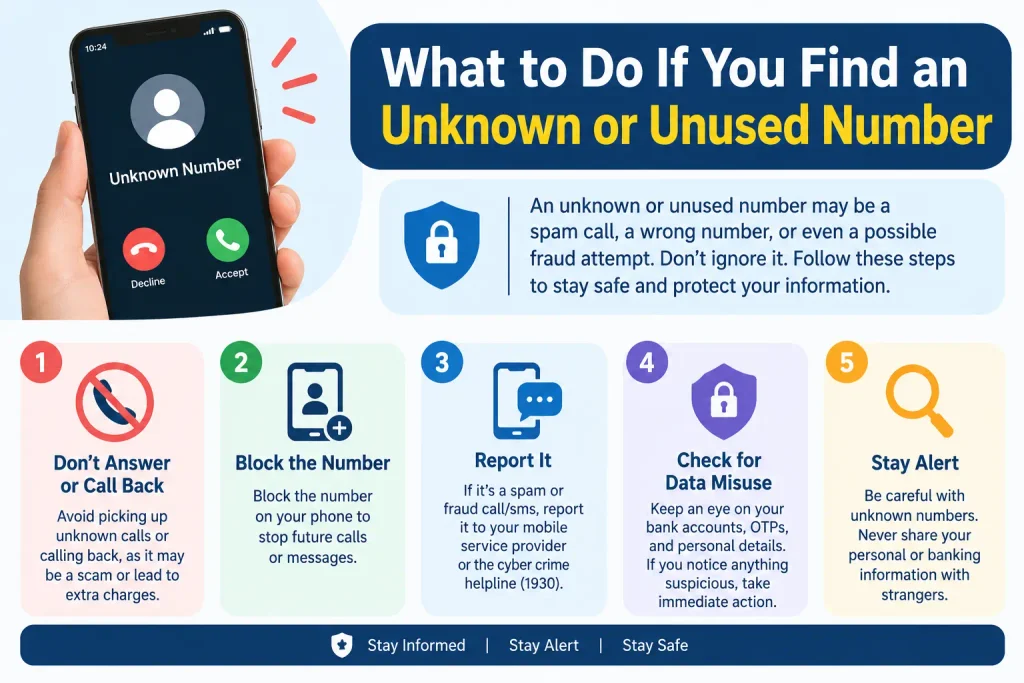
What to Do If You Find an Unknown or Unused Number
For a number you never applied for, choose “Not My Number.” This raises a complaint that is routed to the telecom operator concerned, which verifies the connection and typically deactivates it if the claim holds.
For a number that is genuinely yours but sitting unused — an old SIM from a previous city, a second connection you stopped topping up — choose “Not Required.” That flags it for closure rather than investigation.
Either way, note down the reference number the portal generates. It is your only handle for tracking the complaint, and it saves you a trip to a service centre if you need to follow up.
Other Tools on the Same Portal
TAFCOP is one entry point among several on Sanchar Saathi:
- CEIR (Central Equipment Identity Register): report, block, or trace a lost or stolen handset using its IMEI.
- Chakshu: report suspected fraud calls, SMS, or WhatsApp messages to the authorities.
- Know Your Mobile Connections: the TAFCOP facility described above.
Together they cover the three things that most often go wrong with a phone in India — the device, the connection, and the messages arriving on it.
Common Mistakes to Avoid
- Treating one unknown number as harmless. A single unauthorized SIM is enough to redirect your OTPs. Report it the day you spot it.
- Entering a number that can’t receive SMS. The portal verifies you through the number you submit, not through Aadhaar. If that SIM is dead, borrow an active number or reactivate it first.
- Checking once and forgetting. Retailer-level misuse often surfaces months after the fact. A quarterly check is a reasonable habit.
- Trusting memory over the list. Ported numbers, upgraded plans, and SIMs bought years ago are easy to forget. The portal shows what actually exists, which is frequently one or two more than people expect.
Frequently Asked Questions
How many SIM cards can be linked to one Aadhaar?
Generally up to nine active connections in most of India, and six in Jammu & Kashmir, Assam, and the North-Eastern states. Limits are set by the DoT and can change, so confirm current rules on the Sanchar Saathi portal.
Is the TAFCOP check free?
Yes. There is no charge for viewing your connections or filing a report.
Can I do this without visiting a telecom store?
Yes — the entire process, from OTP verification to filing the complaint, happens online.
What happens after I report a number as “Not My Number”?
The complaint goes to the relevant operator, which verifies it. If the connection is confirmed unauthorized, it is typically deactivated. Timelines vary by operator.
What if I have more than nine SIMs in my name?
You may receive an SMS alert asking you to review your connections. The portal helps you identify which ones to report or close.
What’s the difference between TAFCOP and Sanchar Saathi?
Sanchar Saathi is the umbrella portal. TAFCOP is the specific facility within it for checking and managing mobile connections registered in your name.
One Last Thing Worth Doing
If your list comes back clean, don’t close the tab and forget about it — set a reminder for three months from now. If it doesn’t, and the operator doesn’t act on your complaint within a reasonable window, escalate through the portal’s grievance option or the DoT’s public grievance channel rather than waiting indefinitely. An unresolved unauthorized SIM is a problem that quietly gets worse, not one that resolves itself.
