


If you are a Gujarat student trying to submit a post-matric scholarship before the window closes, or a parent waiting on an income certificate, the real bottleneck is rarely the form itself—it is the login. The OTP does not arrive. The profile stays stuck below 100%. The name on the application does not match Aadhaar. digitalgujarat.gov.in is meant to remove those offline queues, but only if your account is set up correctly. This guide covers what the portal actually offers, how to register without repeats, where scholarships are filed, and the mistakes that cause applications to bounce back.
What You Can Actually Do on Digital Gujarat
Digital Gujarat is a common service portal conceptualised by Gujarat Informatics Limited and developed by the National Informatics Centre. One citizen login gives you access to hundreds of state services, digitally signed certificates, and application tracking.
The services are grouped, and knowing the group saves time. Sugam Digital Gujarat covers fully online work: income certificates, SC/ST/SEBC caste certificates, EWS and non-creamy layer certificates, and ration card changes. Citizen Services include senior citizen certificates, widow certificates, character certificates, and domicile certificates. If your application needs local verification, it is usually routed through Digital SevaSetu at gram panchayats or Janseva Kendras, where staff can file on your behalf.
Scholarships are the exception. They now run through the Gujarat State Scholarship Portal (GSSP) at gssp.gujarat.gov.in. The Digital Gujarat menu links to it, but certificates stay on Digital Gujarat while scholarship proposals move through GSSP. Do not file a scholarship application as a certificate request.
How to Register on www.digitalgujarat.gov.in
Registration is free, but skipping a step here creates problems later. Follow this sequence.
Step 1: Open digitalgujarat.gov.in and click “Login/Register” in the top-right corner.
Step 2: Choose “Citizen Login” from the drop-down. This is the individual applicant route, not the department or Janseva Kendra login.
Step 3: On the dashboard, click “New Registration” on the left.
Step 4: Enter your mobile number, email ID, a password, and the captcha. Click “Save.”
Step 5: OTPs are sent to both your mobile and email. Enter both to verify. If the mobile OTP does not arrive, check whether your number is Aadhaar-linked; Aadhaar OTP login will not work otherwise. Updating that link is a UIDAI process, done through the UIDAI portal or an Aadhaar Seva Kendra—not through Digital Gujarat.
Step 6: Log in again and open “My Dashboard.” Complete the profile update: address, gender, district, taluka, and supporting documents. Most service applications will not submit until the profile shows 100% completion.
For later logins, you can use username and password, mobile OTP, or Aadhaar OTP. Keep the registered mobile number active. Two common pitfalls: the session times out if you leave the form idle, and the captcha resets if you refresh too often. Fill the form in one sitting where possible, and save your application number as soon as it is generated.
Discover More About:👇
Aadhaar Status Check – How to Check Enrolment & Update Status Online
Digital Gujarat Scholarship 2026-27: The Application Route
The scholarship ecosystem covers pre-matric, post-matric, and Mukhyamantri Yuva Swavalamban Yojana (MYSY) schemes for SC, ST, OBC, SEBC, EWS, and minority students. For 2026-27, windows are announced category-wise. As a rough pattern, SC and Developing Caste students typically apply in the July–September period, while ST students often get a later window running into November. Treat that only as a pattern—check the live dates on GSSP before you plan anything around them.
Funds move by Direct Benefit Transfer (DBT) into the student’s bank account. That account must be Aadhaar-linked, and Aadhaar eKYC—electronic Know Your Customer, a digital identity verification step—is generally required. Without eKYC, the proposal usually cannot be processed.
Apply through GSSP, either from the link on Digital Gujarat or directly. If you registered in a previous year, use the existing credentials. Creating a second account to “start fresh” is one of the fastest ways to trigger verification problems.
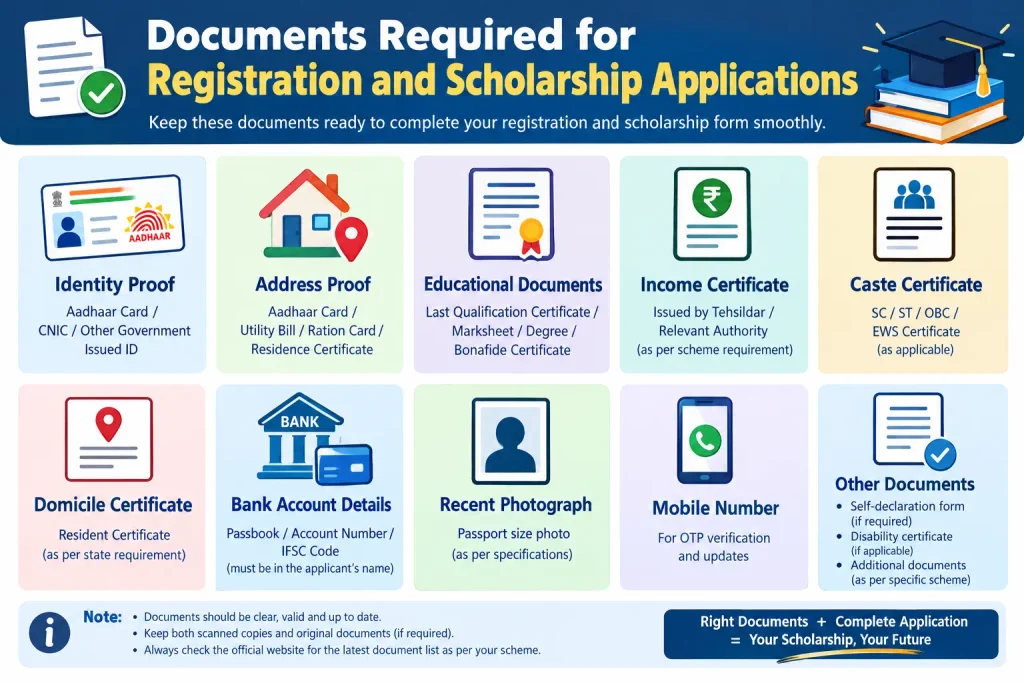
Documents Required for Registration and Scholarship Applications
Keep clear scanned copies ready before you start. PDF or JPG usually works, but blurry phone photos are a frequent cause of delay.
- Aadhaar card for identity verification and eKYC
- Bank account details—account number and IFSC; the account should be Aadhaar-linked for DBT
- Marksheets and admission proof for scholarship applications
- Caste certificate and income certificate from a competent authority, if applying under a reserved category
- Passport-size photograph
Income limits vary by scheme and category. Some SC and Developing Caste schemes commonly have limits around ₹2.50 lakh, but do not rely on a forwarded message. Check the specific scheme page on GSSP for the current limit that applies to you.
Common Mistakes That Delay Applications
Mismatched details. The name, date of birth, and address you enter should match Aadhaar and other official documents. An address mismatch between Aadhaar and the application form is a standard rejection trigger.
Old or unclear certificates. Upload the most recent income or caste certificate. A certificate from several years ago may not be accepted for the current cycle.
Skipping eKYC. Without Aadhaar-based eKYC, scholarship proposals typically sit unprocessed.
Using a non-Aadhaar-linked bank account. DBT payments will not reach an account that is not linked to Aadhaar. Verify the linkage at your bank before submitting.
Waiting for the last week. Portal traffic spikes near deadlines. Slow loading, timeouts, and payment failures are more likely then. File early enough to correct a mistake if one occurs.
Frequently Asked Questions (FAQs)
Is registration on digitalgujarat.gov.in free?
Yes. Creating a citizen account costs nothing. Where a specific service has a fee, you pay it online at that application’s payment step.
Can I use my old Digital Gujarat login for the 2026-27 scholarship?
Yes. If you registered earlier, use the same credentials. A duplicate account can create verification issues.
What is the difference between Digital Gujarat and GSSP?
Digital Gujarat handles certificates and other citizen services. GSSP is the dedicated scholarship portal. The Digital Gujarat menu links to GSSP for scholarship work.
What should I do if I forget my Digital Gujarat password?
Use “Forgot Password” on the login page and follow the OTP reset. If the registered mobile number is no longer active, you will need the portal helpline or a SevaSetu/Janseva Kendra to resolve it.
How can I check my scholarship application status?
Log in to GSSP and check your dashboard. Status updates are also usually sent by SMS and email to the registered contact details.
The OTP is not coming. What now?
Wait a few minutes before requesting another; repeated requests can delay delivery. Check spam for email OTPs, and confirm your mobile number is active and Aadhaar-linked. If it still fails, use the helpline listed on the portal’s contact page rather than creating a new account.
The most useful habit with Digital Gujarat is to treat the profile as a living record, not a one-time formality. Update your mobile number, bank linkage, and documents before a deadline appears, and you will spend far less time fixing errors while a scholarship window is closing. If a submission still fails after the portal’s stated verification period, follow up with your institute or the helpline listed on the official site—do not file the same application twice under a new login.
