

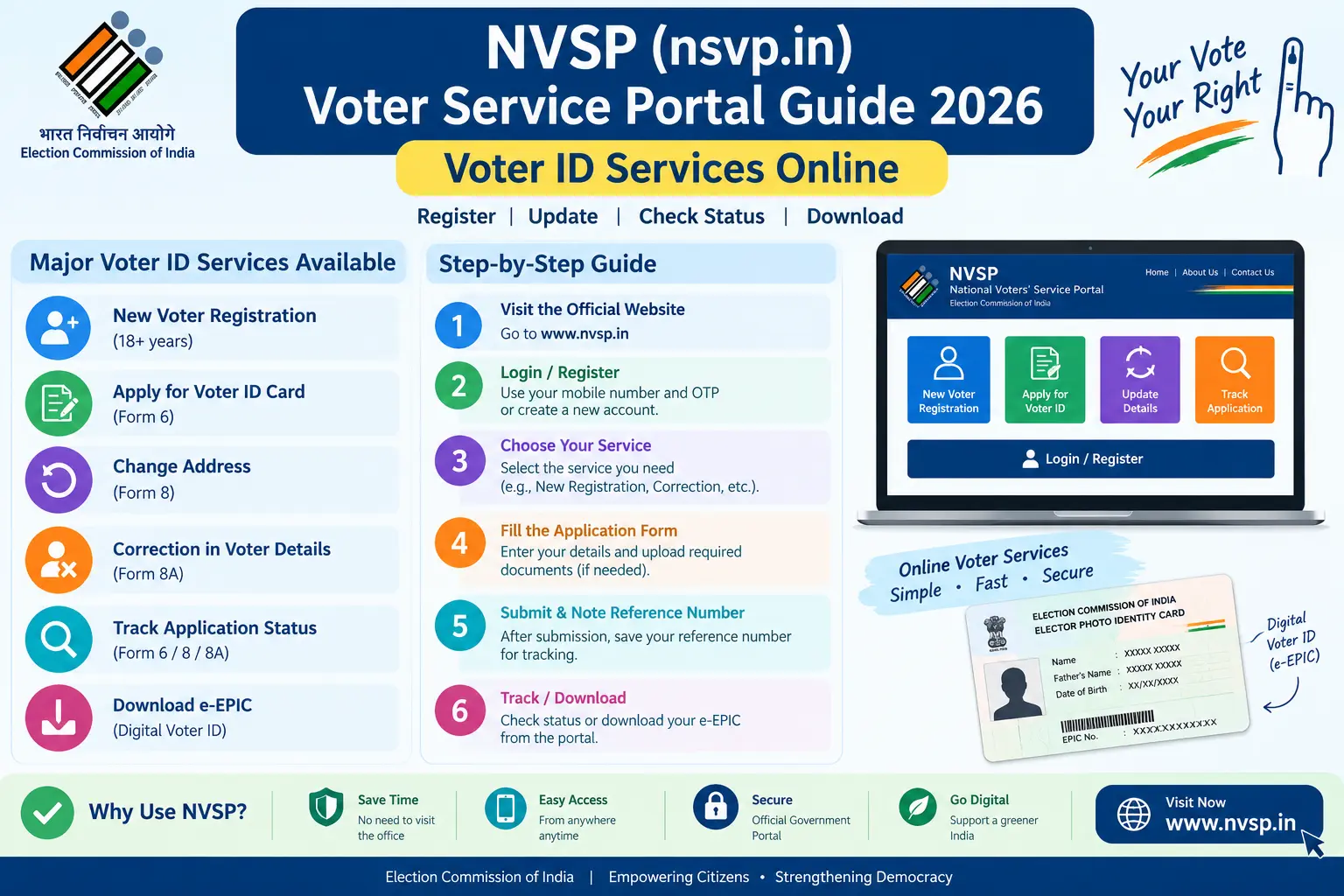
Your name is missing from the voter list. You have shifted to a new city, but your old address still sits on your EPIC. Or the spelling on your Voter ID does not match your Aadhaar, and a bank, exam form, or passport application is asking for a clean e-EPIC copy. The National Voter Service Portal—often reached by typing nsvp .in, though the official address is nvsp.in—is the Election Commission of India’s online window for fixing these problems. This guide covers the forms, documents, step-by-step process, and the mistakes that cause most rejections, so you can finish the job without repeated trips to the ERO office.
What Is the NVSP Portal (Often Searched as nsvp .in) and What Can You Do on It?
NVSP stands for National Voter Service Portal. It is run by the Election Commission of India and linked to the newer Voters’ Service Portal at voters.eci.gov.in. The same services are available on the Voter Helpline App for Android and iOS, which is useful if you do not have a scanner—you can photograph documents and upload them directly from your phone.
Through NVSP, you can:
- Register as a new voter (Form 6)
- Register as an overseas/NRI elector (Form 6A)
- Object to the inclusion or deletion of a name (Form 7)
- Shift residence, correct entries, replace EPIC, or mark as a Person with Disability (Form 8)
- Download your digital Voter ID, called e-EPIC
- Track application status
- Search your name in the electoral roll
For voter-related grievances, the Election Commission’s toll-free helpline is 1950. For specific eligibility or legal questions, verify with your local Electoral Registration Officer (ERO) or Booth Level Officer (BLO), or check the official portal.
Discover More About:👇
Aadhaar Voter Link Status: How to Check Voter ID Aadhaar Link Status Online
Voter Card Aadhaar Card Link: How to Submit Form 6B and Verify Your Voter ID
Form 6B Online: How to Fill & Submit (Voter ID – Aadhaar Link)
Step-by-Step: Applying for a New Voter ID Online
- Create an account. Go to nvsp.in or voters.eci.gov.in. Register with your mobile number and email address. You will receive an OTP on your mobile. If the OTP does not arrive, check your spam folder, wait a minute, and request it again. Do not create multiple accounts with different mobile numbers—it can complicate verification later.
- Log in and choose Form 6. Select the option for New Voter Registration. Form 6 is the application for inclusion of your name in the electoral roll.
- Fill in your details exactly as they appear on your documents. Enter your name, date of birth, gender, and address. Select your state, district, assembly constituency, and parliamentary constituency. If you are unsure of your constituency, use the PIN code lookup on the portal. A common pitfall here is choosing the wrong constituency; verify it before you submit.
- Upload your photograph and documents. You will need a recent passport-size colour photograph against a plain background. Upload scanned copies of your proof of age and proof of address. Commonly accepted documents include Aadhaar, passport, driving licence, PAN card, birth certificate, Class 10 or 12 marksheet, ration card, recent utility bill, bank or post office passbook, and registered rent agreement. Check the portal for current file format and size limits.
- Review and submit. Double-check every field. A single mismatch between your form and your documents can trigger a rejection. After submission, you will receive a reference number. Save it—you will need it to track your application.
- Track your application. Use the Track Application Status section on the portal or the Voter Helpline App. Enter your reference number to see where your application stands.
- BLO verification. A Booth Level Officer may visit your registered address to verify your details. Be available during working hours and keep your original documents ready. If you miss the visit, your application may be marked as “applicant not found.” In that case, contact your BLO or ERO through the portal or local office.
- Download your e-EPIC. Once your application is approved and your name is added to the electoral roll, you can download your digital Voter ID card from the portal or the app.
One practical pitfall: portal sessions can time out while you are uploading documents. Keep your photo and scans ready before you start, and avoid refreshing the page during upload.
How to Correct or Update Your Voter ID Details
Form 8 handles corrections to an existing Voter ID: name, address, date of birth, photograph, or mobile number. Log in to your NVSP account and select Fill Form 8 under the Correction of Entries section. Choose Self as the applicant, enter your EPIC number, and select the type of correction you need.
For a change of address due to shifting residence, provide proof of your new address. For a name change after marriage, a marriage certificate is commonly required along with the application. Upload the relevant documents, submit the form, and track the status using your reference number. As with new registration, the BLO may conduct a verification visit, and the ERO will process the request.
If you are already registered in another constituency and need to shift, use Form 8—not a fresh Form 6. A duplicate Form 6 can be flagged and delayed.
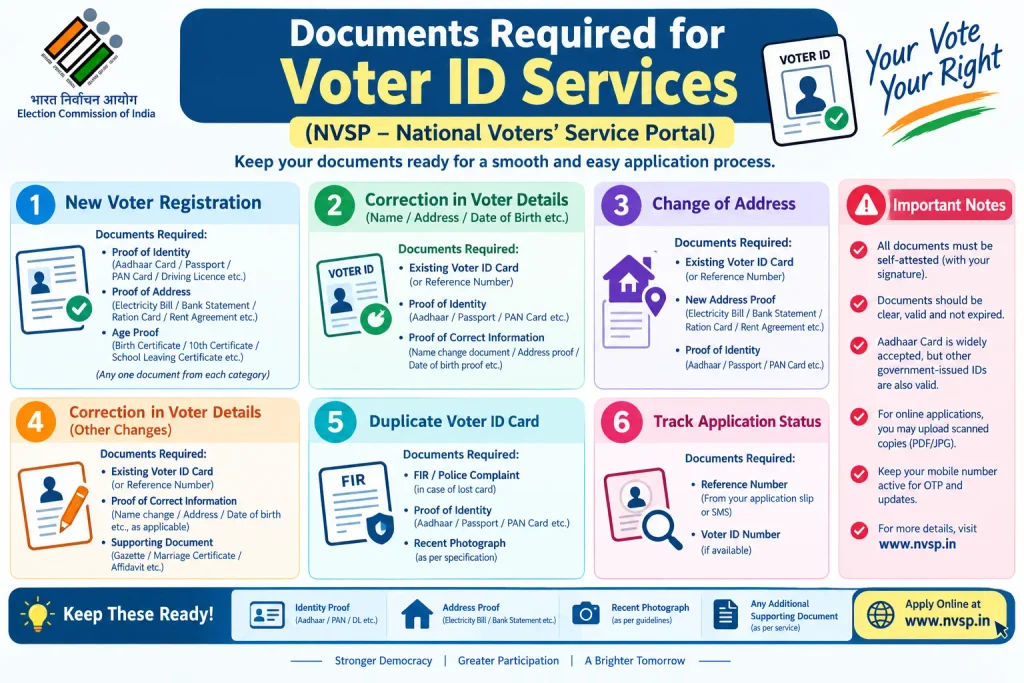
Documents Required for Voter ID Services
For New Voter Registration (Form 6)
- Proof of age: birth certificate, Class 10 or 12 marksheet, passport, or PAN card
- Proof of address: Aadhaar, passport, driving licence, ration card, recent utility bill, bank or post office passbook, or registered rent agreement
- Recent passport-size colour photograph
For Correction of Entries (Form 8)
- Existing EPIC number
- Supporting document for the specific correction: marriage certificate for name change, new address proof for shifting residence, birth certificate for date of birth correction
For Overseas/NRI Voters (Form 6A)
- Copy of passport
- Proof of overseas address
- Recent photograph
Always check the official NVSP portal for the most current list of accepted documents, as requirements and file limits can be updated.
Common Mistakes That Lead to Voter ID Application Rejection
Mismatched details. If your name spelling, date of birth, or address differs across documents, the application may be flagged. Use the same spelling consistently on the form and your proofs.
Wrong constituency. Entering the wrong assembly or parliamentary constituency is a frequent error. Use the portal’s PIN code lookup to confirm your correct constituency before submitting.
Poor quality photograph or scans. A blurry photo, a coloured background, or a document scan that is too dark or too light will be rejected. Use a clear, recent passport-style photo against a plain background, and scan documents in good lighting.
Missing the BLO visit. If the Booth Level Officer visits your address and you are not present, the application may be marked as “applicant not found.” Contact your BLO or ERO to find out the next step.
Submitting a new Form 6 when already registered. If your name already exists in the electoral roll—even in a different constituency—the system may flag it as a duplicate. Use Form 8 for shifting or correction instead.
Ignoring rejection notifications. Rejection reasons are communicated via SMS, email, or the portal. Log in to check the specific reason and reapply with corrections rather than guessing.
Frequently Asked Questions
Can I apply for a Voter ID online without an Aadhaar card?
Yes. Aadhaar is not mandatory for voter registration. You can use other accepted proof of identity and address such as passport, driving licence, ration card, or utility bills.
How do I download my digital Voter ID (e-EPIC)?
Log in to the NVSP portal or the Voter Helpline App using your registered mobile number. Select the Download e-EPIC option and complete OTP-based authentication. The digital card can be saved and printed.
What should I do if my Voter ID application is rejected?
Check the specific rejection reason on the portal under Track Application Status. Common reasons include incomplete forms, insufficient address proof, or BLO verification failure. Correct the issue and reapply through the portal.
Can NRIs register to vote through the NVSP portal?
Yes. Non-Resident Indians can use Form 6A on the NVSP portal to register as overseas electors. They need to provide a copy of their passport and proof of overseas address.
Is there a fee for Voter ID registration or correction?
Voter registration and correction services through the NVSP portal are generally free of cost. If any specific service involves a fee, check the official portal for current details.
What is the difference between NVSP and the Voter Helpline App?
Both offer the same core services. NVSP is the web portal, while the Voter Helpline App is the mobile application. You can use either platform, whichever is more convenient.
A Final Note
If your application still shows pending after the BLO visit, give it a few working days before submitting anything again—duplicate applications can slow down verification. If an election deadline is close and the portal has not updated, call 1950 or visit your ERO/BLO office with your reference number. The portal is the starting point, but the local electoral office is often the fastest way to resolve a stuck case.
