

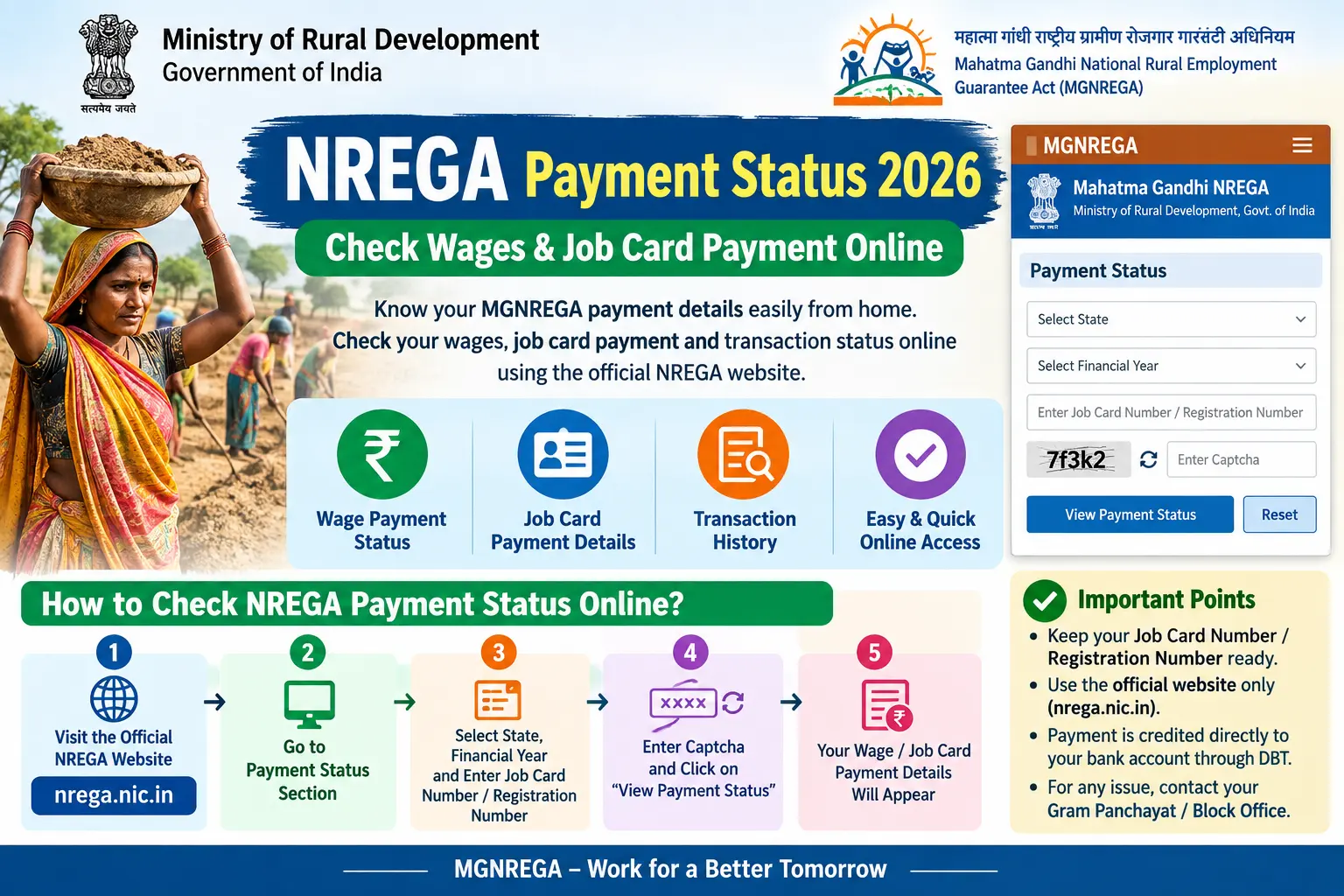
Your muster roll was signed weeks ago. The supervisor confirmed your attendance. Yet when you open the portal, the status still reads “FTO Generated” — and no money has reached your bank account. This is the situation thousands of rural workers face every season. The good news: you do not need to keep visiting the Gram Panchayat office or rely on second-hand information. This guide shows you exactly how to check your mgnrega payment status online, what each status label actually means, why payments stall, and what you can do about it in 2026.
What NREGA Payment Means and Why Checking It Matters
The Mahatma Gandhi National Rural Employment Guarantee Act — MGNREGA, or simply NREGA — guarantees unskilled manual work to every rural household whose adult members are willing to work. In 2026, the scheme was reorganised under the Viksit Bharat Guarantee for Rozgar and Ajeevika Mission (Gramin), or VB-G RAM G, which replaced the older Act and raised the annual work guarantee from 100 to 125 days. Job cards remain valid for workers whose e-KYC (electronic Know Your Customer — the digital identity verification process) is complete.
For lakhs of families, manrega majduri is not supplementary income. It is the primary source of cash during lean agricultural months. When that payment is delayed, school fees, medicines, and household supplies are affected. Checking your NREGA payment status tells you whether your work has been properly recorded, whether the wage calculation is correct, and exactly where the payment is stuck — at the muster roll stage, the FTO stage, or the bank.
Discover More About:👇
DBT Status Check with Mobile Number (2026 Guide)
Aadhaar Bank Seeding Status for DBT: How to Check Aadhaar Bank Link Status
Where to Check Your NREGA Payment Status
The primary portal is the Department of Rural Development’s NREGA site at nrega.dord.gov.in. Older records and some legacy functions remain on the earlier NREGASoft platform at nrega.nic.in. Both are government-run and free to use.
For wage payments specifically, the Public Financial Management System (PFMS) at pfms.nic.in offers a “Know Your Payment” option. Enter your job card number or Aadhaar number, and it shows whether the Fund Transfer Order (FTO) amount has been processed for your card.
An FTO is the official instruction sent from the block office to the bank to credit wages. Until an FTO is generated and signed, no payment can move. This single step is where most delays occur.
Step-by-Step: How to Check MGNREGA Payment Status Online
Step 1 — Open nrega.dord.gov.in. Use any browser on your phone or computer. The portal works on mobile, but the tables are easier to read on a larger screen.
Step 2 — Go to “Reports.” This option is in the main menu. Select your State from the dropdown.
Step 3 — Choose your location. Pick your District, then Block, then Gram Panchayat. Enter the financial year — 2025-26 or 2026-27, depending on when you worked. Selecting the wrong year is a common mistake; if your work was in early 2026, it may fall under the 2025-26 financial year.
Step 4 — Open the Job Card Register. Click “Job Card / Employment Register” to see all registered households in your panchayat. Find your name, or search by job card number if you know it.
Step 5 — Click your Job Card number. This opens your full job card page — work history, days worked, wage rates, and payment details.
Step 6 — Check “Work Done & Payment Details.” You will see the work name, days worked, the applicable daily wage rate, total amount due, payment date if credited, and the current status. Note the FTO number if one has been generated.
Step 7 — Save or print the page. Take a screenshot or save a PDF. If you need to follow up with the panchayat or file a grievance later, this record is useful.
If the portal times out while you are selecting dropdowns, refresh the page and try again — this happens often during peak hours. Also, avoid entering your job card number with spaces or dashes; use only the digits and letters as printed.
Alternatively, go to pfms.nic.in, select “Know Your Payment,” and enter your job card or Aadhaar number for a quicker status check. PFMS sometimes updates faster than the state portal.
What Each Payment Status Label Means
- Registered / Demand Recorded: Your household is registered and your demand for work has been noted.
- Work Allotted: Work has been assigned and attendance is being recorded.
- Muster Roll Signed: The supervisor has verified attendance. Measurement of work is next.
- FTO Generated: The Fund Transfer Order has been created by the block office. Many payments stall here. Typically, it takes a few working days for the FTO to move to the bank, but this can stretch to weeks if there is a backlog.
- FTO Signed: The FTO has been approved and sent to the bank. The money usually arrives within a few days.
- Credited: The wage has reached your account. Verify in your passbook or bank statement.
- Rejected: The payment could not be processed — usually due to an inactive account, Aadhaar-bank linkage mismatch, or incorrect account details.
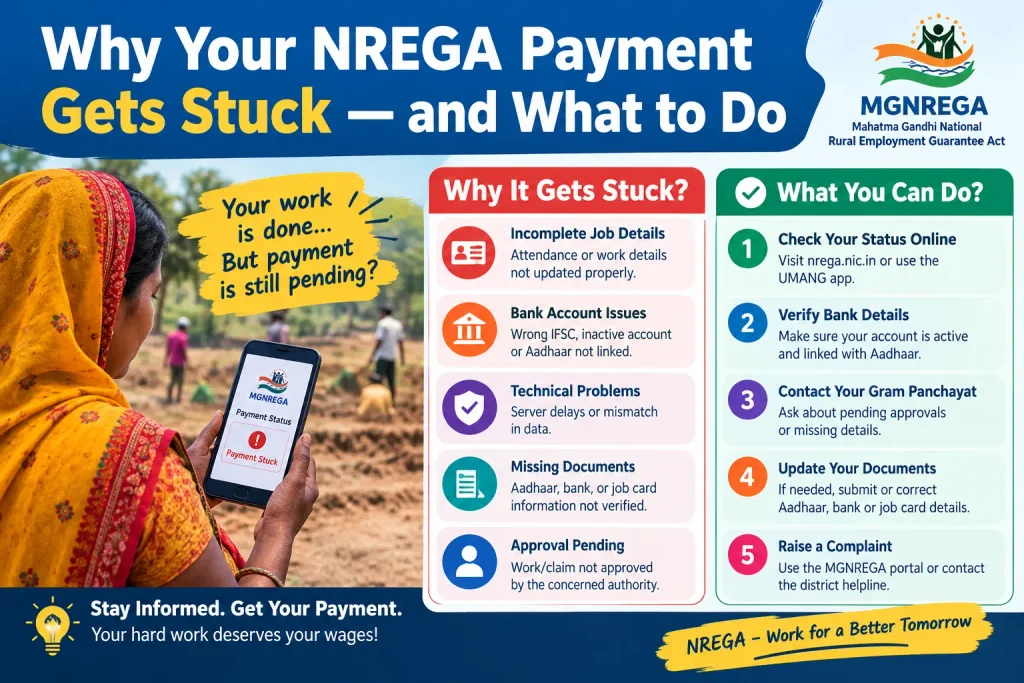
Why Your NREGA Payment Gets Stuck — and What to Do
When your nrega majduri shows no movement for weeks, the cause is usually one of these five issues.
Aadhaar-bank seeding mismatch. NREGA wages route through the Aadhaar Payment Bridge. If your Aadhaar is not linked to your bank account, or the linkage is inactive, the payment cannot be credited. Visit your bank branch, ask for Aadhaar seeding verification, and get a written confirmation if possible.
Dormant or closed bank account. An account with no transactions for a long period may be marked dormant. The FTO will be rejected. Make one small transaction to reactivate it, then update the correct account number with the panchayat.
Measurement delay. The Junior Engineer or Assistant Engineer has not measured the completed work. Without measurement, the muster roll cannot be finalised and the FTO cannot be generated. Ask the panchayat secretary when measurement is scheduled.
FTO pending at block or state level. Sometimes the FTO is generated but sits unsigned at the Block Programme Officer’s desk. A written request asking for the FTO status, submitted to the BPO, creates a paper trail.
Job card cancelled or suspended. In rare cases, job cards are cancelled due to data errors. If yours was cancelled without valid reason, request the cancellation order and appeal to the Block Development Officer.
If wages are not paid within 15 days of work completion, the scheme provides for delay compensation at 0.05% per day of the unpaid wage. This is meant to be automatic, though workers often need to follow up to receive it.
Documents to Keep Ready
Whether you are checking payment status, updating bank details, or filing a grievance, keep these handy:
- Job card (the household identity document issued by the Gram Panchayat)
- Aadhaar card (for identity verification and bank linkage)
- Bank passbook or account statement (showing the account number and recent transactions)
- Muster roll number or wage slip (Form-19), if available
- Mobile number linked to the job card registration
Carry photocopies along with originals when visiting the panchayat or block office.
FAQs on NREGA Payment Status
How can I check my MGNREGA payment status without visiting the panchayat office?
Visit nrega.dord.gov.in, go to Reports, select your state, district, block, and panchayat, then open the Job Card Register. Your payment status is on your job card page. The PFMS portal at pfms.nic.in also shows payment status using your job card number.
What should I do if my NREGA wage payment shows “FTO Generated” for more than 15 days?
Submit a written request to your Gram Panchayat Secretary and the Block Programme Officer asking for the FTO status. If the delay continues, file a grievance on the NREGA portal or through CPGRAMS under the Department of Rural Development. Workers are entitled to delay compensation if wages are not paid within 15 days.
Can I check someone else’s NREGA payment status?
Yes, the NREGA portal allows searching by job card number or name within a specific panchayat. You need the state, district, block, and panchayat details to narrow the search. Personal details like Aadhaar numbers are not publicly displayed.
My NREGA payment was rejected. What does that mean?
A rejected status usually points to a bank account problem — inactive account, Aadhaar-bank linkage issue, or incorrect account details. Visit your bank branch to verify the account status and Aadhaar seeding, then inform the panchayat so the FTO can be regenerated.
Is there a helpline for NREGA payment issues?
Yes, the national MGNREGA helpline is 1800-345-22-44. State-specific helplines operate in many states. Note the call reference number and keep your job card number ready when you call.
Has the NREGA scheme changed in 2026?
From 1 July 2026, the scheme operates under the VB-G RAM G Act, which guarantees 125 days of work instead of 100. Existing job cards remain valid for workers whose e-KYC is complete. Wage rates and portal details are updated periodically, so check the official portal for the latest.
A Final Note
If your payment shows “FTO Signed” but the money hasn’t arrived after a week, check your bank statement before assuming it failed — sometimes the credit appears without an SMS alert. And if your status hasn’t moved at all in three weeks, don’t wait for it to resolve on its own. A written follow-up with the BPO, backed by a screenshot of your status page, moves things faster than repeated verbal inquiries. For current wage rates and any rule changes, the official NREGA portal remains the final word.
