


Your education loan application has been sitting at “In Process” for three weeks. The bank branch you selected isn’t picking up the phone. You’re not sure whether the problem is your CELAF form, your documents, or something you missed entirely. This is the situation most students find themselves in after submitting an application through the Vidya Lakshmi Portal — not because the platform is broken, but because nobody explained what happens after you hit submit. This guide covers the vidhya laxmi portal login process, how to apply for an education loan step by step, what documents actually get rejected and why, how to read your application status correctly, and what to do when things stall.
What Is the Vidya Lakshmi Portal and Why It Matters
The Vidya Lakshmi Portal launched on 15 August 2015 as a single-window platform for students to access education loan information and apply to multiple banks through one Common Education Loan Application Form (CELAF). In April 2026, an upgraded version — PM Vidya Lakshmi Portal 2.0 — was launched with over 30 scholarship schemes on one platform, integration with 40+ nationalized banks, an AI-based eligibility checker, mobile-first design for rural access, and coverage extended to vocational courses.
What this means practically: instead of filling out separate forms for SBI, Bank of Baroda, and Canara Bank, you complete one CELAF and select up to three banks. Each bank sees the same data set. The portal also links to the National Scholarship Portal and provides application tracking, so you’re not calling branches for updates. The portal itself is not a lender — it’s a connector. The bank evaluates your application, verifies your documents, runs credit checks, and makes the final decision.
Discover More About:👇
Aadhaar Status Check – How to Check Enrolment & Update Status Online
How to Register and Log In to the Vidya Lakshmi Portal
The official portal is now pmvidyalaxmi.co.in. The older vidyalakshmi.co.in domain is no longer the primary application portal. Check the domain carefully before entering personal information — lookalike sites exist.
Registration: What Actually Happens
- Open the official portal at pmvidyalaxmi.co.in.
- Select student registration. You’ll see separate options for students and institutions.
- Enter your name exactly as it appears on your Class 10 mark sheet. This is not a formality — the portal cross-checks your name against academic records, and a mismatch (say, “Rahul K.” instead of “Rahul Kumar”) can trigger manual verification later.
- Provide your mobile number and email address. Use ones you check regularly. The portal sends OTPs and application updates here, and if you lose access to these, recovering your account becomes a grievance process.
- Create a password following the portal’s requirements. Don’t reuse your bank password.
- Verify via OTP sent to your mobile and email.
- Log in with your registered credentials.
Login: The Common Pitfalls
- Go to the portal and select student login.
- Enter your registered email and password.
- Enter the captcha.
- Access your dashboard.
Two things trip people up here. First, if the OTP doesn’t arrive, check whether your mobile number is on the Do Not Disturb (DND) list — transactional OTPs sometimes get blocked. Second, if the portal says your email is already registered, use the “Forgot Password” flow instead of creating a new account. Creating a duplicate account splits your applications across two logins and causes delays when banks try to verify your submission history.
How to Apply for an Education Loan: Step-by-Step Process
After logging in, the flow runs: Apply for Loan → Personal Details → Course Details → Financial Details → Upload Documents → Choose Bank/Branch → Review → Final Submit.
Step 1: Open the application. Select the education loan option from your dashboard. Read the instructions before starting — the form times out after a period of inactivity, and you don’t want to lose half-filled data.
Step 2: Enter personal details. Name, contact information, identity details, address. Match every entry to your supporting documents. If your Aadhaar says “Bengaluru” and your form says “Bangalore,” that’s a mismatch a bank officer will flag.
Step 3: Enter academic and course details. Institution name, course, duration, admission information. Select the correct institution from the dropdown when provided — typing it manually can cause the portal to fail validation.
Step 4: Enter financial information. Loan amount required, course expenses, family income, co-borrower details. Use the official fee schedule from your institution, not an estimate.
Step 5: Upload documents. This is where most applications stall. Check file size and format restrictions before uploading. A scan that exceeds the limit can fail silently — the portal may not show an error, but the document won’t attach. After uploading, preview each file to confirm it’s readable.
Step 6: Select banks and branches. You can choose up to three banks. Available options depend on participating banks and your course type. Don’t just pick the biggest names — check which banks have a branch near your institution, because you’ll need to visit for verification.
Step 7: Review and submit. Check every field. Once submitted, save the acknowledgement number. Check your email and portal dashboard for further instructions — some banks request additional documents through the portal, and if you miss that notification, your application sits idle.
Documents Required for Vidya Lakshmi Portal
The exact checklist varies by bank, loan scheme, and whether you’re claiming interest subvention. The portal shows a checklist based on your selections. Commonly required documents include:
- Class 10 marksheet — for name and date of birth verification
- Class 12 or last qualifying examination marksheet
- Proof of admission — offer letter or admission confirmation from the institution
- Schedule of expenses — the fee structure issued by the institution
- Proof of income — issued by a public authority or college authority
- Applicant’s and parents’ photograph
Additional documents that banks commonly request: Aadhaar card, PAN card, address proof, bank statements (usually last 6 months), and co-applicant income proof such as Form 16 or IT return. For overseas courses, add passport copies and visa-related documents. If you’re applying for interest subvention, you’ll need family income proof — the scheme applies to families with annual income up to ₹8 lakh, with 3% interest subvention on loans up to ₹10 lakh, capped at one lakh fresh students per year who aren’t availing other scholarships or subventions.
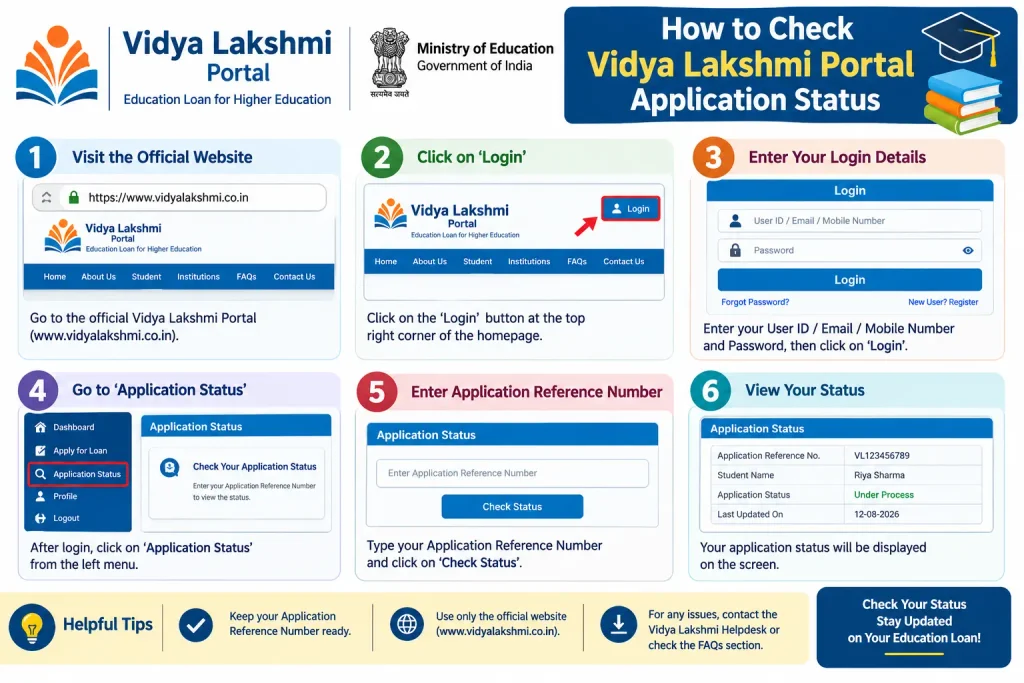
How to Check Vidya Lakshmi Portal Application Status
Log back in with your credentials. On the student dashboard, select “Track Loan Application.” The status shown is updated by the bank, not the portal — so if it says “In Process,” that means the bank has your application but hasn’t finished verification.
Statuses you might see: Submitted, In Process, Reqinfo (the bank needs additional information), PF-Eligible, Sanctioned, Rejected, Disbursed, Withdrawn, or Closed. “Reqinfo” is the one to watch — it means the bank has flagged something and is waiting for you to respond. If you don’t check the portal regularly, you can miss this and your application will sit in limbo.
If the status shows “Rejected,” contact the bank branch that processed your application. The portal doesn’t display rejection reasons; only the bank can explain. If the branch isn’t responsive, escalate to the bank’s nodal officer for education loans.
Common Mistakes to Avoid on the Vidya Lakshmi Portal
Mistake 1: Data mismatches across documents. Your name on the portal, your Aadhaar, your Class 10 marksheet, and your bank account need to match. Even a middle initial discrepancy can trigger manual verification, adding weeks to processing.
Mistake 2: Uploading documents that fail silently. File size limits and format restrictions are enforced, but the portal doesn’t always show a clear error. After uploading, preview each document to confirm it attached.
Mistake 3: Not checking bank-specific requirements before applying. Each bank sets its own limits for loan size, margin money, collateral, and co-applicant income. A bank that approves a ₹5 lakh loan for an engineering course may reject the same application for a management programme. Check the scheme details tab before selecting banks.
Mistake 4: Applying late. Start as soon as you have an admission offer. Banks need time for verification and credit checks. If you apply two weeks before your fee deadline, you’ll likely miss it.
Mistake 5: Creating multiple accounts. The portal allows one registration per student. If you’ve forgotten your password, use the recovery flow — don’t register again.
Frequently Asked Questions (FAQs)
1. What is the official Vidya Lakshmi Portal website for 2026?
The official portal is pmvidyalaxmi.co.in. The older vidyalakshmi.co.in domain is no longer the primary application portal. Verify the domain before entering personal information.
2. Can I apply to more than one bank through the portal?
Yes. After completing the CELAF, you can select up to three banks. Each bank sees the same application data, which reduces duplicate paperwork.
3. How long does it take for an education loan to be sanctioned?
Processing timelines vary by bank and aren’t fixed by the portal. Banks update the status as your application moves through verification and approval. Check the portal for current guidance and follow up with your selected bank branch.
4. What is interest subvention under PM-Vidyalaxmi?
For students with annual family income up to ₹8 lakh, the scheme provides 3% interest subvention on loans up to ₹10 lakh. Each year, up to one lakh fresh students not availing any other scholarship or interest subvention are eligible.
5. I forgot my password. What should I do?
Click “Forgot Password” on the student login page, enter your registered email address, and the portal will send a system-generated password. Don’t create a new account if you’ve already registered.
6. What should I do if my loan application is rejected?
Contact the bank branch that processed your application for clarification. You can also raise a grievance through the portal or escalate to the bank’s nodal officer if the branch isn’t responsive.
Final Thoughts
If your application has been “In Process” for more than two weeks, don’t wait for the portal to update. Call the bank branch you selected and ask for the education loan desk. The portal shows you the status, but the bank controls it — and a five-minute phone call often moves things faster than refreshing your dashboard. Keep your acknowledgement number handy, and check the “Reqinfo” status every few days; that’s the one that quietly stalls applications when students miss the bank’s request for additional documents.
