

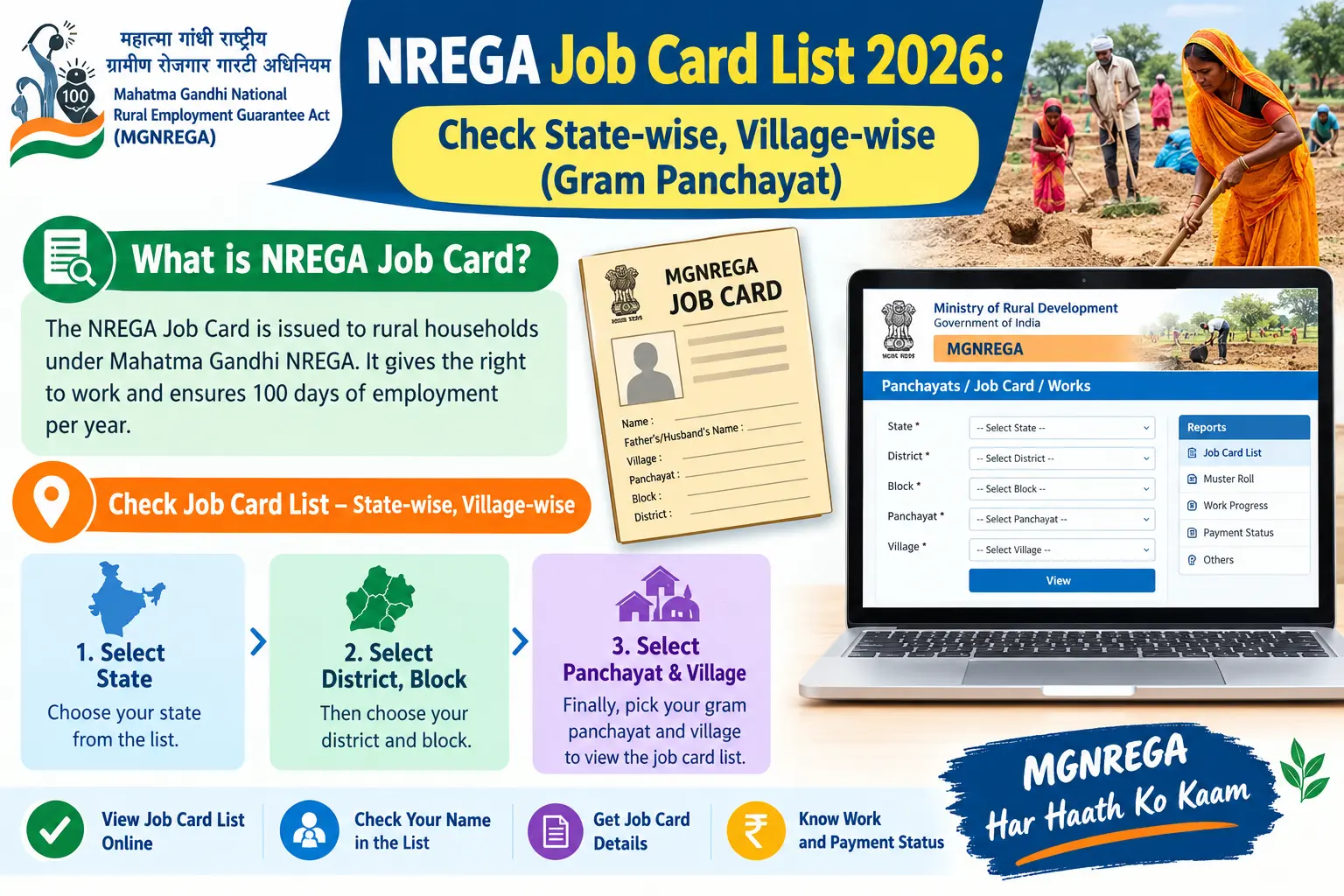
Your household put in the days, but the wage never landed. Or the Gram Panchayat read out the job card list and your name wasn’t on it. Before you file a complaint or re-apply, the first thing to establish is whether your household actually appears on the mgnrega job card list gram panchayat for your village — and in 2026 that list is published under a new scheme name. This guide walks through what the job card is now, how to pull up your Gram Panchayat’s list state-wise and village-wise, how to save it as a PDF, and what to do when an entry is missing or wrong.
What the Job Card Is — and What Changed in 2026
A job card is the household-level identity document issued under the rural employment guarantee. It carries a unique job card number, the names and photographs of every adult member willing to do unskilled manual work, bank or post office account details, and a running record of days worked and wages received. It is the document you use to demand work in writing. It is not a ration card, a bank passbook, or proof of any other entitlement.
The scheme itself has been overhauled. The Mahatma Gandhi NREGA framework was replaced by the Viksit Bharat Guarantee for Rozgar and Ajeevika Mission (Gramin) — the VB-G RAM G Act, 2025 — which raised the guaranteed employment from 100 to 125 days per rural household per financial year. Existing job cards stay valid, and the card issued under the new framework is called the Gramin Rozgar Guarantee Card. The Gram Panchayat remains the authority that issues, verifies, and renews job cards. A card is valid for at least five years, after which it must be renewed following verification; verification itself is an ongoing process, not a one-time event.
Discover More About:👇
E Shram Card Download by Mobile Number
West Bengal Labour Card Status Check by Aadhaar Number
How to Check the MGNREGA Job Card List Gram Panchayat Online
The list is public, free to view, and needs no login. It is published on the official VB-G RAM G portal (listed as vbgramg.dord.gov.in); older financial years remain on the legacy NREGA portal at nrega.nic.in.
The process runs end to end like this:
- Open the official portal on a phone or computer. On the legacy portal, the same reports sit under Key Features → Reports.
- Go to the Reports or Analytics section — Analytics and Reports on the new portal, Reports on the legacy one.
- Select your State from the dropdown — Karnataka, Gujarat, Tamil Nadu, or whichever applies.
- Drill down to District → Block → Gram Panchayat. The block may be labelled taluk or mandal depending on your state. Choose carefully; the same village name often exists in more than one block.
- Choose the financial year — for the current list, the 2026–27 option.
- Open the register. Click R1. Job Card / Registration (or Job Card / Employment Register).
- Read the list. It shows job card number, applicant name, and card status. Clicking a job card number opens the full record: family members, work history, and payment entries.
- Save it. Press Ctrl+P and choose Save as PDF; on a phone, use Share → Print → Save as PDF.
A few practical snags trip people up. The portal often logs you out mid-way if you leave a page open too long — if the next dropdown loads blank, refresh and start again from the state selection. The security question on the reports page sometimes fails silently; if nothing loads after you submit it, switch browsers rather than resubmitting again and again. And there is no all-India name search — you can only look up a worker by job card number if you already know it. Otherwise, you must navigate all the way down to the Gram Panchayat.
Checking the Karnataka List
Karnataka’s NREGA job card list for the current financial year sits on the VB-G RAM G portal. Open MIS Reports under Analytics and Reports, answer the security question, select Karnataka, and click Category wise Household/Workers. Choose your district, taluk, and Gram Panchayat, then open Job card / Employment Register in the R1 section. Ctrl+F will locate your name — but only on the page in view, so if the job card suchi runs over several pages, check each one.
Checking the Gujarat List
For Gujarat, the path runs through Key Features → Reports → State → Panchayats GP/PS/ZP → Gram Panchayats → Generate Reports. Select Gujarat, the financial year, district, block, and panchayat, then proceed to R1. Job Card / Registration. The full MGNREGA Gujarat panchayat list displays with job card number, applicant name, and card status.
e-KYC, Renewal, and Cancellation Safeguards
Verification now runs partly through the NMMS app (National Mobile Monitoring System), which handles e-KYC — electronic Know Your Customer. In practice, the Gram Rojgar Sahayak or a worksite supervisor photographs the worker through the app, and the image is matched against the worker’s Aadhaar details in real time. It takes under a minute per worker. Aadhaar seeding has been completed for the large majority of active workers, though e-KYC completion still varies widely between states.
Cancellation is not routine. A job card can be cancelled only on specific grounds — permanent migration of the household, a proved duplicate, or registration based on forged documents. The Ministry has issued a Standard Operating Procedure laying down safeguards to prevent arbitrary or wrongful deletion. If your card disappears from the list without any of those grounds applying, that is a grievance you can raise, not a fait accompli.
Types of Work Under MGNREGA — and How Wages Reach You
The scheme permits a long list of works — commonly cited at 266 categories — with the largest share tied to agriculture and natural resource management. The main work categories are:
- Water conservation and harvesting — check dams, earthen dams, underground dykes, rooftop rainwater structures.
- Afforestation and plantation — tree and horticulture planting on common land, forest land, road margins, canal bunds.
- Rural infrastructure — sanitation works, individual household latrines, school and Anganwadi toilets.
- Individual assets for vulnerable households — irrigation wells, cattle and poultry sheds, farm ponds, individual toilets.
- Rural connectivity — road building and land development.
Wages are notified state-wise every financial year and are not uniform across the country — some states sit well above ₹400 a day, others closer to ₹300, and the figures change annually. Confirm your state’s current rate on the official portal rather than going by a rate you saw last year.
Two payment rules matter. Wages must be paid within 15 days of the work being completed; if the muster roll closes and payment is delayed beyond that, delay compensation accrues from the sixteenth day. And wages move by DBT (Direct Benefit Transfer) straight into the worker’s bank or post office account — which is why wrong account details in the MIS are the single most common cause of a wage that “never arrived.”
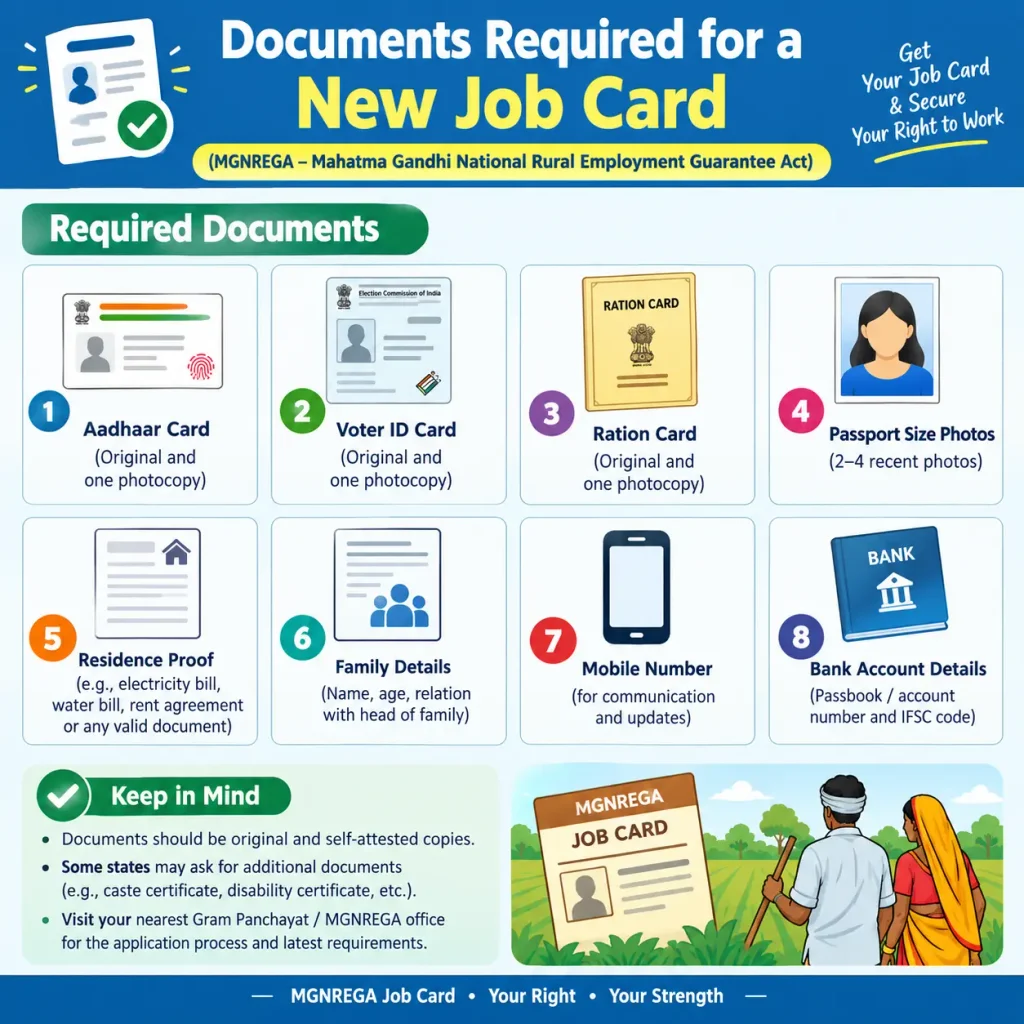
Documents Required for a New Job Card
Registration is free, and the form is available at the Gram Panchayat office; a plain paper application with the required details is also generally accepted. You will typically need:
| Document | Purpose |
|---|---|
| Aadhaar of the family head | Primary ID; routes DBT wages |
| Aadhaar of every adult member | For inclusion as a job card member |
| Photographs of all adult members | Taken free at the Gram Panchayat — no studio photo needed |
| Residence proof | Voter ID, ration card, electricity bill, or Aadhaar showing a rural address |
| Bank or post office account details | For DBT payment; Aadhaar-linked where possible |
| Self-declaration | That the household is willing to do unskilled manual work |
The Gram Panchayat is required to issue the job card within 15 days of application. If it doesn’t, ask for the dated receipt you should have received when you applied — that receipt is what establishes when the clock started.
Common Mistakes to Avoid
- Walking away without a dated receipt. It is the only proof of your 15-day clock.
- Leaving the job card un-updated. Days worked and signature columns are frequently left blank after a work period. Check and get them filled in.
- Ignoring a duplicate card. Two cards with different numbers but the same head of household can exist. Report it to the Gram Panchayat.
- Wrong bank or Aadhaar details on the MIS. These delay DBT payments more than anything else. Verify them yourself.
- A job card with no photographs. It is not valid without them.
- Assuming the card is cancelled because you didn’t work for a season. It isn’t — cancellation needs one of the specific grounds above.
FAQs
What is the difference between MGNREGA and VB-G RAM G?
MGNREGA was the original scheme under the 2005 Act. It has been replaced by the VB-G RAM G framework, which raises guaranteed employment from 100 to 125 days per household per year. Existing job cards remain valid.
Can I check the job card list state-wise and village-wise?
Yes. Both the new portal and the legacy NREGA portal let you select State → District → Block → Gram Panchayat and view or download the list for that village.
How do I download my job card as a PDF?
Open the list for your Gram Panchayat, click your job card number to open the full record, then press Ctrl+P and choose Save as PDF (or Share → Print → Save as PDF on mobile).
What if my wages are not paid on time?
Wages are due within 15 days of work completion, with delay compensation accruing after that. Check your status on the portal under WageList or MusterRoll, and raise the issue with your Gram Panchayat.
Can I still see the 2022-23 list?
Yes. The legacy portal at nrega.nic.in retains previous financial years; select the relevant year when generating the report.
How long is a job card valid?
At least five years from issue, after which it must be renewed following verification.
The list is a snapshot, not a verdict. If your name is missing, a wrong block selection or a spelling mismatch in the MIS is the likeliest cause — check the neighbouring block before assuming the worst. And if a wage payment is stuck, the delay usually traces back to an unseeded Aadhaar or a mismatch between the job card and the bank account, not to the work itself. Fix that first, and the rest tends to follow.
