


Your income certificate has been “Under Process” for two weeks. The OTP for your meeseva login never arrives. You need an Aadhaar slot before a bank deadline. These are the moments when MeeSeva stops feeling like a convenience and starts feeling like a puzzle. This guide walks through the practical parts: creating your MeeSeva registration, logging in without repeated OTP failures, applying for certificates and bill payments, tracking meeseva applications, and knowing when to visit a MeeSeva center instead of retrying online.
What MeeSeva Is — and What It Is Not
MeeSeva is Telangana’s Government-to-Citizen (G2C) and Government-to-Business (G2B) platform. It bundles services from departments such as Revenue, Municipal Administration, Police, and Transport into one interface. You can reach it in three ways: the official Telangana MeeSeva portal, a physical MeeSeva center (often called a MeeSeva kendra), or the official MeeSeva WhatsApp service. Some people search for “meseva” by mistake; the correct spelling is MeeSeva.
It is not a replacement for every government office. It is a delivery channel. For many certificates, you can start and finish online. For others, a centre operator scans documents, submits the form, and hands you a reference number. That distinction matters when you are deciding how to apply at a MeeSeva centre in Telangana.
Discover More About:👇
How to Book an Aadhaar Appointment Online at UIDAI Enrollment/Update Centre
Aadhaar Seva Kendra Near Me: How to Find Your Nearest Aadhaar Enrollment/Update Centre
MeeSeva Registration and meeseva login: Step-by-Step
Creating an account takes ten minutes if your mobile and email work. The delays usually come from OTP issues, session timeouts, or an activation link lost in spam.
Step 1: Open the official MeeSeva portal
Go to the official Telangana MeeSeva website. Choose “New User” or “Register User.” Do not use third-party portals that charge extra for the same form.
Step 2: Create your login ID and password
The login ID typically must start with a letter and stay within 6–10 characters. The password generally needs upper and lower case letters and 8–10 characters. Write both down before submitting; the portal may log you out if you pause too long.
Step 3: Add mobile number and email
Use a mobile number you can access immediately. An OTP will be sent there. Use an email you check often, because an activation link follows. If the OTP does not arrive, wait two minutes, check network coverage, and try “Resend.” Do not keep clicking repeatedly — some portals temporarily block repeated requests.
Step 4: Fill personal details
Enter your name, gender, date of birth, and address details such as street, city, district, and PIN code. If you link Aadhaar, type the 12-digit number carefully. A mismatch between your MeeSeva profile and your supporting documents can cause rejections later.
Step 5: Verify OTP and activate
Enter the OTP, then open the activation email and click the link. Once activated, log in with your user ID and password. If you registered with your mobile number as the login ID, you will generally enter an SMS OTP each time you log in.
Common pitfalls: OTP not received because the mobile inbox is full; activation email in spam; browser session expiring while you search for documents; entering a nickname instead of the name on your Aadhaar or school certificate.
Services You Can Apply For Through MeeSeva
MeeSeva covers hundreds of services across more than ten departments. The most-used categories are:
Certificates
Income, caste, residence/nativity, birth, death, and legal heir certificates. These usually go through the Revenue Department, with verification by a Tahsildar or municipal authority.
Utility and tax payments
Electricity bills, water bills (including HMWSSB), property tax, and traffic challans. You can pay online or at a MeeSeva center.
Police-related services
Police licence applications for hotels, restaurants, resorts, and entertainment venues; police verification certificates for employment, tenants, and drivers; lost document certificates; and bandobusth (security arrangement) requests for events.
Aadhaar-related services
MeeSeva centres in many locations act as Aadhaar enrollment and update points. You can also access Aadhaar e-KYC (electronic Know Your Customer), Aadhaar seeding, and enrollment data. For Aadhaar slot booking in Telangana MeeSeva, the UIDAI appointment system or mAadhaar app remains the primary route; centre availability varies.
Other services
Pensioner applications, driving licence renewal, marriage registration, market value certification, learner’s licence, and temple darshan/accommodation booking.
Checking MeeSeva Application Status
After submission, save the reference number. Without it, tracking becomes guesswork.
- Open the official MeeSeva portal.
- Select “Know Your Application Status” or “Track Application.”
- Enter your application number, transaction ID, or confirmation code.
- The screen shows whether the application is under process, approved, rejected, or pending additional information.
You can also track through the MeeSeva mobile app, which sends status notifications, or through the official MeeSeva WhatsApp service. If the status has not changed after the department’s normal processing window, visit the same MeeSeva center with your reference number. Filing a Right to Information (RTI) request with the concerned department is another option when you need a written status update.
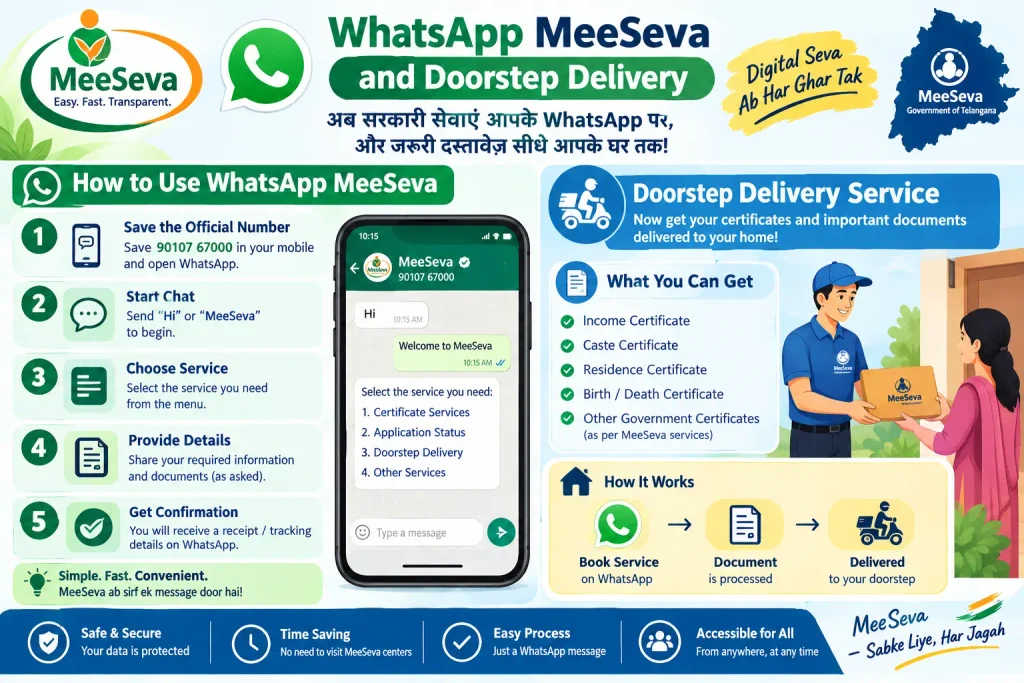
WhatsApp MeeSeva and Doorstep Delivery
MeeSeva now extends beyond the portal. The official WhatsApp service lets citizens apply, pay, track, and download approved certificates through messages. It is useful if you find the web portal hard to navigate or if you need a quick status check.
Doorstep delivery is available for selected services, including birth and death certificates, income/caste/residence certificates, and copies of Encumbrance Certificates (EC). You can book a slot through the state’s 1100 helpline or the MeeSeva portal. Availability and service lists can differ by district, so confirm before paying.
Common Mistakes to Avoid
- Registering with a mobile number you will lose. OTP verification and password resets depend on it.
- Typing details that do not match your documents. Even a spelling variation in your name can trigger verification queries.
- Skipping the reference number. Screenshot the acknowledgement page and save the SMS.
- Assuming every service is fully online. Some require a centre visit, biometric verification, or original document inspection.
- Ignoring “additional information required” statuses. These often have response windows; missing them can close the application.
- Using unofficial agents for Aadhaar slot booking. Use UIDAI channels or a recognised MeeSeva centre.
FAQs
Q1: Can I check my MeeSeva application status without logging in?
Yes. The portal’s status-check option usually works with your application number or transaction ID. You do not need to complete a full meeseva login.
Q2: How do I book an Aadhaar card slot in Telangana MeeSeva?
Aadhaar enrollment and update services are offered at many MeeSeva centres. Slot booking generally goes through the UIDAI appointment system or the mAadhaar app where available; some districts also use the 1100 helpline. Check the UIDAI portal or your nearest centre for current rules.
Q3: I forgot my MeeSeva login password. What now?
Use the “Forgot Password” link on the official portal. Enter your registered mobile number, verify the OTP, and set a new password. If your mobile number has changed, you will likely need to visit a MeeSeva centre with ID proof.
Q4: Is there a MeeSeva mobile app?
Yes. The MeeSeva app for Android offers certificate applications, utility payments, pensioner services, and status notifications. The service list may be shorter than the full portal.
Q5: Can I get a caste or income certificate entirely online?
You can start the application online. Final issuance usually involves departmental verification. Some applicants are asked to submit documents or appear at a MeeSeva centre, so keep originals ready.
Q6: What are the fees for MeeSeva services?
Fees vary by service and are displayed during the application. Government charges and service fees change periodically, so check the official MeeSeva portal or your nearest centre for the current amount. Payments are typically made by UPI, net banking, or debit card.
A Final Practical Note
If your application is still “Under Process” after the normal processing window, do not keep re-submitting. Take the reference number to the same MeeSeva centre and ask for a written status. For Aadhaar updates, remember that UIDAI’s timelines and MeeSeva’s centre operations are separate — a MeeSeva acknowledgement does not always mean the Aadhaar update has been accepted. Keep screenshots, keep the mobile number active, and verify current rules on the official MeeSeva or UIDAI portal before paying again.
