

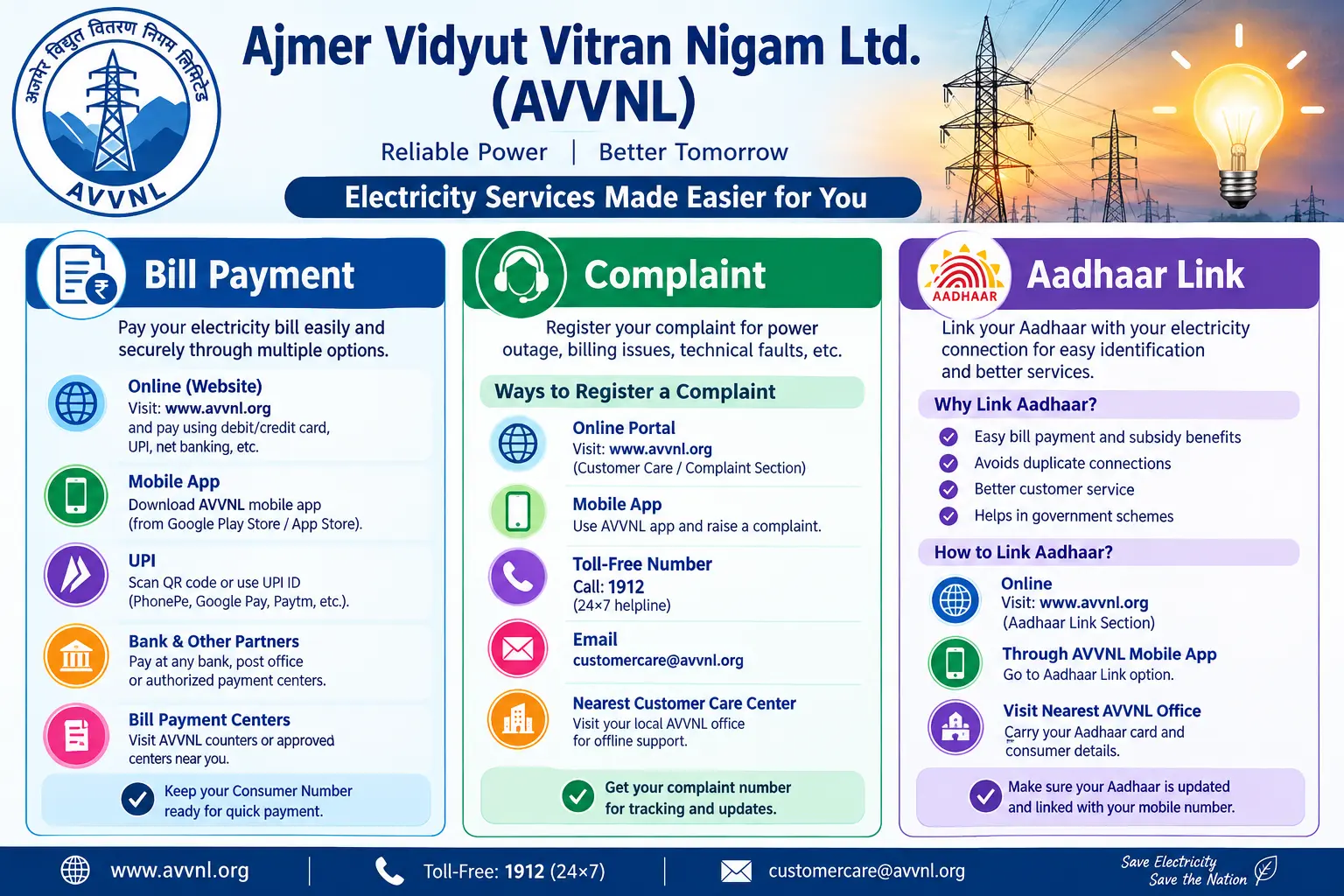
Your bill is due tomorrow. You open the payment page, enter your K-number, and the portal times out. You try again—same result. Meanwhile, a neighbour mentions his subsidy stopped because his Jan Aadhaar was never linked to his connection. If either situation sounds familiar, this guide is for you. It covers the three tasks that cause the most frustration for consumers of Ajmer Vidyut Vitran Nigam Ltd: paying a bill, filing a complaint, and linking Aadhaar or Jan Aadhaar to your electricity connection.
AVVNL supplies power across 14 districts in Rajasthan, from Ajmer and Bhilwara to Udaipur and Nagaur. That is a vast, often rural service area, and the ways to reach the discom—website, mobile app, helpline, or local sub-division office—are not always obvious. What follows is a practical walkthrough, including the small mistakes that trip people up.
Discover More About:👇
TNEB Aadhaar Link Status Check – How to Check Your Electricity Connection Online
How to Check Aadhaar Linked with EB: Complete TNEB Aadhaar Link Status Guide
How to Pay Your AVVNL Electricity Bill
You have four realistic options: the website, the Vidyut Sarthi app, a BBPS-enabled payment platform, or a physical counter. Pick based on how urgently you need the receipt and how comfortable you are with online payments.
Paying Through the AVVNL Website
The official portal (energy.rajasthan.gov.in/avvnl) is the primary online channel. Here is the actual flow:
- Open the payment section. Look for the Web Self Service (WSS) login or the “Quick Pay through BillDesk” link if you do not want to create an account.
- Enter your K-number — the consumer number printed on your bill — and your registered email ID for Quick Pay.
- Verify the bill summary that appears on screen. Check the amount and the billing period before proceeding.
- Choose a payment mode. Debit card, credit card, net banking, and UPI are generally available.
- Complete the transaction and download the e-receipt. Do not close the browser until the receipt is saved.
A common pitfall: the portal sometimes times out during peak hours (typically late morning and early evening). If the payment fails but money is debited, do not pay again immediately. Wait for the transaction to either reflect or reverse, usually within a few working days, and keep the failed transaction reference number.
Paying Through the Vidyut Sarthi App
Vidyut Sarthi is the official mobile app for AVVNL and the other two Rajasthan discoms. You can check your latest bill, view payment history, and pay from your phone. Register with your consumer number after downloading it from the Google Play Store or Apple App Store.
Other Payment Channels
AVVNL is listed as a biller on the Bharat Bill Payment System (BBPS). Most banks, UPI apps, and wallets that support BBPS will let you pay using your consumer number. For offline payment, visit an AVVNL customer service centre or a designated collection counter. If you pay at a counter, always insist on a printed receipt.
How to Register a Complaint with AVVNL
Power outages, faulty meters, and unexpectedly high bills are the three most common reasons consumers file complaints. AVVNL has an internal grievance cell and, for unresolved matters, an external Consumer Grievance Redressal Forum (CGRF).
Registering a Complaint Online
- Go to the AVVNL website and find the complaint or grievance section.
- Fill in your consumer number, the nature of the problem, and the date and time the issue occurred.
- Submit the form and note the complaint reference number. Without this number, tracking becomes difficult.
- You can also file through the Vidyut Sarthi or Urja Sarthi app, which lets you check status without calling anyone.
Complaining by Phone or in Person
Call the AVVNL toll-free helpline at 1912 or 1800-180-6565. For matters that need a paper trail—such as a disputed bill or a meter tampering allegation—visit your nearest AVVNL sub-divisional office and submit a written complaint. The Rajasthan Raj Sampark portal may also accept public grievances related to AVVNL.
What Happens After You File
The Internal Grievance Redressal Cell is expected to address complaints within a specified period, commonly up to 30 days from filing. If that does not happen, or if you are unsatisfied with the outcome, you can approach the CGRF. The CGRF accepts complaints in writing, including by registered post, email, or online mode. Keep copies of everything you submit.
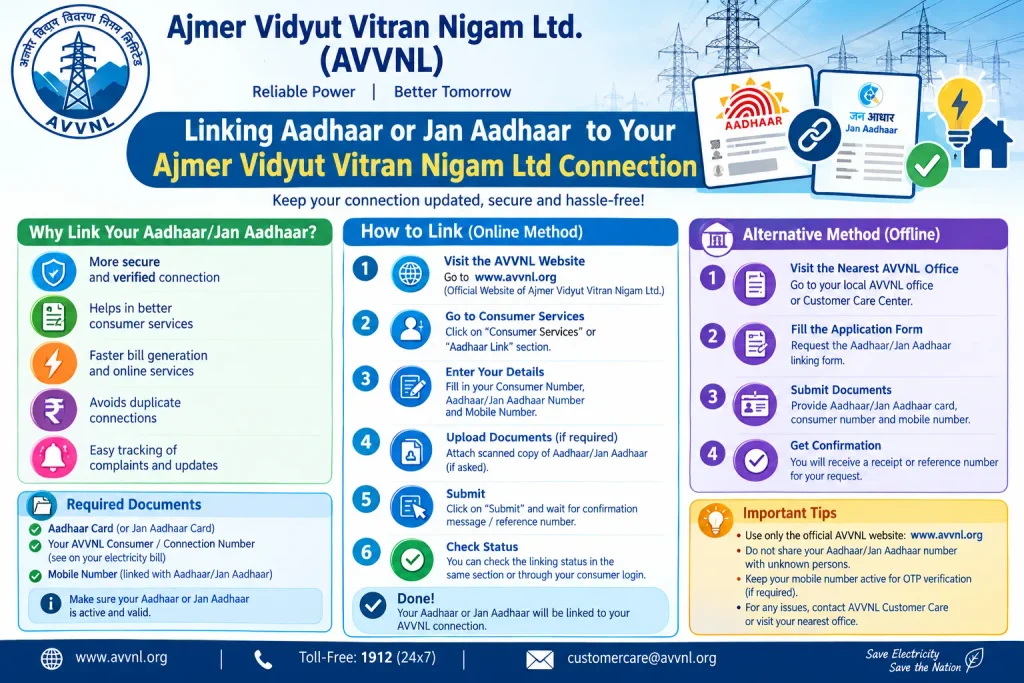
Linking Aadhaar or Jan Aadhaar to Your Ajmer Vidyut Vitran Nigam Ltd Connection
In Rajasthan, electricity subsidies are routed through Aadhaar or Jan Aadhaar (the state’s public ID system). The previous state government’s free electricity scheme for domestic consumers required a Jan Aadhaar number. Agricultural consumers receiving subsidy under the Chief Minister Kisan Mitra Urja Yojana had to link both Aadhaar and bank account details.
Why Linking Matters
Under the Direct Benefit Transfer (DBT) model, subsidy amounts go directly to the consumer’s Aadhaar-linked bank account. If you are eligible but have not completed the linking, your benefit may be withheld or delayed. Linking is not automatic—it is a registration step you must complete.
How to Check or Complete the Linking
The process depends on the scheme. For domestic subsidies, consumers have typically registered their Jan Aadhaar number through the official portal or at designated camps. For agricultural subsidies, linking is often done at the local AVVNL office or through the relevant state department. Rules and portals change, so verify the current process on the official AVVNL website or by calling the helpline. Never share your Aadhaar OTP or pay anyone who promises to “link” your connection for a fee.
Documents Required for Common AVVNL Services
For a new domestic connection, you will commonly need:
- Aadhaar card of the applicant (identity and address verification)
- Property ownership proof — registry, sale deed, allotment letter, or property tax receipt
- Address proof matching the premises — Aadhaar, Voter ID, or a rent agreement
- Passport-size photographs (usually two or three)
- Bank passbook first page for subsidy-related registrations
- NOC from the landlord if you are a tenant
For name changes, load changes, or meter replacement, requirements differ. Check the AVVNL website or your local office for a current checklist.
Common Mistakes to Avoid
- Entering the wrong K-number. This is the key identifier for every AVVNL transaction. Double-check it before paying or complaining.
- Losing the complaint reference number. Without it, you cannot track status online or by phone.
- Assuming Aadhaar linking is automatic. It is not. You must complete a registration step yourself.
- Sharing OTPs or Aadhaar details with unknown callers. No genuine AVVNL official will ask for these over the phone.
- Waiting indefinitely for a resolution. If 30 days pass without action, escalate to the CGRF rather than filing the same complaint again.
Frequently Asked Questions (FAQs)
Q1: Can I pay my AVVNL bill without creating an account?
Yes. Use the “Quick Pay through BillDesk” option on the website with your K-number and registered email ID. The Vidyut Sarthi app and BBPS platforms also work without a website login.
Q2: What is the AVVNL toll-free helpline number?
The customer care numbers are 1912 and 1800-180-6565. The 1912 number is a common toll-free electricity complaint line in several states.
Q3: Is Aadhaar linking mandatory for my AVVNL connection?
Not for having a connection, but it is generally required to receive state electricity subsidies. For example, the free electricity scheme for domestic consumers was available only to those who linked a Jan Aadhaar number.
Q4: How do I track my AVVNL complaint?
If you filed online or through the Vidyut Sarthi app, log in and check using your reference number. If you complained by phone, call the helpline again with your consumer number and complaint details.
Q5: What if my complaint is not resolved?
Approach the Consumer Grievance Redressal Forum (CGRF) at the discom level. It accepts written complaints by registered post, email, or online mode.
Q6: Can I get a new AVVNL connection online?
Yes, through the AVVNL website and the Rajasthan E-Mitra portal. You will upload scanned copies of your identity proof, address proof, and property ownership proof.
Final Thoughts
If a payment fails but money leaves your account, wait at least three working days before escalating—most reversals happen within that window, and filing a duplicate payment complaint immediately often slows things down. For subsidy linking, the practical deadline is usually the state’s scheme cut-off, not the electricity bill due date, so check the current AVVNL or Jan Aadhaar portal notice rather than assuming you have time. Rules, fees, and portal features change; when in doubt, the official AVVNL website or the 1912 helpline is your most reliable source.
