

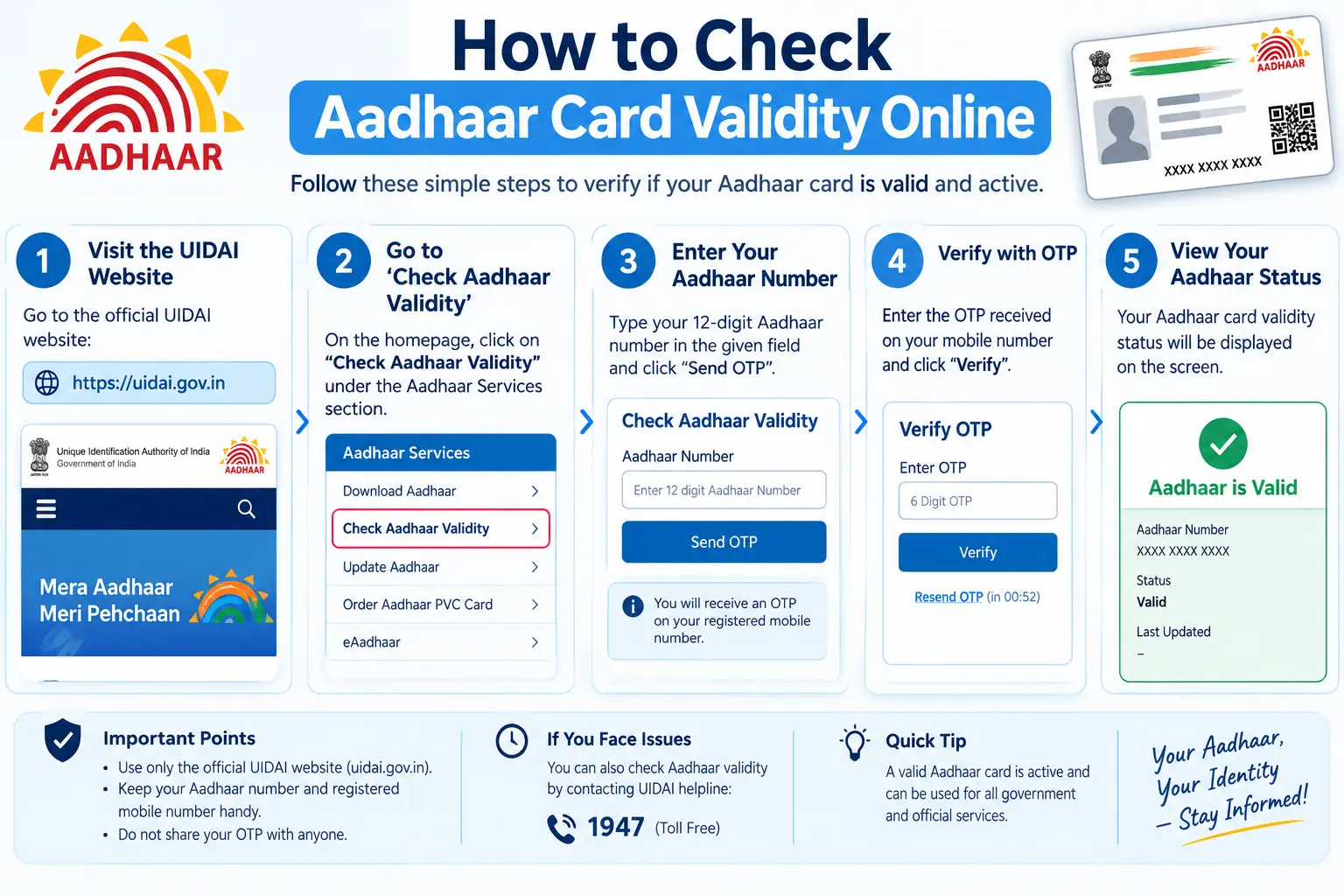
A rejected bank KYC. A rental agreement that stalls because the landlord wants proof your Aadhaar is genuine. A child’s Aadhaar that suddenly stops working at the enrolment centre. These are the moments that send people searching for an aadhaar validity check — usually in a hurry, often after something has already gone wrong. The good news: verifying whether an Aadhaar number is active takes under a minute on the UIDAI website, costs nothing, and requires no OTP, no documents, and no trip to an office. This guide covers the exact steps, what the result actually tells you, and how to read an “invalid” message without assuming the worst.
What an Aadhaar Validity Check Confirms — And What It Doesn’t
A validity check answers one narrow question: does this 12-digit number exist in UIDAI’s database and is it currently active? UIDAI — the Unique Identification Authority of India — runs this free tool on its official portal.
It does not verify your name, address, or photograph. That distinction matters in practice. If you are an employer or landlord checking a photocopy someone handed you, the tool confirms the number is real and live, but it will not tell you whether the person standing in front of you is the Aadhaar holder. For that, you need QR code verification or Aadhaar-based authentication, which we cover below.
A valid result means the number is genuine and not deactivated. An invalid result means one of two things: the number was typed incorrectly, or it has been deactivated by UIDAI.
Read More About👇
Step-by-Step: Checking Aadhaar Validity on the UIDAI Website
The web tool is the fastest route. No login, no registered mobile number, no OTP.
Step 1: Open uidai.gov.in. The portal loads in English and several Indian languages.
Step 2: Find the verification service. Look under the “My Aadhaar” menu for the option to verify an Aadhaar number. The exact label shifts occasionally as UIDAI reorganises its menus, but it sits within the Aadhaar Services section.
Step 3: Enter the 12-digit Aadhaar number. Type slowly. This is where most failures happen — a single transposed digit returns “invalid” and sends people into unnecessary panic.
Step 4: Fill in the CAPTCHA. The security code confirms a human is making the request. If the image is unreadable, refresh it rather than guessing.
Step 5: Submit. The result appears on screen immediately.
Two pitfalls worth knowing. First, the portal session can time out if you leave the page idle while hunting for the Aadhaar number — complete the CAPTCHA promptly. Second, if you are checking multiple numbers, reload the page between each one so the CAPTCHA refreshes properly.
Discover More About: 👇
Voter Card Aadhaar Card Link: How to Submit Form 6B and Verify Your Voter ID
DBT Status Check with Mobile Number (2026 Guide)
PAN Aadhaar Link Status Kaise Check Karein
What the Verification Result Actually Shows
The tool deliberately returns limited information. You will typically see:
- Validity status — active or not
- Age range — a bracket, not the exact date of birth
- Gender
- State linked to the Aadhaar
- Mobile linkage — the last four digits of the registered mobile number, if one is linked
Your full name, photograph, and complete address are never displayed. That design choice is what makes the tool safe to use when verifying someone else’s Aadhaar — you confirm authenticity without exposing their personal data.
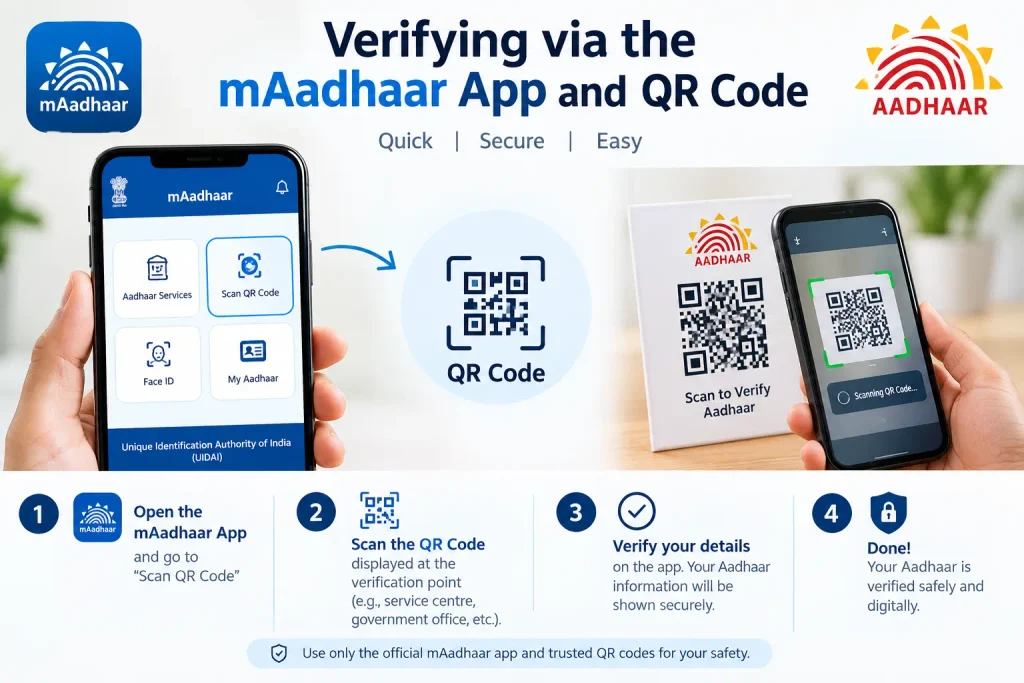
Verifying via the mAadhaar App and QR Code
On a smartphone, the mAadhaar app handles the same task after you log in with your Aadhaar number and an OTP sent to your registered mobile. UIDAI has been transitioning users to a newer Aadhaar app, so the interface may look different depending on which version you have — the underlying verification and QR scanning functions remain.
The QR code option is the more powerful one. Every printed Aadhaar carries a QR code containing digitally signed details. Scanning it with the app reveals what is actually encoded, which is far harder to fake than a convincing-looking photocopy. If someone hands you a physical Aadhaar and you need more assurance than a number check gives, scan the code.
Why “No Expiry” Doesn’t Mean “Never Invalid”
For most adults, Aadhaar has no expiry date — it stays valid for life, even if your address or mobile number is outdated. Two exceptions break that rule.
Children. Aadhaar issued before age five must have biometrics updated at age five, and again at fifteen. Miss either update and the Aadhaar can be deactivated.
Resident Foreign Nationals. Their Aadhaar is typically valid only until the visa or passport expires. For OCI card holders and nationals of Nepal and Bhutan, validity commonly runs ten years from enrolment. Check current UIDAI guidelines for your specific category.
When a Check Returns “Invalid”
An invalid result is not proof of a fake Aadhaar. The usual explanations, in rough order of likelihood:
A typing error. Recheck every digit before concluding anything.
Deactivation by UIDAI. This happens in specific circumstances — for instance, after the Registrar General of India supplies verified death records, or where duplicate Aadhaar numbers were issued to the same person.
Missed biometric updates for a child, as described above.
A genuine database mismatch. Rare, but possible. If your number is definitely correct and the problem persists, call UIDAI’s toll-free helpline at 1947 or visit an Aadhaar Seva Kendra.
Discover More About: 👇
Aadhaar Verification Online: How to Verify & Check Aadhaar Card Validity
How to Retrieve or Find Your Lost Aadhaar Number Online
Documents Required, and Mistakes That Waste Your Time
The validity check itself needs nothing — no ID proof, no address proof, no OTP. Just the 12-digit number and the CAPTCHA. If you are visiting a centre to fix a deactivated Aadhaar, you will commonly be asked to bring your existing Aadhaar or EID (the 28-digit Enrolment ID printed on your enrolment slip), a registered mobile number, and a valid ID and address proof if you are updating details.
Three mistakes recur:
Treating “invalid” as “fake.” It usually means deactivated or mistyped. Use QR scanning if you genuinely suspect tampering.
Sharing your Aadhaar number when a Virtual ID would do. A VID is a temporary 16-digit number that works for authentication and e-KYC without exposing your actual Aadhaar number. Generate one free on the UIDAI portal or in the app, and regenerate it whenever you like.
Trusting a visual inspection of the card. Modern fakes look right. Verify the number online or scan the QR code instead.
Frequently Asked Questions
Can I check Aadhaar validity without a registered mobile number?
Yes. The web tool needs no OTP and no mobile linkage — only the Aadhaar number and the CAPTCHA.
Does the check reveal my full name and address?
No. Only age range, gender, state, and mobile linkage status are shown. Full name, photo, and complete address stay hidden.
What is the difference between Aadhaar number and Virtual ID?
Your Aadhaar number is permanent and should be shared sparingly. A VID is a temporary 16-digit substitute for verification and e-KYC. Regenerate it as often as you want.
My Aadhaar shows invalid. What now?
Recheck the digits first. If the number is correct, the Aadhaar may be deactivated — visit an Aadhaar Seva Kendra or call 1947.
Is e-Aadhaar valid for verification?
Yes. The electronic version downloaded from UIDAI’s website carries the same legal standing as the physical copy.
How often should I re-check my own Aadhaar?
There is no fixed schedule, but it is worth verifying after any update request, and after a child turns five or fifteen, to confirm the change went through.
One Last Thing Worth Doing
If you have just submitted an update — address, mobile number, biometrics — resist the urge to check the same day. Updates commonly take time to reflect, and an early check tells you nothing useful. Wait for the update request number (URN) status to show completion first, then verify. And if you are checking someone else’s Aadhaar before a transaction, remember that a valid number plus a matching QR scan is a far stronger signal than either check alone. UIDAI’s fees, rules, and timelines change periodically, so confirm current details on uidai.gov.in or via the 1947 helpline for your specific case.

2 Comments
Pingback: How to Check Aadhar Card Link With Bank Account
Pingback: Aadhaar Verification Online