
Your bank is asking for Aadhaar before it will complete your e-KYC. Your SIM provider has sent a deadline reminder. And somewhere in the middle of all this, you realise you don’t actually remember your 12-digit Aadhaar number. If that sounds familiar, take a breath. The number isn’t gone — it sits safely in UIDAI’s records, linked to your biometrics and demographic details. What you need is the right official channel to pull it back up. This guide walks through the practical ways to do an aadhar card number check and retrieve aadhaar number — using your registered mobile, your EID, or the mAadhaar app — plus the mistakes that trip people up and what to do when the usual routes don’t work.
Aadhaar Number, EID, VID, and UIDAI: A Quick Primer
Four terms show up repeatedly in this process:
- UIDAI — the Unique Identification Authority of India, the government body that issues Aadhaar.
- Aadhaar number — your 12-digit unique ID, tied to your biometric and demographic data.
- EID (Enrolment ID) — a 28-digit number printed on your enrolment or acknowledgement slip. It matters most when you’ve recently enrolled and don’t yet have the 12-digit number, or when your slip is the only record you still have.
- VID (Virtual ID) — a temporary, revocable 16-digit number you can use in place of your Aadhaar number for many authentication tasks, so your real number stays private.
Here’s the reassuring part: forgetting your Aadhaar number is common, and UIDAI has built official retrieval routes for exactly this situation. The catch is that these routes depend on something you may not have thought about — whether your current mobile number is actually the one registered with Aadhaar.
Read More About👇
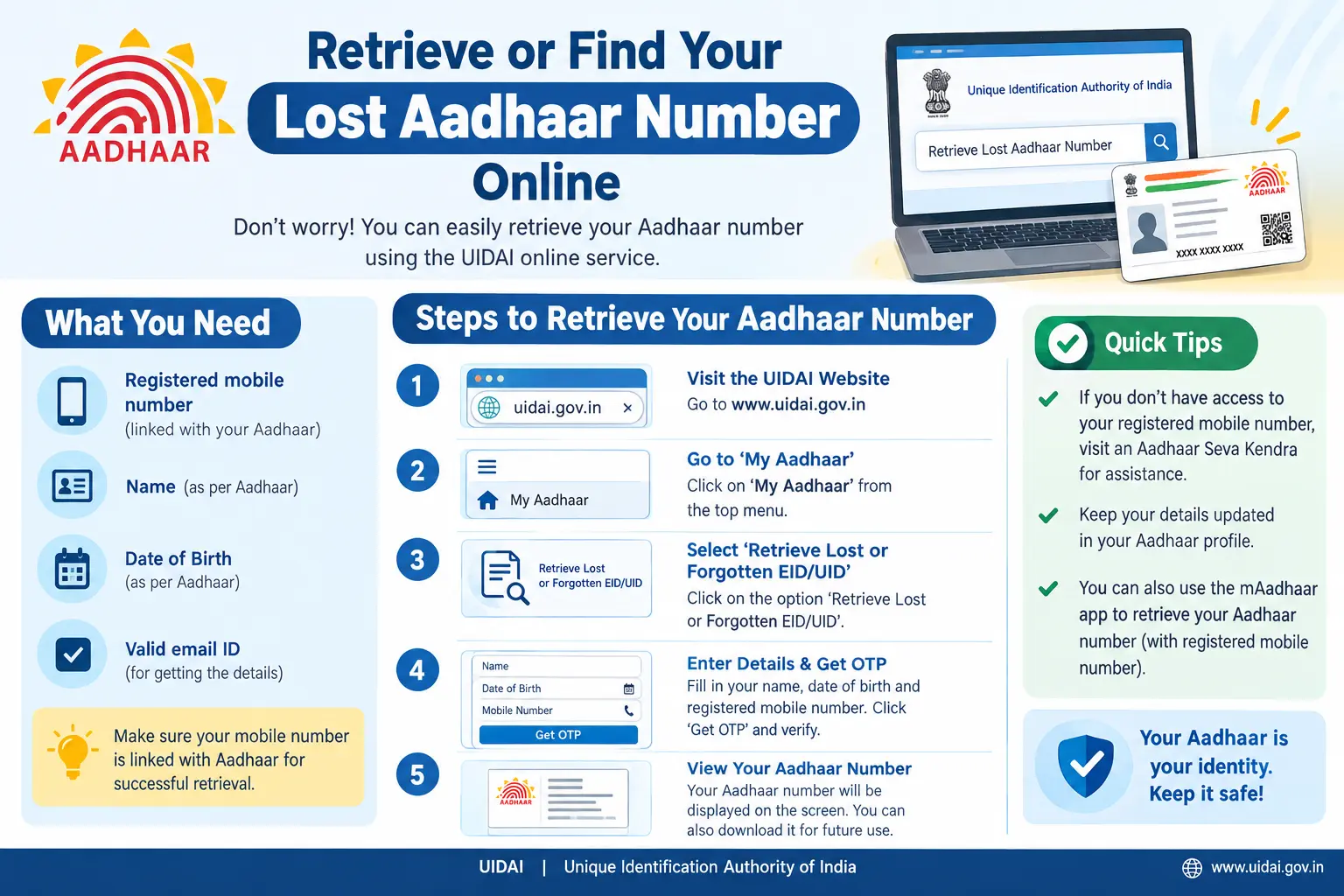
How to Retrieve Aadhaar Number on the UIDAI Portal
The self-service route on uidai.gov.in is the fastest option when your details line up. The portal’s layout gets updated periodically, but the sequence generally works like this:
- Open the official UIDAI website (uidai.gov.in) and find the “My Aadhaar” section, then look for the retrieve Aadhaar number option.
- Pick the method that matches what you have on hand — typically “using Mobile Number” or “using EID.”
- Enter your details. For the mobile route, it must be the number registered against your Aadhaar. For the EID route, key in the full 28-digit EID exactly as printed on your slip.
- An OTP will be sent to your Aadhaar-registered mobile. Enter it to verify.
- Once verified, your Aadhaar number is either displayed on screen or sent to your registered mobile or email, depending on the option you chose.
Discover More About:👇
Aadhaar Status Check – How to Check Enrolment & Update Status Online
PM-KISAN Status Check Using Aadhaar: How to Find Your Registration Number and Check Your Status
Ration Card Status: How to Check Rice Card Status with Aadhaar Number in AP & Telangana
Two pitfalls worth knowing before you start. First, the OTP only reaches an Aadhaar-linked mobile number — if you’ve changed SIMs and never updated Aadhaar, nothing will arrive, no matter how many times you hit resend. Second, the portal session can time out while you’re hunting for your enrolment slip. Keep the slip, your mobile, and your ID proof within reach before you begin, and avoid refreshing mid-session.
If your mobile isn’t linked, this route won’t work at all. You’ll need to update your mobile number at an Aadhaar centre first, or use the EID option if you still have your slip.

Using the mAadhaar App to View Your Aadhaar Number
The mAadhaar app is UIDAI’s official mobile app, and it’s useful in a different scenario — when you’ve already registered your Aadhaar on it and simply need to look up the number again. Download it from the official app store, set up your profile with your registered mobile number, and if your Aadhaar is linked, your number, VID, and basic details are visible inside the app.
It’s also the handiest way to confirm which mobile number is attached to your Aadhaar — a aadhaar phone number check you can run yourself instead of visiting a centre. The limitation is obvious: the app only helps if you set it up before losing track of your number. If you never registered, you’re back to the portal or a physical visit. One tip — if the app was set up on an old phone, you’ll need your registered SIM in the new device to receive the OTP during setup.
Aadhaar Search by Name: What Actually Works
Queries like aadhar card search by name, aadhar card search by name and father name, and aadhaar number search by name are extremely common — and the honest answer is that UIDAI does not offer any public tool where you type a name and get an Aadhaar number back. That’s deliberate. An open name-based lookup would be a privacy disaster, exposing anyone’s Aadhaar to anyone who knows their name.
So how do people find their own number? Through the official methods above — registered mobile, EID, or a centre visit with documents. If you’re trying to retrieve a family member’s number, you generally can’t do it without their consent and proper authorisation; the main exception is a parent or guardian handling a minor’s Aadhaar. Treat any website promising a find aadhar number by name search as a red flag — these are almost always data-harvesting traps.
If Your Mobile Isn’t Linked and You’ve Forgotten the Number
This is the genuinely difficult combination: no Aadhaar number, no linked mobile, and no OTP route available. Online options largely close off here, and the realistic paths are:
- Visit an Aadhaar Seva Kendra or authorised enrolment centre with identity and address proof. Staff can help after verification.
- Use your EID on the UIDAI portal if you still have the enrolment slip — this is the single most valuable document in this situation.
- If you know your Aadhaar number but not your linked mobile, an Aadhaar centre or official update service can tell you which number is attached.
Document requirements and procedures can shift, so confirm the current list on uidai.gov.in or via the UIDAI toll-free helpline before travelling to a centre.
Discover More About: 👇
Aadhaar Verification Online: How to Verify & Check Aadhaar Card Validity
How to Check Aadhaar Card Validity Online (Step-by-Step Guide)
Common Mistakes That Delay the Process
- Trusting unofficial lookup sites. Only uidai.gov.in and the mAadhaar app are legitimate. Everything else is a risk to your data.
- Sharing your OTP. UIDAI never asks for it by phone, email, or message. Anyone who does is running a scam.
- Assuming a name-based search exists. It doesn’t — see above.
- Letting your mobile number stay unlinked. This is the root cause of most retrieval failures. Fix it at a centre when you get the chance.
- Discarding your enrolment slip. That EID is your fallback when everything else fails.
Documents Typically Needed at an Aadhaar Centre
For retrieval or a mobile number update at a centre, you’ll commonly need proof of identity (passport, PAN, voter ID, or driving licence), proof of address (bank passbook, electricity bill, or ration card), your enrolment slip or EID if available, and a parent or guardian’s documents for a child’s case. The accepted list and any applicable fees are revised from time to time — check the official UIDAI website for the current requirements rather than relying on older information.
FAQs
Can I find my Aadhaar number using my mobile number?
Yes, generally — if that mobile number is registered with Aadhaar, the UIDAI portal’s retrieve option will send an OTP to it and display or deliver your number after verification.
How do I know my Aadhaar number if I’ve forgotten it?
Try the portal with your registered mobile or EID first. If neither works, visit an Aadhaar Seva Kendra with valid identity and address proof.
Is there an Aadhaar search by name and father name?
No. UIDAI provides no public name-based search. Any site claiming otherwise should be avoided.
How do I check which mobile number is linked to my Aadhaar?
The mAadhaar app shows linked details once set up; otherwise, an Aadhaar centre can confirm it. Some official services display a masked version of the linked number.
What is EID, and how does it help?
EID is the 28-digit Enrolment ID on your enrolment slip. It can be used on the UIDAI portal to retrieve your Aadhaar number or check enrolment status when you don’t have the 12-digit number yet.
Can I retrieve my Aadhaar number without a mobile number?
Sometimes — via the EID route or an in-person visit with documents. The viable path depends on your specifics, so verify with the official UIDAI helpline.
One Last Thing
If you’ve just updated your mobile number or other details at a centre, don’t expect the portal to reflect it instantly — updates typically take some time to sync, and retrying within minutes usually just produces the same error. Give it a reasonable gap, then attempt retrieval again. And if an online route keeps failing despite correct details, stop repeating it and go in person; a centre visit resolves in one sitting what a dozen retries often can’t.
1 Comment
Pingback: How to Check Aadhar Card Link With Bank Account