

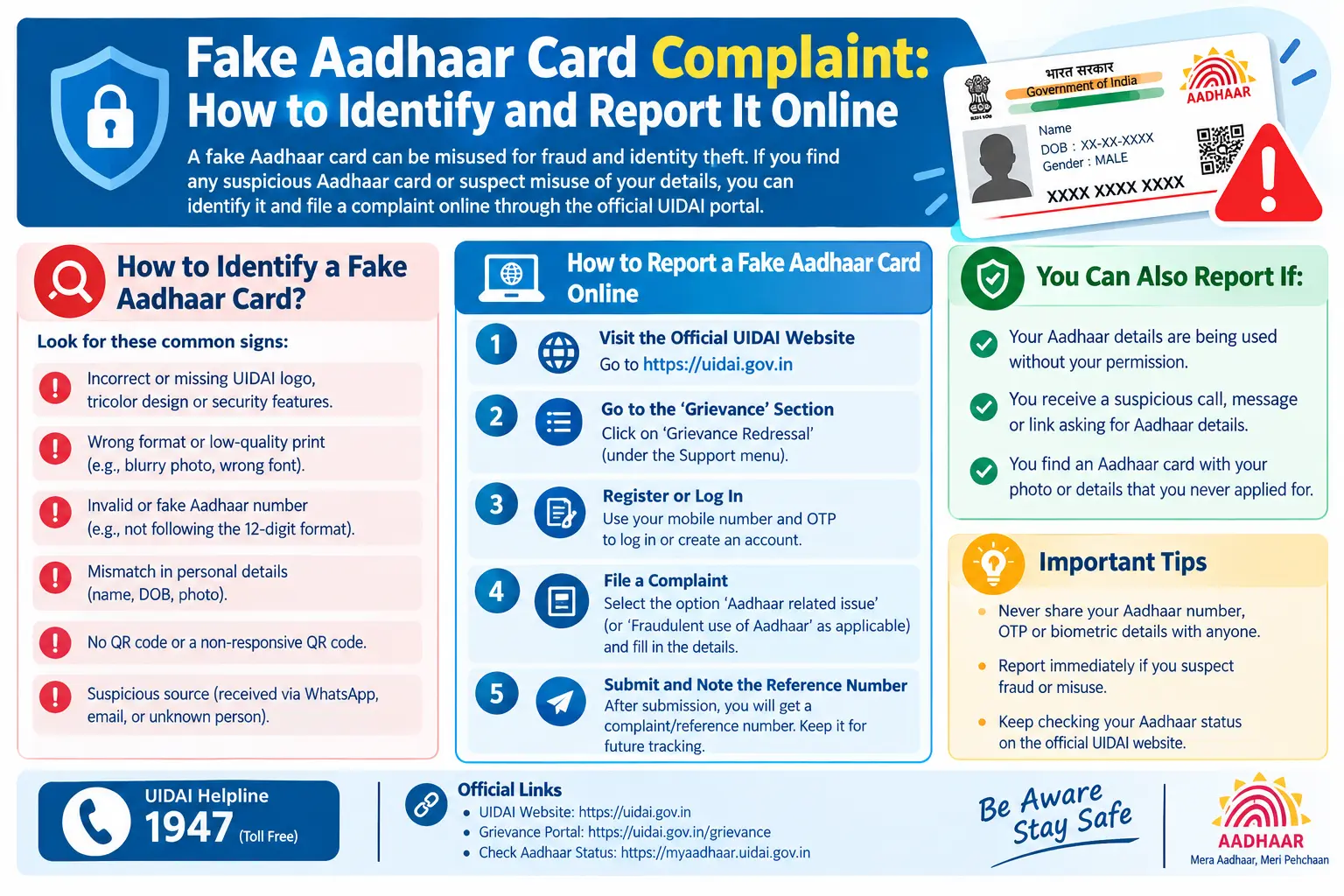
Your loan application was rejected because a bank account you never opened is already linked to your Aadhaar. Or a stranger’s photo appeared when a lender scanned the QR code on the Aadhaar copy you submitted. Either way, someone is using your identity — and every day you wait, the misuse gets harder to unwind. This guide walks you through how to spot a forged Aadhaar, how to file a fake Aadhaar card complaint online through UIDAI’s official channels, and the practical traps that stall complaints for weeks. Treat the steps below as general guidance; UIDAI revises its portal, fees, and grievance flow periodically, so confirm current details on uidai.gov.in or through the UIDAI toll-free helpline before acting.
Discover More About:👇
Aadhaar Verification Online: How to Verify & Check Aadhaar Card Validity
Aadhaar Complaint Status: Check Online in 2 Minutes
What Counts as a Fake Aadhaar Card
Not every suspicious Aadhaar is a forgery, and the category determines how you report it.
- Fully fabricated card — a document styled like an Aadhaar card but never issued by UIDAI (Unique Identification Authority of India, the body that issues Aadhaar).
- Tampered genuine card — a real Aadhaar with an edited photo, date of birth, address, or number.
- Misused genuine Aadhaar — someone else’s valid Aadhaar number used by an impostor to pass verification.
- Forged QR code — the printed card looks authentic, but scanning the code does not return the same details.
To be unambiguous: nothing here is a how-to. Creating, altering, or knowingly using a fake Aadhaar card is a criminal offence. This article is only about detection and reporting.
How to Identify a Fake Aadhaar Card
Scan the QR
CodeEvery genuine Aadhaar — the older laminated paper version and the newer PVC card — carries a QR code. Scanned through the mAadhaar app or a compatible reader, it should return the cardholder’s details exactly as printed. If it fails to scan, returns different details, or the digital and printed information diverge, treat the card as suspect. This aadhaar QR code verify step takes under a minute and catches most crude forgeries.
Run Aadhaar Verification Online
UIDAI’s online verification facility lets you enter an Aadhaar number alongside a linked value — typically the registered mobile number or email — and confirms only whether they match UIDAI’s records. It deliberately does not display personal data. That restraint is the point: any site offering “full Aadhaar details” for a fee is almost certainly harvesting data, not verifying it. Use the official route or nothing.
Inspect the Print Quality
Genuine cards share consistent typography, sharp edges, a hologram, and the UIDAI emblem. Red flags include blurred or misaligned text, misspelt names or addresses, a photo with visible cut-and-paste edges, a washed-out hologram, and numbers that look right at a glance but fail basic format checks.
Check the Number Itself
A genuine Aadhaar number is 12 digits and does not normally begin with 0 or 1. Do not confuse it with the VID (Virtual ID) — a separate 16-digit number you can generate to share instead of your Aadhaar number. A VID is a privacy shield, not a substitute Aadhaar. A card showing a VID in the Aadhaar number field, or vice versa, deserves scrutiny.
Why Early Reporting Matters
A forged Aadhaar is rarely the end goal — it is the key that opens bank accounts, loans, SIM cards, subsidies, and pensions in your name. Fraudsters also use it to complete e-KYC (electronic Know Your Customer, the paperless identity check used by banks and telecom operators). The longer a fraudulent account stays active, the harder it is to prove you were never involved. Reporting early generally freezes the misuse while records are still traceable, and it feeds into UIDAI’s and law enforcement’s efforts against organised forgery rackets.
Filing a Fake Aadhaar Card Complaint Online: Step by Step
These are the steps as they typically work on UIDAI’s grievance system. Screens and labels change, so follow whatever the live portal shows.
1. Collect evidence before you touch the portal. Photograph both sides of the suspicious card, screenshot fraudulent SMS alerts or emails, and write down dates, names, and amounts. Do not post any of this on social media — you would be publishing your own Aadhaar number.
2. Go to uidai.gov.in and find the grievance section. It usually sits under “Contact & Grievance” or a similarly named tab. UIDAI’s resident grievance portal lets you register and later track a complaint with a reference number.
3. Register with a mobile number and email you actually control. This matters more than it sounds. The OTP for login and every status update goes to these details — if you use a number you are about to change, you will lock yourself out of your own complaint.
4. Pick the closest complaint category. Options generally include Aadhaar misuse, fraudulent Aadhaar, and unauthorised use. Choosing a mismatched category is one of the most common reasons complaints sit idle for days before being rerouted.
5. Describe what happened in plain, dated facts. State the Aadhaar number or VID concerned, what was misused, where, and when. Skip emotion; include specifics. Attach scanned copies — not originals — of your evidence.
6. Submit and save the acknowledgement number. This reference is your only handle for tracking. Screenshot it and note it somewhere offline.
7. File a police complaint if money, documents, or identity theft is involved. An FIR at your local station, or through your state’s online police portal, carries more weight than a UIDAI grievance alone when banks need to reverse fraudulent transactions.
8. Notify the institution where the fake was used. Write to the bank, telecom operator, or lender so they flag the account and preserve records — verbal complaints over a phone call rarely create the paper trail you will need later.
9. Follow up with your reference number. If there is no movement within a reasonable window, escalate through the UIDAI helpline or the next redressal level listed on the portal.
Two pitfalls worth knowing in advance: the OTP often does not arrive if your mobile number is not registered with UIDAI or if DND settings are blocking service messages — in that case you may need to update your mobile number at an Aadhaar Seva Kendra before you can even log a complaint. Second, the portal session times out quickly, so draft your complaint description in a notes app first and paste it in rather than losing twenty minutes of typing.
Reporting by Email or Post
Some cases are easier to put in writing. UIDAI publishes its current grievance email address and postal address on the contact section of its website — these are revised from time to time, so pull the fake Aadhaar card complaint email ID fresh from uidai.gov.in rather than from a forwarded WhatsApp message, which is a classic phishing vector. A written complaint should carry your name and contact details, the Aadhaar number or VID concerned, a subject line such as “Complaint regarding suspected fake Aadhaar card,” a dated sequence of events, and photocopies of supporting documents.
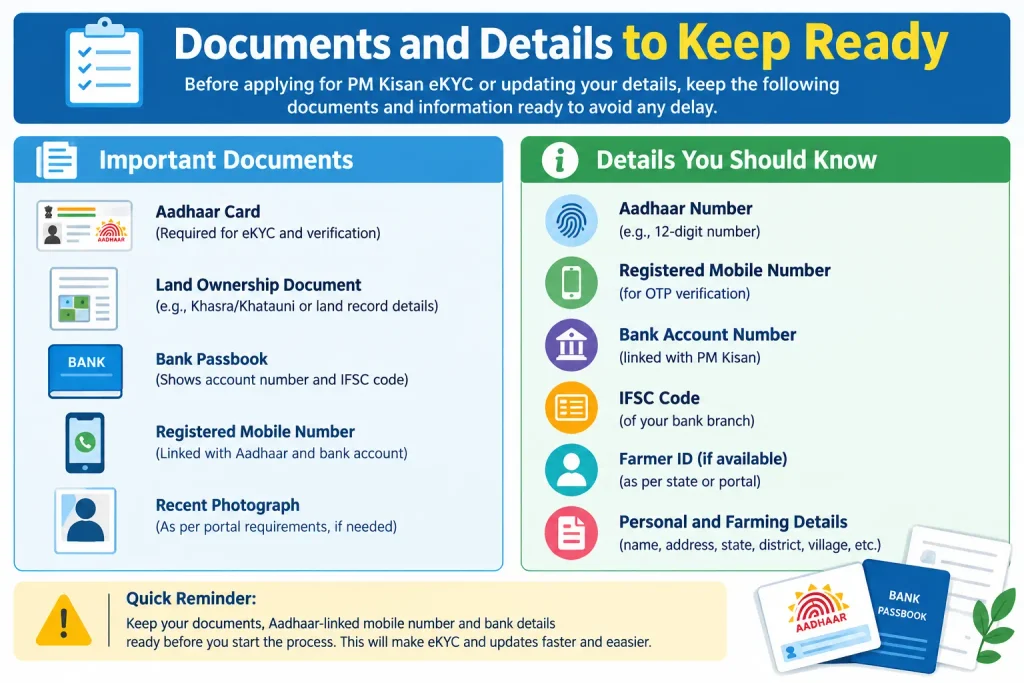
Documents and Details to Keep Ready
Have these within reach before you start:
- A copy or photograph of the suspicious Aadhaar card, front and back·
- Your own Aadhaar number or VID, if you are the affected party·
- Proof of fraud — bank statements, SMS alerts, emails, screenshots·
- A written timeline of events·
- Photo ID for a police complaint·
- Any earlier complaint reference number
On the “download” query: many people search for a fake Aadhaar card complaint download, expecting a ready-made form. UIDAI’s process is largely online and issues a reference number rather than a downloadable document. If a downloadable format exists for a specific grievance type, it will sit on the official portal itself. A “complaint form” offered by any other site is a phishing attempt, not a shortcut.
Discover More About:👇
UIDAI Grievance Portal: How to File a Complaint Online (+ 1947 Helpline)
Common Mistakes to Avoid
- Posting your Aadhaar number or an OTP in a public forum while asking for help. No genuine official ever asks for an OTP.
- Paying an “agent” to file or fast-track your complaint. UIDAI’s grievance channels do not require intermediaries.
- Treating a tweet or social media post as a complaint. It is not, and it will not create a record.
- Dropping the matter because the fraudulent amount looks small. Small misuse is usually a test run for larger fraud.
- Using a fake Aadhaar yourself “just once.” That converts you from victim to accused.
Frequently Asked Questions
Can I file a fake Aadhaar card complaint online without visiting an office?
Generally yes — UIDAI’s grievance portal handles registration and tracking remotely. Where money or identity theft is involved, a police complaint, often available online at the state level, is advisable in parallel.
What is the fake Aadhaar card complaint email ID?
UIDAI lists its current grievance email on its official website. Because contact details change, verify the address on uidai.gov.in rather than trusting a saved or forwarded copy.
How do I verify whether an Aadhaar card is genuine?
Use UIDAI’s online verification service and scan the card’s QR code through the mAadhaar app. The scanned details should match what is printed.
What should I do if my lost Aadhaar is being misused?
Lock your biometrics in the mAadhaar app, file a UIDAI grievance, lodge a police complaint, and inform every institution where the misuse surfaced.
Is a “complaint form download” from a third-party site safe?
No. Third-party forms and “helpline numbers” are a standard phishing pattern. Use only the official UIDAI portal.
Will reporting a fake Aadhaar get me into trouble?
Reporting in good faith as a victim or witness is exactly the right step. Knowingly filing false information, however, can carry consequences — keep your complaint factual.
One Last Thing
Once your complaint is registered, resist the urge to check status daily — grievance systems typically update in stages, and repeated duplicate complaints can actually slow your case by splitting it across queues. Give it a reasonable interval, then follow up with your reference number. And if the misuse involved a bank or lender, chase that institution separately — their internal fraud cell often moves faster than any grievance portal, and their records are what ultimately clear your name.
