


Your application is submitted. The college says it has forwarded it. Yet weeks pass, and the maintenance allowance hasn’t reached your mother’s account. You check the portal, and the status reads “Pending”—with no explanation of what’s missing or who to ask. This is the situation thousands of Andhra Pradesh students find themselves in every academic year, and it usually comes down to one small detail that was missed during registration or confirmation.
The jnanabhumi scholarship portal is the Government of Andhra Pradesh’s single window for post-matric scholarships, fee reimbursements, and maintenance allowances. It covers SC, ST, BC, EBC, Kapu, Minority, and Differently-abled students. This guide walks through the full process—registration, login, checking your jnanabhumi scholarship status, and the specific errors that stall payments—so you can fix problems before they cost you a semester.
What the Jnanabhumi Portal Actually Covers
Jnanabhumi is not one scholarship. It is an umbrella platform that runs several welfare schemes simultaneously, and the one you apply under depends on your course and category.
Post-Matric Scholarships (RTF and MTF) form the core. RTF—Reimbursement of Tuition Fee—goes directly to your college. MTF—Maintenance Allowance—is credited to your mother’s bank account to cover hostel, food, and study costs. This applies to ITI, Polytechnic, Degree, Engineering, Medical, and other courses pursued after Class 10.
Ambedkar Overseas Vidya Nidhi supports SC, ST, and BC students pursuing PG, PhD, or professional courses abroad, with assistance that can run into several lakhs depending on the course and university ranking.
Mega DSC Free Coaching provides residential coaching for SC and ST students preparing for the DSC teacher recruitment exams.
The portal also handles admissions, biometric attendance tracking, and examination automation for colleges—which is why attendance data feeds directly into scholarship eligibility.
Discover More About:👇
Aadhaar Status Check – How to Check Enrolment & Update Status Online
Eligibility: Who Qualifies and Who Doesn’t
The application window for 2026-27 is expected to open around October or November 2026, though the Social Welfare Department announces exact dates each year. Applications are routed through your college’s scholarship section using the J-SAF (Jnanabhumi Scholarship Application Form).
To qualify for the Post-Matric Scholarship, you must:
- Be a permanent resident of Andhra Pradesh.
- Belong to SC, ST, BC, EBC (non-Kapu), Kapu, Minority, or Differently-abled category.
- Have a family annual income of ₹2.5 lakh or less.
- Maintain at least 75% aggregate attendance—mandatory for both fresh and renewal applications.
- Have been admitted through the convener (counselling) quota. Management quota and spot admission students are not eligible, regardless of category or income.
Additional restrictions: no family member should be a government employee or pensioner, own a four-wheeler (taxis, tractors, and autos are exempt), or be an income tax payee. Family landholding must stay below 10 acres of wet land or 25 acres of dry land. Students in private universities, deemed universities, or distance education are also excluded.
How to Apply: Step-by-Step
The physical paperwork goes through your college, but the digital steps happen on the jnanabhumi ap gov in portal. Here is what the process actually looks like—including where people typically get stuck.
Step 1: Collect and fill the J-SAF. Get the form from your college admission office, District Welfare Office, or download it from the portal. Fill in personal details, academic information, caste certificate number, income certificate number, bank account details, and mobile/email. Pitfall: Many students enter their bank account number incorrectly or use an account that isn’t linked to Aadhaar. Double-check the passbook before writing anything.
Step 2: Complete One Time Registration (OTR). On the portal homepage, click “Student 1st Time Registration”, enter your Aadhaar number, and verify via OTP sent to your registered mobile. Pitfall: If your mobile number isn’t linked to Aadhaar, the OTP will never arrive. Get this corrected at an Aadhaar Seva Kendra or through the mAadhaar app before you start.
Step 3: Submit the signed J-SAF to your college. The college verifies your details and submits the application online. Keep a photocopy of everything you submit—if the college loses it, you’ll need to reproduce the entire set.
Step 4: Complete biometric authentication. Renewal students complete updates and biometric authentication at the college. Fresh students complete Aadhaar-based authentication during admission. Pitfall: If your registered mobile number has changed and you haven’t updated it, authentication fails silently.
Step 5: Link your bank account with Aadhaar. DBT payments require Aadhaar-linked accounts. The name on the account must match your Aadhaar records exactly.
Step 6: Log in and confirm your details. This is the step most students miss. Once your login is created, sign in to the jnanabhumi ap gov portal and confirm your personal, scholarship, caste, income, and bank details. Incomplete confirmation keeps your application stuck in “Pending” indefinitely, even if everything else is correct.
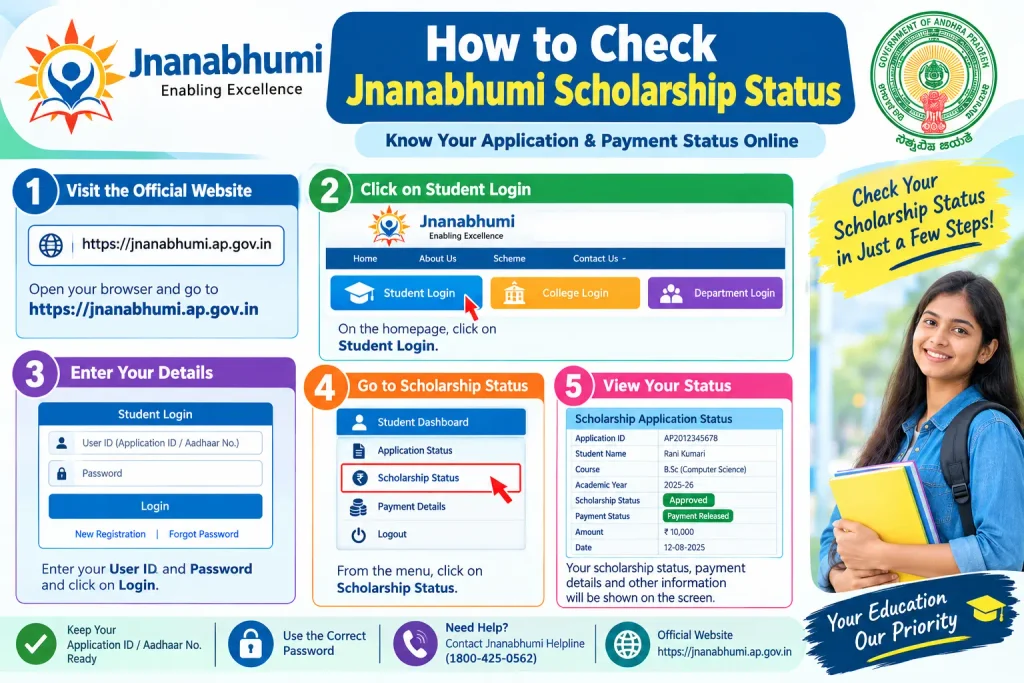
How to Check Jnanabhumi Scholarship Status
You can check your jnanabhumi scholarship status without logging in, using either your Aadhaar number or Application ID.
- Visit jnanabhumi.ap.gov.in.
- Click “Scholarship Status” on the homepage.
- Choose Aadhaar number or Application ID as your search method.
- Enter the details and captcha code.
- Verify with the OTP sent to your registered mobile, if prompted.
- Your status appears as Approved, Pending, or Rejected, along with RTF and MTF payment details.
For a fuller picture, log in with your Aadhaar number and OTP. The dashboard shows application status, RTF payment to the college, and MTF payment to your mother’s account in one view. If you’re checking jnanabhumi fee reimbursement status specifically, the RTF line item shows whether the college has received the amount.
Documents You’ll Need
Missing or mismatched documents are the leading cause of rejection and delay. Gather these before you begin:
- Aadhaar card—mandatory for registration and authentication.
- Student bank passbook first page showing account number and holder name.
- MeeSeva caste certificate number for SC, ST, BC, EBC, Kapu, or Minority categories.
- White ration card number or income certificate number. Income certificate is accepted only if the applicant’s, father’s, or mother’s name isn’t on the ration card, or if no ration card was issued.
- Mobile number and email ID registered on the application.
- Biometric authentication at the college for renewal students.
For Ambedkar Overseas Vidya Nidhi, add passport, visa, admission letter from the foreign university, and proof of university ranking.
Common Mistakes That Stall Payments
Aadhaar-bank mismatch. The name on your bank account must match your Aadhaar records. If the account isn’t Aadhaar-linked, MTF cannot be credited—no matter how many times you recheck the portal.
Attendance below 75%. Biometric attendance feeds directly into the system. Fall below the threshold, and the release is automatically blocked. There is no manual override.
Incomplete detail confirmation. Students complete registration, assume the college will handle the rest, and never confirm their details in the student module. This is the single most common reason for a “Pending” status that never moves.
Management or spot quota admission. These students are ineligible, even if they meet every other criterion.
Unupdated mobile number. If your number changes and isn’t updated during biometric authentication, OTP verification fails—and you lose access to status checks and payment alerts.
Frequently Asked Questions
Q1: Is Jnanabhumi the same as Jagananna Vidya Deevena?
Yes. Jagananna Vidya Deevena was the previous name for fee reimbursement. The scheme now runs through the Jnanabhumi portal with two components—RTF (tuition fee to college) and MTF (maintenance to mother’s account).
Q2: How do I check my jnanabhumi scholarship status check 2021 or 2022?
Log in with your Aadhaar number, go to the Application/Payment Status section, and select the relevant academic year. Historical records are typically available, though older data may need help from your college’s scholarship section.
Q3: What is the Jnanabhumi helpline number?
The helpline is 1902. The official portal also lists updated contact details and grievance redressal options.
Q4: Can I apply without Aadhaar?
No. Aadhaar is mandatory for registration, authentication, and bank linkage. Enrol for Aadhaar first if you don’t have one.
Q5: How do I check if my name is on the jnanabhumi student list?
Once approved, your name appears in the beneficiary list accessible through the Scholarship Status option on the portal. Use your Aadhaar number or Application ID to search.
Q6: What is jnanabhumi student attendance and why does it matter?
The portal tracks biometric attendance submitted by your college. A minimum of 75% aggregate attendance is required for scholarship release, and your attendance is visible in your student login.
Before You Rely on This Guide
Scholarship rules, fees, and timelines change. Treat this as a general roadmap, not a guarantee. Verify current eligibility criteria, document requirements, and deadlines on the official jnanabhumi .ap.gov.in portal or through your college’s scholarship section. The helpline (1902) is the fastest route for portal-specific problems.
If your status stays “Pending” for more than a few weeks after confirmation, don’t wait for it to resolve on its own. Visit your college’s scholarship section with your Application ID and ask them to check whether the welfare department has flagged anything. Most delays trace back to a single mismatched field—a name spelling, a bank branch code, an attendance shortfall—and they’re fixable, but only if you catch them before the disbursement cycle closes.
