

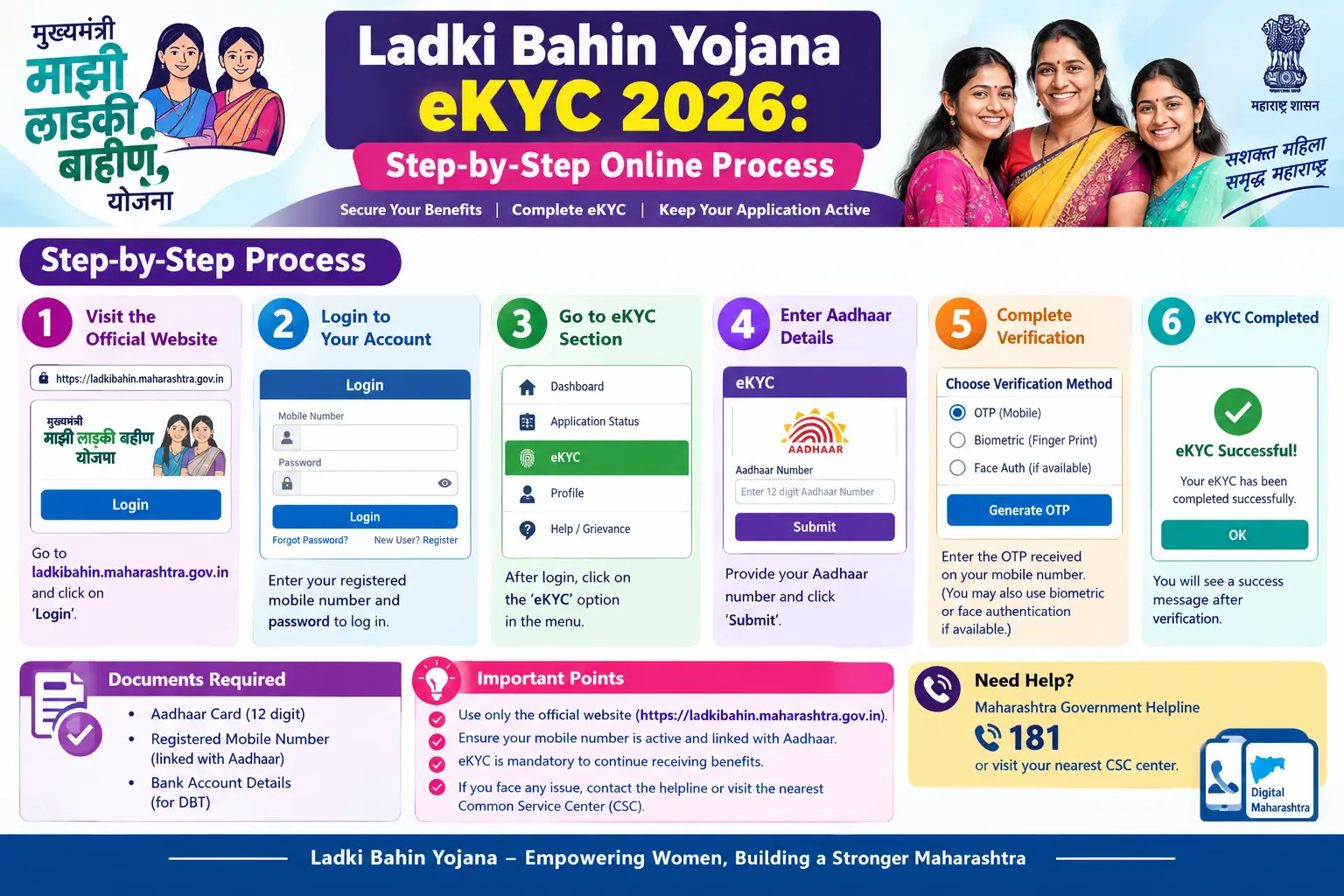
Your ₹1,500 didn’t show up this month. You’ve checked your bank passbook twice. The money that used to arrive like clockwork has simply stopped—and there’s a good chance the reason is an incomplete eKYC. Maharashtra has made Aadhaar-based verification mandatory for every woman receiving benefits under the Mukhyamantri Ladki Bahin Yojana, and beneficiaries who haven’t finished it are seeing their instalments paused. This guide walks you through the mukhyamantri ladki bahin yojana ekyc process on the official portal, the documents to keep ready, where most people get stuck, and how to confirm your verification actually went through.
What Is Mukhyamantri Ladki Bahin Yojana eKYC and Why Is It Mandatory?
The scheme, launched in July 2024, pays ₹1,500 a month to eligible women aged 21 to 65 whose family income stays below ₹2.5 lakh a year. eKYC—electronic Know Your Customer—is the Aadhaar-based step that confirms you are who you say you are before that money is released. The Women and Child Development Department carries out this verification as a Sub-AUA (Sub-Aadhaar User Agency) appointed by UIDAI.
Why did the government make it compulsory? Officials flagged a large volume of doubtful registrations—duplicate entries, ineligible recipients, and cases where the same woman was drawing benefits from more than one scheme. A verification drive checking income limits, four-wheeler ownership, and scheme overlap followed. Official figures indicate the beneficiary count dropped from roughly 2.4 crore to somewhere between 1.66 crore and 1.77 crore women after the eKYC deadline passed. That scale of removal explains why the process is now non-negotiable.
One distinction trips people up constantly: clearing eKYC confirms your identity. It does not, on its own, release your payment. A green tick on the eKYC screen means nothing if your Aadhaar isn’t mapped to your bank account through NPCI, or if your eligibility details don’t match the department’s records. Treat the two as separate checkpoints.
Mazi Ladki Bahin Yojana KYC: Documents You Need to Keep Ready
Gather these before you sit down at the computer. Half-finished sessions are the most common reason people have to start over.
- Aadhaar card with an active mobile number linked to it—this is where your OTP will go.
- A recent photograph of the beneficiary.
- Proof of residence. A domicile certificate is the cleanest option. If you don’t have one, a ration card or voter ID issued at least 15 years ago, a birth certificate, or a school leaving certificate is commonly accepted.
- Income proof. Not needed if you hold a Yellow or Orange ration card. White ration card holders, or those without any ration card, will need an income certificate.
- Marriage certificate, if you’re newly married and your name doesn’t appear on the ration card—your husband’s ration card can serve as income proof in that case.
- Bank account details, with the account linked to your Aadhaar for direct benefit transfer.
- A self-declaration confirming your eligibility.
Women whose father or husband has passed away, or who are divorced, face one extra offline step. After completing eKYC online, they need to submit a verified copy of the death certificate, divorce certificate, or court order to the district Women and Child Development Officer or the local Anganwadi Sevika.
Discover More About:👇
Aadhaar KYC Process: How to Complete Aadhaar-Based KYC
Aadhaar Verification Online: How to Verify & Check Aadhaar Card Validity
Mukhyamantri Ladki Bahin Yojana eKYC Online: Step-by-Step Process
Everything happens on ladakibahin.maharashtra.gov.in. There is no separate eKYC website, and no mobile app for this process—so treat any other site or app claiming to offer it with suspicion. Here’s how it works.
Step 1: Open the Official Portal
Type ladakibahin.maharashtra.gov.in directly into your browser rather than clicking a search result. The spelling matters: it’s “ladakibahin,” with an extra “a,” not “ladkibahin.” Look-alike domains have been set up to harvest Aadhaar numbers.
Step 2: Find the eKYC Section
On the homepage, look for the eKYC banner or an “e-KYC” link. Depending on how the portal is currently laid out, you may first need to click “Applicant Login” and sign in with your registered mobile number and password.
Step 3: Enter Your Aadhaar Number and Captcha
The form asks for your Aadhaar number and a captcha code. Type both carefully—a single wrong digit will either fail silently or send the OTP to someone else’s phone. Tick the consent box for Aadhaar authentication, then hit Send OTP.
Step 4: Enter the OTP
The OTP lands on the mobile number linked to your Aadhaar—not necessarily the number you registered on the portal, which is a detail that confuses many users. If it hasn’t arrived in two or three minutes, don’t keep hammering the button; wait, then request a fresh one. Repeated requests can lock the session.
Step 5: Confirm or Re-upload Your Details
If the portal prompts you to verify or re-upload information, check your name, address, Aadhaar number, ration card number, and income details against your documents. Your name, date of birth, and address must match your Aadhaar record exactly—even a middle name spelled differently can hold things up.
Step 6: Submit and Save the Reference Number
Once submitted, note down any confirmation message or reference number on screen. Screenshot it. That reference is what you’ll quote if you need to follow up with the department later.
Two pitfalls worth watching for: First, the portal can time out mid-session if you leave the page idle while hunting for a document—finish your paperwork before you start. Second, if you enter an old Aadhaar number or the wrong EID (the 28-digit enrolment number printed on your Aadhaar slip), the system may show an error that looks like a server problem when it’s actually a data-entry issue.
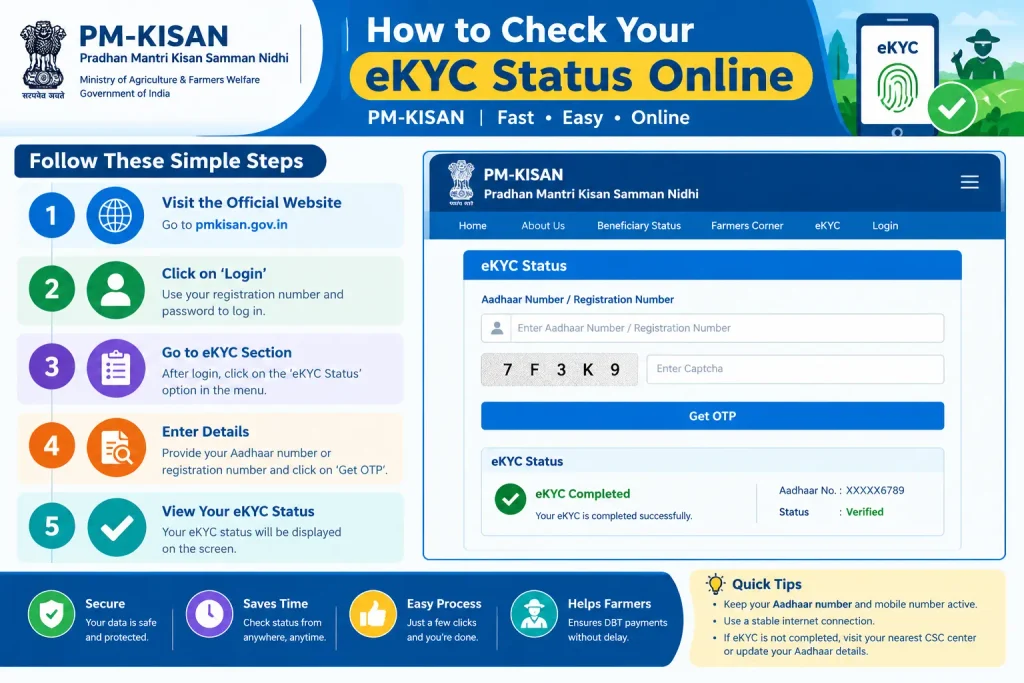
How to Check Your eKYC Status Online
Completed the process but not sure it registered? The same portal lets you check.
- Log in at ladakibahin.maharashtra.gov.in with your registered mobile number and password.
- Open the “Application Status” or “eKYC Status” section on your dashboard.
- Enter your Aadhaar number, mobile number, or Application ID.
- Authenticate with the OTP sent to your registered mobile.
- Your status will read one of four ways: eKYC completed, eKYC pending, approved, or rejected with a stated reason.
A completed eKYC still doesn’t guarantee a bank credit. If your verification shows complete but no money has arrived, check your bank statement and confirm your Aadhaar-bank linkage, then follow up with the District Women and Child Development Officer’s office.
Common Mistakes to Avoid During Ladki Bahin eKYC
Most stuck applications trace back to one of these:
- Aadhaar not linked to your bank account. This is the single biggest cause of payments failing after eKYC clears. Without NPCI mapping, direct benefit transfer has nowhere to land.
- Wrong answers to verification questions. One confusingly worded question about family members in government service has tripped up many beneficiaries—the correct answer in most cases is “No.”
- Name, DOB, or address mismatch with Aadhaar records. Even minor variations can stall verification.
- An outdated mobile number. If the number linked to your Aadhaar has changed, you won’t receive the OTP at all.
- Incomplete fields. Leaving a required field blank can push the application into a rejected or stuck state.
If eKYC keeps failing or the portal won’t load, your local Anganwadi Sevika can help, and the state helpline 181 is available for assistance.
Frequently Asked Questions (FAQs)
Q1: Is eKYC mandatory every year for Ladki Bahin Yojana?
Yes. The state government has indicated eKYC will be an annual requirement from the next cycle onward.
Q2: What is the last date to complete Ladki Bahin eKYC in 2026?
The last confirmed extended deadline was April 30, 2026. As of mid-2026, no fresh deadline has been announced. Check the official portal for current updates.
Q3: Can I complete eKYC if my Aadhaar isn’t linked to my mobile number?
No—the OTP goes to your Aadhaar-linked number. Update your mobile number first at an Aadhaar Seva Kendra or through the UIDAI portal, then return to the eKYC process.
Q4: My eKYC is complete but I’m not receiving the ₹1,500. What now?
Confirm your Aadhaar-bank linkage through NPCI mapping, then re-check your eligibility: family income below ₹2.5 lakh, age 21 to 65, and no duplication with other state welfare schemes. For payment issues, contact the District Women and Child Development Officer’s office.
Q5: What happens if I miss the eKYC deadline?
Payments to unverified beneficiaries are stopped, and the government has stated that payouts resume only after verification is complete. If you’re eligible and your instalments have halted, finish the eKYC and follow up with the department.
Q6: Is there an app for Ladki Bahin eKYC?
No. The process runs only through ladakibahin.maharashtra.gov.in. Be wary of any unofficial app or site offering this service.
If your eKYC goes through cleanly, give the system a few weeks before expecting the next instalment to reflect—database updates and bank processing don’t happen overnight. And if your verification still shows pending a month after you submitted it, don’t wait for the next deadline to find out why: take your reference number to the Anganwadi Sevika or the district office and ask for a manual check. For current deadlines, fees, and process changes, always confirm details on the official UIDAI website (uidai.gov.in) and the Maharashtra Ladki Bahin portal, since scheme rules are revised periodically.
