

You check your bank passbook and the payment hasn’t arrived. Or you applied at a Duare Sarkar camp months ago and still don’t know whether your name made the cut. With Lakshmir Bhandar now replaced by Annapurna Bhandar Yojana and roughly 30 lakh names flagged during re-verification, thousands of women across West Bengal are asking the same question: is my name still on the list?
This guide answers that. You’ll find the exact steps to check the Laxmi Bhandar beneficiary list West Bengal on the official Social Registry portal, the documents you need if your name is missing, and the errors that silently block payments even for eligible women. The scheme’s name has changed and the payment amount has gone up, but verifying your status is still something you can do yourself in a few minutes.
What Changed: Lakshmir Bhandar to Annapurna Bhandar
Lakshmir Bhandar started in February 2021 as West Bengal’s flagship cash transfer scheme for women. General category women received ₹1,500 per month; SC and ST women received ₹1,700. At its peak, about 2.2 crore women were enrolled.
That scheme no longer exists in its original form. From June 1, 2026, it was replaced by Annapurna Bhandar Yojana, which pays ₹3,000 per month to eligible women with no category-based difference. Existing beneficiaries’ data was largely migrated automatically — but “largely” is the problem. The government flagged approximately 30 lakh beneficiaries as ineligible during re-verification, citing issues like deleted voter records and citizenship discrepancies. If you were receiving Lakshmir Bhandar payments, that history alone does not guarantee you’re on the new list. You need to check.
Discover More About:👇
Lakshmir Bhandar Status Check 2026: By Application ID, Aadhaar & Mobile Number
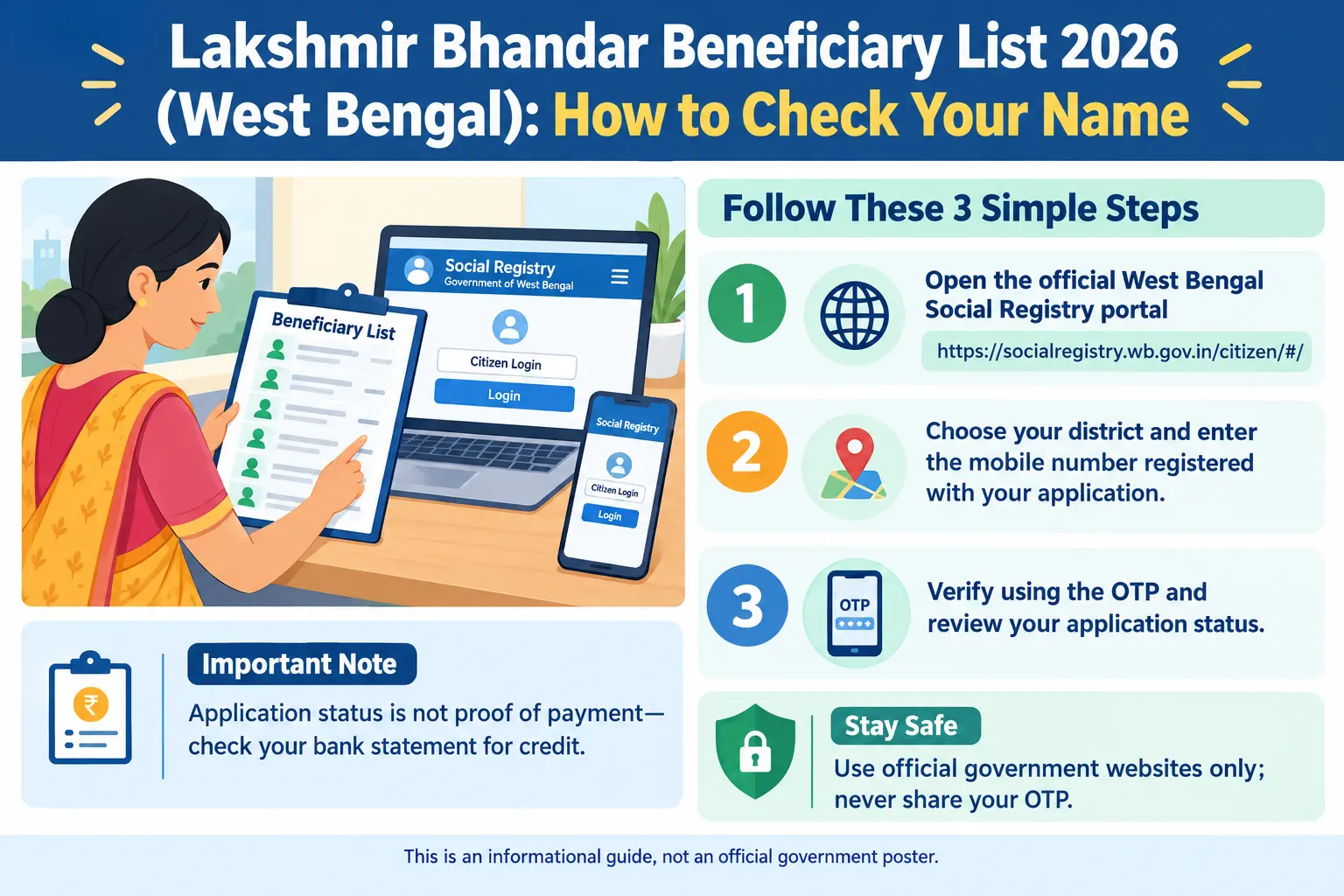
How to Check Your Name on the Laxmi Bhandar Beneficiary List West Bengal (Step-by-Step)
The official record sits on the Social Registry portal (socialregistry.wb.gov.in), run by the Women and Child Development and Social Welfare Department. Here’s how to check your status.
Step 1: Open the Official Portal
Go to socialregistry.wb.gov.in on your phone or computer. Use only this government site. Third-party websites asking for your Aadhaar number, mobile number, or bank details are not official and may be fraudulent.
Step 2: Select Your District
Choose your district from the drop-down menu — Kolkata, Murshidabad, Paschim Medinipur, or whichever applies. This routes your query to the correct block-level records.
Step 3: Enter Your Registered Mobile Number
Type the mobile number you used during your Duare Sarkar application. If you’re unsure which number that was, try the one linked to your Aadhaar.
Step 4: Verify with OTP
Click “Get OTP.” A one-time password will arrive on your registered mobile number. Enter it and click “Verify.”
A common pitfall: The OTP often doesn’t arrive if your mobile number is not updated in the Social Registry database, even if it’s linked to Aadhaar. If you’ve waited a few minutes and nothing comes, check that your number is correctly recorded at your BDO office before trying again. Also avoid refreshing the page repeatedly — the portal can time out and you’ll have to start over.
Step 5: View Your Beneficiary Profile
Your profile shows your application status (pending, approved, or rejected), payment status (credited or not), the bank account on record, and the last transfer amount with its credit date. Note down your application ID. You’ll need it if you have to escalate to your block office or file an RTI request.
Another pitfall: If you enter the wrong application number or EID (Enrolment ID — the 28-digit number on your Aadhaar acknowledgement slip), the portal may show “no record found” even when your application exists. Double-check the number before assuming your name is missing.
If you applied at a Duare Sarkar camp, you can also check status on the Duare Sarkar portal (ds.wb.gov.in) using your application number.
Documents You’ll Typically Need
For first-time applicants or those re-verifying details, the following are commonly required. Self-attest copies where applicable.
- Aadhaar card — primary identity document; must be linked to your bank account for DBT
- Bank passbook — showing account holder name, account number, bank name, IFSC, and MICR code
- Recent passport-size photograph
- Active mobile number — the one registered with Aadhaar or used during application
- SC/ST certificate — if applicable, to claim the category-specific benefit (under the old scheme)
- Swasthya Sathi card — previously mandatory; no longer required under revised rules
If you’re an existing beneficiary who already submitted these, a fresh application is usually not needed. But verify that your Aadhaar-bank linkage is still active — that’s where most payments fail.
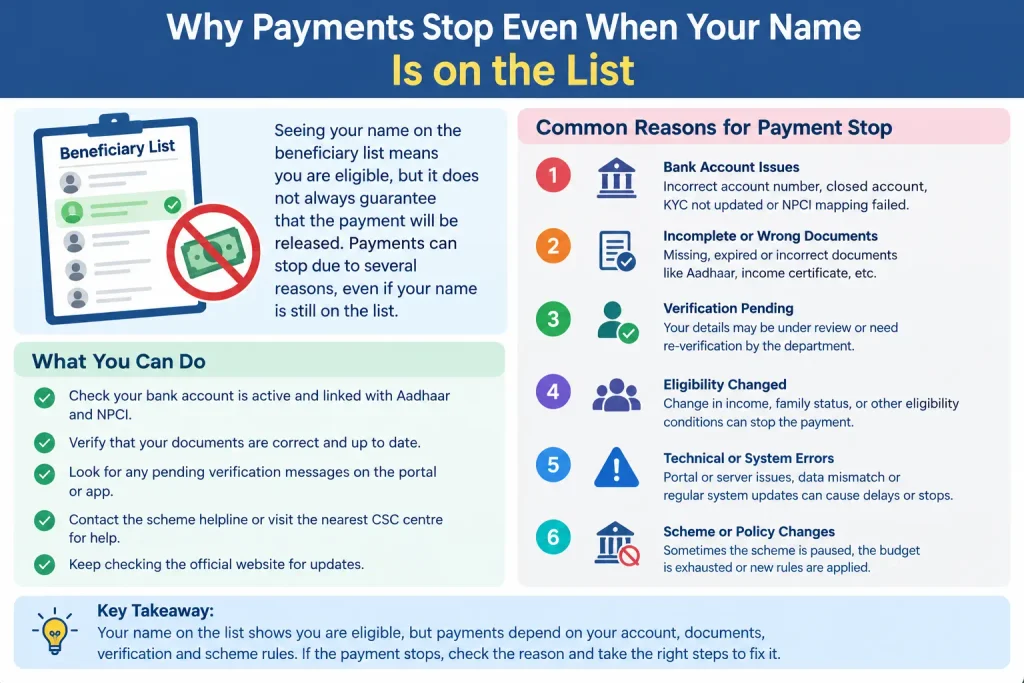
Why Payments Stop Even When Your Name Is on the List
Eligibility and payment are two different things. Your name can appear on the beneficiary list and you still won’t see money in your account. Here’s what typically goes wrong.
Aadhaar not linked to your bank account. This is the single biggest cause of payment failure. Even with an approved application, funds won’t move unless your Aadhaar is seeded to your bank account and DBT is active on the NPCI mapper. Visit your bank branch and confirm both.
Name mismatch across documents. If your name on the application doesn’t match your Aadhaar or bank records — even a spelling variation — the payment can be suspended or rejected.
Joint bank account. Payments are meant for single-holder accounts. If you’ve been using a joint account, open a single-holder account in your own name.
Age outside 25–60. The scheme covers women aged 25 to 60. At 60, beneficiaries typically move to the old-age pension scheme.
Government employee or pensioner. Permanent or retired government employees and government pension recipients are not eligible.
Assuming automatic migration. Many former Lakshmir Bhandar beneficiaries assumed their name carried over to Annapurna Bhandar automatically. While data migration was largely automatic, ineligible names were removed during verification. Check even if you were receiving payments before.
FAQs
Can I check the beneficiary list by SMS?
No official SMS-based method exists. Use the Social Registry portal with your registered mobile number and OTP, or visit your BDO or municipality office in person.
What if my name is missing from the list?
First check Aadhaar-bank linkage and DBT status. If those are fine, visit your BDO office or the Duare Sarkar camp where you applied. Carry your application ID, Aadhaar card, and bank passbook. You may need to re-submit documents or file a grievance through the official portal.
Is Aadhaar mandatory for Annapurna Bhandar?
Yes. Aadhaar is the primary identity document and must be linked to your bank account for DBT. For Aadhaar updates — name correction, address change — use the UIDAI portal (uidai.gov.in), the mAadhaar app, or visit an Aadhaar Seva Kendra. The Aadhaar Enrolment/Update Client is the software used at enrolment centres. If your Aadhaar details don’t match your bank records, fix that first.
What is the helpline number?
The Social Welfare Department helpline is 1800-345-5505. The CM Connect Grievance Cell can be reached at 1971 or 1800-3456-851. Duare Sarkar’s general helpline is 033-22143526. Verify these numbers on the official portal before calling — helpline numbers change.
Can I apply online?
Applications are generally submitted in person at BDO offices (rural), SDO offices (urban), or KMC offices (Kolkata). Duare Sarkar camps also accept applications. Some online facilities may exist on the official portal, but in-person submission remains the primary route.
Will I lose benefits if I don’t re-apply?
Existing beneficiaries’ data was generally migrated. But with a large number flagged during verification, if you haven’t received the new ₹3,000 payment, check your status on the Social Registry portal and visit your BDO office with documents if needed. The government provided a 90-day window for re-enrollment.
Before You Close This Page
The most useful habit you can build right now is a monthly check. Log into the Social Registry portal once a month, confirm your payment status shows “credited,” and keep a screenshot. If a payment doesn’t arrive, you’ll know within days rather than weeks — and you’ll have the application ID and payment history ready when you visit your BDO office. Payment failures tied to Aadhaar seeding or name mismatches are usually fixable, but only if you catch them early. For current fees, timelines, and eligibility rules, check the official West Bengal social security portal or call the Social Welfare Department helpline.
