

You applied months ago. Your neighbours have received their payments. Yours hasn’t arrived, and the portal just says “Validation Error” with no explanation. Or worse — you can’t even log in because the OTP never reaches your phone. If any of this sounds familiar, you’re not alone. Thousands of women across West Bengal face the same confusion every payment cycle.
This guide walks you through exactly how to check your laxmi bhandar status online — using your Application ID, Aadhaar number, or registered mobile number — and what to do when something goes wrong. You’ll also learn what the different status messages actually mean, which documents you need on hand, and the mistakes that most commonly delay payments.
What Is Lakshmir Bhandar and Why Your Status Matters
Lakshmir Bhandar is a social security scheme run by the Government of West Bengal. It provides monthly financial assistance to women aged 25 to 60 who are permanent residents of the state — specifically homemakers and economically vulnerable women who are not government employees, pensioners, or income taxpayers.
The scheme has seen changes in 2026, including revised payment structures and eligibility rules. Some beneficiaries are being migrated to a new scheme. Because of these transitions, checking your status regularly is no longer optional — it’s the only way to catch problems before they delay your payment for months.
Your status tells you three things: whether your application was approved, whether your payment has been processed, and whether any data errors are blocking your money.
Discover More About:👇
DBT Status Check with Mobile Number (2026 Guide)
Aadhaar Status Check – How to Check Enrolment & Update Status Online
Aadhaar Bank Seeding Status: How to Check Aadhaar Card Link With Bank Account
How to Check Laxmi Bhandar Status Online: Step-by-Step
The West Bengal government maintains an official Social Registry portal for tracking applications and payments. Here’s how to use it.
Step 1: Go to the Official Portal
Open socialregistry.wb.gov.in on your phone or computer. Use only this official URL. Third-party sites that ask for your Aadhaar or OTP are not secure and should be avoided.
Step 2: Select Your District
From the drop-down menu, choose your district — Kolkata, Murshidabad, Paschim Medinipur, or whichever applies. This routes your query to the correct block-level records. Selecting the wrong district is a common mistake that returns a “no record found” message even when your application exists.
Step 3: Enter Your Registered Mobile Number
Type the mobile number you used when you applied through a Duare Sarkar camp or your local office. If you’re unsure which number is registered, try the one linked to your Aadhaar. If neither works, you’ll need to visit your block office to update it.
Step 4: Verify with OTP
Click “Get OTP.” A one-time password will be sent to your registered mobile. Enter it and click “Verify.”
Common pitfall: If the OTP doesn’t arrive within 2–3 minutes, don’t keep clicking “Get OTP” repeatedly — this can temporarily lock your session. Wait a few minutes, check that your phone has signal, and try again. If it still fails, your registered number may be outdated.
Step 5: View Your Beneficiary Profile
Once verified, your profile page displays:
- Application status — pending, approved, or rejected
- Payment status — credited or not credited
- Bank account number on record
- Amount last transferred and the credit date
Write down your Application ID from this screen. You’ll need it if you have to escalate to your block office or file a Right to Information (RTI) request.
Another pitfall: The portal sometimes times out during peak hours (mornings and the first few days after a payment announcement). If the page hangs after you enter the OTP, try again during off-peak hours — late evening or early morning.
Other Ways to Check Your Laxmi Bhandar Status
If the Social Registry portal isn’t working for you, there are alternatives.
Using the Social Security Portal
Visit socialsecurity.wb.gov.in and click “Track Applicant Status.” You can enter your Application ID, mobile number, Swasthya Sathi card number, or Aadhaar number. This portal often works when the other one is slow.
Laxmi Bhandar Status Check by Aadhaar Number
On either portal, select the Aadhaar option and enter your 12-digit number. The system will pull up your application details if your Aadhaar is linked to your beneficiary profile. This is useful when you’ve forgotten your Application ID.
Checking Your Bank Account Directly
Sometimes the portal says “Payment Under Process” while the money has already reached your account — or vice versa. Check your Aadhaar-linked bank account through net banking, mobile banking, a passbook update, or an SMS alert from your bank. This gives you the ground truth.
What Your Laxmi Bhandar Application Status Actually Means
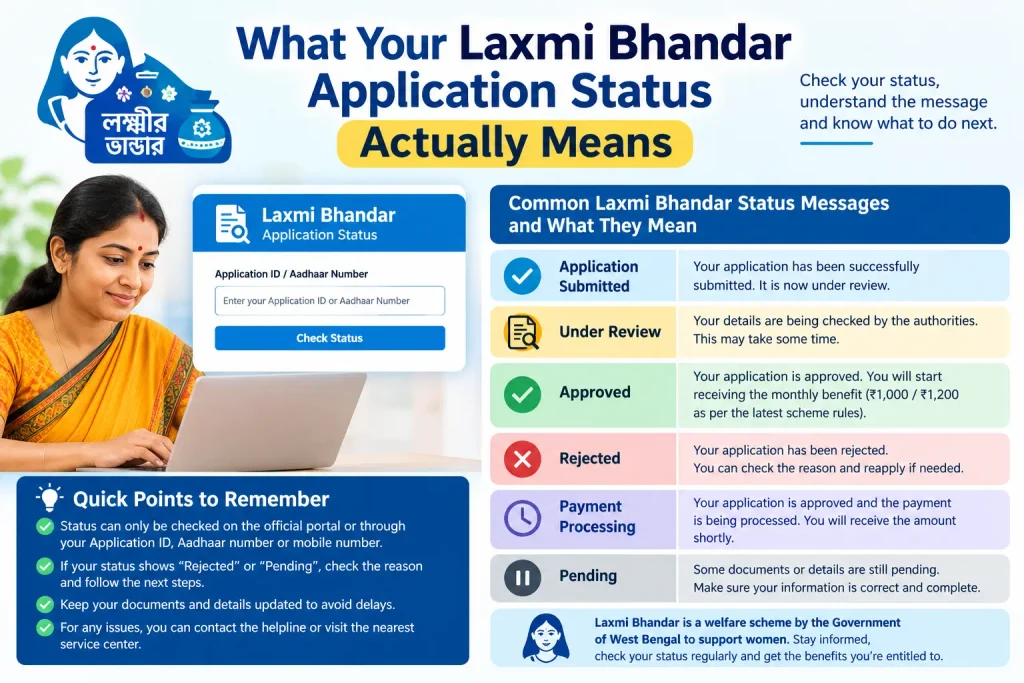
When you check your laxmi bhandar application status, you’ll see one of several messages. Here’s what each one generally indicates.
“Validation Success” or “Payment Under Process”
Your details have been verified and the payment is in the pipeline. Money typically reaches your account within a few working days, though timelines vary by bank and block.
“Validation Error”
This means there’s a data mismatch. Common causes include:
- Name on your Aadhaar doesn’t match your bank account
- Wrong bank account number or IFSC code entered during application
- Mobile number doesn’t match government records
- Aadhaar not linked to your bank account
Contact your local Block Development Officer (BDO) office or visit a Duare Sarkar camp with your documents. They can correct the data on the spot.
“Approved” but Payment Not Received
If your application is approved but no money has arrived, the most likely reason is a failed DBT (Direct Benefit Transfer) push. This happens when:
- Your bank account is not linked to Aadhaar
- The account is dormant or inactive
- It’s a joint account (scheme payments require a single account in your name)
Visit your bank to fix these issues, then re-check your status after a week.
Documents You’ll Typically Need
For a new application or to update your records, keep these ready:
- Aadhaar card (self-attested copy)
- Bank passbook (first page showing account holder name, account number, bank details, IFSC, and MICR)
- Passport-size colour photograph
- Active mobile number linked to your Aadhaar
- SC/ST certificate (if applicable, for the higher allowance category)
The Swasthya Sathi card is no longer mandatory under the revised rules.
Common Mistakes That Delay Payments
Most payment failures trace back to a handful of avoidable errors.
Aadhaar and Bank Account Name Mismatch
Your name on Aadhaar and your bank account must match. If you applied using your married surname but your bank account still carries your maiden name, the payment will bounce. Fix this at your bank first, then update your scheme records.
Using a Joint Bank Account
Lakshmir Bhandar payments are not deposited into joint accounts. If your only account is joint, open a single account in your name and update the details at your block office.
Wrong IFSC Code or Account Number
A single wrong digit in your account number or IFSC code will cause rejection. Check your passbook or cheque book carefully before submitting.
Dormant Bank Account
If your account hasn’t been used for a long time, it may be marked dormant. DBT payments won’t process. Visit your bank with your Aadhaar and passbook to reactivate it.
Changed Mobile Number
If you’ve changed your phone number and didn’t update it with the scheme office, you won’t receive OTPs. Update it at your block office or a Duare Sarkar camp.
Frequently Asked Questions
How can I check my Lakshmi Bhandar status?
Visit socialregistry.wb.gov.in or socialsecurity.wb.gov.in and enter your Application ID, Aadhaar number, or registered mobile number. Both portals show your application and payment status.
What’s the difference between Lakshmir Bhandar and the new scheme?
The scheme has undergone revisions in 2026. Payment amounts and eligibility rules may differ from earlier cycles. Check the official state portal for current amounts applicable to your category.
Can I check my status without an Application ID?
Yes. Use your Aadhaar number, registered mobile number, or Swasthya Sathi card number on the official portal.
What should I do if my status shows “Validation Error”?
Visit your local BDO office or a Duare Sarkar camp with your Aadhaar card, bank passbook, and mobile number. Officials can correct the data.
How do I check my status if I applied through a Duare Sarkar camp?
Use the same mobile number you provided during application. If you don’t remember it, visit the camp or your block office for help.
Is the Swasthya Sathi card mandatory?
No. Under the revised rules, it’s no longer mandatory for applying or receiving benefits.
Final Thoughts
If your status still shows an error after correcting your bank or Aadhaar details, don’t wait for the next payment cycle to re-check. Give it about a week, then log in again. If the same error persists, escalate in person — a phone call rarely resolves data mismatches, but a visit to your block office with documents in hand usually does. And keep your Application ID saved somewhere safe, because you’ll need it every time you follow up.

1 Comment
Pingback: Laxmi Bhandar Beneficiary List West Bengal