

Your application shows “Approved.” Your neighbour in the same ward has already received her ₹5,000. Your account is still empty. This is the most common complaint among Subhadra Yojana beneficiaries in Odisha, and in most cases it has nothing to do with the application itself — the money is stuck at the bank or the Aadhaar-mapping stage, not the scheme stage. This guide walks you through a complete Subhadra Yojana status check by Aadhaar card, explains what each status label is actually telling you, shows how to confirm whether the instalment reached your bank, and covers the two problems that block most payments: an incomplete Aadhaar seeding and an outdated mobile number linked to Aadhaar.
Discover More About:👇
Aadhaar Status Check – How to Check Enrolment & Update Status Online
DBT Status Check with Mobile Number (2026 Guide)
Aadhaar Bank Seeding Status for DBT: How to Check Aadhaar Bank Link Status
What the Scheme Pays, and When
The Subhadra Yojana is a Government of Odisha welfare scheme for women, launched in 2024. Under the current scheme guidelines, an eligible beneficiary receives ₹50,000 over five years, paid as ₹10,000 per year in two instalments of ₹5,000 each.
Disbursements have generally been timed around Raksha Bandhan and International Women’s Day, though the actual release schedule has shifted in practice — so treat those as the usual windows, not fixed dates, and check the official Subhadra portal for announcements.
Payments move through Direct Benefit Transfer (DBT), which means the amount is sent straight to the beneficiary’s Aadhaar-linked bank account rather than through a middleman. Beneficiaries also receive a SUBHADRA Card, an ATM-cum-debit card.
Eligibility, as per current guidelines, generally requires the applicant to be a woman resident of Odisha aged 21 to 60, from an economically weaker household, and not receiving more than ₹1,500 per month or ₹18,000 per year from any other state or central scheme. Criteria can be revised, so verify your specific case on the official portal.
How to Check Subhadra Yojana Status by Aadhaar Card Online
Step-by-step
- Open the official portal. Type
subhadra.odisha.gov.indirectly into your browser. Do not use links forwarded on WhatsApp or arrived at through a search ad — several lookalike sites collect Aadhaar numbers this way. - Find the status or login option. The label on the homepage may read “Application Status,” “Beneficiary Status,” or simply “Login,” depending on the current layout.
- Enter your Aadhaar number. You can typically log in with your Aadhaar number, your registered mobile number, or your application reference number. Aadhaar-based login is the most commonly used route.
- Complete OTP verification. A one-time password is sent to the mobile number registered with your Aadhaar. Enter it and tick the declaration box before submitting.
- Read the dashboard, not just the headline. The screen shows your application status, your e-KYC status (electronic Know Your Customer — a digital identity verification process), your DBT enablement status, and a separate row for each instalment, marked either “Successfully Disbursed” or “Payment Failed.”
Where people get stuck
The OTP never arrives. This almost always means the mobile number linked to your Aadhaar is old or was never added. Updating it generally requires an in-person visit to an Aadhaar Seva Kendra or an authorised enrolment/update centre, since mobile number changes involve biometric authentication. Check the official UIDAI portal at uidai.gov.in for the current process and fees before you go, and carry your existing Aadhaar or EID (Enrolment ID).
The portal times out mid-session. Keep your Aadhaar card and bank passbook in front of you and finish the check in one sitting rather than switching between apps.
You mistype the Aadhaar number or reference ID. Aadhaar is a 12-digit number; a single wrong digit usually returns a “record not found” message that looks like a rejection but isn’t one. Re-enter carefully before assuming anything is wrong.
What Each Status Label Means
- Under Process — your file is still being verified. No payment is due yet. Waiting is the correct action; repeated complaints at this stage rarely speed things up.
- Approved — your application cleared verification. This is not confirmation that money has been credited. Always scroll down to the instalment rows.
- Rejected — a recorded condition was not met. The reason usually appears on the same screen. Read it before filing a complaint, because the remedy depends entirely on which condition failed.
- DBT & Aadhaar seeding pending — your bank account is not yet mapped with the NPCI DBT mapper (the National Payments Corporation of India system that routes DBT credits to the correct account). No amount can land until your bank completes this. Visit your branch with your Aadhaar card and passbook.
Confirming the money actually arrived
Since every Subhadra payment travels by DBT, your bank record is the final word. Check your passbook or account statement for a credit described with “SUBHADRA” or “DBT,” and watch for the transaction SMS most banks send to your registered number. If the portal says “Successfully Disbursed” but your statement shows nothing, ask your branch for the DBT credit report — the discrepancy is usually a mapping issue on the bank’s side.
How to Check the Beneficiary List
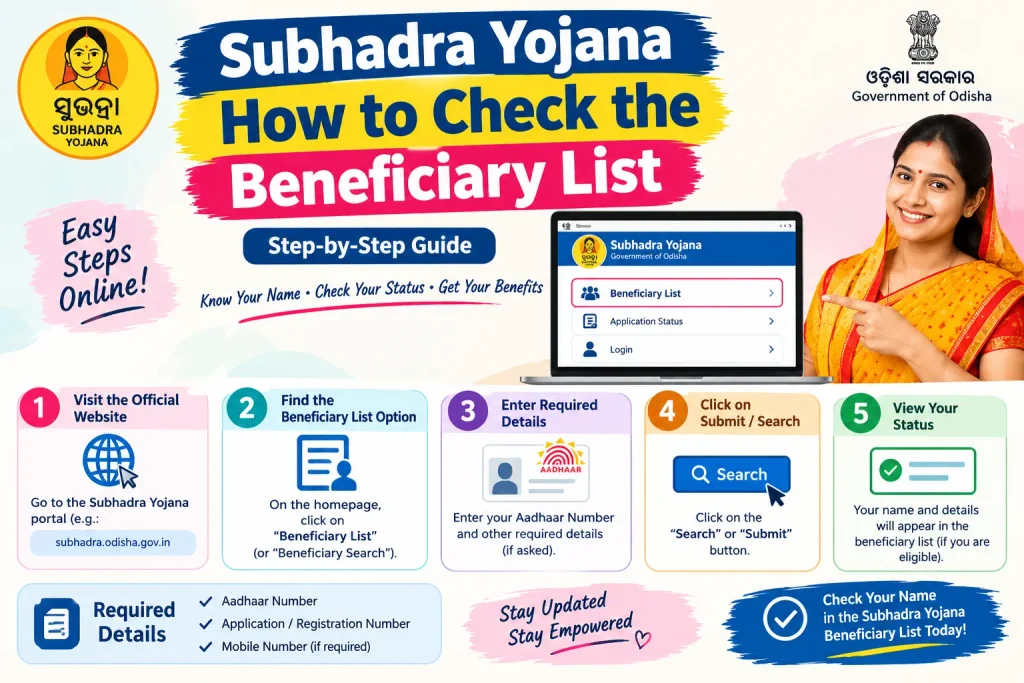
You can also confirm your inclusion by checking whether your name appears on the published beneficiary list. This helps if you want to verify your own entry or check the status of other eligible women in your area.
- Visit
subhadra.odisha.gov.in. - Select the “Beneficiary List” option.
- Choose your district.
- Select your block or urban local body, then your Gram Panchayat or ward.
- The list displays approved beneficiaries for that area.
If your name is missing despite meeting the eligibility conditions, contact your nearest Anganwadi Centre, Common Service Centre (CSC), or the district Women and Child Development office. The Subhadra Yojana toll-free helpline, 14678, is the other route.
Documents Commonly Required
For a fresh application or a detail update, the following are generally required:
- Aadhaar card (mandatory for identity verification and Aadhaar-based login)
- Proof of residence — ration card, voter ID, or a utility bill
- Income certificate
- Bank account details — passbook or a cancelled cheque
- Passport-size photographs
- A mobile number linked to Aadhaar, for OTP verification
Your name, date of birth, and address on the application should match your Aadhaar records exactly. A spelling variation or a different date format is enough to fail verification.
Mistakes That Delay Payment
- Details that don’t match Aadhaar. Even a minor spelling difference in your name can cause a mismatch during e-KYC.
- A bank account in someone else’s name. The account must be in the beneficiary’s own name and linked to her Aadhaar.
- Ignoring a “Payment Failed” row. A failed instalment does not correct itself in the next cycle. Treat it as an open item and get the seeding fixed at the branch.
- Sharing your Aadhaar number or OTP on unofficial sites. Forwarded “beneficiary list PDFs” and lookalike status pages are not official and frequently carry wrong information. If a page asks for payment to check your status, close it — the official check is free.
Frequently Asked Questions
Can I check my Subhadra status without an Aadhaar number?
The portal primarily supports login through Aadhaar number or registered mobile number. An application reference number may work in some cases, but Aadhaar-based verification is generally required for most beneficiaries.
What does “Payment Failed” mean?
It means the DBT transfer could not be completed. The usual causes are pending Aadhaar seeding, an inactive account, or incorrect bank details. Check your DBT enablement status on the same portal and visit your branch if seeding is pending.
When is the next instalment due?
Instalments have typically been released around Raksha Bandhan and International Women’s Day, but dates have varied. Check the official portal for current announcements rather than relying on a fixed date.
Can I still apply if I missed the earlier registration window?
Fresh applications have generally been invited once a year, usually during a limited window in April, and are open to women who have not applied before. Confirm the current window and criteria on the official portal.
My name isn’t on the beneficiary list. What now?
Contact your Anganwadi Centre, CSC, or district Women and Child Development office, or call the Subhadra helpline at 14678.
Is the status check free?
Yes. Anyone charging you to check or update your Subhadra status is not operating officially.
One Last Thing
After a disbursement announcement, give the bank a few working days before assuming your payment has failed — DBT credits to large volumes of accounts are processed in batches, and same-day reflection isn’t guaranteed. The number that matters is whether a “Payment Failed” row persists into the next cycle. If it does, the problem is almost certainly a bank-side mapping or seeding issue rather than anything wrong with your application, and the fix happens at your branch counter — not on the portal. Keep your Aadhaar mobile number current, and keep your details identical across Aadhaar and your bank records, and the instalments will usually find their way without a follow-up.
