

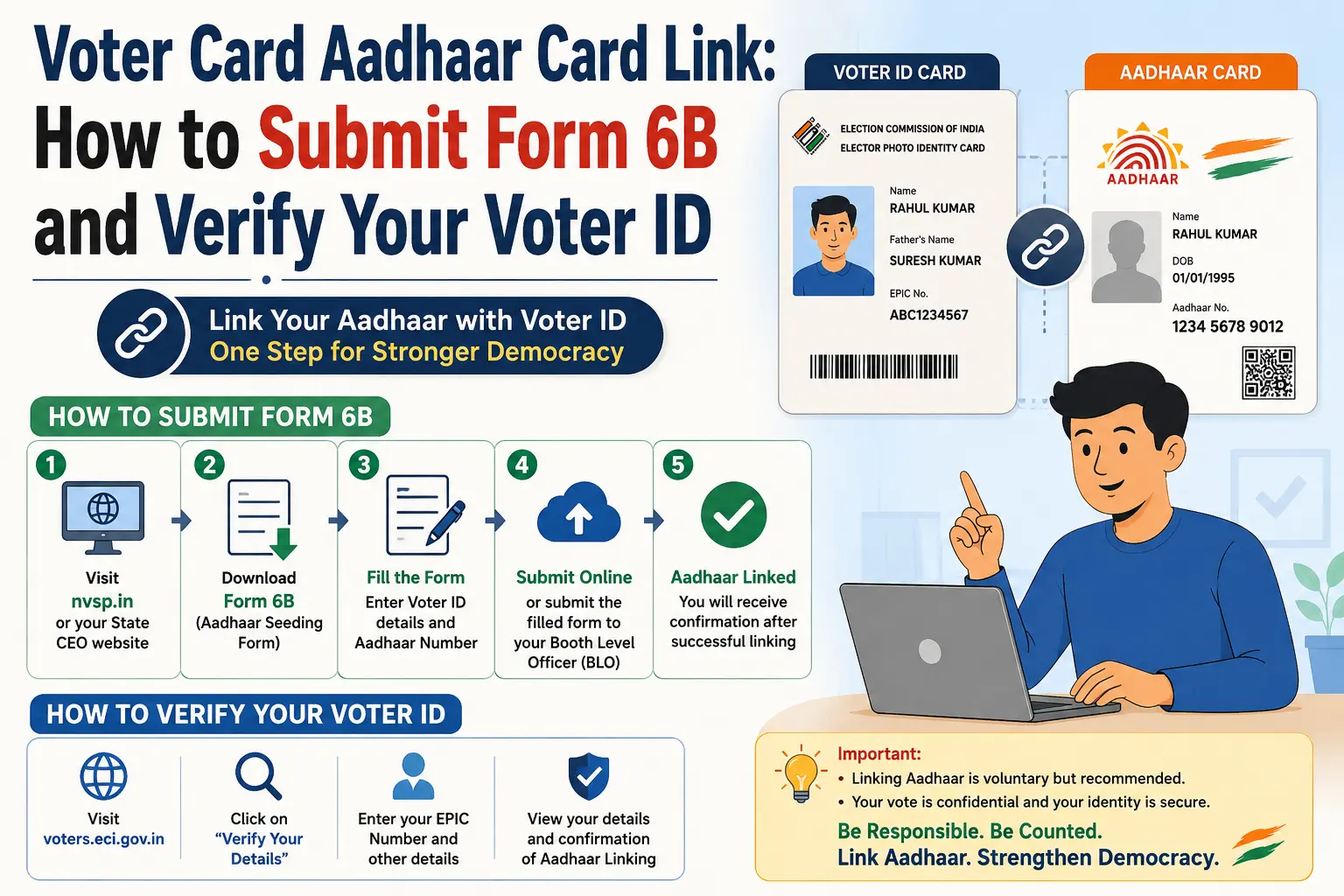
You may have searched “voter card aadhar card link” because you want one simple answer: Is my Aadhaar connected to my Voter ID, and if not, how do I submit it? The confusion starts because several different voter services use similar words—linking, verification, authentication and status.
For existing electors, the official Election Commission of India (ECI) route for providing Aadhaar information is Form 6B. It is specifically meant for electoral-roll authentication. It is not the same as checking your name in the voter list or tracking a voter application.
This guide explains what Form 6B does, how the current ECI voter-service system fits in, what people mean by “Voter ID Aadhaar link status,” and how to avoid confusing the process with Aadhaar e-KYC or other government services.
Independent guide: CheckAadharStatus.com is not an official ECI or UIDAI website. Use this article for information, but complete voter-related transactions only through official Election Commission channels.
Discover More About:👇
DBT Status Check with Mobile Number (2026 Guide)
Quick Facts
| Detail | Information |
|---|---|
| Service | Aadhaar information submission for electoral-roll authentication |
| Official form | Form 6B |
| Governing body | Election Commission of India (ECI) |
| Aadhaar submission | Voluntary |
| Main voter identifier | EPIC/Voter ID number |
| Current ECI ecosystem | ECINET / ECI voter services |
| Alternative documents | Available in Form 6B for electors who do not have Aadhaar |
| Separate voter verification | Electoral-roll/name search |
| Separate status service | Application/reference tracking |
Voter ID and Aadhaar: What Does “Linking” Actually Mean?
When people search for voter id link with aadhar, they are generally looking for a way to provide their Aadhaar details in connection with their existing electoral-roll record.
The official ECI terminology is more precise. Form 6B is titled the “Letter of Information of Aadhaar number for the purpose of electoral roll authentication.”
That distinction matters because “linking” can make it sound as though your Voter ID and Aadhaar become one combined identity record. That is not how the service should be described.
ECI separately provides services for:
- Searching your name in the electoral roll
- Tracking voter applications
- Correcting electoral-roll details
- Downloading e-EPIC
- Providing Aadhaar information through Form 6B
So before starting, decide what you actually need.
Want to submit Aadhaar information? Look for Form 6B.
Want to check whether you are registered as a voter? Search the electoral roll.
Want to know what happened to an application you submitted? Use application/status tracking.
Is Aadhaar Mandatory for Voter ID?
No. ECI has stated that the Aadhaar field is voluntary. Non-submission of Aadhaar cannot, by itself, be a ground for rejecting a voter application or deleting an existing electoral-roll entry.
Form 6B also provides an alternative-document option for an elector who does not have an Aadhaar number. The official form lists several possible documents for this purpose.
This is important because users sometimes hear that their voter registration will automatically be cancelled if they do not provide Aadhaar. That claim should not be treated as the official ECI position.
What Is Form 6B?
Form 6B is the official ECI form for providing Aadhaar information for the purpose of electoral-roll authentication.
The form includes information such as:
- Elector’s name
- EPIC/Voter ID number
- Aadhaar number, where available
- Contact information
- Declaration by the elector
If an elector does not have an Aadhaar number, Form 6B includes a route for providing an alternative document from the options specified on the form.
Form 6B should not be confused with an Aadhaar update or correction form. If your Aadhaar itself needs correction, that is a separate UIDAI process.
How to Submit Form 6B Online
The current ECI voter-service ecosystem uses the official voter-services portal and ECINET branding. ECI’s documented workflow provides the following broad route for online Form 6B submission.
1. Open the official ECI voter-service portal
Use the official ECI voter-service system rather than a third-party website claiming to provide an Aadhaar-Voter linking service.
2. Sign in where required
The current ECI system provides voter-service access through ECINET. Depending on the service and current interface, you may be asked to sign in using the available account details.
3. Find the Form 6B service
Look for the electoral authentication/Form 6B service.
Older guides may show different menus because ECI’s voter-service ecosystem has changed over time.
4. Enter your EPIC/Voter ID details
The documented Form 6B workflow asks an elector to indicate that they have a Voter ID and enter the relevant voter ID/EPIC number.
5. Provide Aadhaar information
If you have an Aadhaar number, provide it in the field requested by the official form.
6. Complete the declaration
Review the declaration carefully and make sure the information you provide is accurate.
7. Preview and submit
Check the information displayed before confirming the submission.
8. Save the reference information
After submission, retain the reference/referral ID shown by the system. ECI’s documented workflow includes a confirmation and reference ID after successful submission.
Important: Portal menus and labels can change. If an older video shows an option in a different location, follow the current official ECI interface rather than trying to reproduce an outdated screen.
How to Verify Voter ID Online
If your search is how to verify voter id, you may not actually need the Aadhaar service.
ECI provides an electoral-roll search service that lets electors check their voter record. The official ECI Electors page separately lists “Search your name in E-Roll” along with other voter services.
This is useful when you want to confirm whether:
- Your name appears in the electoral roll
- Your voter record can be found
- Your EPIC-related details are available in the electoral system
Voter-list verification is different from Aadhaar submission.
Three terms that are easy to mix up
Electoral-roll verification:
“Is my voter record/name present?”
Form 6B:
“I am providing Aadhaar information for electoral-roll authentication.”
Application tracking:
“What is the status of the voter request/application I submitted?”
A successful voter-list search does not automatically mean that a Form 6B submission has been processed.
How to Check Voter ID Aadhaar Link Status
This is one of the biggest sources of confusion.
Many people expect a simple tool where they enter their Aadhaar number and immediately receive a message saying “Voter ID linked” or “Not linked.”
You should not assume that every website offering such a checker is an official ECI service.
ECI’s official ecosystem separates electoral-roll search, application tracking and Aadhaar submission.
If you have already submitted Form 6B, keep the reference information provided after submission and use the relevant official voter-service/status facility where applicable.
Do not treat a random third-party “link checker” as proof of your electoral-roll Aadhaar authentication status.
NVSP Aadhaar Linking: Why Old Tutorials Look Different
The search phrase nvsp aadhaar linking remains popular because many older tutorials and articles used the National Voters’ Service Portal (NVSP) when explaining Aadhaar submission.
That creates a common problem: a user follows an older video and cannot find the same button or menu.
ECI has since introduced ECINET, a unified digital platform intended to bring together a wide range of election-related digital services. ECI officially launched ECINET in January 2026.
The current ECI voter-service portal also uses ECINET branding.
So the useful takeaway is simple:
“NVSP Aadhaar linking” is still a valid search phrase for finding older information, but do not assume an old NVSP tutorial reflects the current interface.
Always check the latest official ECI service before entering personal information.
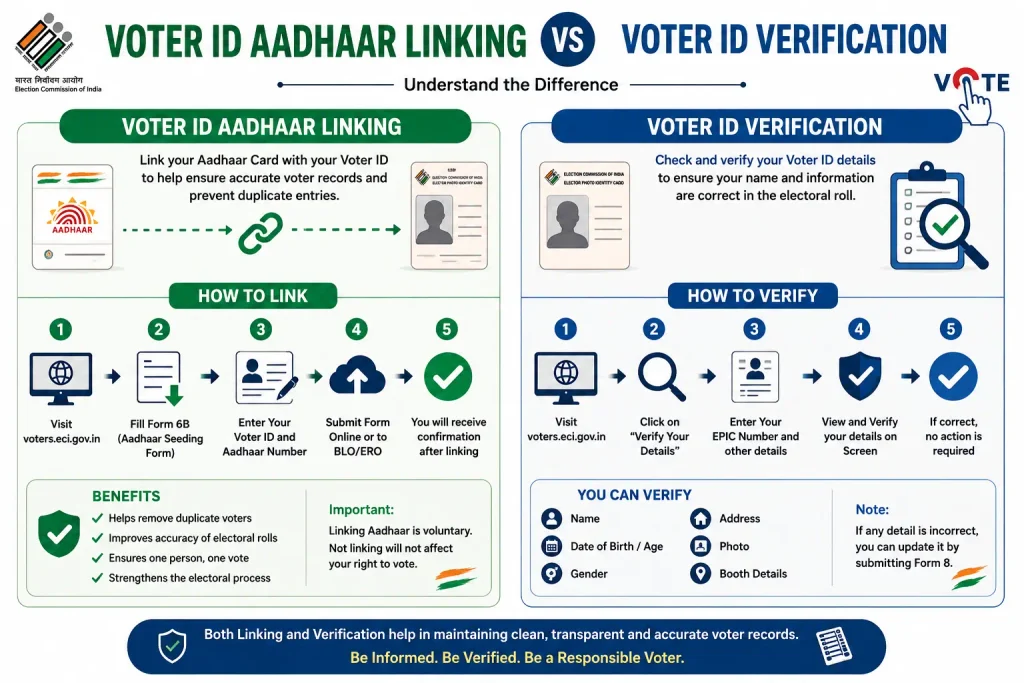
Voter ID Aadhaar Linking vs Voter ID Verification
| What you want to do | Correct service/route |
|---|---|
| Provide Aadhaar information for electoral-roll authentication | Form 6B |
| Check whether your voter record/name appears | Electoral-roll search |
| Track a submitted voter application | Application/status tracking |
| Correct voter details | Appropriate electoral-roll correction service |
| Download electronic voter card | e-EPIC service |
ECI currently presents these as separate voter services.
Common Problems With Aadhaar-Voter Submission
“I cannot find Form 6B”
Check the current ECI voter-service interface. An older tutorial may refer to NVSP or show a different menu.
“My EPIC number is not found”
Check that the EPIC/Voter ID information has been entered correctly. You can also use the official electoral-roll search service to locate your voter record.
Discover More About:👇
How to Retrieve or Find Your Lost Aadhaar Number Online
How to Check Aadhaar Card Validity Online (Step-by-Step Guide)
“My Aadhaar and voter details are different”
Do not automatically assume that Form 6B is a voter-detail correction service. If your electoral-roll information needs correction, use the appropriate voter correction facility.
“I submitted the form, but I cannot see the result”
Keep the reference ID provided after submission. Use the relevant official status/application facility rather than submitting multiple duplicate requests.
“Someone wants money to link my Aadhaar and Voter ID”
Be cautious. You do not need to trust an unknown person simply because they claim to provide a government “linking” service. Use official ECI channels and avoid sharing Aadhaar information with unfamiliar websites or individuals.
Is Voter ID Aadhaar Linking the Same as PM-KISAN e-KYC?
No.
This is an important distinction because Aadhaar is used across many government services.
Voter ID + Aadhaar: Form 6B and electoral-roll authentication.
PM-KISAN: a separate government scheme with its own registration, beneficiary and payment-status processes.
PM-KISAN e-KYC: a separate Aadhaar-based authentication process.
So if you searched for voter card aadhar card link, you should not be redirected to a PM-KISAN beneficiary-status process.
Similarly, completing Aadhaar e-KYC for another government service does not mean that your Form 6B submission has automatically been completed.
Good to Know
Aadhaar submission is voluntary
ECI’s official clarification says that providing Aadhaar details is voluntary, and non-submission cannot by itself result in rejection or deletion from the electoral roll.
Form 6B is specifically about electoral-roll authentication
It is not a general Aadhaar update form.
“Linking” is a user-friendly search phrase, not the whole story
People naturally say “Aadhaar-Voter linking,” but understanding the official purpose of Form 6B makes it easier to choose the correct service.
NVSP searches can lead to outdated instructions
The current ECI ecosystem has moved toward ECINET, so older tutorials may not match the present interface.
FAQs
How can I link my Voter ID with Aadhaar?
For an existing elector, the relevant official route is Form 6B, which is used to provide Aadhaar information for electoral-roll authentication.
Is Aadhaar compulsory for Voter ID?
No. ECI states that Aadhaar submission is voluntary. Non-submission cannot by itself be a reason for rejecting an application or deleting an electoral-roll entry.
What is Form 6B used for?
Form 6B is the ECI form for providing Aadhaar information for the purpose of electoral-roll authentication.
How do I check whether my Voter ID is valid?
Use the official ECI electoral-roll search service to check your voter record and name in the electoral roll. This is separate from Form 6B.
Is voter verification the same as Aadhaar linking?
No. Voter verification generally concerns your electoral-roll record, while Form 6B concerns providing Aadhaar information for electoral-roll authentication.
Is NVSP still used for Aadhaar linking?
“NVSP Aadhaar linking” remains a common search term because older guides use NVSP terminology. The current ECI ecosystem uses ECINET branding, so follow the current official ECI interface rather than relying on an old tutorial.
Can I submit Form 6B if I do not have Aadhaar?
Form 6B provides an alternative-document option for electors who do not have an Aadhaar number.
Does checking my voter record mean my Aadhaar has been linked?
No. Searching the electoral roll and submitting Aadhaar information through Form 6B are separate functions.
Final Takeaway
If you are searching for a voter card aadhar card link, start by identifying what you actually need.
For providing Aadhaar information, Form 6B is the key official process. For checking whether you are registered, use electoral-roll search. For a submitted voter request, use application tracking.
And if you are searching voter id link with aadhar, how to verify voter id, or nvsp aadhaar linking, remember that these phrases often describe different parts of the voter-service journey.
The safest approach is also the simplest: use the current official ECI voter-service system, keep your reference information after submitting a request, and do not enter Aadhaar details on unfamiliar websites promising an instant “link status” result.

4 Comments
Pingback: How to Check Mobile Number Linked to Aadhar Online
Pingback: Aadhaar Validity Check: How to Verify Aadhaar Online
Pingback: Form 6B Voter ID Online: How to Fill & Submit
Pingback: nsvp.in Voter Services Online