

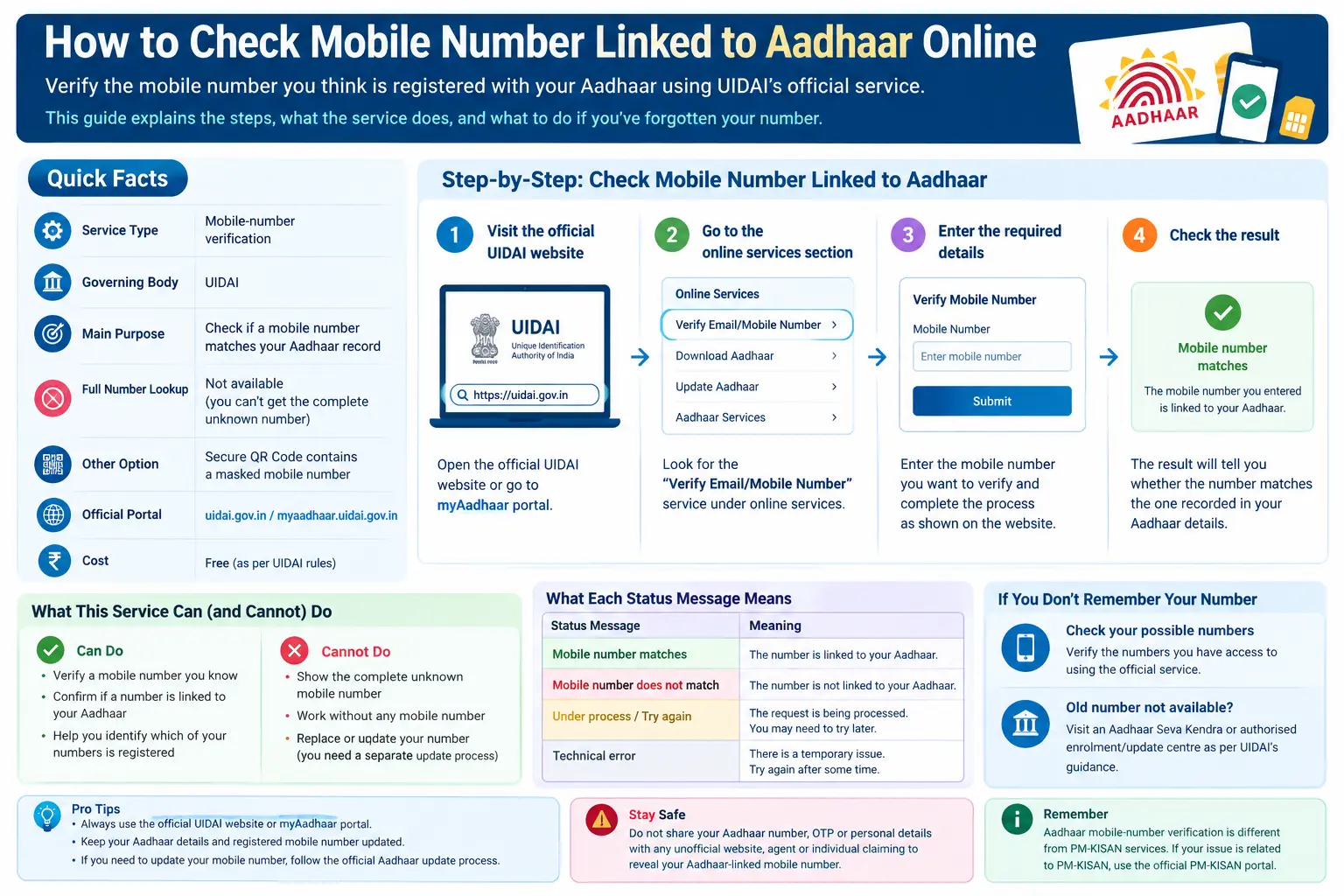
You may have two or three mobile numbers and suddenly need to know which one is registered with your Aadhaar. Then comes the familiar problem: an Aadhaar OTP is expected, but you are not sure where it will arrive.
If you are searching for how to check mobile number linked to aadhar, there is one important distinction to understand first. UIDAI provides a facility to verify a mobile number against your Aadhaar record. It should not be treated as a public tool for revealing an unknown registered mobile number in full.
This guide explains how Aadhaar mobile-number verification works, what you can do if you have forgotten your registered number, what “without OTP” really means, and how the process differs from PM-KISAN services. It also covers what to do when your old number is no longer available.
Independent guide: CheckAadharStatus.com is not affiliated with UIDAI. Use this article for information only and complete Aadhaar-related transactions through official UIDAI channels.
Discover More About: 👇
Aadhaar Card Update: Complete Guide
Voter Card Aadhaar Card Link: How to Submit Form 6B and Verify Your Voter ID
Quick Facts
| Detail | Information |
|---|---|
| Service | Aadhaar mobile-number verification |
| Governing body | UIDAI |
| Main purpose | Verify a mobile number against Aadhaar records |
| Full unknown number lookup | Not something you should expect from the official verification service |
| Other option | Aadhaar Secure QR Code can contain a masked mobile number |
| If old number is unavailable | Use an authorised Aadhaar update centre where required |
| Official source | UIDAI / myAadhaar |
What Does Aadhaar Mobile Number Verification Actually Check?
The easiest way to understand the service is this:
You provide a mobile number you know, and the official service helps verify whether it matches the mobile number recorded with your Aadhaar.
UIDAI describes its service as verification of the mobile number declared during Aadhaar enrolment or the latest Aadhaar update.
That is different from:
“I don’t know my registered number. Show me the complete number.”
This distinction matters because many online articles use phrases such as “find your Aadhaar-linked mobile number,” which can create the impression that UIDAI will display an unknown number in full.
If you have several possible numbers, the practical approach is to verify the numbers you know rather than using an unofficial “Aadhaar mobile-number finder.”
How to Check Mobile Number Linked to Aadhaar
If you already have a mobile number that you believe is registered with your Aadhaar, use UIDAI’s official mobile-number verification facility.
Step 1: Open the official UIDAI service
Start from the official UIDAI or myAadhaar website. Avoid websites that claim they can reveal Aadhaar-linked information for a fee.
Step 2: Open mobile-number verification
Look for UIDAI’s Verify Email/Mobile Number service.
UIDAI lists this facility among its Aadhaar online services and explains that it can be used to verify the mobile number declared at enrolment or during the latest update.
Step 3: Enter the requested information
Follow the fields currently displayed by the official UIDAI service and enter the mobile number you want to verify.
Because government portals can change their interface, always follow the fields and instructions actually shown on the official page rather than relying on an old screenshot or third-party tutorial.
Step 4: Complete the verification
Submit the information and complete any security or authentication step requested by UIDAI.
Step 5: Check the result
The result tells you whether the mobile number you supplied matches the mobile number recorded with Aadhaar.
Important: A successful verification does not mean that UIDAI has revealed a previously unknown mobile number. It confirms the number you supplied.
How to Check Which Number Is Linked to Aadhaar
The query how to check which number is linked to aadhar usually comes from someone who has forgotten the number used when their Aadhaar was enrolled or updated.
For example, you may have:
- an old personal number;
- a new personal number;
- a family member’s number;
- a number you used several years ago.
If you still have access to those possible numbers, you can check them through the official UIDAI verification facility.
The important limitation is that you should not expect a legitimate public service to reveal the complete unknown mobile number simply because you enter an Aadhaar number.
What if you don’t remember the number at all?
This is where the process becomes different.
If you have no idea which number was registered, don’t use an unofficial website claiming to “find” or “extract” the number. If the old registered number is unavailable, UIDAI’s current Aadhaar App guidance directs users to an Aadhaar Seva Kendra or authorised Aadhaar enrolment/update centre for the applicable mobile-number update process.
Discover More About: 👇
Aadhaar Bank Seeding Status for DBT: How to Check Aadhaar Bank Link Status
Aadhaar Verification Online: How to Verify & Check Aadhaar Card Validity
Aadhaar Card Mobile Number Check Without OTP: What Is Actually Possible?
Many users search for aadhar card mobile number check without otp because they have lost access to their old number or simply want to know which number is registered.
There is an important privacy distinction here.
You may see a masked number in Aadhaar information
UIDAI’s Secure QR Code can contain a masked mobile number along with other Aadhaar information. The QR code is available through Aadhaar documents and can be read using supported UIDAI tools.
A masked number is not the same as the complete registered mobile number.
What you should not do
Avoid any website, app, agent or individual claiming:
- “Enter your Aadhaar number and we will show the full mobile number.”
- “Pay us to retrieve your Aadhaar-linked number.”
- “Give us your OTP and we can check the number.”
Such claims should be treated as a security and scam risk.
If a service genuinely needs Aadhaar authentication, complete it through the official UIDAI channel instead.
Aadhaar Mobile Number Verification vs Mobile Number Update
These are two different tasks.
| Task | What it means |
|---|---|
| Mobile-number verification | Checking whether a number you know matches the Aadhaar record |
| Mobile-number update | Changing the mobile number recorded with Aadhaar |
| Aadhaar authentication | Authentication of an Aadhaar holder for an authorised service |
| e-KYC | KYC completed using an applicable authentication method |
The current Aadhaar App includes mobile-number update functionality. UIDAI’s current guidance also distinguishes between situations where the user has access to the old registered number and situations where the old number is unavailable.
If the old registered number is unavailable, follow the authorised centre route specified by UIDAI rather than trying to bypass the process.
What If Your Aadhaar Mobile Number Is Lost or Changed?
A common situation is:
“My old SIM is gone. I have a new number. How do I get Aadhaar OTP now?”
First, don’t assume that your new mobile number has automatically replaced the old number in your Aadhaar record.
If your old registered number is unavailable, UIDAI’s current Aadhaar App guidance says to visit an Aadhaar Seva Kendra or authorised Aadhaar enrolment/update centre for the appropriate update.
The current Aadhaar App also provides mobile-number update functionality in supported circumstances.
Aadhaar Mobile Number Verification and PM-KISAN Are Not the Same
This is an important point for readers who reached this page while trying to complete a farmer-related service.
Someone searching how to check which number is linked to aadhar card may actually be trying to solve a PM-KISAN OTP or e-KYC problem.
But Aadhaar and PM-KISAN have separate workflows.
The official PM-KISAN website currently provides a Know Your Registration Number service that allows users to search using either their Aadhaar Number or Mobile Number.
PM-KISAN then has a separate Know Your Status process based on the PM-KISAN Registration Number, with OTP sent to the registered mobile number.
So the correct sequence for someone trying to access PM-KISAN information can be:
Aadhaar/Mobile Number → PM-KISAN Registration Number → PM-KISAN Status
It is not accurate to describe this as simply “checking PM-KISAN status with Aadhaar.”
What about PM-KISAN e-KYC?
PM-KISAN currently requires e-KYC for registered farmers and provides different e-KYC methods, including OTP-based, biometric and face-authentication routes.
Therefore, if your actual problem is PM-KISAN e-KYC, identify that service first instead of assuming the Aadhaar mobile-verification page is a PM-KISAN status checker.
Common Problems When Checking an Aadhaar-Linked Mobile Number
The number you entered does not match
The number you supplied may simply not be the mobile number currently recorded with Aadhaar.
If you have another possible number, verify that number through the official service.
You are waiting for an OTP
First identify which service is sending the OTP. An Aadhaar OTP, bank OTP and PM-KISAN OTP are not automatically interchangeable.
Your old number is no longer available
If you cannot access the old registered number, follow UIDAI’s current update process rather than attempting to retrieve the number through an unofficial service.
The Aadhaar App shows a technical error
Users have publicly reported occasional technical or verification problems with Aadhaar-app services. These are individual experiences and should not be treated as evidence that UIDAI’s services are always unavailable.
If a technical issue occurs, use the official UIDAI channel and retry according to the instructions provided there.
You are checking the wrong portal
This is especially common when Aadhaar and PM-KISAN are involved.
Before entering information, ask:
Am I verifying my Aadhaar mobile number, updating Aadhaar, completing PM-KISAN e-KYC, or checking PM-KISAN status?
The answer determines which official service you need.
Aadhaar Mobile Verification vs Other Official Options
| Situation | Best official route |
|---|---|
| Verify a mobile number you already know | UIDAI mobile-number verification |
| Check masked mobile information in Aadhaar data | Secure QR Code |
| Update Aadhaar mobile number | UIDAI’s current Aadhaar update options |
| Old Aadhaar-registered number unavailable | Aadhaar Seva Kendra/authorised update centre where required |
| Find PM-KISAN Registration Number | Official PM-KISAN registration-number service |
| Check PM-KISAN status | Official PM-KISAN status service |
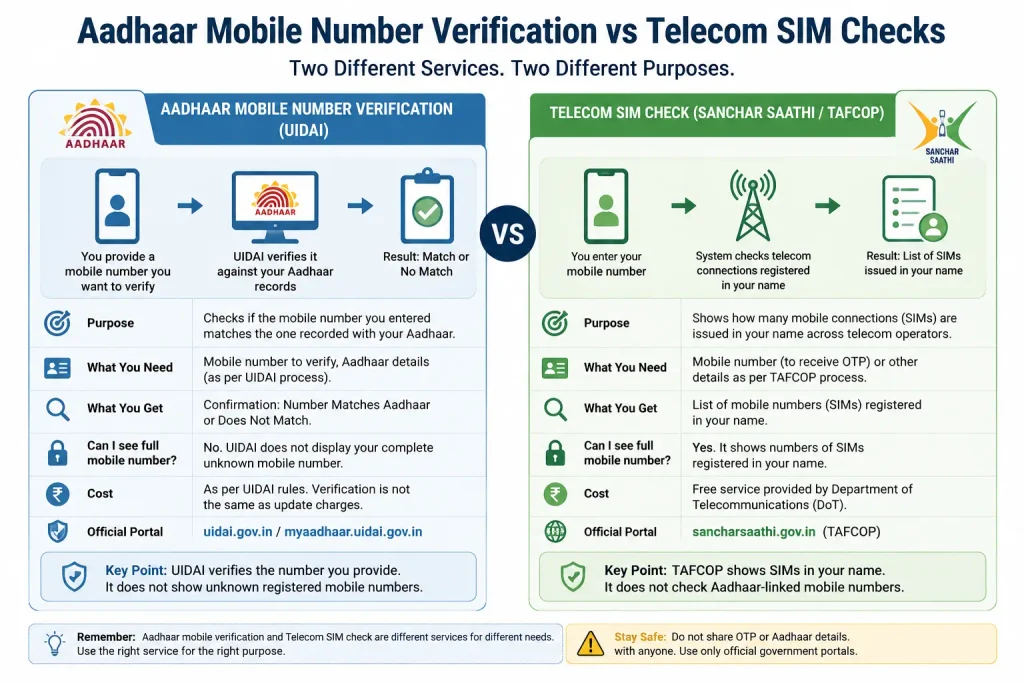
Aadhaar Mobile Number Verification vs Telecom SIM Checks
Another common confusion is between an Aadhaar-linked mobile number and mobile connections registered in your name.
The Department of Telecommunications’ Sanchar Saathi/TAFCOP service is designed to help users check mobile connections issued in their name. That is a telecom-service check, not a replacement for UIDAI’s Aadhaar mobile-number verification.
So:
TAFCOP = mobile connections in your name
UIDAI verification = checking a mobile number against your Aadhaar record
Don’t treat the two services as interchangeable.
Is Aadhaar Mobile Number Verification Free?
Do not confuse verification with mobile-number updating.
The verification facility and a paid demographic update are different matters. UIDAI’s current charges information states that demographic updates such as mobile number, email, name, gender, date of birth and address are free when done together with a biometric update, while a separate demographic update carries the prescribed charge.
Always check UIDAI’s current fee information before paying for an update, because charges and service rules can change.
Never pay an unofficial person simply to “check” your Aadhaar-linked mobile number.
Safety Tips Before Checking Your Aadhaar Mobile Number
Keep these points in mind:
- Use only official UIDAI or myAadhaar services for Aadhaar transactions.
- Never share an Aadhaar OTP with another person.
- Avoid websites promising to reveal a complete Aadhaar-linked mobile number.
- Don’t pay an unofficial “Aadhaar agent” for a service that should be completed through an official channel.
- Check the website domain carefully before entering personal information.
- Don’t assume your bank, PM-KISAN and Aadhaar records use exactly the same mobile-number workflow.
- If your old number is unavailable, follow the authorised UIDAI update route.
FAQs
How to check aadhar linked mobile number?
Use UIDAI’s official mobile-number verification facility to check whether a mobile number you know matches the number recorded with your Aadhaar. It is not a general full-number lookup service.
How to check mobile number linked with aadhar if I have multiple numbers?
If you have several possible numbers, check them individually using the official UIDAI verification facility. This lets you determine which known number matches the Aadhaar record.
How to check which number is linked to aadhar if I forgot it completely?
If you don’t remember the number at all, don’t use an unofficial number-finder service. If the old registered number is unavailable, UIDAI’s current guidance provides an authorised update route through an Aadhaar Seva Kendra or enrolment/update centre.
Can I see the full mobile number linked to Aadhaar?
You should not expect an official public service to reveal an unknown registered mobile number in full. Aadhaar’s Secure QR Code can contain a masked mobile number.
Can I check an Aadhaar mobile number without OTP?
If by “without OTP” you mean seeing the complete unknown registered number, don’t rely on websites claiming to provide that service. Aadhaar information can include a masked mobile number through the Secure QR Code, but that is not the same as revealing the complete number.
Can I update my Aadhaar mobile number if my old SIM is lost?
UIDAI’s current Aadhaar App guidance says that when the old registered mobile number is unavailable, the user should visit an Aadhaar Seva Kendra or authorised Aadhaar enrolment/update centre for the applicable process.
Is Aadhaar mobile-number verification the same as PM-KISAN status checking?
No. PM-KISAN has separate services for finding a registration number and checking status. Its registration-number service can use Aadhaar or mobile number, while the status process uses the PM-KISAN Registration Number.
Does Aadhaar mobile verification prove that my bank has the same mobile number?
No. You should not assume that the mobile number recorded by UIDAI is automatically the same number maintained by your bank or another service provider.
Final Takeaway
If you are trying to check which mobile number is linked to Aadhaar, start by separating two situations: verifying a number you know and trying to discover a number you have completely forgotten.
UIDAI’s official mobile-number verification facility is intended for the first situation. If your old number is unavailable, use the authorised Aadhaar update route instead of searching for an unofficial “Aadhaar number finder.”
And if your search started because of PM-KISAN, e-KYC or a payment-status problem, check the correct PM-KISAN service separately. The fastest solution is not always another Aadhaar search—it is using the right official service for the exact problem you are trying to solve.

2 Comments
Pingback: Aadhaar Status Check – Check Enrolment & Update Status Online
Pingback: How to Check Aadhar Card Link With Bank Account