

Quick Answer: How to Check Aadhaar Linking Status
If You Mean Aadhaar–Bank/DBT Linking:
Visit MyAadhaar (myaadhaar.uidai.gov.in) and check “Bank Seeding Status” using your 12-digit Aadhaar number and OTP. This shows which bank account is linked for DBT payments.
If You Mean Aadhaar Linked to a TNEB/EB Electricity Connection:
Visit the official TANGEDCO portal (nsc.tnebltd.gov.in/adharupload), enter your Service Connection Number, and check the AADHAR field in your consumer details. If it shows “Link your Aadhar,” your Aadhaar is not yet linked to the electricity connection.
Important: CheckAadharStatus.com is an independent informational website, not an official UIDAI or electricity-board website. Use official government portals for actual Aadhaar or electricity-service transactions.
Discover More About: 👇
Aadhaar Card Update: Complete Guide
Aadhaar Status Check – How to Check Enrolment & Update Status Online
PM-KISAN Status Check Using Aadhaar: How to Find Your Registration Number and Check Your Status
Quick Facts
| Detail | Verified Information |
|---|---|
| Aadhaar-bank status | Available through UIDAI’s MyAadhaar services |
| DBT-related seeding | Connected with NPCI Aadhaar seeding |
| Electricity-board Aadhaar linking | Separate from Aadhaar-bank linking |
| Tamil Nadu electricity service | TNPDCL/TANGEDCO online system |
| EB information needed | Service Connection Number |
| EB authentication | Current official page requires an Aadhaar-linked mobile number for OTP |
| Official Aadhaar authority | UIDAI |
| Official DBT/NPCI ecosystem | UIDAI and NPCI |
What Aadhaar Linking Status Are You Trying to Check?
Before checking anything, identify the service you mean.
Aadhaar Linked to a Bank Account
This is the status that matters when you are checking whether your Aadhaar is available for Aadhaar-based DBT payments.
UIDAI says the bank-seeding information displayed through MyAadhaar is fetched from NPCI. This is different from checking whether Aadhaar appears in an electricity consumer record.
Aadhaar Linked With an Electricity Connection
If your search is “how to check Aadhaar linked with EB”, you may be referring to an electricity service connection.
For Tamil Nadu consumers, the official electricity system has a separate Aadhaar-linking facility. The current TNPDCL page asks for the Service Connection Number and an Aadhaar-linked mobile number for OTP authentication.
This should not be confused with Aadhaar-bank linking or NPCI seeding.
How to Check Aadhaar-Bank Linking Status Online
If your goal is to check whether Aadhaar is linked and seeded for DBT purposes, use the official UIDAI route.
1. Open the Official MyAadhaar Service
Step 1: Visit MyAadhaar (myaadhaar.uidai.gov.in)
Step 2: Navigate to “Bank Seeding Status” under the MyAadhaar section
Step 3: Enter your 12-digit Aadhaar number or 16-digit Virtual ID
Step 4: Click “Send OTP” — an OTP will be sent to your Aadhaar-registered mobile number
Step 5: Enter the OTP and click Submit
Step 6: The portal will display the bank account(s) linked to your Aadhaar
Source: UIDAI states that this status information is obtained from the NPCI server. UIDAI also says that the information fetched for this purpose is not stored by UIDAI.
2. Check Through NPCI Aadhaar Seeding Status
Step 1: Visit the NPCI Aadhaar Seeding Status portal at www.npci.org.in/aadhaar-seeding-status
Step 2: Enter your 12-digit Aadhaar number and registered mobile number
Step 3: Enter the OTP sent to your mobile
Step 4: The system will show whether your Aadhaar is seeded in the NPCI mapper and which bank is mapped
3. Check Through USSD on Mobile
Step 1: Dial *99*99*1# from your registered mobile number
Step 2: Enter your 12-digit Aadhaar number when prompted
Step 3: Confirm the number — you’ll receive a confirmation message if your Aadhaar is linked to a bank account
What Does Aadhaar Seeding Mean?
The word “seeding” often appears when people check Aadhaar-bank status.
NPCI uses its mapper to maintain Aadhaar numbers associated with participating banks for Aadhaar-based payment routing.
That is why DBT-related searches can involve several terms:
- Aadhaar-bank linking
- Aadhaar seeding
- NPCI mapper
- DBT
- Bank account
These terms belong to the banking/payment side of Aadhaar services.
An electricity-board Aadhaar link is a separate service relationship.
What Does Your Aadhaar-Bank Status Mean?
Aadhaar Linked / Seeded
Meaning: Your Aadhaar is successfully linked to a bank account AND seeded in the NPCI mapper. You are eligible for DBT benefits through this account.
What to do next:
- Confirm the displayed bank account is correct
- Update if you want to change the linked account
- Proceed with DBT enrollment
Aadhaar Not Linked or Not Seeded
Meaning: Your Aadhaar is not associated with any bank account or not mapped in the NPCI system.
What to do next:
- Visit your bank branch with Aadhaar to link
- Confirm the bank has seeded the NPCI mapper
- Follow up with the bank until seeding is confirmed
Bank Details Not Showing or Status Unavailable
Meaning: The system cannot retrieve your bank seeding information.
Possible causes:
- Bank has not seeded the NPCI mapper
- Registered mobile number mismatch
- Technical issue with UIDAI/NPCI service
What to do next:
- Contact your bank directly
- Call UIDAI helpline 1947
- Wait 24–48 hours after bank linking before checking
How to Check If Aadhaar Is Linked With EB/TNEB
This section covers the specific search query: “how to check aadhar linked with eb”
Find Your TNEB/TNPDCL Consumer or Service Connection Details
Step 1: Locate your Service Connection Number or Consumer Number on your electricity bill
Step 2: Visit the official TANGEDCO/TNEB consumer portal at nsc.tnebltd.gov.in/adharupload
Step 3: Enter your Service Connection Number, mobile number, and captcha code
Step 4: Click “Enter” to view your connection details
Check the Aadhaar Field in the Official Consumer Record
Step 1: After logging in, check the consumer/service details page
Step 2: Look for the AADHAR field in the displayed consumer record
Step 3: Interpret the status:
- Aadhaar number displayed → Successfully linked to the electricity connection
- “Link your Aadhar” or blank field → Not yet linked
Alternative: Check via Bill Status Page
Step 1: Visit the TANGEDCO website and navigate to Online Services → Payment and Billing Services
Step 2: Click on Bill Status and enter your service connection number and mobile number
Step 3: The details of your connection will be displayed, including your Aadhaar linking status
What “Link Your Aadhar” Means
When the consumer details page displays “AADHAR — Link your Aadhar,” it means:
- The record exists but Aadhaar is not associated
- The system is prompting you to complete the link
- You need to visit the official Aadhaar linking portal
To link: Visit nsc.tnebltd.gov.in/adharupload, select your status (Owner/Tenant), enter your Aadhaar number, provide consent, and complete OTP verification.
Important: The current service is available for Domestic, Hand Loom, Power Loom, Agriculture, and Hut service connections only. Enter the service connection number in the exact format shown in your SMS or printed receipt.
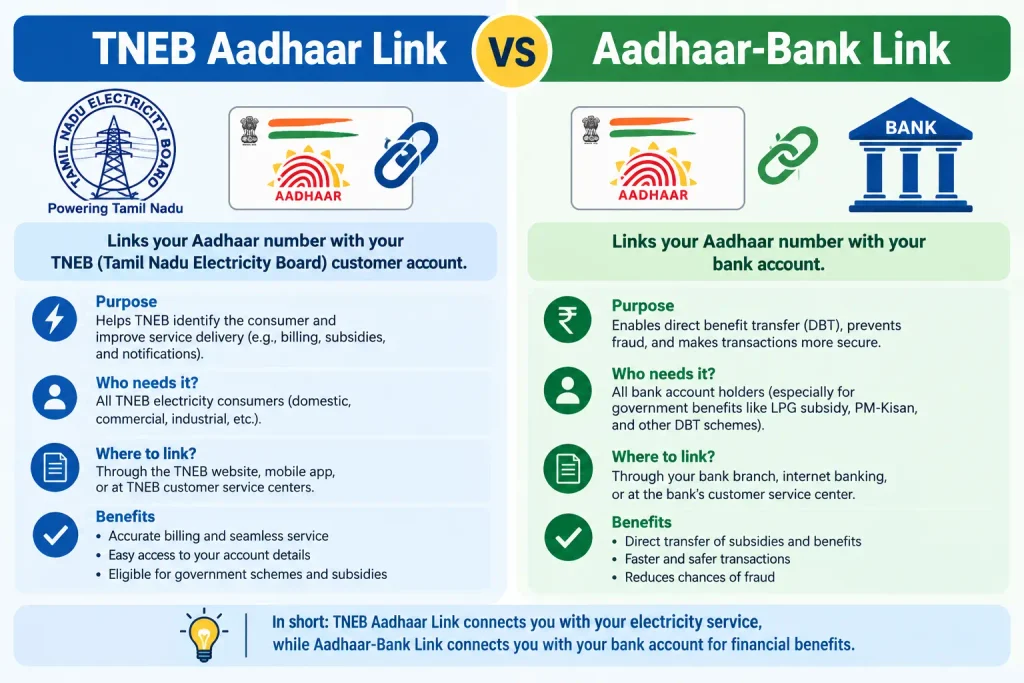
TNEB Aadhaar Link vs Aadhaar-Bank Link: What’s the Difference?
| Feature | Electricity Aadhaar Link | Aadhaar-Bank/DBT Link |
|---|---|---|
| What’s linked | Electricity consumer record | Bank account |
| Organisation | TANGEDCO/TNEB | Bank + NPCI + UIDAI |
| Identifier | Service Connection Number | Aadhaar number |
| Purpose | Electricity subsidies, bill payment eligibility | DBT benefits, Aadhaar-based payments |
| NPCI involved? | No | Yes |
| MyAadhaar status | Not displayed | Yes |
| Where to check | TNEB portal | MyAadhaar / NPCI portal |
Which Status Should You Check?
- Want to know if your Aadhaar is linked to your electricity connection? → Check TNEB/TANGEDCO portal
- Want to know if your Aadhaar is linked to your bank for DBT? → Check MyAadhaar/NPCI portal
- Need to receive government scheme benefits? → Check bank seeding status
Critical: These are completely separate processes. Do NOT assume that checking TNEB Aadhaar status tells you anything about your DBT eligibility.
Discover More About: 👇
Common Aadhaar Linking Problems and What to Do
Aadhaar Status Is Not Showing
Possible causes:
- Registered mobile number mismatch
- Bank/TNEB not yet updated the system
- Technical issue
What to do:
- Ensure your mobile number is updated in Aadhaar
- Visit your bank branch and confirm seeding
- Try again after 48 hours
- Call UIDAI helpline 1947
Aadhaar Is Not Seeded With the Bank
What to do:
- Visit your bank branch with a copy of your Aadhaar
- Request bank to seed Aadhaar in the NPCI mapper
- Bank will process after obtaining your consent
- Check status again after 24–48 hours
- If still not seeded, escalate to the bank manager
TNEB/EB Record Still Shows the Link Option
What to do:
- Complete the online linking process
- Ensure OTP is entered correctly
- Check if the mobile number matches Aadhaar records
- Visit your local TANGEDCO office if online linking fails
Aadhaar Data Lost Despite Confirmation
Tangedco has confirmed that some consumers’ Aadhaar data was lost despite receiving SMS confirmation of successful linking. The company has enabled a verification provision through the bill status page for consumers to check whether the linking was successful.
Tenant/Owner Issues
Tenants can link their Aadhaar by selecting the “Tenant” option during the linking process. Over 70,000 tenants in Madurai district alone are yet to link their Aadhaar with their power connections, with officials urging expedited completion.
Registered Mobile Number or OTP Problems
Aadhaar OTP not received:
- Confirm mobile number is linked to Aadhaar
- Check network signal
- Wait for resend option
- Use the MyAadhaar portal to check your registered mobile number
TNEB OTP not received:
- Ensure mobile number is registered with TNEB
- Update mobile number at local office if needed
- Check SMS inbox/junk folder
Service Connection Number Not Accepted
Check the number against your latest electricity bill, receipt or official SMS. TNPDCL specifically instructs consumers to enter the service connection number in the format provided in the relevant record.
“I submitted my Aadhaar. Does that mean it is linked?”
Not necessarily. A submission or authentication attempt should not automatically be treated as confirmation of completed linking. Check the result or status shown by the official service.
Important Things to Know Before Checking Aadhaar Linking Status
- ✅ Use only official government portals — MyAadhaar, NPCI, TANGEDCO, UIDAI
- ❌ Never enter Aadhaar information on unofficial third-party websites
- 🔍 Verify the exact service you’re checking — electricity vs. bank linkage
- 📝 Keep your Aadhaar and Service Connection Number ready
- 📱 Ensure your mobile number is updated in both Aadhaar and the relevant service
- ⏳ Allow processing time — link status may take 24–48 hours to update
- 🏦 For DBT issues, contact your bank first, then UIDAI/NPCI
- 🏠 Tenants should select “Tenant” status during linking
- 💰 Never pay a third-party or agent claiming to complete Aadhaar linking for you
- 🔐 Never share your Aadhaar OTP with an unknown person
Be Careful With Old TNEB Aadhaar Guides
A significant amount of online information about electricity-board Aadhaar linking comes from the original rollout period.
Older reports and tutorials may mention deadlines, screens or procedures that are no longer current.
This matters particularly for searches such as aadhaar electricity bill link status and aadhaar EB connection status check, because a tutorial published years ago can continue appearing in search results long after the official process has changed.
For any deadline, required field, eligibility condition or portal instruction, trust the current official electricity-board or government source—not an old screenshot.
Related Aadhaar Status Checks
Aadhaar Update Status
Check whether your Aadhaar correction/update request has been processed through MyAadhaar.
Aadhaar Enrolment Status
Check if your Aadhaar has been generated after enrolment at a centre.
Aadhaar-Bank Linking Status
Verify which bank account is linked with your Aadhaar for DBT.
Aadhaar PVC Order Status
Check the delivery status of your PVC Aadhaar card order.
Frequently Asked Questions
How do I check if my Aadhaar is linked with EB?
Visit the official TANGEDCO portal (nsc.tnebltd.gov.in/adharupload), enter your Service Connection Number, and check the AADHAR field in the consumer details.
How do I check TNEB Aadhaar link status?
Log in to the TNEB/TANGEDCO consumer portal, access your service details, and look for the Aadhaar field. If it shows “Link your Aadhar,” the link is not complete.
How do I check Aadhaar-bank linking status?
Visit MyAadhaar (myaadhaar.uidai.gov.in) and check “Bank Seeding Status” after OTP verification. Alternatively, dial *99*99*1# from your registered mobile.
Is TNEB Aadhaar linking the same as Aadhaar-bank linking?
No. TNEB linking is for your electricity connection record, while bank linking is for DBT/payment purposes. They are separate processes.
Can a tenant link Aadhaar with an electricity connection?
Yes — tenants can select the “Tenant” option when linking and use their own Aadhaar. Tangedco officials are urging tenants to complete the process, especially to ensure they receive government subsidies.
How do I know if my Aadhaar is linked to my electricity connection?
Check the consumer details page on the TANGEDCO/TNEB portal. If the AADHAR field shows a number, it’s linked. If it shows “Link your Aadhar,” it’s not linked.
What does “Link your Aadhar” mean on the TNEB consumer page?
It means Aadhaar is not yet associated with that electricity connection. You need to complete the linking process through the official TNEB Aadhaar portal.
What is NPCI Aadhaar seeding?
NPCI seeding is the process where banks update the NPCI mapper with your Aadhaar-linked bank account information for Aadhaar-based payment routing.
Why is my Aadhaar-bank status not showing?
Possible reasons include: registered mobile mismatch, bank not yet seeded NPCI, or technical issues. Contact your bank first, then UIDAI.
What should I do if my Aadhaar is not seeded with my bank?
Visit your bank branch with your Aadhaar and request seeding. Confirm after 24–48 hours. If still not seeded, escalate to the bank manager.
What number is needed for an EB Aadhaar link?
The current TNPDCL Aadhaar page asks for the Service Connection Number and says it should be entered in the format shown in the SMS or printed receipt.
Can I use the bank-seeding status to check my electricity Aadhaar link?
No. Bank-seeding status concerns Aadhaar’s relationship with a bank account and NPCI mapper. It does not confirm an electricity-service connection’s Aadhaar status.
Does Aadhaar seeding mean electricity-board Aadhaar linking?
No. Aadhaar seeding in the NPCI context is associated with bank accounts and Aadhaar-based DBT/payment routing. It is not confirmation of an electricity-board Aadhaar link.
Final Takeaway
The easiest way to avoid confusion is to identify which Aadhaar link you actually need to check.
For DBT or bank-related purposes, check your Aadhaar-bank seeding status through the official UIDAI/MyAadhaar and NPCI ecosystem.
For an EB/electricity connection, use the electricity provider’s own Aadhaar-linking service. In Tamil Nadu, the current TNPDCL facility uses the Service Connection Number and Aadhaar-linked mobile OTP.
So if you searched “how to check Aadhaar linked with EB,” don’t accidentally check your bank-seeding status. The two records serve different purposes — and checking the right one is the first step to getting the right answer.
Last reviewed: September 2026. Always refer to official UIDAI, NPCI, and TANGEDCO websites for the most current procedures.
This is an independent informational guide and is not affiliated with UIDAI, TNEB, TNPDCL, NPCI, or any government department.

1 Comment
Pingback: Ajmer Vidyut Vitran Nigam Ltd