

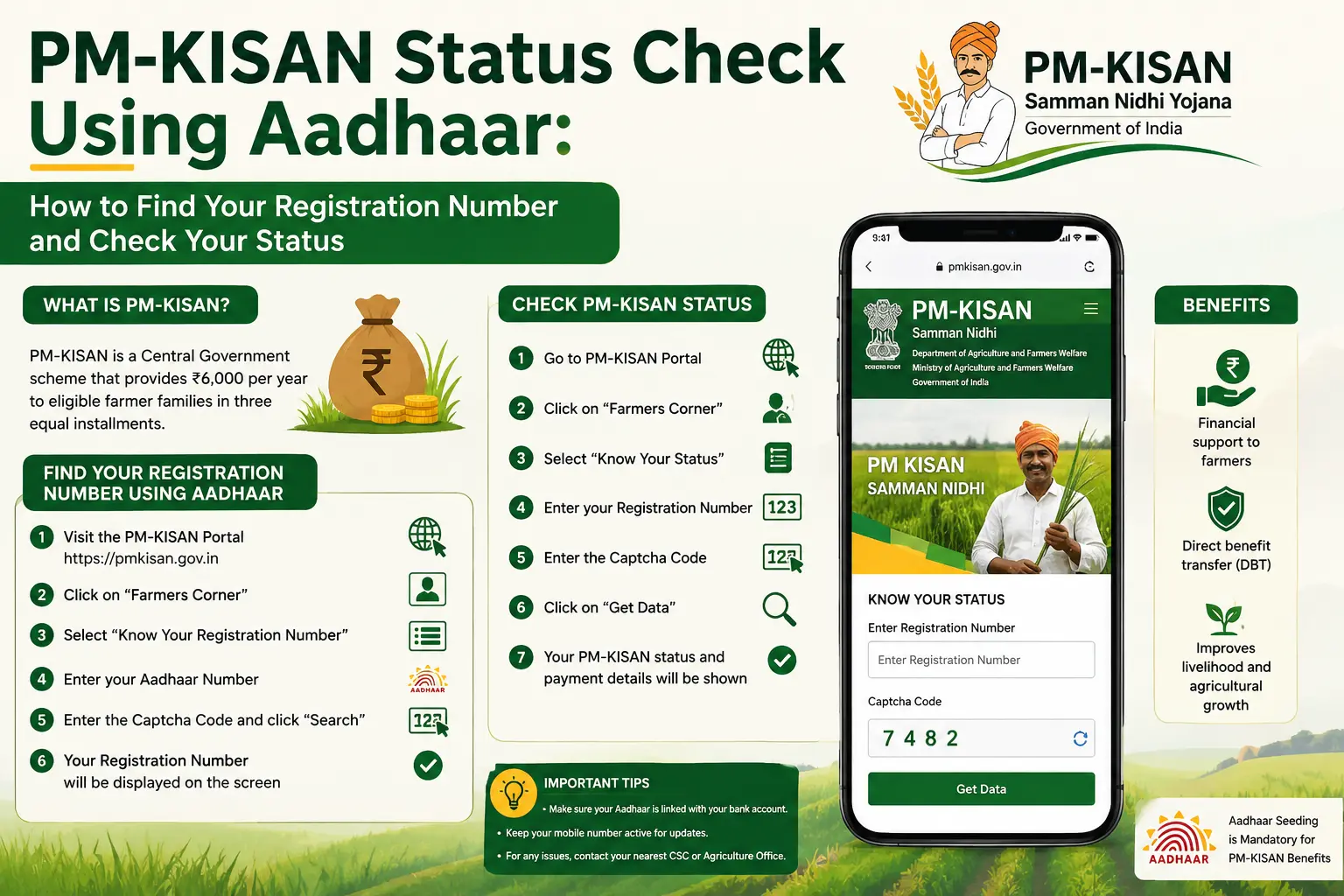
You have your Aadhaar number, but the PM-KISAN status page is asking for a Registration Number. This is one of the most common points of confusion behind searches such as pm kisan status check aadhaar.
The good news is that Aadhaar can be used on the official PM-KISAN website to find your Registration Number. The current Know Your Status page then uses that Registration Number to show available payment and account information, with OTP verification through the registered mobile number.
So, the process is not simply “enter Aadhaar on the status page.” It is better understood as:
Aadhaar → Find Registration Number → Know Your Status → OTP → Check payment details
This guide explains that process, what information the status page shows, and what to check if your PM-KISAN payment has not arrived.
Note: CheckAadharStatus.com is an independent informational website and is not affiliated with the Government of India or PM-KISAN. Use the official PM-KISAN website for actual status checks and transactions.
Discover More About: 👇
Aadhaar Card Update: Complete Guide
Aadhaar Status Check – How to Check Enrolment & Update Status Online
Ration Card Status: How to Check Rice Card Status with Aadhaar Number in AP & Telangana
Quick Facts
| Detail | Information |
|---|---|
| Service | PM-KISAN status and Registration Number lookup |
| Governing department | Department of Agriculture & Farmers Welfare, Ministry of Agriculture & Farmers Welfare |
| Aadhaar lookup | Available for finding the PM-KISAN Registration Number |
| Status lookup | Uses PM-KISAN Registration Number |
| Verification | OTP is sent to the registered mobile number on the current status page |
| Status information | Payment Status, Bank Name, UTR Number, Payment Mode, Account Credited, Credited On |
| e-KYC information | Financial-year-wise e-KYC information is shown |
| Official portal | PM-KISAN website |
The official PM-KISAN pages were last updated on 17 February 2026.
Can You Check PM-KISAN Status Directly With Aadhaar?
Not on the current Know Your Status page.
The official Know Your Status page currently asks for a Registration Number, captcha and OTP. It states that the OTP is sent to the registered mobile number.
However, the official Know Your Registration Number page provides two search options:
- Mobile Number
- Aadhaar Number
That means Aadhaar is useful for finding your PM-KISAN Registration Number, which you can then use for the status lookup.
The important difference
If you searched for pm kisan status check using aadhaar, this is the distinction to remember:
Aadhaar Number is available for the Registration Number lookup; the current Know Your Status page uses the Registration Number.
This prevents a common mistake—looking for an Aadhaar input box on a page that currently asks for a Registration Number.
How to Do PM-KISAN Status Check Using Aadhaar
1. Open the official PM-KISAN website
Go to the official PM-KISAN portal and use its Know Your Registration Number facility.
The official page is maintained by the Department of Agriculture & Farmers Welfare and hosted by the National Informatics Centre.
2. Select Aadhaar Number
On Know Your Registration Number, the official page currently shows:
- Mobile Number
- Aadhaar Number
Select Aadhaar Number and enter the information requested by the portal. Complete the captcha or other verification shown on the page.
3. Retrieve your Registration Number
The purpose of this page is to help you find your PM-KISAN Registration Number.
Keep the Registration Number available because it is the identifier requested by the current Know Your Status page.
4. Open Know Your Status
Now open the official Know Your Status facility.
Enter your Registration Number, complete the captcha and proceed with the verification requested by the portal.
The current page states that an OTP will be sent to the registered mobile number.
5. Review your PM-KISAN status
Once the verification process is completed, the official page can display account and payment information such as:
- Payment Status
- Bank Name
- UTR Number
- Payment Mode
- Account Credited
- Credited On
It also provides financial-year-wise e-KYC information.
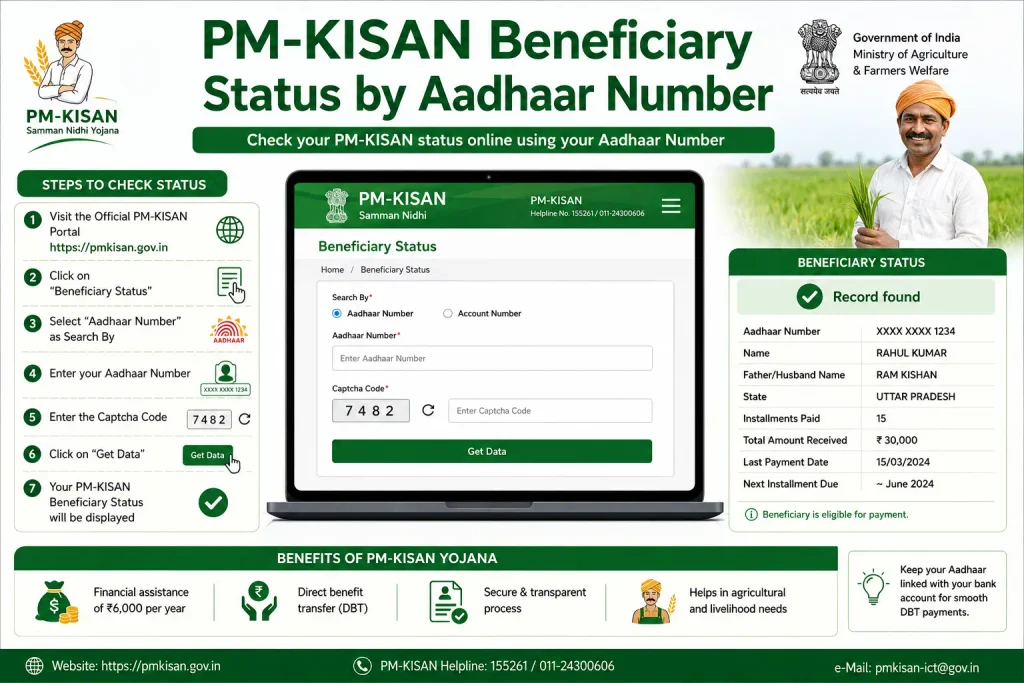
PM-KISAN Beneficiary Status by Aadhaar Number: What Are You Actually Checking?
The search pm kisan beneficiary status by aadhaar number can represent several different questions.
A farmer may actually want to know:
- Is my PM-KISAN registration present?
- Am I receiving PM-KISAN benefits?
- Has my payment been processed?
- Has my account been credited?
- Is my e-KYC information complete?
- Is there an Aadhaar or bank-related issue?
- Is my land information properly seeded?
These are related, but they are not the same status.
The official portal separates the Registration Number lookup from the Know Your Status facility.
Discover More About: 👇
Smart Card Status Check 2026: TNPDS, Aadhaar & Ammavodi
TNEB Aadhaar Link Status Check – How to Check Your Electricity Connection Online
What Information Does the PM-KISAN Status Page Show?
The current official status page lists several account and payment fields.
| Field | Why it matters |
|---|---|
| Payment Status | Shows the payment-related status available on the portal |
| Bank Name | Identifies the bank information displayed for the beneficiary |
| UTR No. | Provides the UTR information where available |
| Payment Mode | Shows the payment mode recorded by the system |
| Account Credited | Shows the credited-account information displayed by the portal |
| Credited On | Shows the credited date where available |
| Financial Year-wise e-KYC | Shows e-KYC information by financial year |
If your main concern is a missing installment, don’t stop after seeing one field. Review the payment-related information available on the page.
Why Aadhaar Matters for PM-KISAN
Aadhaar has a role beyond simply helping users find their Registration Number.
Government information says PM-KISAN benefits are transferred through Direct Benefit Transfer into Aadhaar-seeded bank accounts.
The government also states that land seeding, Aadhaar linking with bank accounts and e-KYC are mandatory requirements for eligible beneficiaries.
This means an Aadhaar-related search can actually be driven by a broader payment problem.
For example, someone searching check pm kisan status aadhaar may really be asking:
“My PM-KISAN installment has not arrived. Is everything connected correctly?”
That question cannot always be answered by looking at Aadhaar alone.
PM-KISAN Payment Not Received? Check These Details
If you expected an installment but cannot see the money in your account, first review the information available through the official status facility.
Check Payment Status
Look at the Payment Status shown on the official page.
Check Account Credited
The page includes an Account Credited field. Check what the portal reports rather than relying on assumptions about whether a payment has been sent.
Check the Credited On field
Where a credited date is displayed, review the Credited On information.
Check the UTR Number
If a UTR Number is displayed, keep it available when you need to discuss a payment-related issue with the relevant official or banking channel.
Check e-KYC information
The current status page includes financial-year-wise e-KYC information.
Consider the other mandatory requirements
Government information identifies land seeding, Aadhaar-bank linking and e-KYC as mandatory requirements connected with PM-KISAN benefit delivery. Beneficiary data is also validated and verified by States and Union Territories.
So, a missing payment should not automatically be blamed on Aadhaar.
Aadhaar, e-KYC, Bank Seeding and Land Seeding Are Different
These terms are often mixed together in online searches, but they refer to different parts of the PM-KISAN process.
Aadhaar
Aadhaar is used as part of the identification and payment-related framework of PM-KISAN. It can also be used on the official portal’s Registration Number lookup facility.
e-KYC
e-KYC is an electronic verification requirement for eligible PM-KISAN beneficiaries.
Aadhaar-bank linking
The government states that linking the beneficiary’s bank account with Aadhaar is a mandatory requirement for PM-KISAN benefit delivery.
Land seeding
Land records also need to be seeded/validated as part of the PM-KISAN beneficiary process. The government identifies land seeding as a mandatory requirement.
Having an Aadhaar number does not by itself tell you whether every PM-KISAN payment requirement has been completed.
Check PM-KISAN Status Aadhaar Card: What Do You Need?
If you want to use Aadhaar as part of the official lookup, keep these details ready:
- Aadhaar Number
- Access to the official PM-KISAN website
- PM-KISAN Registration Number, or the ability to retrieve it using the Aadhaar lookup
- Registered mobile number for the status-page OTP
- Any captcha or verification requested by the portal
Never share your OTP or Aadhaar details with someone claiming they can “release” a PM-KISAN payment for a fee.
What If You Forgot Your Registration Number?
This is exactly where the official Aadhaar lookup can help.
Open Know Your Registration Number and choose the Aadhaar Number option. The official page also provides a Mobile Number option.
After retrieving the Registration Number, use it on Know Your Status.
You do not need to guess which number belongs in the status field—the current official page specifically labels the required input as Registration No.
Common PM-KISAN Status Problems
“I have Aadhaar, but the status page asks for Registration Number.”
This is expected on the current Know Your Status page. Use the official Registration Number lookup first.
“I don’t remember my Registration Number.”
Use the official Know Your Registration Number facility and select Aadhaar Number or Mobile Number.
“The OTP is not coming.”
The current status page says that the OTP is sent to the registered mobile number. Check that you are using the correct registered number and follow the current instructions displayed on the official portal.
“My payment has not arrived.”
Review the payment information displayed on the official status page. Also consider the mandatory requirements identified by the government, including e-KYC, Aadhaar-bank linking and land seeding.
“My registration is pending.”
The official PM-KISAN grievance page allows users to raise or check a grievance. It also says that a Temporary ID can be used when a registration is new or pending for approval at any level.
What If You Need to Raise a PM-KISAN Grievance?
If checking your status does not resolve the problem, use the official PM-KISAN grievance facility rather than relying on an unofficial agent.
The official grievance page provides options to Raise Grievance and Check Status. It asks for a Temporary/Registration Number and explains when a Temporary ID may be used.
Frequently Asked Questions
Can I check PM-KISAN status directly with my Aadhaar number?
The current Know Your Status page asks for a Registration Number. However, Aadhaar Number can be used on the official Know Your Registration Number page to find the Registration Number.
How do I check PM-KISAN status using Aadhaar?
First use the official Know Your Registration Number facility and select Aadhaar Number. After obtaining your Registration Number, use it on the Know Your Status page and complete the verification requested there.
Can I check PM-KISAN status using my Aadhaar card?
Aadhaar can be used as a lookup option for finding your PM-KISAN Registration Number. The current status page itself asks for the Registration Number.
What details are shown in PM-KISAN status?
The official status page currently lists Payment Status, Bank Name, UTR Number, Payment Mode, Account Credited and Credited On. It also includes financial-year-wise e-KYC information.
Why has my PM-KISAN payment not been credited?
There is no single reason that applies to every case. Government information identifies land seeding, Aadhaar-bank linking and e-KYC as mandatory requirements, while beneficiary data is also validated by States and Union Territories.
What if I forgot my PM-KISAN Registration Number?
Use the official Know Your Registration Number facility. It currently offers Aadhaar Number and Mobile Number as search options.
Is PM-KISAN status the same as e-KYC status?
No. The status facility can display financial-year-wise e-KYC information, but e-KYC is only one part of the wider beneficiary verification and payment process.
Final Takeaway
If you searched pm kisan status check aadhaar, don’t worry if the main status page does not show an Aadhaar input box.
The current official process separates the two functions:
Use Aadhaar to find your PM-KISAN Registration Number → use the Registration Number on Know Your Status → complete OTP verification → review payment, account and e-KYC information.
This also explains the intent behind searches such as pm kisan beneficiary status by aadhaar number, pm kisan status check using aadhaar, check pm kisan status aadhaar, and check pm kisan status aadhaar card without promising an Aadhaar-only status lookup that the current official status page does not provide.
For actual checks, use the official PM-KISAN portal and verify the process there before entering personal information.

3 Comments
Pingback: DBT Status Check with Mobile Number (2026 Guide)
Pingback: FID PM Kisan Farmer Details by Aadhaar Number
Pingback: CM Kisan Samman Nidhi MP 2026