

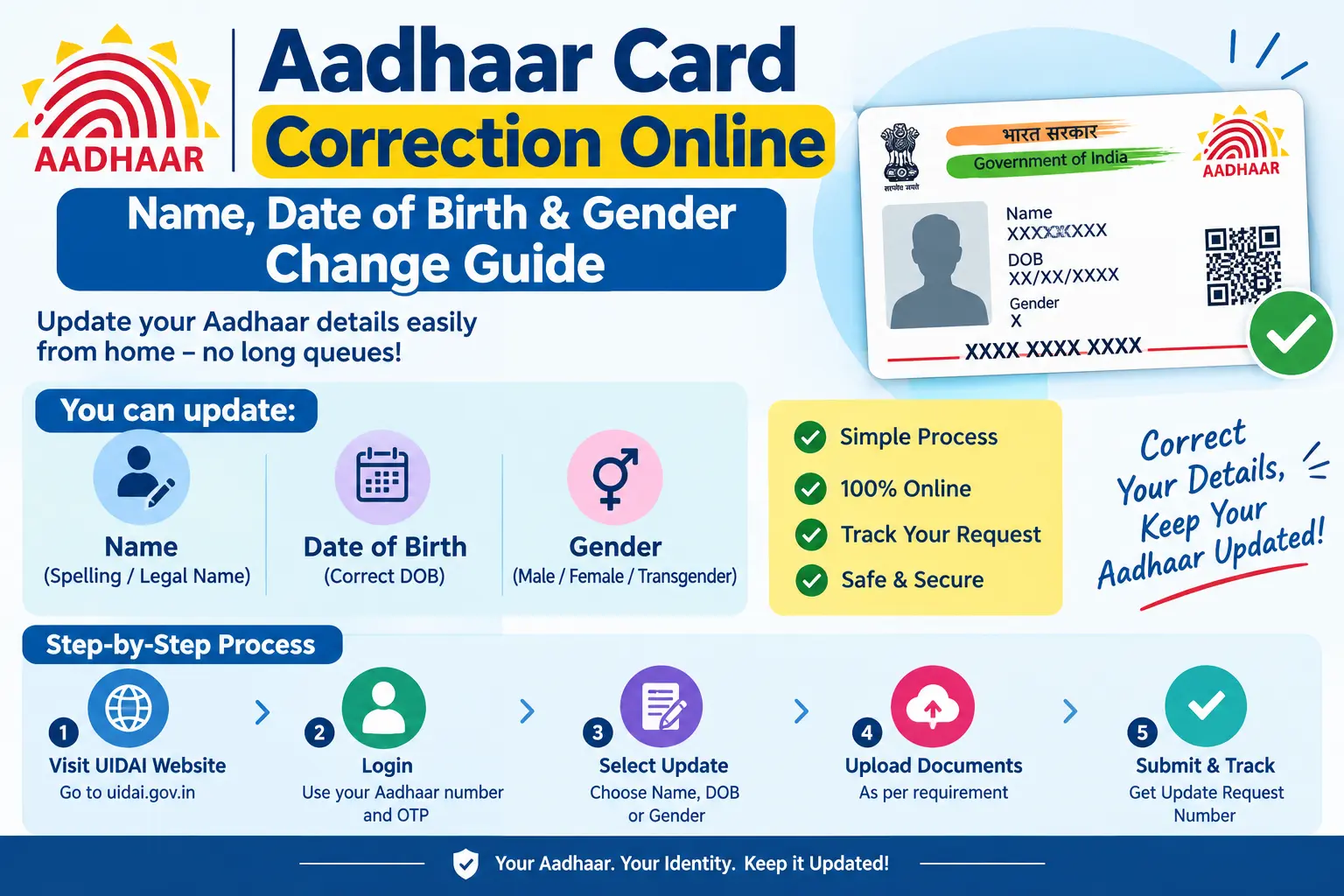
Your loan application is on hold because the name on your Aadhaar doesn’t match your PAN. Your new SIM won’t activate because e-KYC fails on a date-of-birth mismatch. Or worse — you’ve submitted a correction request, the URN says “under process,” and weeks have passed with no update. If any of this sounds familiar, the problem is almost always a demographic detail that needs fixing, and aadhar card correction is the fix. This guide covers how to correct your name, date of birth, and gender, which documents actually work, and the pitfalls that cause rejections.
A quick note on authority: UIDAI (Unique Identification Authority of India) issues Aadhaar, and its fees, document lists, and processing windows change periodically. Confirm current specifics on uidai.gov.in or the UIDAI toll-free helpline before you act.
Read More About👇
What Counts as an Aadhaar Correction
Aadhaar correction means changing the demographic details stored against your Aadhaar number — name, address, date of birth, gender, mobile number, or email. These appear on your Aadhaar card and sit in UIDAI’s database; an approved update changes both, and your next download reflects it.
Why it matters: banks, telecom operators, schools, and welfare schemes match your Aadhaar against other records. A spelling difference between Aadhaar and PAN, or a date of birth that disagrees with your birth certificate, can stall verification. Fixing it early is almost always faster than fixing it mid-application.
Discover More About: 👇
EPFO UAN KYC Update Online: How to Link & Update KYC with Aadhaar
Baal Aadhaar: How to Apply for Aadhaar Card for Children Online
SSUP Full Form: What Is Self Service Update Portal in Aadhaar?
Four terms worth knowing before you start:
- UID — your 12-digit Aadhaar number.
- EID (Enrolment ID) — the 28-digit number on your original enrolment slip; useful if you don’t yet have an Aadhaar number.
- VID (Virtual ID) — a temporary, revocable 16-digit number that can substitute for your Aadhaar number in some online tasks.
- e-KYC — electronic Know Your Customer, the paperless verification that banks and telecom companies run against your Aadhaar.
Name Change in Aadhaar Card Online
Name corrections are the most common request, and the difficulty depends on the type of change.
- Spelling fixes — a missing letter, an extra space, a transliteration error — are the simplest. One supporting document usually suffices.
- Full name changes — after marriage, divorce, or a legal name change — need stronger proof: a marriage certificate, a gazetted officer’s certificate, or a court order.
- Update limits — UIDAI typically restricts how often certain fields can be changed online within a given period. Plan the change you actually need rather than submitting trial corrections.
You’ll fill the Aadhaar correction/update form online and upload a scan of your proof. The same form is used at a centre if you go in person.
Aadhaar Date of Birth Change
Date of birth is treated more strictly than a name because it anchors your identity across documents. The proof you submit must clearly show the correct date — UIDAI generally does not accept documents where the DOB is absent or ambiguous.
Commonly accepted proofs include:
- Birth certificate from a competent authority
- Indian passport
- Class 10 (SSLC) certificate or mark sheet showing DOB
- PAN card with DOB printed
- Government service records or pension documents
Two things trip people up here. First, UIDAI has at various points capped the number of DOB updates allowed — check the current limit before submitting. Second, minor corrections may sometimes be accepted via self-declaration, but this depends on prevailing rules. If your Aadhaar DOB is already correct and the mismatch is in another document, fix that document instead.
Gender Change in Aadhaar
Gender correction is usually the most direct of the three, provided your supporting document reflects the requested change. UIDAI allows male, female, or transgender, subject to the options available at the time.
Standard proofs: passport, PAN card, birth certificate, or a government-issued certificate showing gender. For transgender applicants, UIDAI has at times accepted specific certificates or declarations — verify the current requirement on the portal before you upload.
The mechanics are identical to any other demographic update: log in, select gender, upload proof, submit. Biometric re-verification, if required, happens at an Aadhaar Seva Kendra.
Discover More About: 👇
Aadhaar Correction/Enrollment Form: Download, Fill & Submit Guide
How to Apply for New Aadhaar Card Online – Full Registration Guide (Adults & Children)
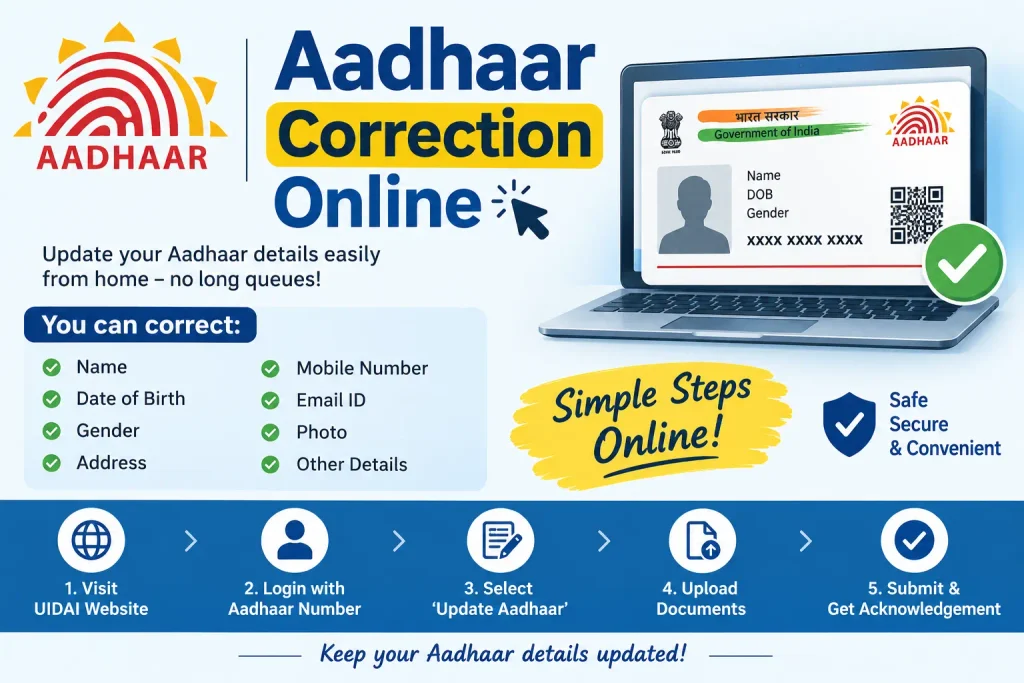
Step-by-Step: Aadhaar Correction Online
Exact screens shift over time, but the sequence below reflects how the process actually runs.
- Open uidai.gov.in directly. Type the address rather than clicking search results — lookalike sites charge inflated fees and harvest personal data.
- Enter the Aadhaar update section. The mAadhaar app handles some steps if you prefer mobile.
- Log in with your Aadhaar number or VID. An OTP goes to your registered mobile. Pitfall: if the OTP never arrives, your mobile isn’t linked — you’ll need to visit a centre to add it before any online correction is possible.
- Pick the field to correct — name, DOB, gender, address, mobile, or email.
- Type the corrected details exactly as they appear on your proof. Even a stray space can trigger rejection.
- Upload the document. Watch the file size and format limits; a photo taken at an angle usually fails quality checks.
- Review and submit. You’ll receive an Update Request Number (URN). Screenshot it. Pitfall: if the portal times out during upload, your request may not have registered — check for the URN before assuming it went through.
- Complete biometric verification if prompted. Book a slot at an Aadhaar Seva Kendra and carry originals.
- Track with your URN. Once approved, download the updated Aadhaar.
Prefer in person? Visit an Aadhaar Seva Kendra and fill the standard correction form there; the aadhar gazetted form applies where a gazetted officer’s attestation is needed for your particular change. Centre operators use the Aadhaar Enrolment/Update Client software — you don’t install anything yourself.
Documents Required
What you need depends on the field:
- Name: passport, PAN, marriage certificate, or gazetted officer’s certificate
- Date of birth: birth certificate, Class 10 certificate, passport, or PAN
- Gender: passport, PAN, birth certificate, or relevant government certificate
- Address: utility bill, bank passbook, rent agreement, or government address proof
- Mobile/email: no separate document, but OTP verification on the existing registered number
Carry originals plus photocopies for a centre visit; upload clear scans for online submission.Common Mistakes to Avoid
- Blurred or cropped scans. The single biggest cause of rejection.
- Spelling drift. Your request must match your proof document character for character.
- Third-party “agents.” Some charge markups for a free process. Use uidai.gov.in or an authorised centre only.
- Losing the URN. Without it, you can’t track or escalate.
- Expecting instant results. Demographic updates take time. Check the portal for the current window rather than trusting old timelines.
- Altering the document yourself. Editing an Aadhaar card or fabricating one is illegal. This guide covers legitimate correction only.
FAQs
Can I change my name in Aadhaar without visiting a centre?
Often yes, but if biometric verification is triggered, a Seva Kendra visit is mandatory. The portal tells you during submission.
How many times can I change my date of birth?
UIDAI has imposed limits at various points. Check the current cap on the official portal.
What’s the fee for Aadhaar correction?
UIDAI charges a modest fee for demographic updates; the amount is revised periodically. Confirm on uidai.gov.in or at your centre.
Where do I get the aadhar correction form?
Online on the UIDAI portal, or at any Aadhaar Seva Kendra.
How do I check my correction status?
Enter your URN in the portal’s status-check section.
My mobile isn’t registered — can I still correct Aadhaar online?
No. OTP verification needs a registered number, so you’ll visit a centre to add it first.
Before You Submit
Two habits separate a smooth correction from a frustrating one. First, match your request to your proof document word for word — retype the name or date rather than relying on memory. Second, if your update is still stuck well past the window UIDAI quotes, don’t resubmit blindly; a duplicate request can complicate the original. Call the UIDAI helpline with your URN and ask for the specific rejection reason, then fix that one thing. Most failed corrections fail for a single, correctable detail.

2 Comments
Pingback: SRN Number in Aadhar Card: How to Track Update Status
Pingback: SSUP Full Form: Self Service Update Portal