

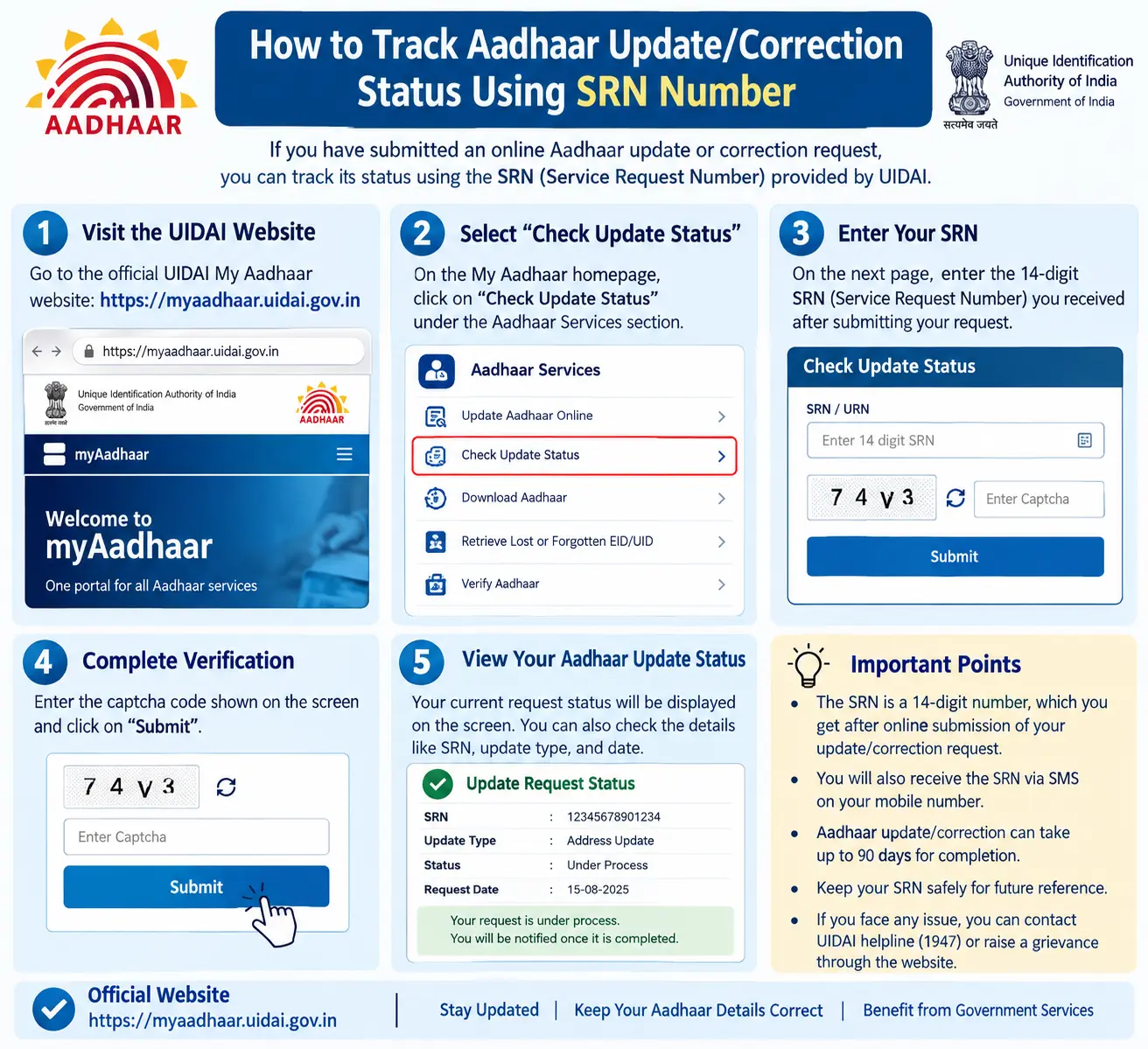
Your Aadhaar update request was submitted two weeks ago. The bank is asking for updated e-KYC before your account gets restricted, and your new SIM is on hold because your address doesn’t match. You keep checking, but the status still reads “under process.” Without a way to verify exactly where your request stands, you’re stuck guessing — and that’s precisely what the SRN number in your Aadhaar acknowledgment slip is for.
This guide explains what the SRN is, where to locate it, and how to use the srn number in Aadhar card to check whether your request is pending, approved, or rejected — without making another trip to the Aadhaar Seva Kendra.
Read More About👇
What Is an SRN Number in Aadhaar Card?
SRN stands for Service Request Number — a unique reference code generated the moment you submit an Aadhaar update or correction request, whether for your name, address, date of birth, mobile number, or biometrics.
It works like the token number you get at a bank counter. Once your request enters UIDAI’s system, the SRN becomes the only reliable way to pull up that specific request and check its progress. It is not the same as your Aadhaar number, nor should it be confused with:
- EID (Enrolment ID) — the 28-digit number on your original enrolment slip
- VID (Virtual ID) — a temporary 16-digit number you can use in place of your Aadhaar number for authentication
Depending on how you filed the request, the SRN may be numeric or alphanumeric. Either way, it typically appears on the acknowledgment slip you receive after submission.
Discover More About: 👇
Check Aadhaar Enrolment Status Online (2026) – EID/URN
How to Change Aadhaar Card Mobile Number Online (2026 Guide)
SSUP Full Form: What Is Self Service Update Portal in Aadhaar?
Why the SRN Matters for Aadhaar Updates
UIDAI processes a massive volume of update requests daily, and your Aadhaar number alone won’t surface a specific pending application. The SRN does. With it, you can:
- Confirm your request was actually registered — not lost during submission
- Check whether it’s pending, approved, rejected, or returned for correction
- Avoid standing in queue at an Aadhaar Seva Kendra just to ask for status
- Keep a record if you need to escalate or refile later
If your update is time-sensitive — say, for a bank KYC deadline or a government scheme enrollment — the SRN is what lets you follow up with specifics instead of vague inquiries.
Where to Find Your SRN Number
The SRN is issued at the time of submission. Depending on your method, you’ll find it:
- On the printed acknowledgment slip from an Aadhaar Seva Kendra or enrolment centre
- In the SMS or email confirmation sent after an online update request
- Within the mAadhaar app, if you submitted through it
- On the UIDAI portal (uidai.gov.in) if the request was raised online
Misplaced the slip? Search your SMS inbox and email for the acknowledgment message first. If that fails, visit the centre where you submitted the request or call the UIDAI helpline — they can guide you on retrieving it, though you may need to provide your Aadhaar number and request date.
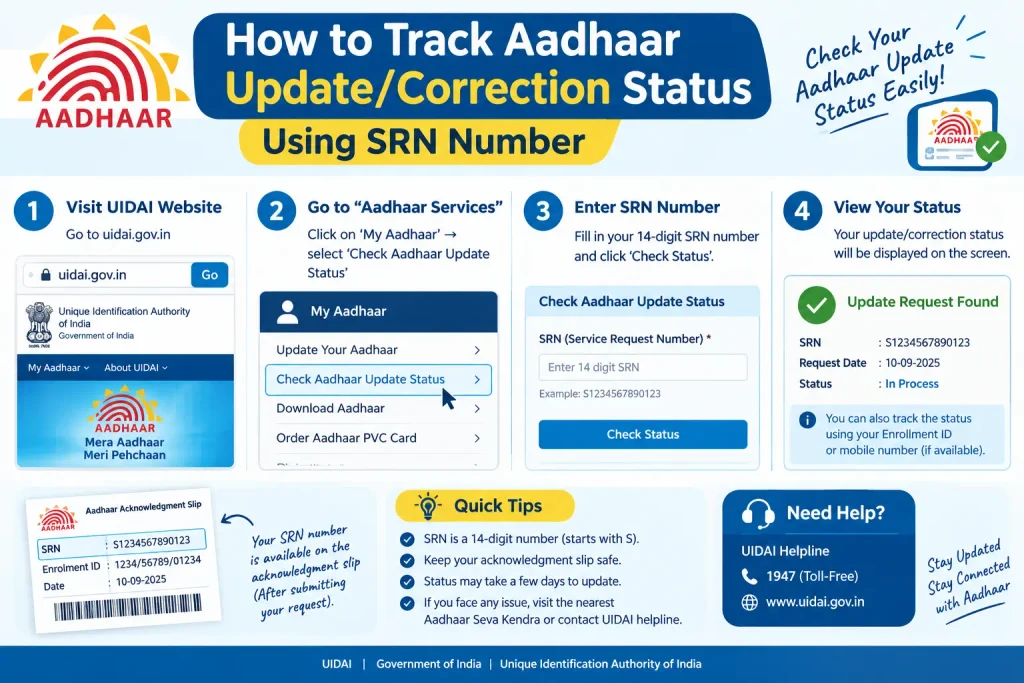
How to Track Aadhaar Update/Correction Status Using SRN Number
The srn number track aadhar card process is straightforward, but small errors can stall it. Here’s how to do it properly.
Step 1: Open the Official UIDAI Portal
Go to uidai.gov.in directly — type the address rather than clicking links from search results or messages. Third-party sites claiming to track Aadhaar status often harvest your Aadhaar number and SRN. Stick to the official domain.
Step 2: Find the Update Status Option
Look under the “My Aadhaar” or “Aadhaar Services” menu for an option labeled something like “Check Aadhaar Update Status” or “Enrolment/Update Status.” Menu labels do change periodically, so scan for the closest match rather than expecting an exact wording.
Step 3: Enter Your SRN and Details
You’ll typically need:
- Your SRN number (from the acknowledgment slip)
- Your Aadhaar number or EID
- A captcha or OTP verification, if prompted
Common pitfall: If your mobile number isn’t linked to Aadhaar, the OTP won’t arrive. In that case, you may need to use an alternative verification route or visit a centre. Also double-check the SRN — a single wrong digit returns “no record found,” which many people mistake for a rejected request.
Discover More About: 👇
How to Update Name, Date of Birth & Photo in Aadhaar Card (Demographic Update Guide)
EPFO UAN KYC Update Online: How to Link & Update KYC with Aadhaar
Step 4: Submit and Read the Status
After submitting, the portal displays your current status. You’ll usually see one of these:
- Pending — request is queued or awaiting processing
- In Progress — verification is underway
- Approved/Completed — update has been processed
- Rejected — request could not be processed, often due to document issues
- Sent Back — you may need to revisit the centre with corrected documents
Another common pitfall: The portal may time out if you leave the page idle during OTP entry. Keep your SRN and Aadhaar details handy before you start, so you’re not hunting for them mid-session.
Step 5: Act on the Status
If approved, you can download the updated Aadhaar (where applicable) or wait for the physical copy if you opted for one. If rejected or sent back, the portal usually states a reason — read it carefully before refiling, since resubmitting the same documents will likely produce the same result.
Other Channels for Checking Status
The mAadhaar app offers several Aadhaar services, but update-status tracking often redirects you to the UIDAI portal rather than displaying results in-app. You can also check through:
- The Aadhaar Enrolment/Update Client software at enrolment centres (operators use this)
- A visit to the Aadhaar Seva Kendra where you submitted the request
- The UIDAI toll-free helpline for cases where online tracking isn’t working
Each channel has different requirements, so start with the official portal — it’s usually the fastest.
Common Mistakes to Avoid
- Confusing SRN with EID or Aadhaar number — they are three separate identifiers
- Using an old SRN — each new request generates a fresh one; previous SRNs won’t show newer applications
- Tracking on unofficial websites — only uidai.gov.in and the mAadhaar app are authorized
- Skipping the status reason — “sent back” is not the same as “approved”; the reason tells you what to fix
- Discarding the acknowledgment slip — it’s your only proof and contains the SRN
When in doubt, verify on the official UIDAI portal or call the helpline rather than relying on secondhand advice.
Frequently Asked Questions (FAQs)
Q1: What is the SRN number in Aadhaar card?
A: SRN (Service Request Number) is a unique reference code generated when you submit an Aadhaar update or correction request. It allows you to track that specific request’s progress.
Q2: How can I track my Aadhaar card using SRN number?
A: Visit the official UIDAI portal, locate the update status option, enter your SRN along with required details, and submit. The portal displays whether your request is pending, approved, or rejected.
Q3: Is Aadhaar SRN tracking available on the mAadhaar app?
A: The mAadhaar app provides several Aadhaar services, but for update status tracking, it often redirects to the UIDAI portal. Check the app for current features, as they change periodically.
Q4: What if I lose my SRN number?
A: Check your SMS, email, or acknowledgment slip first. If you still can’t locate it, visit the Aadhaar Seva Kendra where you submitted the request or contact the UIDAI helpline for assistance.
Q5: How long does it take for an Aadhaar update to reflect after approval?
A: Timelines vary by request type and workload. Generally, updates may reflect within days to a few weeks after approval. Check the official UIDAI portal for current processing timelines.
Q6: Can I use an Aadhaar SRN number to track someone else’s update?
A: No. The SRN is tied to a specific request and should only be used by the person who submitted it or an authorized representative. Misuse may violate privacy regulations.
Final Thoughts
If your request still shows “pending” or “in progress” after a reasonable wait, don’t refile immediately — that can create duplicate requests and further delays. Note the date you last checked, wait a few more days, then recheck using the same SRN. If the status hasn’t moved and your deadline is close, calling the UIDAI helpline with your SRN in hand gives you a far better chance of getting a concrete answer than submitting a fresh application.

8 Comments
Pingback: E Shram Card Download by Mobile Number
Pingback: How to Change Aadhar Card Mobile Number Online (2026)
Pingback: SSUP Full Form: Self Service Update Portal
Pingback: Update Photo in Aadhar Card: Name & DOB
Pingback: Baal Aadhaar: How to Apply for Aadhaar Card for Children
Pingback: UIDAI Grievance Portal: File a Complaint Online
Pingback: Aadhaar PVC Card: How Many Days to Get It?
Pingback: Quality Check of Submitted Documents: Aadhaar Update Status