
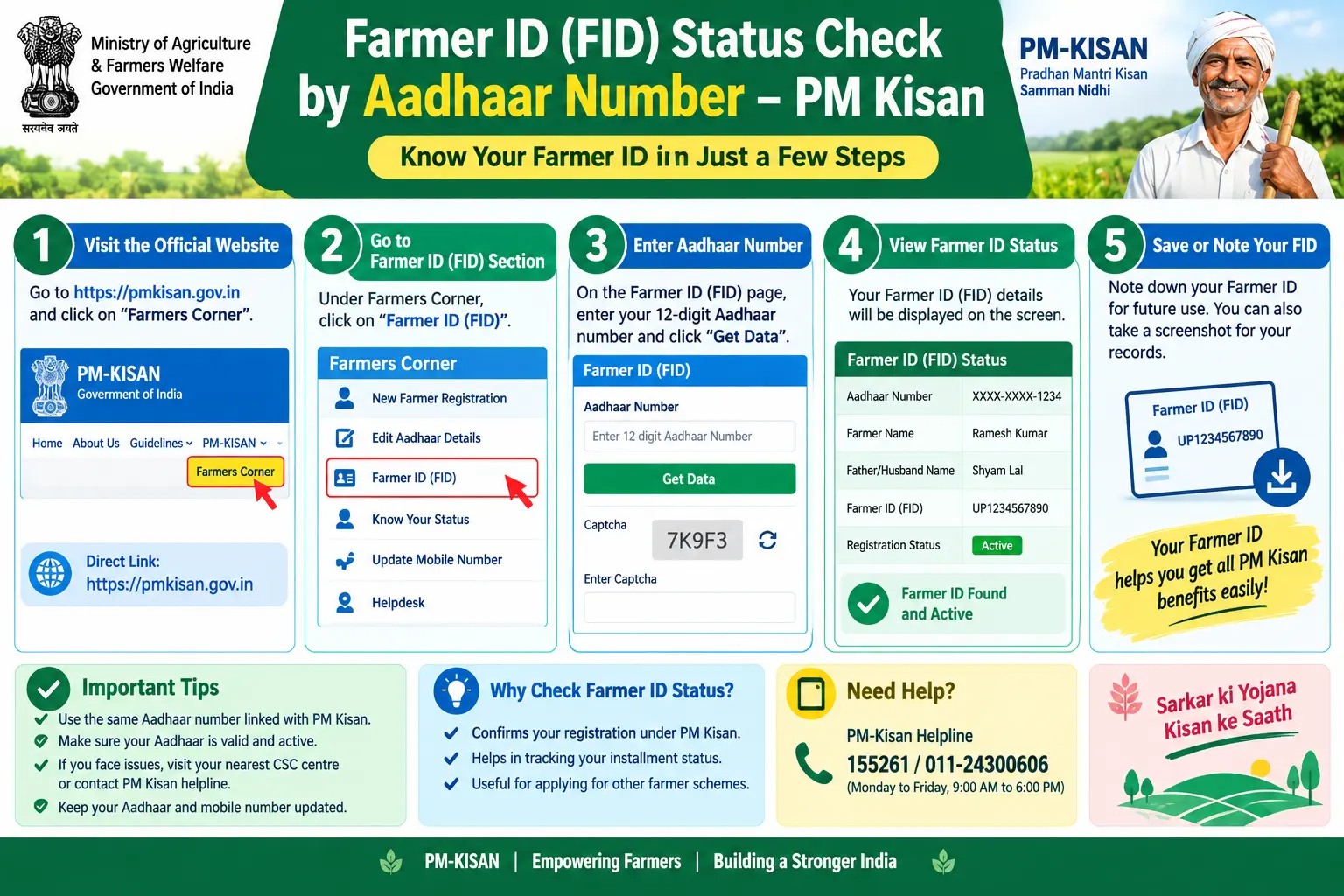
Your PM Kisan instalment is due, the portal shows “FTO Generated” or “Payment Stopped,” and you have no idea which link in the chain broke. Or worse — you have completed e-KYC twice, yet the status still shows “Pending.” For thousands of farmers, the real problem is not registration; it is figuring out whether their fid pm kisan farmer details by aadhaar number are correctly linked across the PM Kisan database, the state land records, and the new AgriStack Farmer Registry. This guide walks through what a Farmer ID is, how to check your PM Kisan beneficiary status and KYC status using Aadhaar or your enrollment number, what each status message actually means, and the specific mistakes that hold up payments.
What Is a Farmer ID (FID) and How Does It Connect to PM Kisan?
A Farmer ID — also called a Kisan Pehchaan Patra or Farmer Registry ID in some states — is a unique number issued under the Digital Agriculture Mission. The system behind it, AgriStack, is being built to give every farmer one verified digital identity that links three things: Aadhaar, digitized land records, and bank account details.
For PM Kisan, this matters because beneficiary verification no longer depends on manually matching names across village lists. The FID allows authorities to confirm identity, land ownership, and bank details from a single record. That reduces duplicate entries and speeds up direct benefit transfers — but it also means that if any one of those three links is broken, your payment can stall.
State-level implementation varies. Karnataka, for instance, issues its Farmer ID through the FRUITS portal, which then connects to PM Kisan. Other states are at different stages of rolling out their own registries. What stays constant is that Aadhaar is the anchor for the entire verification chain.
Discover More About:👇
PM-KISAN Status Check Using Aadhaar: How to Find Your Registration Number and Check Your Status
DBT Status Check with Mobile Number (2026 Guide)
How to Check PM Kisan Beneficiary Status by Aadhaar Number
The PM Kisan portal is the fastest route. The steps below reflect how the portal generally works; button labels may shift slightly as the site is updated.
- Open the official PM Kisan website (https://pmkisan.gov.in/) and go to the Farmers Corner section.
- Select Know Your Status.
- Enter your Aadhaar number (or your registration number, if you have it).
- Type the captcha exactly as shown — it is case-sensitive.
- Click Get Data.
The result screen typically shows your beneficiary status, e-KYC completion, instalment history, and the bank account currently mapped to the scheme.
Pitfalls to watch for:
- OTP not arriving: If the portal asks for an Aadhaar-linked OTP and your mobile number is not updated in UIDAI records, the OTP will never come. In that case, complete Aadhaar mobile number update first at an Aadhaar Enrolment/Update Centre or Aadhaar Seva Kendra.
- Captcha timeout: The captcha expires quickly on slow connections. If the page hangs after you click Get Data, refresh and re-enter rather than waiting — a stale session often returns an error even when your details are fine.
- Wrong number entered: Farmers sometimes enter the Aadhaar Virtual ID (VID) or their PM Kisan registration number into the Aadhaar field. These are different numbers and will return “No record found.”
If you have lost your registration number, the Know Your Registration Number option on the same portal can retrieve it using Aadhaar.
For state-level Farmer IDs, the check happens on the state registry portal instead — Karnataka’s FRUITS portal, for example, has its own status page where entering Aadhaar displays your FID number and registration state.
What Each Status Message Actually Means
Reading the status correctly saves a wasted trip to the agriculture office. Here is how to interpret the common ones:
Active / Payment Credited: Registration verified, e-KYC complete, instalment processed. If the portal says “Processed” but your bank shows nothing, the issue is usually at the bank end — a DBT mapping problem or an inactive account, not a PM Kisan problem.
e-KYC Pending: The single most common cause of stalled payments. The scheme has made e-KYC mandatory; no instalment is released without it.
FID Not Linked: Your Farmer ID exists but has not been attached to your PM Kisan registration. This typically requires a visit to the local agriculture office or a Common Service Centre — it is not usually fixable online.
Land Records Mismatch: The name or survey details on your land documents do not match your Aadhaar or PM Kisan entry. Correction happens at the revenue office, not on the PM Kisan portal.
Payment Stopped / Withheld: This appears when the system flags a possible duplicate beneficiary, an ineligible member, or a case pending physical verification. Payments resume after the verification clears.

How to Check PM Kisan KYC Status and Complete e-KYC
Your KYC status appears in the same result screen as your beneficiary details — look for the e-KYC column. If it reads “No” or “Pending,” you have three ways to complete it:
- OTP-based: On the PM Kisan portal or app, using the mobile number registered with Aadhaar. Fastest option if your number is current.
- Biometric: At a Common Service Centre or State Seva Kendra, using fingerprint authentication. Needed when your Aadhaar-linked mobile is outdated.
- Face authentication: Requires the PM Kisan app plus the Aadhaar Face RD app. You log in with your registered mobile number and complete verification by scanning your face.
One practical note: after completing e-KYC, do not expect the portal to update instantly. Give it a reasonable window, then re-check. If it still shows pending after that, the authentication likely did not register on the UIDAI side — redo it rather than assuming it worked.
Discover More About:👇
Aadhaar Bank Seeding Status for DBT: How to Check Aadhaar Bank Link Status
Common Mistakes That Delay PM Kisan Payments
Most stalled payments trace back to a handful of fixable issues:
- Skipping e-KYC entirely. No e-KYC, no instalment — this is non-negotiable under current rules.
- Name mismatches. Even a missing initial or a spelling variation between Aadhaar, bank records, and land documents can cause a DBT failure. All three need to match.
- Dormant or wrongly mapped bank accounts. An inactive account, a wrong IFSC, or an account not seeded with Aadhaar for DBT will block the transfer even when everything else is correct.
- Undigitized land records. The Farmer ID system depends on clean land data. If your records are not digitized or contain errors, verification cannot complete.
- Missing from the beneficiary list. Application errors or incomplete verification can leave a name out of the village beneficiary list entirely. Checking that list confirms whether the problem is upstream.
- Multiple family members enrolled. The scheme generally permits only one eligible member per family. Duplicate entries trigger a hold until the verification resolves.
Frequently Asked Questions
How do I check my FID status by Aadhaar number?
It depends on your state. States with a dedicated registry portal — Karnataka’s FRUITS, for example — let you enter Aadhaar on the status page to see your FID number and registration state. For scheme-level checks, use Know Your Status on the PM Kisan portal.
Can I check PM Kisan status by enrollment number?
Yes. The portal accepts your registration or enrollment number in place of Aadhaar on the Know Your Status page, and returns the same beneficiary and payment details.
What is an AgriStack Farmer ID and why does it matter?
AgriStack is the digital infrastructure building a unified farmer database. The Farmer ID is the unique identifier linking your Aadhaar, land records, and personal details — designed to speed up subsidy delivery and cut down on duplicate or fraudulent claims.
What if my PM Kisan Aadhaar link status shows pending?
First confirm your Aadhaar is seeded with your bank account for DBT. Then check that your PM Kisan registration details match your Aadhaar exactly. If the mismatch is not obvious, a visit to a Common Service Centre or agriculture office is usually the quickest resolution.
Is e-KYC mandatory for PM Kisan?
Yes. Instalments are not released without completed e-KYC. You can finish it via OTP, biometric authentication at a CSC, or face authentication through the mobile app.
How long does the status take to update after e-KYC?
Timelines vary and are not fixed, so the portal is the only reliable source. Check back after a reasonable gap, and if the status has not moved, repeat the e-KYC rather than waiting further.
If your status has not changed after a re-check, resist the urge to redo e-KYC repeatedly on the same day — multiple attempts in quick succession can confuse the verification trail. Wait a few days, confirm your Aadhaar mobile number and bank DBT mapping are current, and only then escalate to your local agriculture office with your Aadhaar, land documents, and bank passbook in hand. Most stalled cases clear once those three records finally agree with each other.
1 Comment
Pingback: Bihar Agriculture DBT Portal 2026: Registration & Status