

Your bank needs updated KYC by Friday. Your SIM provider is threatening disconnection. You submitted an address change three weeks ago, and the portal still says “we’re currently doing a quality check of your submitted documents.” Is that good news or bad? Did you make a mistake? Should you resubmit and risk creating a duplicate request?
Those are the questions this guide answers. Below, you’ll find what each common Aadhaar update status actually means, how to track your request properly using the right reference number, where people typically go wrong on the UIDAI portal, and what to do when a request seems frozen. No jargon, no guesswork.
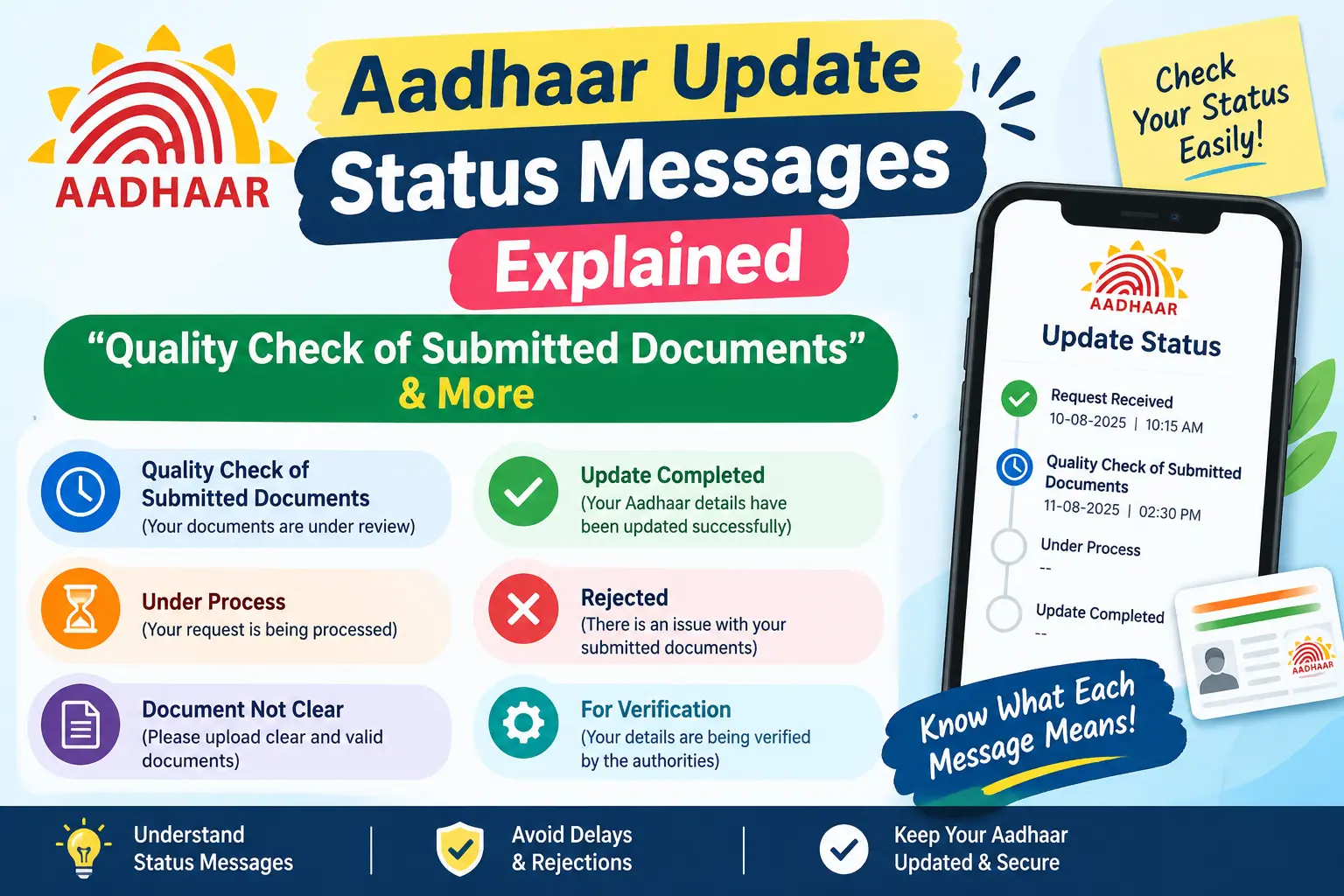
What “Quality Check of Submitted Documents” Actually Means
This status means UIDAI has received your request and is verifying it. It is not a rejection, and it does not require action from you.
Here’s what happens behind the scenes. When you upload a document online — a rent agreement for an address change, for instance — the system accepts it instantly but does not approve it instantly. A verification stage follows, and this is where the phrasing above comes from. Someone (or a review process) checks that your document is readable, belongs to the accepted list for that update type, and matches the details you typed into the form.
If everything lines up, your request moves to the next stage. If it doesn’t, UIDAI may place the update on hold and notify you — which is why checking your registered SMS inbox matters more than refreshing the portal.
Discover More About:👇
How to Track Aadhaar Update/Correction Status Using SRN Number
Aadhaar Complaint Status: Check Online in 2 Minutes
Common Aadhaar Update Status Messages and Their Meanings
Status wording shifts depending on whether you applied online or in person. These are the ones you’ll see most often.
“We’re Currently Validating Your Biometrics Data”
This appears when your request involves fingerprints, iris scans, or your photograph. Since biometrics can’t be captured online, this stage only follows a visit to an Aadhaar Seva Kendra or an Aadhaar Enrolment/Update Centre. UIDAI is confirming the captured data is of usable quality and belongs to the right person. Nothing for you to do here except wait.
“Request Accepted”
Your submission entered the queue. That’s all it means — the update is not done yet.
“Validation Completed”
Verification has finished successfully. Your documents or biometrics passed, and the system is finalising the change to your record. An updated e-Aadhaar is usually downloadable shortly after.
“Update Completed”
The process is finished. Download your revised Aadhaar from the portal and check that every field reads correctly before relying on it for KYC.
How to Check Your Aadhaar Update Status
Know Which Reference Number You Need
Using the wrong number is the single most common reason people see errors or “no record found.”
- URN (Update Request Number) — a 14-digit number issued when you submit an online update, particularly address changes through the Self-Service Update Portal. It appears on screen and arrives by SMS.
- SRN (Service Request Number) — issued for certain online service requests, also sent by SMS.
- EID (Enrolment ID) — a 28-digit number on the acknowledgement slip from an enrolment or update centre. It combines your enrolment number with the date and time.
If you applied online, you need the URN or SRN. If you visited a centre, use the EID from your slip. Your 12-digit Aadhaar number will not work for tracking an in-progress update.
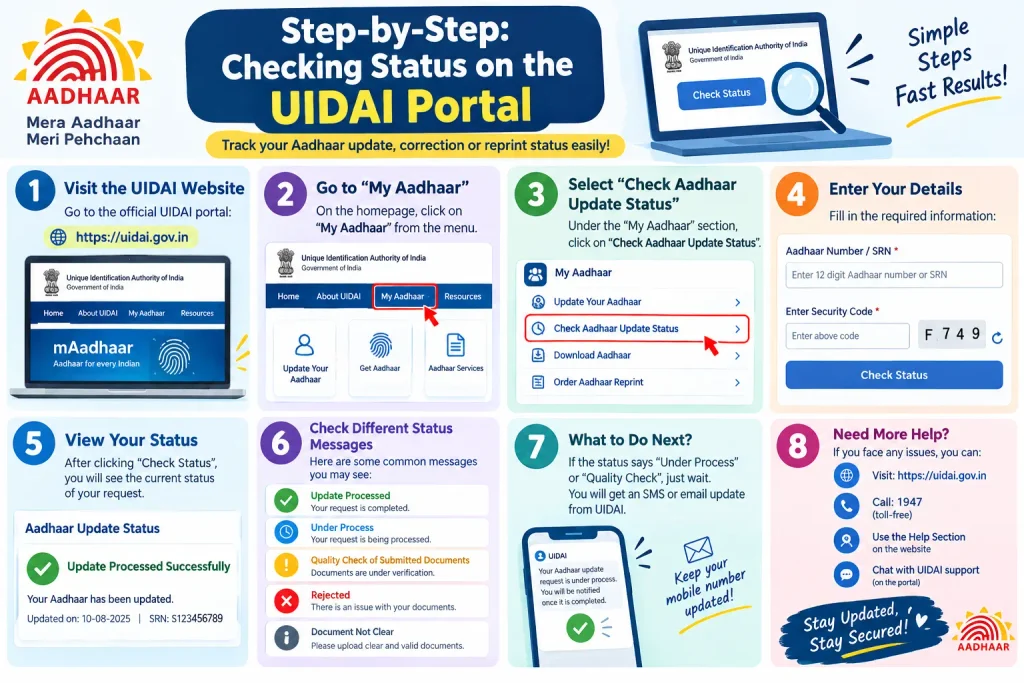
Step-by-Step: Checking Status on the UIDAI Portal
Step 1 — Open the official portal. Type myaadhaar.uidai.gov.in into your browser directly. Avoid links from search ads or forwarded WhatsApp messages.
Step 2 — Choose “Check Enrolment and Update Status.” This opens the tracking form.
Step 3 — Enter your URN, SRN, or EID. Copy it character by character from your SMS or slip. Transposed digits are the most frequent cause of failed lookups.
Step 4 — Fill in the captcha. Case-sensitive, and it expires if you leave the page open too long. If it fails repeatedly, refresh and try again rather than re-entering everything.
Step 5 — Submit and read the result. You’ll see one of the statuses covered above, or “Under Processing” or “Rejected.”
Step 6 — Download your e-Aadhaar if the update is complete. The download is password-protected: typically the first four letters of your name in capitals plus your birth year.
Pitfalls worth knowing: The session times out if you’re slow, wiping your entered details. The OTP for related services only reaches your registered mobile number — if you’ve changed phones without updating it, you’ll need to visit a centre first. And if you resubmit the same request because the status looks stuck, you may create a duplicate that complicates things further.
Alternatives: mAadhaar App and Helpline
The official mAadhaar app offers the same status check on your phone. For human help, call the UIDAI toll-free helpline at 1947 with your reference number and Aadhaar number ready.
If Your Status Hasn’t Moved in Weeks
UIDAI does not publish fixed processing timelines, and durations vary by update type and workload. Before assuming something is wrong, confirm three things: that you’re entering the correct reference number, that you haven’t missed an SMS about a document problem, and that your registered mobile number is still active.
If all three check out and the status remains unchanged for an extended period, escalate through the UIDAI helpline at 1947, the grievance redressal option on the UIDAI website, or your nearest Aadhaar Seva Kendra.
One outcome to understand: a quality check can occasionally lead to temporary suspension of your Aadhaar if a serious discrepancy surfaces. A suspended Aadhaar blocks OTP and biometric authentication, so bank and SIM services stop working. Document-related suspensions are generally resolved by contacting the concerned Aadhaar Regional Office with supporting papers; biometric issues usually require a centre visit.
Common Mistakes That Cause Delays
Poor scans. Blurry, dark, or cropped uploads fail review. Use a colour scan or a well-lit photo of the original document.
Wrong document type. UIDAI maintains separate accepted-document lists for proof of identity, address, date of birth, and relationship. A document valid for one purpose may not be accepted for another.
Mismatched details. The name, address, or date on your document should match what you typed in the form. Small spelling differences can trigger a hold.
Losing the acknowledgement slip. Without your URN, SRN, or EID, tracking becomes difficult. If you’ve misplaced it, you may be able to retrieve your EID on the portal using your registered mobile number.
Frequently Asked Questions
What does “we’re currently doing a quality check of your submitted documents” mean?
It means your request is under verification, not rejected. UIDAI is confirming your document is valid, legible, and appropriate for the update requested. If it passes, the request proceeds automatically.
How long does a quality check take?
No fixed timeline is published, and it varies with update type and request volume. Check periodically rather than daily, and contact UIDAI support if the status hasn’t budged for a notably long stretch.
What’s the difference between URN, SRN, and EID?
URN covers online update requests, SRN covers certain online service requests, and EID comes from an in-person enrolment or update. Use whichever matches how you applied.
My status says “Validation Completed” — what now?
Verification succeeded and your record is being finalised. Expect to download the updated e-Aadhaar shortly, and watch for an SMS confirmation.
Can I check status without a URN or SRN?
It’s difficult. Try retrieving your EID through the portal using your registered mobile number, or call 1947 for guidance.
What if my request is rejected?
UIDAI typically indicates a reason through the portal, SMS, or support channels. Common causes are unclear documents, mismatched details, or an unaccepted document type. You can generally reapply once the issue is corrected.
One Last Thing
Don’t resubmit a pending request out of anxiety — duplicates create more problems than they solve. A more useful habit: after submitting any update, verify that your registered mobile number is current. Nearly every status update, OTP, and alert travels through that number, and an outdated one turns a routine update into a centre visit. For current fees, timelines, and accepted documents, the official UIDAI portal and the 1947 helpline remain the only sources worth trusting.
