


You are opening a new mutual fund account, and the registrar asks for your CKYC number. Or your bank says your KYC is already on file but cannot locate the record. Or you have moved cities, changed your mobile number, and now no institution can verify your details without starting the paperwork all over again. A CKYC number is what prevents that loop — a single 14-digit identifier that stores your verified KYC details in one central registry, so every bank, NBFC, insurer, and mutual fund can pull the same authenticated record instead of asking you to re-submit documents. This guide explains what the CKYC number is, how to check it online, how to download your CKYC card, and what the registration process actually involves.
What is CKYC and Why It Exists
CKYC stands for Central Know Your Customer. It is a centralised digital repository of verified identity and address details, managed by CERSAI (Central Registry of Securitisation Asset Reconstruction and Security Interest of India), a body established under an Act of Parliament.
Before this system existed, every bank, NBFC, insurance company, and mutual fund ran its own KYC checks independently. You submitted the same PAN, Aadhaar, and address proof at each one, and each one stored it separately. Duplicate paperwork, mismatched records, and slow onboarding were the norm. CKYC replaced that with one authoritative record that any regulated financial entity can access — with your consent — instead of starting from zero.
Think of it as a shared, verified file rather than a document you carry around. Once one institution uploads your verified details, others can retrieve them.
Read More About👇
What is a CKYC Number?
When your KYC details are validated and uploaded to the Central KYC Records Registry (CKYCR), you are assigned a CKYC number — a unique 14-digit identifier, also called a KIN (KYC Identification Number).
It is linked to your verified identity documents, most commonly PAN and Aadhaar, and is valid across India with any institution regulated by the RBI, SEBI, IRDAI, or PFRDA. In practice, quoting this number when you open a new account lets the institution fetch your existing verified details from the registry, so you typically do not need to resubmit physical documents.
Why Your CKYC Number Matters
An active CKYC record changes how you deal with financial institutions in a few concrete ways:
- Faster onboarding: Instead of a fresh verification cycle, the institution retrieves your record and proceeds.
- No repeated documentation: Your PAN, Aadhaar, and address proof are not collected again at every new provider.
- Uniform details everywhere: One record means fewer mismatches between institutions.
- Simpler updates: Address or contact changes made through one institution can flow to the central record.
- Harder to misuse: A centralised, verified file reduces the room for identity fraud across multiple accounts.
How to Get a CKYC Number
You do not create a CKYC number yourself on a standalone website. It is generated when a regulated financial institution uploads your verified KYC details to the registry. The process looks like this:
- Approach a regulated institution — a bank, NBFC, insurer, mutual fund registrar, or any entity regulated by RBI, SEBI, IRDAI, or PFRDA. This can be an existing relationship or a new account you are opening.
- Submit your KYC documents — commonly PAN (mandatory for most financial transactions), plus a valid proof of identity and address. Aadhaar, passport, voter ID, driving licence, or NREGA job card are typically accepted.
- Complete verification — depending on the institution and product, this may be in-person verification, OTP-based authentication, or biometric verification.
- Upload to the registry — once verified, the institution uploads your details to the Central KYC Registry.
- Receive your number — the 14-digit CKYC number is generated and usually shared via SMS, email, or in your account welcome kit. You can also retrieve it later through the CKYC portal or your bank’s customer service.
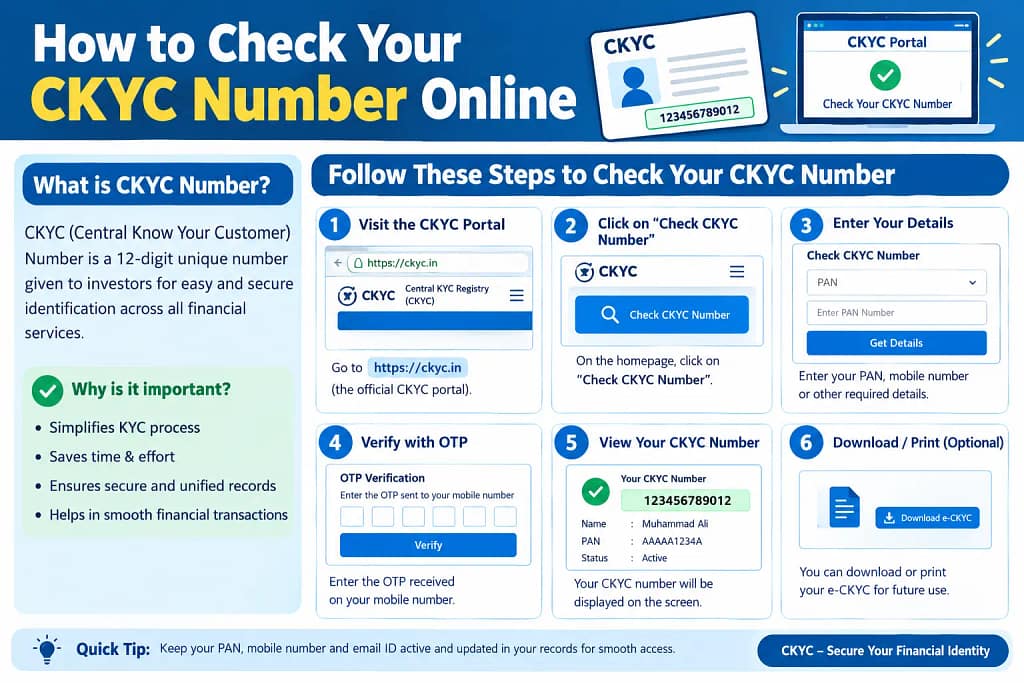
How to Check Your CKYC Number Online
If you are unsure whether a record exists, or you have misplaced the number, the CKYC portal is the most direct route. The steps below reflect the typical flow — portal labels and fields can change, so treat them as a guide rather than a fixed script.
- Go to the official CKYC India portal (ckycindia.in).
- Look for the “Fetch your CKYC card” option or a similar search facility on the homepage.
- Enter your identification details — usually your PAN and registered mobile number. Some flows also accept an Aadhaar-linked mobile number.
- Verify with OTP sent to your registered mobile number.
- View and note your 14-digit CKYC number, and download the CKYC card PDF if you need a copy.
Where people get stuck: the OTP is the most common failure point. If your mobile number has changed since you last completed KYC, the OTP will never arrive — you will need to update the number with your bank or institution first. A mistyped PAN, or a PAN that does not match the one on file, will also return a “record not found” result even when a CKYC record exists. And if the portal times out between entering your details and submitting the OTP, start the session again rather than refreshing mid-flow.
Other ways to check:
- Your bank or financial institution — customer service can retrieve the number after verifying your identity.
- Bank app or net banking — many banks display the CKYC number in the profile or KYC section.
- Old communications — SMS, email, or welcome letters from when you first completed KYC often mention it.
How to Download Your CKYC Card
The CKYC card is a document containing your CKYC number along with key personal details such as name, date of birth, and registered address. It serves as proof that your KYC is registered in the central system.
The download follows the same path as the check above — verify your identity on the CKYC portal using your PAN and registered mobile number, then choose the download option for the CKYC card PDF. One detail people miss: the PDF is usually password-protected, and the password is commonly your date of birth in DDMMYYYY format. Store the file somewhere secure, since it contains personal identifiers.
Documents Required for CKYC Registration
Requirements mirror standard KYC. Typically you will need:
- PAN card — generally mandatory for financial transactions and CKYC registration.
- Proof of Identity (POI) — Aadhaar, passport, voter ID, driving licence, or NREGA job card.
- Proof of Address (POA) — Aadhaar, passport, driving licence, or a recent utility bill, usually not older than two months.
- Photograph — a recent passport-size photograph.
- Consent form — some institutions provide a specific CKYC form or consent declaration to sign.
For online or OTP-based CKYC, verification often happens through Aadhaar-linked OTP or video KYC, which reduces the physical paperwork involved.
Common Mistakes to Avoid
- Assuming CKYC is automatic. Having a bank account does not guarantee a CKYC record exists — the number is only generated when an institution actually uploads your verified details.
- Using an outdated mobile number. The portal sends OTPs to your registered number. If it has changed and was not updated with your institution, the check will fail.
- Ignoring mismatches. Inconsistencies between your PAN, Aadhaar, and address proof can delay or block registration. Fix the mismatch at the source before applying.
- Overlooking duplicate records. In rare cases, separate institutions may have uploaded your details independently, creating more than one CKYC record. If you suspect duplicates, contact your bank or the registry to have them reconciled.
FAQs
What is the full form of CKYC?
CKYC stands for Central Know Your Customer. It is a centralised system managed by CERSAI that stores verified KYC records for individuals across India.
How can I get my CKYC number if I don’t remember it?
Retrieve it through the official CKYC portal using your PAN and registered mobile number. Alternatively, contact the bank or financial institution where you completed KYC — they can pull it from the registry.
Is CKYC registration mandatory?
It is not a separate registration you complete on your own. It happens as part of the KYC process when you open an account or start a relationship with a regulated entity. If you have completed KYC at an RBI, SEBI, IRDAI, or PFRDA-regulated institution since the system was introduced, you likely already have a CKYC number.
Can I update my CKYC details online?
Updates are typically initiated through a financial institution. Visit your bank or service provider, complete a CKYC modification form, and submit supporting documents for the change — a new address or a name change, for example. The institution verifies and uploads the updated information to the registry.
What if my CKYC number check fails on the portal?
A failed check usually means either no institution has uploaded your details yet, or the details you entered do not match the record. Re-check your PAN and mobile number first. If the problem persists, contact your bank’s customer care, since they can query the registry on your behalf.
If your CKYC check fails, resist the urge to keep retrying the same details — the mismatch is usually in the mobile number or PAN on file, not in your typing. Fix the underlying record with your bank first, then attempt the portal check again after a day or two, since updates to the registry are not always reflected instantly.