

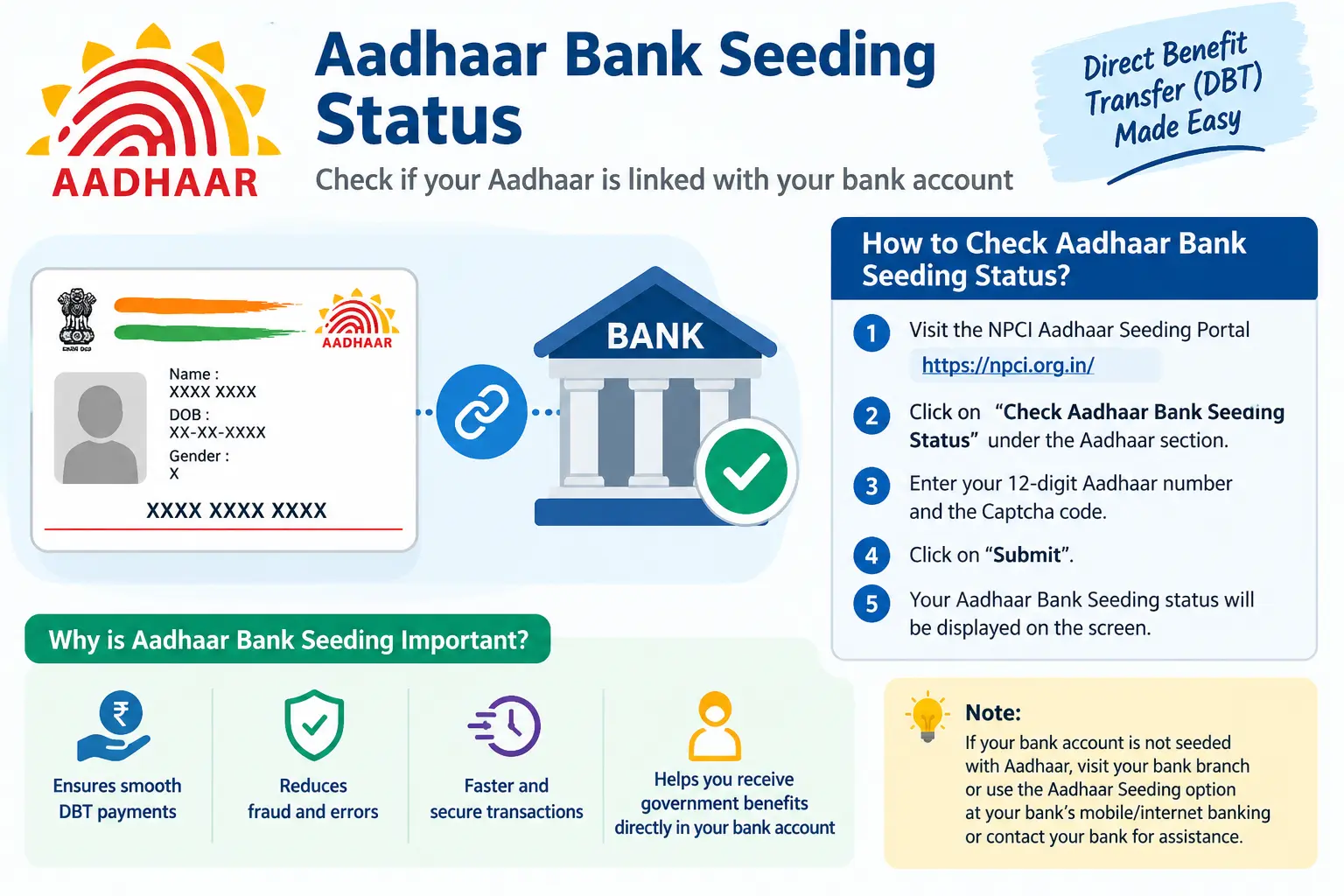
Your bank may tell you that your Aadhaar is linked, but that does not always answer the question that matters most: is the correct bank account mapped for Aadhaar-based DBT?
This is why people searching for how to check aadhar card link with bank account often end up confused by terms such as linked, seeded, mapped, and DBT enabled. These terms are connected, but they are not necessarily describing the same step.
UIDAI provides a way to check Aadhaar bank-seeding status through myAadhaar, with the displayed information fetched from NPCI. NPCI also provides facilities for checking Aadhaar seeding status.
This guide explains how to check the status, what the result means, why bank linking and NPCI seeding can be different, and what to do if your bank says everything is linked but a scholarship, subsidy, or other DBT payment is still not arriving.
Important: CheckAadharStatus.com is an independent informational website, not an official UIDAI service. Use only official UIDAI, NPCI, or bank channels for actual Aadhaar-related transactions.
Discover More About:👇
Aadhaar Verification Online: How to Verify & Check Aadhaar Card Validity
How to Retrieve or Find Your Lost Aadhaar Number Online
How to Check Aadhaar Card Validity Online (Step-by-Step Guide)
Quick Facts
| Detail | Information |
|---|---|
| Service | Aadhaar Bank Seeding Status |
| Main purpose | Check Aadhaar-bank seeding/mapping status for DBT |
| Official sources | UIDAI and NPCI |
| Main online route | myAadhaar |
| Information source | NPCI |
| Authentication | OTP-based authentication is used for the official status service |
| DBT mapping | Aadhaar-based payments are routed to the applicable mapped bank account |
| Independent guide | CheckAadharStatus.com |
How to Check Aadhaar Bank Seeding Status Online
If you want to verify whether your Aadhaar is linked with your bank for DBT purposes, use the official Aadhaar bank-seeding status service rather than relying only on a bank employee’s verbal confirmation.
Check Aadhaar Bank Seeding Status Through myAadhaar
The general process is:
- Open the official myAadhaar website at myaadhaar.uidai
- Sign in using the required Aadhaar authentication
- Select the service for checking Aadhaar Bank Seeding Status or Aadhaar-bank linking status
- Complete the required OTP verification
- Review the bank-seeding information displayed
Important: UIDAI says the information displayed through this service is fetched from the NPCI server. UIDAI also states that it does not store this fetched information and is not responsible for its correctness.
What Do You Need to Check the Status?
The official service requires Aadhaar authentication, including OTP verification. The exact fields and interface can change, so readers should follow the current instructions displayed on the official myAadhaar website.
If you are checking because a DBT payment is missing, also keep the relevant bank and government-scheme information available. You may need it when contacting the bank or scheme authority.
What Does Aadhaar Bank Seeding Status Mean?
Aadhaar bank seeding becomes particularly important when you are expecting an Aadhaar-based government payment.
NPCI explains that the NPCI Mapper is used to associate Aadhaar numbers with a particular bank for routing Aadhaar-based payment transactions.
In simple terms:
| Term | Meaning |
|---|---|
| Aadhaar-bank linking | The bank links your Aadhaar with your bank account after the required verification |
| Aadhaar seeding | The bank updates the NPCI Mapper after the required linking and customer consent process |
| NPCI mapping | The Aadhaar is associated with the relevant bank for Aadhaar-based payment routing |
| DBT | Eligible government benefits can be routed through the Aadhaar-based payment system |
The important point is that these terms should not automatically be treated as interchangeable.
When you check your status, you’ll typically see one of these results:
| Status | What It Means | What to Do |
|---|---|---|
| Active | Your Aadhaar is correctly mapped to your bank account in the NPCI Mapper for DBT | No further action needed |
| Inactive | A record exists, but the account is not enabled for DBT payments | Visit your bank branch to submit a fresh DBT/NPCI seeding request |
| Not Mapped | No Aadhaar mapping record is found in the NPCI Mapper | Visit your bank branch to initiate Aadhaar seeding for DBT |
Aadhaar Bank Linking vs Aadhaar Seeding: What’s the Difference?
This distinction explains many of the complaints people have about Aadhaar and DBT.
NPCI describes bank-account linking and NPCI Mapper seeding as separate parts of the process. The bank first links the Aadhaar to the customer’s account after verification. The bank then updates the NPCI Mapper based on the required process and consent.
Discover More About:👇
How to Check Mobile Number Linked to Aadhaar Online
Voter Card Aadhaar Card Link: How to Submit Form 6B and Verify Your Voter ID
| Aadhaar Bank Linking | Aadhaar Seeding / NPCI Mapping |
|---|---|
| Connects Aadhaar with the bank account | Updates the NPCI Mapper |
| Takes place within the bank’s process | Used for Aadhaar-based payment routing |
| Requires bank verification | Requires the relevant seeding process and consent |
| Does not by itself explain every DBT status | Directly relevant to Aadhaar-based DBT routing |
This is why a bank saying “your Aadhaar is linked” may not completely resolve a DBT problem.
If your purpose is simply to know whether your bank has your Aadhaar, account-level linking may be the question. If you are waiting for a government benefit, you should also understand the NPCI seeding/mapping status.
How Aadhaar Seeding Works for DBT
The DBT process involves more than simply entering an Aadhaar number into a bank account.
The DBT Mission’s standard operating procedure describes Aadhaar seeding as involving two broad stages:
- The bank verifies Aadhaar and links it with the customer’s account in its core banking system
- The bank seeds the Aadhaar in the NPCI Mapper
Once the relevant process is completed, the account can become eligible to receive Aadhaar-based DBT credits.
text
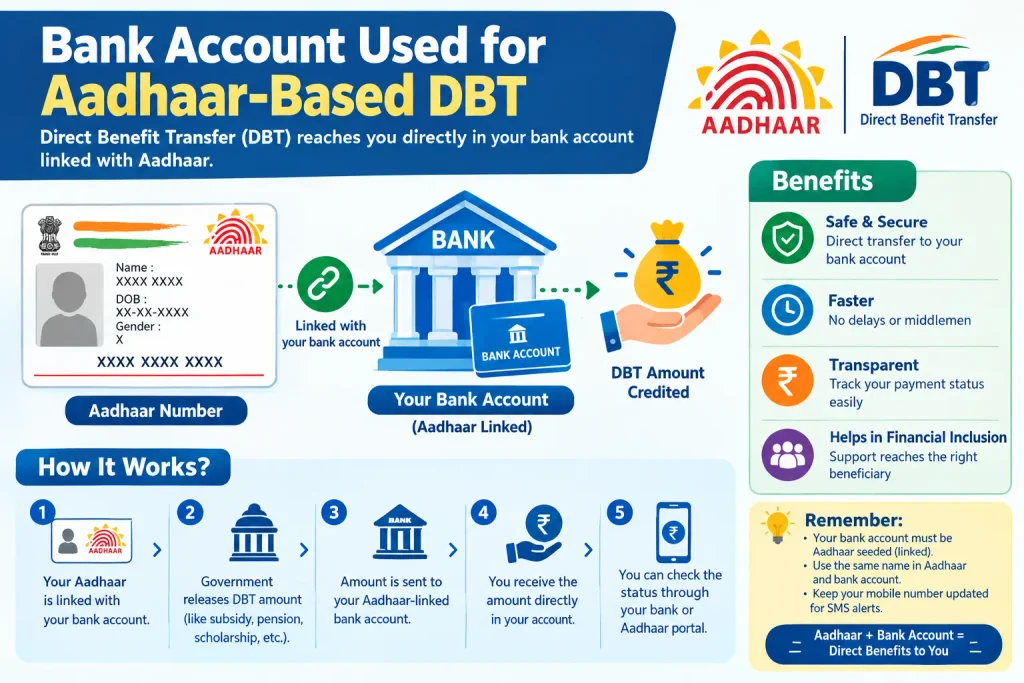
Aadhaar Holder → Submits consent/mandate to bank
         ↓
    Bank verifies information
         ↓
    Bank links Aadhaar in CBS
         ↓
    Bank updates NPCI Mapper (seeding)
         ↓
    NPCI Mapper enables Aadhaar-based DBT routing
         ↓
    Government DBT payments reach your account
This is also why simply checking whether an Aadhaar number exists in a bank’s internal records may not tell you the full DBT status.
What If Your Aadhaar Is Linked but DBT Is Not Coming?
This is one of the most confusing situations for users.
If your bank says your Aadhaar is linked but your expected government payment has not arrived, work through the problem instead of immediately submitting another linking request.
1. Check the Aadhaar Bank Seeding Status
First, check the official status through myAadhaar or NPCI.
Look at the bank information and seeding/mapping result shown by the service.
2. Ask the Bank to Verify NPCI Seeding
If the bank only confirms that your Aadhaar is linked to the account, ask whether the Aadhaar has also been seeded in the NPCI Mapper for DBT.
This is more specific than simply asking, “Is my Aadhaar linked?”
3. Check the Government Scheme or Payment Status
A correct Aadhaar-bank mapping does not automatically prove that every government payment has been processed.
If you are waiting for a scholarship, subsidy, pension, incentive, or another benefit, check the relevant scheme or payment status separately.
4. Don’t Keep Repeating the Same Request
If your Aadhaar is already correctly linked and mapped, repeatedly submitting another request may not solve a separate payment or eligibility issue.
Ask the bank to identify the exact problem first.
Which Bank Account Receives DBT if You Have Multiple Accounts?
This is another common source of confusion.
You may have several bank accounts, but that does not mean an Aadhaar-based DBT payment will be deposited into every account.
UIDAI explains that DBT benefits are credited to the account selected through the applicable mandate/consent and seeded in the NPCI Mapper.
So if you have accounts with multiple banks and want to know which bank is currently mapped for Aadhaar-based DBT, checking the official bank-seeding status is important.
The key distinction is:
Having multiple bank accounts ≠ receiving the same Aadhaar-based DBT in all of them.
How it works:
- Different banks may submit seeding requests for the same Aadhaar
- The latest successful mandate becomes the active mapping in the NPCI Mapper
- Aadhaar-based DBT benefits are received in only one selected account at a time
How to Change the Bank Account Used for Aadhaar-Based DBT
If you want a different bank account to receive Aadhaar-based DBT, UIDAI advises visiting the relevant bank and submitting the required mandate and consent form.
The bank then carries out the applicable linking and seeding process.
Steps to change:
- Approach your desired bank – Visit the bank branch where you want DBT to be received
- Submit an Aadhaar-seeding request – Fill out the bank’s mandate/consent form (often Annexure I)
- Complete the bank’s verification process – Provide any required documents
- The bank will seed your Aadhaar in the NPCI Mapper
- The new mapping becomes active – The latest seeding request becomes the active mapping
NPCI documentation also provides for moving Aadhaar seeding from one bank to another through its BASE framework.
Because this can affect where Aadhaar-based benefits are routed, verify the resulting status after the bank completes the process.
Alternative Official Way to Check Aadhaar Seeding Status
Besides myAadhaar, NPCI provides Aadhaar-seeding facilities through the Bharat Aadhaar Seeding Enabler (BASE) framework.
Steps to check through NPCI BASE:
- Visit the official NPCI website: npci.org.in
- Click on the “Customer” tab
- Select “Bharat Aadhaar Seeding Enabler (BASE)”
- From the menu, choose:
- “Get Aadhaar Mapped Status” – to check current linkage
- “Get Aadhaar Mapping History” – to view historical linkage data
- Enter your Aadhaar details and authenticate with OTP
- Review your seeding status
NPCI’s procedural documentation lists BASE services including:
- Checking Aadhaar seeding status
- Aadhaar seeding
- Aadhaar deseeding
- Moving Aadhaar seeding from one bank to another
NPCI has also introduced a Get Account Details API within BASE. Its documented flow can provide information about whether Aadhaar is linked with an account in the bank’s core banking system and, where applicable, whether subsidy is enabled, subject to authentication and the bank’s response.
Common Aadhaar-Bank Linking and Seeding Problems
| Problem | What to Check | Next Action |
|---|---|---|
| Status Not Showing | Current seeding status through official portal | Verify with your bank branch directly |
| Bank Says “Linked” But Status Differs | NPCI Mapper mapping status | Ask bank to specifically verify NPCI seeding |
| Wrong Bank Showing | Current active mapping | Follow the bank’s reseeding process |
| Aadhaar Seeding Status Inactive | Account eligibility and mapping status | Contact your bank and submit fresh mandate |
| DBT Payment Not Received | DBT + mapping + scheme status | Check with relevant authority and your bank |
“My bank says Aadhaar is linked, but the status is different.”
Ask the bank to check both the Aadhaar link in its banking system and the NPCI Mapper seeding status.
“My Aadhaar is seeded, but my payment hasn’t arrived.”
Do not automatically assume Aadhaar seeding is the only problem. Check the relevant government scheme and payment status as well.
“The wrong bank is showing.”
Verify which bank is currently mapped for Aadhaar-based DBT. If you want to change it, contact the relevant bank and follow its required mandate/consent process.
“My status isn’t showing correctly.”
Use the official UIDAI/NPCI channels. If the problem continues, contact your bank for verification.
“Someone is asking me to pay to check or activate Aadhaar seeding.”
Be careful with unofficial paid services. You do not need to hand over your Aadhaar OTP or banking credentials to an unknown person to have them “check” your status. Use official UIDAI, NPCI, or bank channels instead.
Is Aadhaar-Bank Account Linking Safe?
The safest approach is simple: use official services and protect your authentication information.
Security facts you should know:
- UIDAI does not maintain bank-account information in its Aadhaar database
- The bank seeding status displayed is fetched from NPCI and is not stored by UIDAI
- UIDAI does not have visibility into your bank-account information merely because Aadhaar is linked
Safety guidelines:
- Use only official UIDAI (myaadhaar.uidai) or NPCI (npci.org.in) websites
- Use your bank’s official app or website for banking matters
- Never share your OTP with anyone claiming to check or activate your status
- Never use unofficial third-party websites that ask for your Aadhaar or OTP
- Never pay agents claiming to “activate DBT” for you
Never share your Aadhaar OTP with another person. Avoid posting your Aadhaar number, bank account details or other sensitive information in public comments, social-media posts or forums.
UIDAI also explains that the bank-seeding information displayed through its service comes from NPCI rather than being stored by UIDAI.
For official Aadhaar assistance, UIDAI provides the toll-free 1947 helpline.
Troubleshooting Decision Tree
If you’ve checked your status and still have issues, follow this decision tree:
1. Status shows “Active”
→ If DBT payment is missing, check the relevant scheme/payment record directly. Don’t automatically assume Aadhaar seeding is the problem.
2. Status shows “Inactive” or “Not Mapped”
→ Contact your bank branch and ask specifically about Aadhaar linking + NPCI Mapper/DBT seeding.
3. Bank says linked but NPCI status doesn’t match
→ Ask your bank to verify NPCI seeding/mapping, not merely account-level KYC linking.
4. Wrong bank appears in status
→ Verify which bank is currently mapped for DBT and discuss changing/reseeding through the appropriate bank process.
5. Government scheme still says “not seeded”
→ Check the scheme’s own requirements separately. Don’t assume the generic Aadhaar status alone proves the entire payment workflow is complete.
FAQs
How do I check if my Aadhaar is linked with my bank account?
Use the official Aadhaar bank-seeding-status facility through myAadhaar. UIDAI says the displayed seeding information is fetched from NPCI.
How do I check Aadhaar bank seeding status online?
You can check it through the official myAadhaar service. NPCI also provides seeding-status facilities through BASE.
Is Aadhaar linking the same as Aadhaar seeding?
No. Bank-account linking and NPCI Mapper seeding are separate parts of the overall process.
Which bank account receives Aadhaar-based DBT?
Aadhaar-based DBT is routed to the applicable bank account mapped through the relevant mandate/consent and NPCI Mapper process. It is not automatically credited to every account you hold.
What if my bank says Aadhaar is linked but DBT is not working?
Ask the bank to verify whether your Aadhaar has also been seeded in the NPCI Mapper. Then check the relevant government scheme or payment status separately.
Can I change the bank account used for Aadhaar-based DBT?
Yes. UIDAI advises submitting the applicable mandate and consent through the bank for changing the account used for DBT.
Can I check which bank is mapped to my Aadhaar?
The official Aadhaar bank-seeding status service can provide information about the bank associated with the Aadhaar seeding record fetched from NPCI.
Is there a separate paid service I need to use to check Aadhaar-bank status?
Do not rely on unofficial paid services for this. Use the official UIDAI or NPCI channels for checking Aadhaar bank-seeding status.
Can Aadhaar be linked with multiple bank accounts?
Yes, you can link your Aadhaar to multiple bank accounts for KYC purposes. However, only one account can be active in the NPCI Mapper for DBT at a time.
What is NPCI Mapper?
NPCI Mapper is the central repository maintained by NPCI that contains Aadhaar numbers linked with the relevant bank/IIN information. It is used for routing Aadhaar-based payment transactions, including DBT subsidies.
Why is my Aadhaar bank seeding status inactive?
The status may be inactive if the NPCI mapping was not completed successfully, the account is not eligible for DBT, or the seeding request was rejected. Visit your bank branch to investigate and resubmit if needed.
Does UIDAI store my bank-account details?
No. UIDAI does not maintain bank-account information in its Aadhaar database. The bank seeding status is fetched from NPCI and is not stored by UIDAI.
Final Takeaway
If you’re trying to find out how to check aadhar card link with bank account, start with the official Aadhaar bank-seeding status rather than relying only on a bank’s verbal confirmation.
For DBT, the important chain is:
Bank linking → NPCI seeding/mapping → DBT routing
Understanding that difference can make it much easier to diagnose problems such as a missing payment, an unexpected bank mapping, or a mismatch between what your bank says and what a government scheme shows.
When the status doesn’t match your situation, don’t hand over your OTP or pay an unofficial “Aadhaar agent.” Check the official UIDAI/NPCI status first, then contact your bank or the relevant government scheme through its official channel.
Disclaimer: This is an independent informational guide and is not affiliated with UIDAI, NPCI, or the Government of India. Always verify the current status on the official UIDAI/NPCI or your bank’s website.

3 Comments
Pingback: Aadhaar Bank Seeding Status for DBT: Check Adhar Link Status
Pingback: PM Jan Dhan Yojana 2026: Benefits & Account Opening
Pingback: Post Office Rate of Interest 2026