


If you are searching for nseit login because the old NSEIT website is no longer opening, you are not alone. The important change is that UIDAI’s Aadhaar Operator/Supervisor certification registration and examination services have moved from the earlier NSEIT portal to the Dexit Global platform.
This change can create confusion, especially for candidates who already have an account, need to recover a User ID or password, or are trying to find the correct login page. Searches such as “nseit login 2026”, “nseit new link”, “nseit forgot user id”, and “nseit exam login” are often attempts to solve the same problem: which portal should I use now, and what should I do if my old login does not work?
This guide explains the current situation, the login process, account recovery, the difference between certification login and aadhar ucl login, and some commonly searched terms such as andhar open password, andher, and ain status.
Important: CheckAadharStatus.com is an independent informational website, not an official UIDAI service. Complete registrations, payments, examinations, and Aadhaar-related transactions only through official UIDAI or authorised government-linked portals.
Discover More About: 👇
PVC Status Check Online – Aadhaar PVC Card Tracking (2026)
Aadhaar Complaint Status: How to Check UIDAI Grievance Status Online
Quick Facts
| Detail | Information |
|---|---|
| Service | UIDAI Aadhaar Operator/Supervisor/CELC certification |
| Earlier platform | NSEIT |
| Current certification platform | Dexit Global |
| Main purpose | Registration, account access, certification examination services |
| Old NSEIT portal | Transition notice directs users to the Dexit Global portal |
| Certification validity | 3 years |
| Official authority | UIDAI |
What Is NSEIT Login?
The term NSEIT login is commonly used for access to the UIDAI Aadhaar Operator/Supervisor certification examination system.
Candidates and Aadhaar-related personnel may use the certification portal for activities such as registration, account access, examination-related services, mock examination and seat booking.
However, there is an important 2026 update: the earlier NSEIT examination portal announced that its old registration URL and NSEIT helpdesk would no longer be available from 12 March 2026. Users were directed to the new Dexit Global UIDAI examination portal instead.
That means searching for an old “UIDAI NSEIT login” page can lead you to outdated instructions.
What changed from NSEIT to Dexit Global?
The key point is simple:
Old NSEIT portal → Current Dexit Global UIDAI certification portal
So if the old website is not working, do not assume that your account or certification process has disappeared. First, use the current portal identified in the official transition notice.
How to Access the Current UIDAI Certification Login
For candidates looking for the nseit login new link, the official transition notice directs users to the Dexit Global UIDAI examination portal.
The current portal is intended for UIDAI certification-related services rather than general Aadhaar services.
When accessing it:
- Open the current UIDAI certification portal referred to in the official transition notice.
- Choose the login option available for registered users.
- Enter the required account credentials.
- Submit the login form.
- If your credentials are accepted, continue to the relevant certification service.
If you are a new candidate, do not confuse registration with an existing-user login. The portal’s registration process and login process serve different purposes.
- Official UIDAI website
- Current Dexit Global UIDAI certification portal
New User Registration vs Existing User Login
One common reason people get stuck is choosing the wrong option.
If you have not registered
You need to follow the certification registration process and provide the information requested by the official portal.
Current application instructions include steps involving Aadhaar-related verification information, mobile verification, registration details and other requirements specified by the portal.
If you already have an account
Use the existing-user login option rather than starting another registration unnecessarily.
If you cannot remember your User ID or password, use the official recovery options instead.
Forgot NSEIT User ID or Password?
Searches such as nseit forgot user id, nseit password forgot, and nseit login not working usually indicate an account-access problem rather than a new registration problem.
The earlier NSEIT system provided separate recovery options for forgotten passwords and User IDs. Password recovery could use the available verification methods, while User ID recovery used account information such as date of birth and registered mobile details.
Because the platform transitioned in 2026, however, users should rely on the recovery facilities available on the current Dexit Global portal rather than repeatedly trying outdated NSEIT pages.
If you forgot your password
Try the official password-recovery option shown on the current portal.
Keep the mobile number or other account information required for verification available.
If you forgot your User ID
Look for the official Forgot User ID or account-recovery option on the current portal.
Do not create multiple accounts simply because you cannot remember your original login details.
If recovery does not work
Check that:
- You are using the current certification portal.
- Your registered details are entered correctly.
- You are using the correct recovery option.
- You are not relying on an old NSEIT login page.
- You follow the support instructions provided by the current portal.
NSEIT Login Not Working? Check These Things First
Before assuming that your account is blocked, check the basics.
1. Confirm the website
The old NSEIT portal is no longer the correct destination for new registration and certification services after the announced transition.
2. Check your credentials
Make sure the User ID and password are entered exactly as required.
3. Use account recovery
If you cannot remember the credentials, use the portal’s official recovery options instead of guessing repeatedly.
4. Avoid unofficial websites
Search results may show websites claiming to provide Aadhaar, UCL or certification services. Do not enter your Aadhaar details, OTP, password or other sensitive information into an unverified website.
5. Check official instructions
If the problem continues, use the support or help information provided by the current official certification portal or UIDAI.
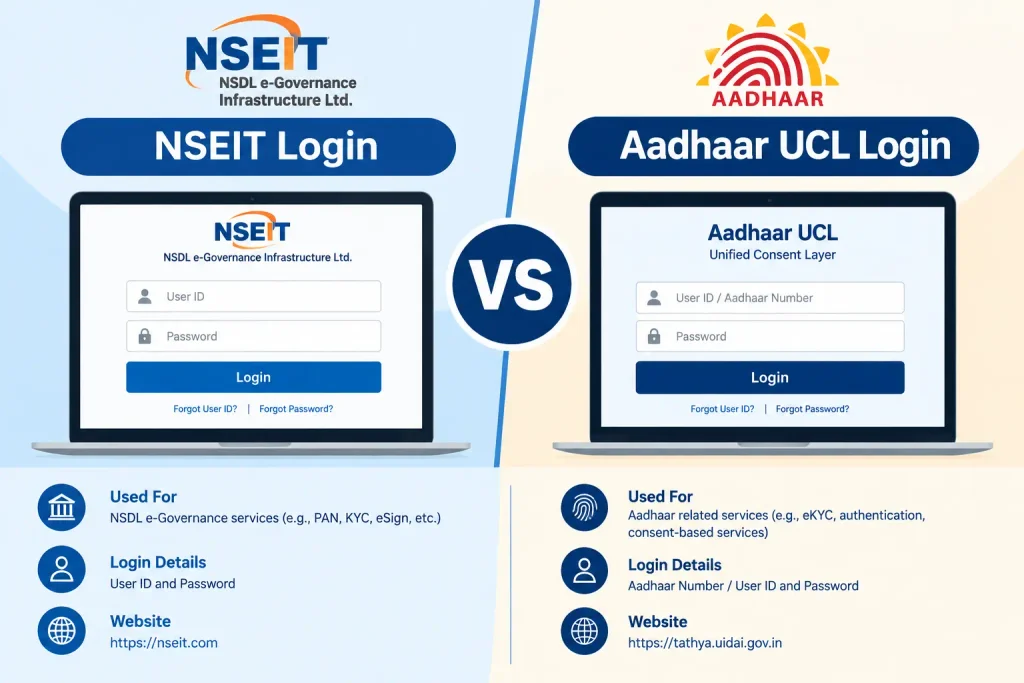
NSEIT Login vs Aadhaar UCL Login
These two searches are often mixed together, but they refer to different things.
NSEIT/Dexit certification login relates to the UIDAI certification examination and related account services.
Aadhaar UCL login relates to the Update Client Lite (UCL) environment used for Aadhaar update operations.
UIDAI documentation describes UCL in the context of updating Aadhaar data, including demographic information and photographs, with biometric authentication used as part of the process.
Discover More About: 👇
Aadhaar Seva Kendra Near Me: How to Find Your Nearest Aadhaar Enrollment/Update Centre
UIDAI Aadhaar Helpline Number & Customer Care: Toll-Free Numbers, Email & Contact Details
| Feature | NSEIT/Dexit Login | Aadhaar UCL Login |
|---|---|---|
| Main purpose | UIDAI certification/examination services | Aadhaar update operations |
| User context | Certification candidates/operators/supervisors | Authorised Aadhaar update operators |
| Same login? | No | No |
| Related to certification exam? | Yes | Not the same service |
| General Aadhaar card login? | No | No |
So, if your search is specifically aadhar ucl login, do not use the certification login simply because both involve Aadhaar-related work.
What Does “Andhar Open Password” Mean?
The phrase andhar open password appears to be a misspelled or informal search for an Aadhaar PDF password.
If you mean the password required to open a downloaded e-Aadhaar PDF, UIDAI provides a standard password format.
According to UIDAI, the e-Aadhaar PDF password is:
First four letters of the Aadhaar holder’s name in CAPITAL letters + year of birth (YYYY).
For example, if the name begins with “RAVI” and the year of birth is 1995, the password format follows the corresponding four-letter-plus-year rule.
The important point is that this is not the same thing as your NSEIT/Dexit account password.
What Does “Andher” Mean in Aadhaar Searches?
The keyword andher does not have a clearly established Aadhaar-specific meaning in the official information reviewed for this guide.
It may be:
- A spelling mistake,
- An incomplete search query, or
- A shortened version of another Aadhaar-related term.
Because there is no reliable official Aadhaar definition to attach to the word, it would be misleading to invent one.
If you saw “andher” in a specific error message, portal field or document, the surrounding text is more useful than the keyword alone.
What Is “AIN Status”?
The phrase ain status also does not correspond to a clearly verified Aadhaar status-check service in the official UIDAI material reviewed for this article.
AIN can have meanings in other government or administrative contexts, so it should not automatically be treated as an Aadhaar status code.
If you are actually trying to check:
- Aadhaar update status,
- Aadhaar enrolment status,
- Aadhaar PVC status,
- Aadhaar authentication status, or
- PM-KISAN payment status,
use the specific official service for that purpose rather than searching by an unclear abbreviation.
Can You Check PM-KISAN Status Directly With Aadhaar?
This is another area where different Aadhaar-related searches can become confusing.
Aadhaar is used in the PM-KISAN system for registration and authentication, but the current official Know Your Status process is not simply an “enter Aadhaar number and see payment status” page.
The official PM-KISAN status service asks for a Registration Number, captcha and an OTP sent to the registered mobile number. The page can then display information such as payment status, bank details, UTR, payment mode, credited information and financial-year e-KYC details.
Therefore, do not rely on websites promising an unofficial “Aadhaar-only PM-KISAN status” method.
- Official PM-KISAN Know Your Status
Keep These Services Separate
Aadhaar-related portals can look similar in search results, but they perform different jobs.
| What you want to do | Use the relevant official service |
|---|---|
| UIDAI operator/supervisor certification | UIDAI certification/Dexit Global portal |
| Open downloaded e-Aadhaar PDF | e-Aadhaar password format provided by UIDAI |
| Aadhaar update operations | Authorised Aadhaar update/UCL environment |
| General Aadhaar services | UIDAI / myAadhaar |
| PM-KISAN payment status | Official PM-KISAN status service |
This separation is useful because entering Aadhaar information on the wrong website can create both confusion and security risks.
What You Should Never Do
When dealing with an Aadhaar or certification login, avoid:
- Sharing OTPs with another person.
- Giving your account password to an unknown caller.
- Entering Aadhaar details on an unfamiliar website.
- Paying an unofficial “agent” to recover a login.
- Assuming every website appearing for “NSEIT login” is the current official portal.
- Treating social-media tutorials as a substitute for current official instructions.
A tutorial uploaded months ago may still show the old NSEIT system even though the official platform has changed.
Frequently Asked Questions
What is the new NSEIT login website in 2026?
The earlier NSEIT portal announced that users should move to the Dexit Global UIDAI examination portal from 12 March 2026. Use the current official portal rather than an outdated NSEIT registration URL.
Is NSEIT still used for Aadhaar certification?
The name “NSEIT” remains common in searches because it was associated with the earlier certification system. However, the official portal announced the transition to Dexit Global in 2026.
What should I do if my old NSEIT login does not work?
First, move to the current Dexit Global certification portal. If you cannot access your account, use the available official recovery options rather than repeatedly trying the old website.
What is the NSEIT exam login used for?
It is commonly used to refer to account access for UIDAI Aadhaar Operator/Supervisor/CELC certification-related examination services.
Is NSEIT login the same as Aadhaar UCL login?
No. Certification login and UCL are separate systems serving different purposes. UCL is associated with Aadhaar update operations.
What is the Aadhaar PDF password?
UIDAI states that the e-Aadhaar PDF password uses the first four letters of the name in CAPITAL letters followed by the year of birth in YYYY format.
Why is “andhar open password” showing up in searches?
It appears to be a misspelled or informal query referring to opening an Aadhaar PDF. If that is what you mean, use the official UIDAI e-Aadhaar password format.
What does “andher” mean?
There is no clearly verified Aadhaar-specific meaning for andher in the official sources reviewed. It should not be treated as an official Aadhaar status or error code without additional context.
What does AIN status mean?
There is no clearly verified Aadhaar-specific AIN status service identified in the official UIDAI material reviewed for this guide. Use the exact name of the Aadhaar service you are trying to access.
Can I check PM-KISAN payment status using only Aadhaar?
The current official PM-KISAN “Know Your Status” service uses a Registration Number, captcha and OTP to the registered mobile number. Aadhaar is used within the broader PM-KISAN registration/authentication process, but the status page should not be represented as a generic Aadhaar-only status checker.
Final Takeaway
If you are searching for nseit login in 2026, the most important thing to remember is the portal transition. The old NSEIT system should not be your first destination; the official transition notice directs users to the current Dexit Global UIDAI certification portal.
For other searches, identify the service before entering your details: aadhar ucl login is different from certification login, and andhar open password usually points to the e-Aadhaar PDF password rather than an account password. Terms such as andher and ain status should not be given an invented Aadhaar meaning when the official documentation does not establish one.
When in doubt, start with the official UIDAI website or the relevant government portal, verify the service you need, and only then enter your information.

4 Comments
Pingback: Aadhaar Complaint Status: Check Online in 2 Minutes
Pingback: Aadhaar Seva Kendra Near Aadhaar Enrollment/Update Centre
Pingback: Fake Aadhar Card Maker: Check if an Aadhaar Is Genuine
Pingback: Aadhaar Complaint Status: Check UIDAI Grievance Status Online