

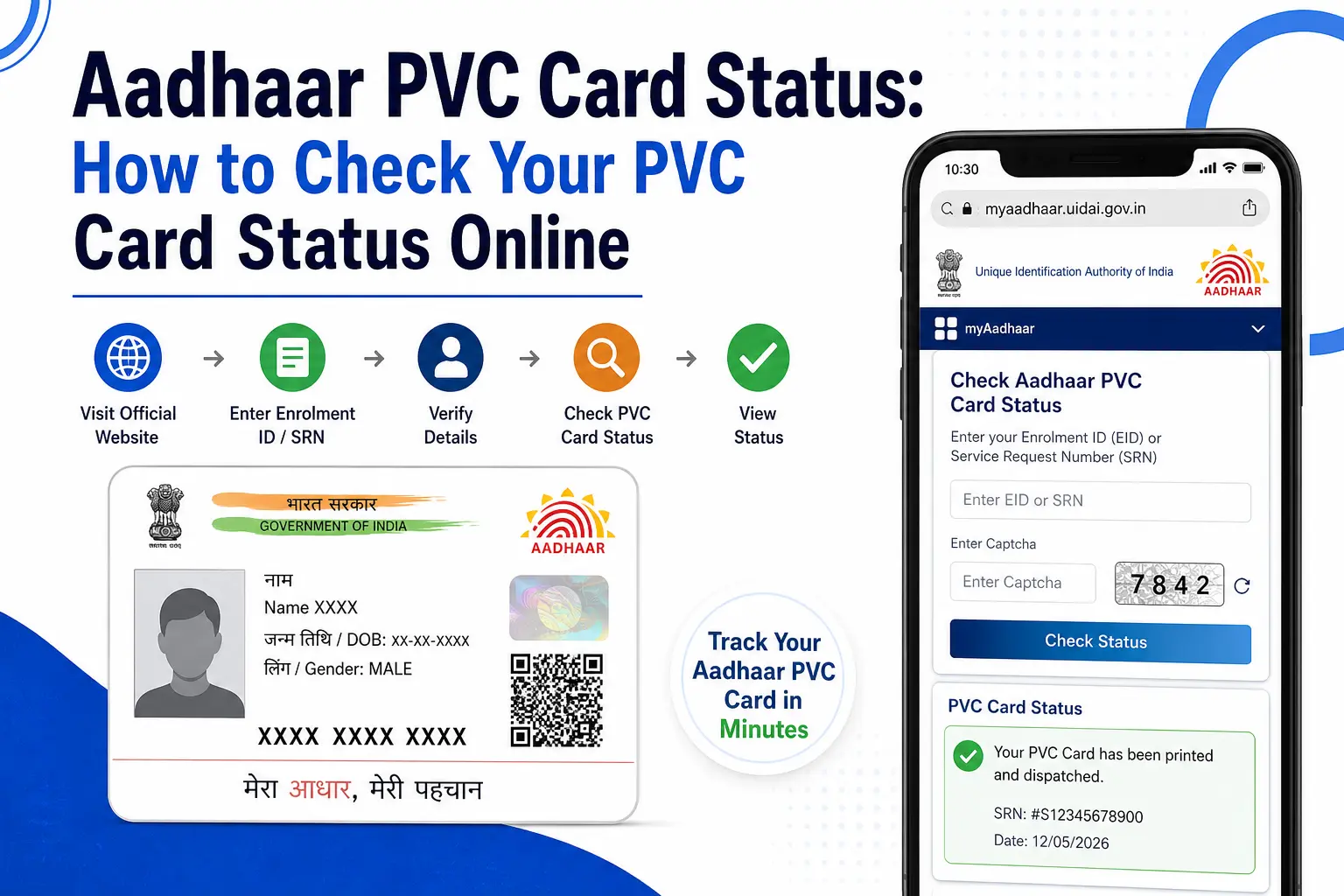
You ordered an Aadhaar PVC Card, the payment went through, and now you are wondering: Where is my card?
That is where the difference between an SRN and an AWB number becomes important. Your Aadhaar PVC request is tracked through UIDAI up to dispatch, while the postal delivery stage is tracked through the Department of Posts after an AWB number is generated.
This guide explains how the tracking process works, what the important numbers mean, how long UIDAI says the printing and handover stage takes, and what to do if your status does not appear as expected.
It also clears up a common search-intent problem. Searches such as “check my Aadhaar card status” and “aadhaar card status online” can refer to several different Aadhaar services. A PVC order, an Aadhaar update, an e-Aadhaar download, and PM-KISAN beneficiary status are not the same process.
Important: CheckAadharStatus.com is an independent informational website and is not affiliated with UIDAI. Use only official UIDAI/MyAadhaar services for Aadhaar transactions and avoid unofficial websites asking for Aadhaar details or payment.
To check PVC status online: go to the official UIDAI/MyAadhaar website, open the PVC Card status service, and enter your SRN (Service Request Number) from your order confirmation. You’ll see whether it’s processing or dispatched. Once dispatched, use the AWB number for postal tracking.
Quick Facts
| Detail | Current information |
|---|---|
| Service | Aadhaar PVC Card |
| Governing authority | UIDAI |
| Current charge | ₹75, including GST and Speed Post charges |
| Main tracking number | SRN — Service Request Number |
| After dispatch | AWB/postal tracking number |
| UIDAI handover standard | Within 5 working days, excluding the date of request |
| Delivery | India Post Speed Post |
| Validity | Same validity as other accepted Aadhaar forms |
UIDAI currently lists the Aadhaar PVC Card charge as ₹75. Its official FAQ says the printed card is handed to the Department of Posts within five working days, excluding the request date, and delivered through Speed Post.
Discover More About:👇
Aadhaar Complaint Status: How to Check UIDAI Grievance Status Online
Aadhaar Complaint Status: Check Online in 2 Minutes
Aadhaar Verification: How to Check if an Aadhaar Is Genuine
What Is Aadhaar PVC Card Status?
Aadhaar PVC card status refers to the progress of an Aadhaar PVC Card order placed through UIDAI.
The PVC Card is a compact, durable version of Aadhaar. UIDAI says it carries the same validity as e-Aadhaar and the paper Aadhaar Letter. The card includes security features such as a tamper-proof QR code, micro text, ghost image, guilloche pattern and an embossed Aadhaar logo.
The current PVC service costs ₹75, inclusive of GST and Speed Post charges. UIDAI revised the rate from ₹50 to ₹75 with effect from January 1, 2026.
How to Check Aadhaar PVC Card Status Online
If you have already ordered your PVC Card, keep the Service Request Number (SRN) from your confirmation SMS or receipt ready.
Step 1: Keep your SRN ready
After a successful PVC request, UIDAI generates an SRN for the service request. Keep the acknowledgement or SMS until the card reaches you.
Step 2: Use the official UIDAI service
Go to the official UIDAI/MyAadhaar website and use the relevant PVC-card status service.
Do not use a random website offering to “track Aadhaar” or asking you to pay an additional service charge.
Step 3: Enter the requested details
Follow the fields shown on the official UIDAI status page and submit the information requested for your PVC order.
The exact page interface can change as UIDAI updates its online services, so rely on the current official page rather than an old screenshot or third-party tutorial.
Step 4: Check the order stage
Your result will tell you whether the request is still being processed or has moved towards dispatch.
Step 5: Track the shipment after dispatch
Once the card is dispatched, an AWB number is associated with the postal shipment. UIDAI says the delivery can then be tracked through Department of Posts tracking services.
SRN vs AWB: Which Number Should You Use?
This is one of the easiest parts of the process to get wrong.
| Number | Meaning | Used for |
|---|---|---|
| SRN | Service Request Number | Tracking the PVC request before dispatch |
| AWB | Airway Bill number | Tracking the dispatched postal shipment |
Think of it as a two-stage journey:
PVC order → SRN → UIDAI processing → Dispatch → AWB → Postal tracking
UIDAI’s official information distinguishes the service-request tracking stage from postal delivery tracking.
Where Can I Find My SRN?
The SRN is generated when you place the PVC-card request. UIDAI’s online-service information says the request generates a service-request number that can be used for tracking.
Keep the confirmation message or receipt rather than relying on memory.
What Is the AWB Number?
AWB means Airway Bill. In this context, it is the tracking number associated with the postal shipment.
Once your PVC Card has entered the postal delivery stage, the AWB becomes the useful number for shipment tracking.
Track Your PVC Card by SRN, AWB, or Order Number
However you’re searching — track pvc aadhar card, pvc aadhar card status check, or pvc card order status check — the method depends on which number you have and which stage your order is in. Use this table to find your situation:
| You have this | Your order is at this stage | What to do |
|---|---|---|
| SRN only | Order placed, not yet dispatched | Use the official UIDAI PVC status service to check pvc card status with your SRN |
| SRN + “dispatched” shown | Printed and handed to postal service | Wait for the AWB number to appear against your request |
| AWB number | Dispatched, in transit | Use Department of Posts (India Post) tracking — this is how to track aadhar card delivery once it has left UIDAI’s system |
| No SRN or AWB found | Payment or order issue | Recheck your payment confirmation SMS before assuming the aadhar card dispatch status hasn’t updated |
Aadhar PVC Card Order Status vs Delivery Status
It’s worth separating two things people often search together:
- PVC aadhar card status / order status — this is the UIDAI-side processing stage, checked using your SRN.
- Aadhar delivery status — this is the postal stage, checked using your AWB number once it’s issued.
If you’re trying to do a uidai pvc card order status check and nothing appears, your request may still be in the printing queue — this is normal in the days immediately after ordering, and it’s not the same as an error.
Quick Answer: Where Do I Track PVC Aadhar Card Status?
For the order/processing stage, track it through UIDAI using your SRN. For the shipping stage, track it through India Post using your AWB. There is currently no single combined tracker that shows both stages on one scree that’s the main reason people search for so many variations of “track pvc aadhar card” without finding one answer.
How Long Does an Aadhaar PVC Card Take?
UIDAI says it hands the printed Aadhaar PVC Card to the Department of Posts within 5 working days, excluding the date of request. The card is then delivered through Speed Post according to existing postal delivery norms.
That distinction matters.
Five working days is not a promise that the card will arrive at your home within five days. It refers to UIDAI’s handover of the printed card to the Department of Posts.
The actual delivery stage is handled through the postal system.
What If Aadhaar PVC Status Is Not Showing?
If your aadhaar pvc status is missing, unclear or not behaving as expected, do not immediately place another order.
First check:
- whether you entered the correct SRN;
- whether the payment was successful;
- whether you received the confirmation SMS or acknowledgement;
- whether the order has already moved to dispatch;
- whether an AWB number has been issued;
- whether the official UIDAI page is temporarily experiencing a technical problem.
If the card has already been dispatched, the relevant information may now be available through postal tracking rather than only through the original UIDAI request stage.
For unresolved Aadhaar-related issues, use UIDAI’s official support channels rather than an unofficial “agent” or paid tracking website.
What Does “Print in Process” Mean?
People sometimes become worried when a PVC request continues to show a printing-related status.
The important point is that public discussions and individual user experiences should not be treated as official definitions of UIDAI status labels.
If you see a status such as “Print in Process”, use the official status information available for your request and compare it with the official processing/handover information.
Do not assume that an unfamiliar status automatically means your order has been cancelled.
What About “Print Retry”?
“Print Retry” is another status phrase that users discuss online, but individual reports are not enough to establish a universal official meaning.
If this appears on your request:
- Check the status again through the official UIDAI service.
- Keep your SRN and payment acknowledgement.
- Check for any later SMS or dispatch information.
- Do not automatically place another paid order.
- Contact UIDAI if the problem remains unresolved.
This approach avoids turning an unverified interpretation from a forum or social-media post into an official UIDAI instruction.
Check My Aadhaar Card Status: Which Status Are You Actually Looking For?
If you search “check my Aadhaar card status”, the first question should be: What did you apply for?
Aadhaar has several different online services, so the correct status method depends on the request.
| What you did | What you probably need to check |
|---|---|
| Ordered a PVC Card | PVC order status |
| Enrolled for Aadhaar | Enrolment status |
| Changed Aadhaar details | Update status |
| Need a digital Aadhaar copy | e-Aadhaar download |
| Checking a government benefit | The relevant government scheme’s status service |
This is why aadhaar card status online is a broad search phrase rather than the name of one universal status checker.
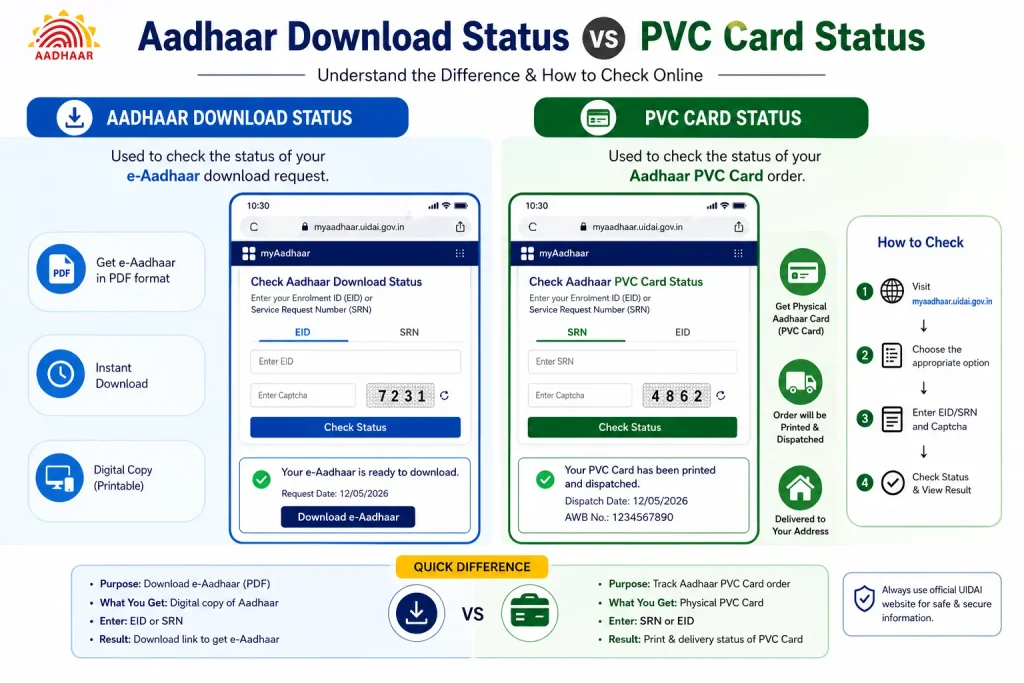
Aadhaar Download Status vs PVC Card Status
Another common confusion is between an e-Aadhaar download and a physical PVC order.
If you searched “aadhaar download status”, you may actually want to know whether your latest Aadhaar is available as an electronic copy.
That is different from asking where your PVC Card is.
e-Aadhaar
e-Aadhaar is the digital form of Aadhaar that can be accessed through UIDAI’s official services.
Aadhaar PVC Card
The PVC Card is a physical card ordered separately through UIDAI.
UIDAI confirms that Aadhaar Letter, Aadhaar PVC Card, e-Aadhaar and the Aadhaar App are all valid forms of Aadhaar.
Discover More About:👇
Aadhaar Seva Kendra Near Me: How to Find Your Nearest Aadhaar Enrollment/Update Centre
How to Check Which Mobile SIM Cards Are Linked to Your Aadhaar Card
Aadhaar PVC Card Not Received? Check These Stages
If your card has not arrived, identify the stage first.
1. Order still being processed
Use your SRN and check the request through the official UIDAI service.
2. Order dispatched
Look for the AWB information and move to postal tracking.
3. No AWB yet
Check whether the order has actually reached the dispatch stage. An AWB is associated with the postal shipment.
4. Aadhaar details were recently updated
If you want the PVC Card to reflect newly updated Aadhaar details, make sure the update has been successfully completed before ordering the PVC Card.
5. Status looks unusual
Do not rely on a social-media explanation of a status label. Verify the request through UIDAI or contact official support.
What If the Website Shows an Error?
Government portals can occasionally display technical errors or fail to load properly.
If this happens, use the official service again later and make sure you are on the genuine UIDAI/MyAadhaar website.
More importantly, avoid entering your Aadhaar number, OTP or payment information into an unfamiliar website simply because it appears in a search result.
For official assistance, UIDAI provides the 1947 helpline and other grievance/support channels.
Aadhaar PVC Card vs e-Aadhaar
You do not necessarily need to wait for a PVC Card to have a valid Aadhaar document.
UIDAI says its different Aadhaar forms—including Aadhaar Letter, PVC Card and e-Aadhaar—are equally valid and acceptable.
| Feature | PVC Card | e-Aadhaar |
|---|---|---|
| Format | Physical | Digital |
| Storage | Wallet/card holder | Phone/computer |
| Ordering | Separate PVC request | Official e-Aadhaar service |
| Validity | Valid Aadhaar form | Valid Aadhaar form |
The better option depends on what you need at that moment.
Important: Aadhaar Status Is Not the Same as PM-KISAN Status
This distinction matters because some users search for Aadhaar status when their actual goal is to check a PM-KISAN beneficiary or payment status.
PM-KISAN is a separate government scheme with its own status system.
The current official PM-KISAN portal provides a “Know Your Registration Number” service where users can search by Mobile Number or Aadhaar Number.
However, the PM-KISAN “Know Your Status” page asks for the PM-KISAN Registration Number and sends an OTP to the registered mobile number. The resulting account information includes payment status, bank name, UTR number, payment mode and credit date.
So the correct distinction is:
Aadhaar/Mobile Number → Find PM-KISAN Registration Number → Check PM-KISAN Status
An Aadhaar PVC-card tracking procedure will not show your PM-KISAN payment status.
Current Aadhaar PVC Card Facts
- UIDAI’s current PVC-card charge is ₹75, including GST and Speed Post charges.
- UIDAI says the printed card is handed to the Department of Posts within 5 working days, excluding the request date.
- Delivery is through India Post Speed Post.
- The PVC Card has the same validity as other accepted forms of Aadhaar.
- UIDAI revised the PVC-card service fee from ₹50 to ₹75 from January 1, 2026.
- The PVC Card includes several security features, including a tamper-proof QR code, micro text and ghost image.
FAQs
How do I check my Aadhar PVC card status?
Use the official UIDAI PVC-card status service and the SRN associated with your request. After dispatch, use the AWB number for postal tracking.
What is an SRN in Aadhar PVC tracking?
SRN means Service Request Number. It identifies your PVC-card request and is used for tracking the request through the UIDAI stage.
What is an AWB number?
AWB means Airway Bill. It is associated with the postal shipment and is used for delivery tracking after dispatch.
How much does an Aadhaar PVC Card cost in 2026?
UIDAI currently lists the charge at ₹75, inclusive of GST and Speed Post charges.
How many days does UIDAI take to send the PVC Card?
UIDAI says it hands the printed card to the Department of Posts within 5 working days, excluding the date of request. This is the handover standard, not a guaranteed home-delivery time.
Is an Aadhaar PVC Card as valid as e-Aadhaar?
Yes. UIDAI says the Aadhaar Letter, Aadhaar PVC Card, e-Aadhaar and Aadhaar App are equally valid forms of Aadhaar.
What should I do if my Aadhaar PVC status is not showing?
Verify your SRN, payment confirmation and current order stage through the official UIDAI service. If the card has already been dispatched, look for the AWB and use postal tracking. For unresolved issues, contact UIDAI through its official support channels.
Does Aadhaar number directly show PM-KISAN payment status?
Not in the same way as PVC tracking. The official PM-KISAN portal allows Aadhaar or mobile number to be used to find the PM-KISAN Registration Number; its current “Know Your Status” page then asks for that Registration Number and an OTP.
Where should I track my Aadhaar PVC delivery after dispatch?
Once an AWB is available, use the official Department of Posts tracking service. UIDAI specifically directs Aadhaar PVC delivery tracking to postal tracking after dispatch.
Final Takeaway
The easiest way to understand Aadhaar PVC tracking is to remember one simple sequence:
SRN → UIDAI request tracking → Dispatch → AWB → India Post delivery tracking
If you are searching for general Aadhaar status, first identify what you actually need: an update status, enrolment status, PVC order status or e-Aadhaar.
And if your real goal is a PM-KISAN beneficiary or payment status, switch to the official PM-KISAN process instead of trying to use an Aadhaar PVC-status checker. The PM-KISAN portal currently provides a separate route for finding your Registration Number and checking scheme status.
For Aadhaar services, always use the official UIDAI/MyAadhaar channels and avoid unofficial websites or agents requesting sensitive information or additional payment.

9 Comments
Pingback: Aadhaar Complaint Status: Check UIDAI Grievance Status Online
Pingback: Aadhaar Complaint Status: Check Online in 2 Minutes
Pingback: Fake Aadhar Card Maker: Check if an Aadhaar Is Genuine
Pingback: Aadhaar Seva Kendra Near Aadhaar Enrollment/Update Centre
Pingback: Aadhar Card Customer Care Number: UIDAI Helpline
Pingback: Aadhar Card SIM Check: How to Check Linked SIM Cards
Pingback: NSEIT Login 2026: UIDAI Certification Portal
Pingback: Smart Card Status Check 2026: TNPDS, Aadhaar & Ammavodi
Pingback: Aadhaar PVC Card: How Many Days to Get It?