

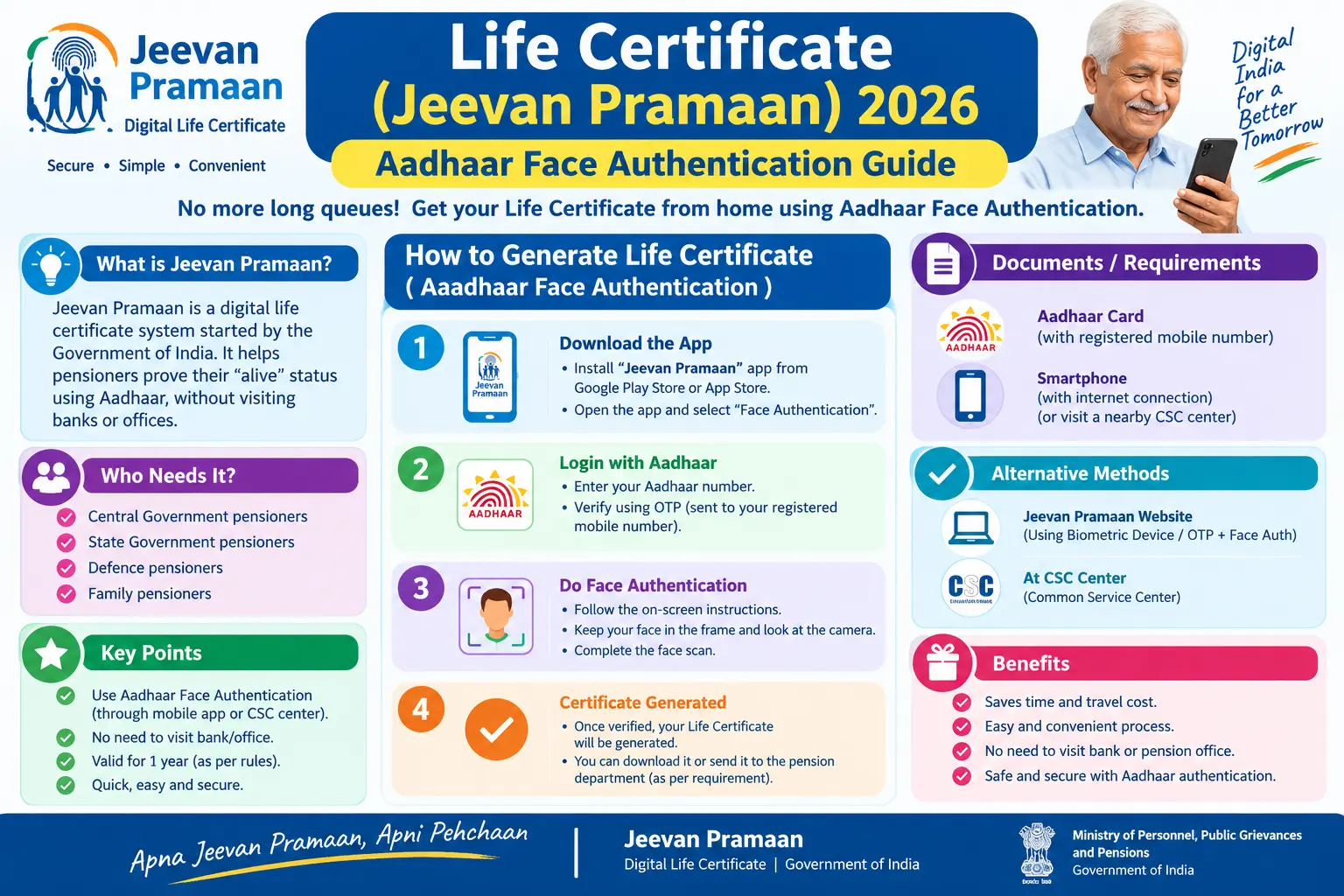
Miss the November 30 deadline and your pension stops. That single fact is why thousands of pensioners — or their sons and daughters — start scrambling every October, hunting for the nearest bank branch, only to find a queue that snakes out the door. The Jeevan Pramaan system was built to end that scramble. With Aadhaar face authentication, you can generate your Digital Life Certificate from your living room in under ten minutes, provided your Aadhaar details are in order and your mobile number is linked.
This guide walks through the 2026 submission window, how face authentication actually works, the exact steps to generate your DLC on a smartphone, and the mistakes that cause rejections. If you are a central, state, defence, or EPFO pensioner — or helping a parent who is — start here.
Discover More About:👇
Aadhaar Biometric Unlock Online: How to Unlock Aadhaar Biometrics
mAadhaar App Download & Guide: Features, Face RD and AadhaarPay Explained
Pension, Labour and Beneficiary Status by Aadhaar: How to Check Government Scheme Status Online
What Jeevan Pramaan Does and Why It Replaced the Queue
Jeevan Pramaan is a biometric-enabled digital service that lets pensioners submit their life certificate electronically instead of appearing in person before a bank officer or pension office. Your Pension Disbursing Agency (PDA) — the bank, post office, or treasury that credits your pension — receives the Digital Life Certificate directly.
The older system required physical presence. For a pensioner in a wheelchair, or someone whose bank branch is forty kilometres away, that was a genuine hardship. Face authentication removes the need for external hardware like fingerprint scanners or iris devices. A smartphone with a working front camera is enough — Android or iOS.
The core principle has not changed in 2026: Aadhaar-linked verification confirms you are alive and eligible. What has improved is access. The face authentication route now handles cases where fingerprints have worn down with age or where iris scans fail.
Who Submits When: The 2026 Submission Window
The window is phased by age, and getting this wrong means a wasted trip or a failed app attempt.
Pensioners aged 80 and above can submit from October 1 to November 30. This early start exists specifically to keep super senior citizens out of the November crush.
Pensioners below 80 must wait for November 1. The window closes for everyone on November 30, 2026.
If the certificate is not submitted by that date, pension disbursement can be paused until verification is complete. Arrears are typically released once the certificate clears, but the gap months are an avoidable headache.
Timelines can be revised administratively. Before you plan your submission, confirm the current year’s dates on the official Jeevan Pramaan portal or with your PDA.
How Aadhaar Face Authentication Works
Face authentication is a consent-based 1:1 match. Your live facial image, captured by the phone’s front camera, is compared only against the facial image stored in UIDAI’s Central Identities Data Repository (CIDR) linked to your Aadhaar number. It is not a search across a database of many faces.
Two apps are required:
- AadhaarFaceRD — the UIDAI service app that captures and processes your facial image.
- Jeevan Pramaan — the application that submits your Digital Life Certificate to the pension system.
Both are available on Google Play and the Apple App Store. The Jeevan Pramaan face authentication feature works only within India — NRI pensioners need to check with their PDA for alternate procedures.
The AadhaarFaceRD app packages your biometric data securely; the Jeevan Pramaan app submits it alongside your pension details.
Step-by-Step: Generating Your Digital Life Certificate
This is the sequence as it actually runs on the app, including the points where people commonly get stuck.
Step 1: Install both apps.
Download AadhaarFaceRD first, then the Jeevan Pramaan app. You need a working front camera, stable internet, and enough storage. Install AadhaarFaceRD first — if you open Jeevan Pramaan without it, the face authentication option will not function.
Step 2: Grant permissions.
Open Jeevan Pramaan and allow camera and device permissions when prompted. Denying camera access will stall the process later.
Step 3: Complete operator registration.
Enter your Aadhaar number, mobile number, and email. The mobile number must be linked to your Aadhaar — if it is not, the OTP will never arrive, and this is the single most common reason people abandon the process. The operator — the pensioner, or a family member acting on their behalf — enters their name and ticks the authorisation box.
Step 4: Enter pension details and scan your face.
Capture your facial image using the front camera. Then enter your PPO (Pension Payment Order) number and bank account details. If your PPO appears in a dropdown with prefilled details, select it. Otherwise, choose “add new PPO number” and type it carefully — a single wrong digit here triggers rejection later.
Step 5: Submit and note your Pramaan ID.
Tap Submit. If you hold multiple PPO numbers, the app will ask whether to generate a DLC for the others as well. On success, an acknowledgement and a Pramaan ID are sent by SMS to your registered mobile number.
Two pitfalls worth knowing before you start:
- OTP not arriving. If your Aadhaar-linked mobile number is outdated, no OTP will come. You will need to update the mobile number at an Aadhaar Seva Kendra before proceeding.
- Session timeout. The app can time out if you take too long entering pension details. Keep your PPO number and bank details written down and within reach before you begin the scan.
If the pensioner cannot manage a smartphone: a family member, caregiver, or trusted person can act as operator. Doorstep banking through public sector banks and India Post Payments Bank, or an in-person visit to a bank branch, post office, or Common Service Centre (CSC), remain valid alternatives.
Why Life Certificate Submissions Get Rejected
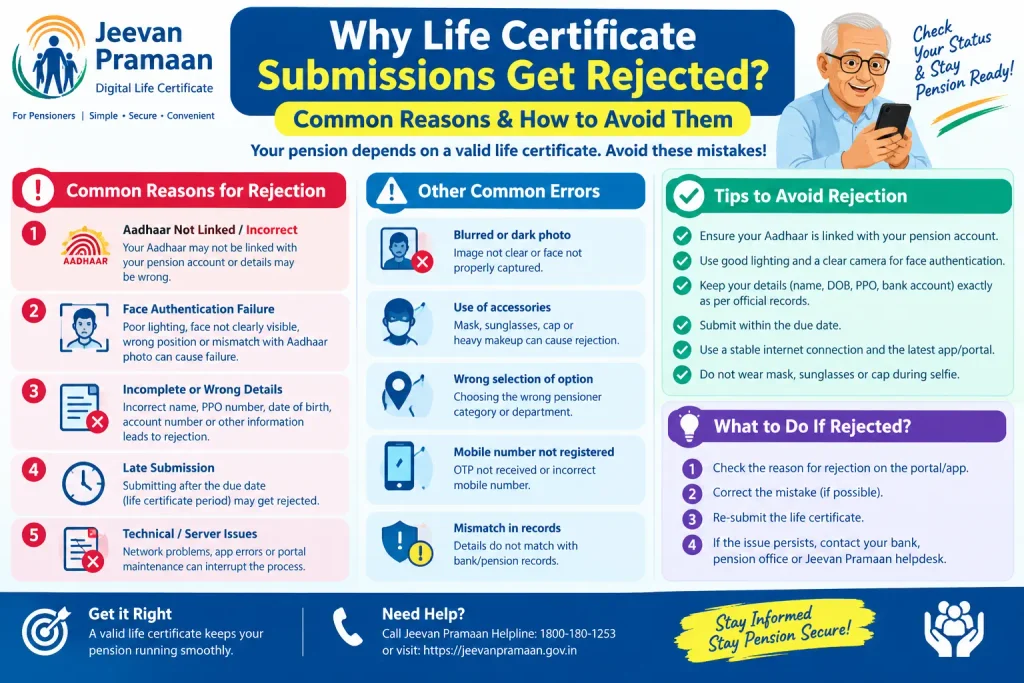
Most rejections trace back to a data mismatch, not a technical failure.
Wrong PPO or bank details. The PPO number, account number, or treasury details entered do not match PDA records. This is the most frequent cause.
Aadhaar data mismatch. Name, date of birth, or other personal details in the app differ from your Aadhaar database. Even a middle name spelled differently can cause a failure.
Poor image capture. Blurry or badly lit facial images fail authentication. Stand in even, natural light and hold the phone steady.
Weakened biometrics. Ageing changes facial features, and fingerprints can fade. If face authentication fails repeatedly, biometrics may need updating at an Aadhaar Seva Kendra before retrying.
Connectivity drops. Unstable internet mid-authentication interrupts submission. Use a reliable connection.
If your DLC is rejected, contact your PDA first to identify the exact mismatch. You will need to generate a fresh DLC with corrected details — which means a new Pramaan ID.
Frequently Asked Questions
Q1: Can I use the Jeevan Pramaan face authentication app from outside India?
The face authentication app is designed for use within India. NRI pensioners typically submit through their bank abroad or an Indian embassy or consulate, depending on their pension scheme rules. Confirm the specific procedure with your PDA.
Q2: What do I need before starting a Digital Life Certificate?
Your Aadhaar number with a linked mobile number, your PPO number, bank account details registered with your PDA, and a smartphone with a working camera. The Aadhaar number must be registered with your PDA.
Q3: What is a Pramaan ID?
A unique number generated each time a Digital Life Certificate is created successfully. It is proof of submission and can be used to check DLC status on the official Jeevan Pramaan portal. It arrives by SMS on your registered mobile.
Q4: My fingerprints have weakened. Can I still use Jeevan Pramaan?
Yes — face authentication exists precisely for this situation. It needs no physical contact or external biometric device. If face authentication also fails repeatedly, visit an Aadhaar Seva Kendra to update biometrics.
Q5: Is there a fee?
Jeevan Pramaan is a government digital initiative. Some PDAs or CSCs may charge a nominal assisted-submission fee. Check the official Jeevan Pramaan portal or ask your bank or post office for current charges.
Q6: What if I miss November 30?
Pension payments may be temporarily paused. Once the certificate is submitted and verified, payments are typically restored and arrears released. Submit within the window — October 1 to November 30 for those 80 and above, November 1 to November 30 for those below 80.
A Final Point Worth Remembering
If your face authentication fails on the first attempt, do not assume the system has rejected you. Try again in better lighting, with a steadier hand, and confirm your Aadhaar-linked mobile number is current. If it fails a second time, the likely culprit is outdated biometrics or a data mismatch — both fixable, but only at an Aadhaar Seva Kendra or through your PDA. Getting that sorted in October is far easier than getting it sorted on November 29, when every bank branch is full and every helpdesk is busy. For fees, timelines, and procedural updates, the official Jeevan Pramaan portal and uidai.gov.in remain the only sources worth trusting.
