

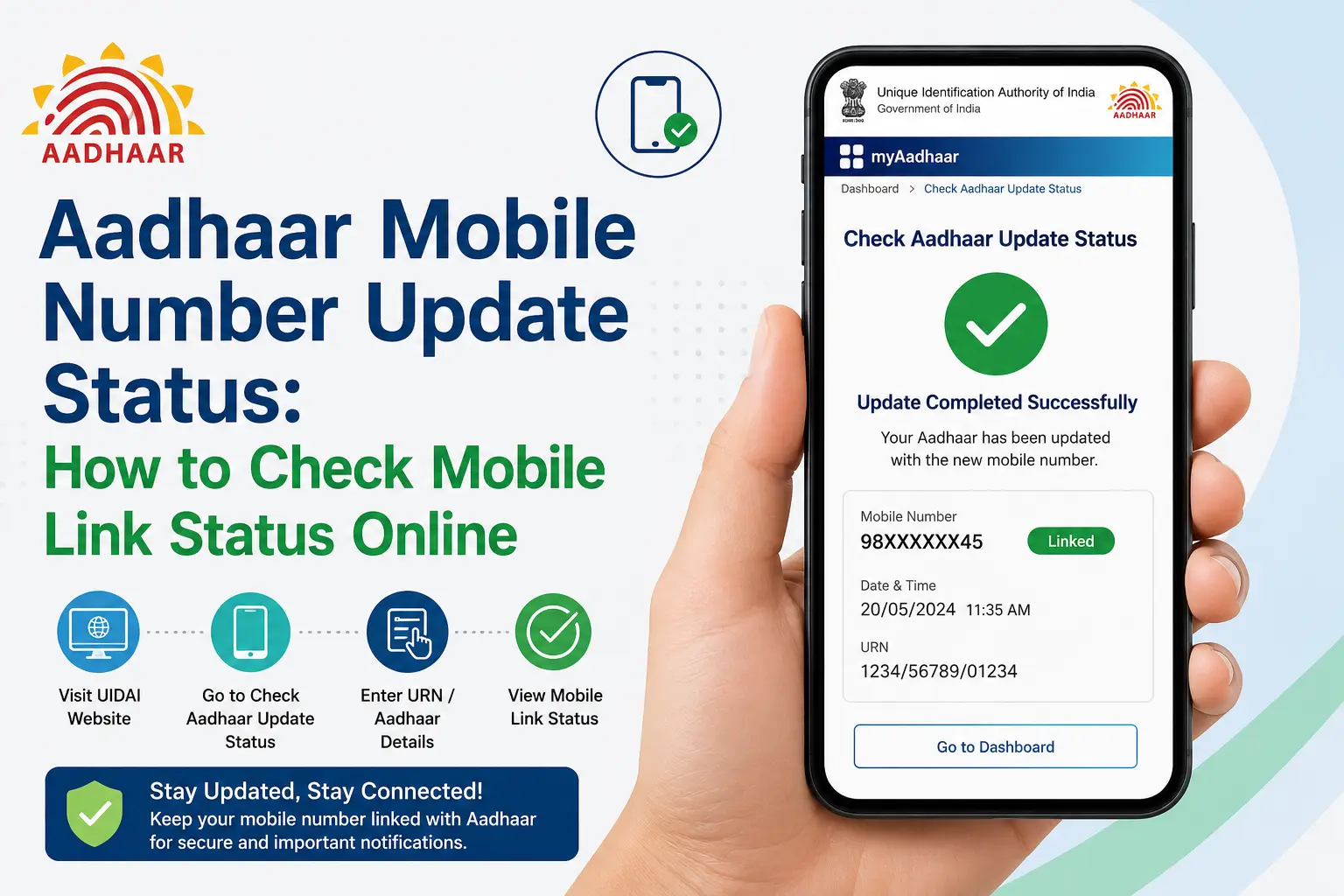
You changed your mobile number in Aadhaar, but now the big question is: has the update actually gone through? Or perhaps you are not trying to update anything at all—you simply want to know whether a particular mobile number is registered with your Aadhaar.
These are two different tasks, and that distinction matters when you search for aadhaar mobile number update status.
UIDAI provides a Verify Registered Mobile or Email ID service for checking a declared mobile number, while the Aadhaar App also offers mobile-number updates and a Track my request facility.
This guide explains which official route fits your situation, what happens after a mobile-number update, what to do if your old number is unavailable, and why Aadhaar mobile status should not be confused with PM-KISAN beneficiary or payment status.
Read More About👇
Important: This is an independent informational website and is not affiliated with UIDAI or the Government of India. Always complete Aadhaar-related transactions through official UIDAI channels.
Quick Facts
| Detail | Information |
|---|---|
| Service | Aadhaar mobile-number verification/update |
| Governing body | UIDAI |
| Main official platform | UIDAI / Aadhaar App |
| Mobile verification | UIDAI’s Verify Registered Mobile or Email ID service |
| Mobile update | Aadhaar App in specified scenarios; authorised Aadhaar centre in other cases |
| Tracking | Aadhaar App includes “Track my request” |
| Processing time | Mobile-number/address updates through the Aadhaar App can take up to 30 days |
| Old mobile unavailable | Visit an Aadhaar Seva Kendra or authorised Aadhaar enrolment/update centre |
| First-time mobile registration | Aadhaar Seva Kendra/authorised centre |
| PM-KISAN status | Separate PM-KISAN service |
UIDAI’s Aadhaar App FAQ confirms that mobile-number updating and request tracking are available through the app.
Discover More About: 👇
Aadhaar Voter Link Status: How to Check Voter ID Aadhaar Link Status Online
e Card Download: How to Download e-Aadhaar, XML, PVC & Get a Physical Aadhaar Card
Aadhaar Biometric Unlock Online: How to Unlock Aadhaar Biometrics
Aadhaar Mobile Number Update Status vs Mobile Link Status
Before checking anything, identify what you actually want to know.
- If you recently submitted a mobile-number change: you need to track the update request.
- If you simply want to know whether a number is registered with Aadhaar: you need the UIDAI registered-mobile verification service.
- If you want to know whether a PM-KISAN payment was credited: you need the official PM-KISAN status service.
The phrase aadhaar mobile number link status is commonly used for more than one of these situations. It is therefore better to choose the official service based on your actual requirement rather than searching for a generic “link status” page.
How to Check Aadhaar Mobile Number Update Status
If you have already submitted a mobile-number update through the Aadhaar App, use the app’s request-tracking facility.
Steps to track your request
- Open the official Aadhaar App.
- Sign in to your Aadhaar profile.
- Open the relevant service/request section.
- Select Track my request.
- Check the latest status displayed for your request.
- Keep your acknowledgement/request details available if you need to follow up.
UIDAI lists Track my request among the services currently available in the Aadhaar App.
If you used the app to submit a mobile-number update, UIDAI also says the acknowledgement slip contains an SRN (Service Request Number) , which can be used to track the request.
Alternative Method: Using the UIDAI Portal
You can also check the status online:
- Visit the official myAadhaar portal (
myaadhaar.uidai.gov.in). - Select “Check Aadhaar Update Status” .
- Enter your SRN (for online updates) or URN (Update Request Number) (for offline updates) .
- Complete the captcha and OTP verification.
- The system will display your current update status.
What if the status is still processing?
A pending or processing status does not automatically mean that the request has been rejected.
UIDAI says Aadhaar update requests go through verification and validation. The Aadhaar App guidance states that mobile-number and address updates made through the app can take up to 30 days.
Avoid submitting repeated requests simply because the status has not changed immediately.
How to Check Aadhaar Mobile Number Link Status
If your question is simply, “Is my mobile number registered with Aadhaar?”, you need a different service.
UIDAI provides Verify Registered Mobile or Email ID. This service can verify the mobile number or email address declared during Aadhaar enrolment or the latest Aadhaar detail update.
Steps to verify your mobile number:
- Visit the official UIDAI website (
uidai.gov.in). - Go to the “My Aadhaar” section.
- Click on “Verify Email/Mobile Number” .
- Enter your 12-digit Aadhaar number .
- Enter the mobile number you want to verify .
- Complete the captcha and click “Send OTP” .
- Enter the OTP received on your mobile phone.
- The screen will confirm whether your mobile number is linked to your Aadhaar.
What mobile verification does not mean
Mobile verification should not be confused with:
- changing your registered mobile number ;
- tracking a mobile-number update ;
- checking Aadhaar authentication history;
- completing PM-KISAN beneficiary verification;
- checking a PM-KISAN payment.
In other words, verification, updating and tracking are separate tasks.
How to Update Your Aadhaar Mobile Number Through the Aadhaar App
The Aadhaar App supports mobile-number updating in specified circumstances. UIDAI’s guidance describes three scenarios.
Scenario 1: The app is registered with your Aadhaar-registered mobile number
If the mobile number used for Aadhaar App registration is the same number already registered with Aadhaar, UIDAI says you can:
- verify the new mobile number with OTP;
- complete Face Authentication; and
- pay the prescribed charges of ₹75 .
Scenario 2: The app uses a different mobile number
If the mobile number used for Aadhaar App registration is different from the mobile number currently registered with Aadhaar, UIDAI says both the old registered number and the new number need to be verified with OTP, followed by Face Authentication and payment of the prescribed charges.
Scenario 3: You cannot access the old number
If you no longer have access to the old registered mobile number, UIDAI says you must visit the nearest Aadhaar Seva Kendra or an authorised Aadhaar enrolment and update centre .
The same centre-based route applies if you have never registered a mobile number with Aadhaar before.
So, if your old SIM has been lost or permanently disconnected, do not assume that you can complete every step through the app.
How Long Does Aadhaar Mobile Update Take?
- Aadhaar App Mobile Update Timeline: Mobile-number and address updates made through the app can take up to 30 days .
- General Aadhaar Update Timeline: UIDAI states that normally 90% of Aadhaar update requests are completed within 30 days, but can take up to 90 days .
This is a processing guideline, not a guarantee that every request will be completed on the same day or within exactly 30 days.
Once an update is successfully completed, the revised information is reflected in the Aadhaar App.
Aadhaar Mobile Update Status: Understanding the Result
The exact wording can vary depending on the service and interface. In general, users may encounter results such as:
| Status/Result | What It Means |
|---|---|
| Pending / Processing | The request is still being processed |
| Completed / Updated | The requested update has been successfully processed |
| Rejected | The request was not accepted after validation |
| Failed | The request did not complete successfully |
| Request not found | The request details entered may not match the available record |
Do not treat a pending request as an automatic rejection. UIDAI’s process includes verification and validation before an update is accepted or rejected.
Common Reasons Aadhaar Mobile Update Gets Rejected
Understanding why a request gets rejected helps you avoid resubmitting the same mistake. Based on UIDAI’s stated verification and validation process, most rejections happen for one of these reasons:
| Reason | What Happens | How to Avoid It |
|---|---|---|
| OTP verification failed | The OTP sent to your number wasn’t entered correctly, expired, or wasn’t received in time | Ensure the number has active network coverage and enter the OTP promptly; request a fresh OTP if it expires |
| Face Authentication failed | Scenario 1 updates require Face Authentication along with OTP; a failed scan halts the request | Use good lighting, hold the phone steady, and follow the Aadhaar App’s on-screen guidance during the scan |
| Old number unavailable but app used anyway | Users without access to their previously registered number try to update via the app, which isn’t supported for this case | If you can’t access the old number, skip the app and visit an Aadhaar Seva Kendra directly |
| Details mismatch | The number or details entered don’t match UIDAI’s enrolment record | Double-check the number and personal details before submitting |
| Payment incomplete | The ₹75 prescribed charge wasn’t completed or failed mid-transaction | Confirm payment goes through fully before closing the app |
| Duplicate/repeated requests | Submitting a new request while an earlier one is still processing can cause conflicts | Wait for the current request’s status to resolve before submitting again |
If your request is rejected, check the official status page for the specific reason shown, correct the applicable issue, and resubmit through the correct official route (Aadhaar App or Aadhaar Seva Kendra, depending on your scenario).
What to Do If Aadhaar Mobile Update Is Not Working
OTP is not arriving
OTP-based verification requires access to the relevant registered mobile number in the applicable scenario.
- Check that you are using the correct number.
- Ensure your mobile number is active and has network coverage.
- Wait a few minutes and try again.
- Never share an Aadhaar OTP with another person claiming to be an agent.
Your old mobile number is unavailable
This is one of the most important cases to understand.
UIDAI’s guidance says that users who do not have access to the old registered mobile number must visit an Aadhaar Seva Kendra or authorised Aadhaar enrolment/update centre .
The request is still pending
Check the request through the official tracking facility and allow the stated processing period.
If the request remains unresolved beyond the processing period, use UIDAI’s official support channels rather than paying an unofficial website or individual to “speed up” the process.
The update was rejected
A rejected request means the update was not accepted after the applicable validation process. Check the official status/instructions and follow the route specified by UIDAI.
Important: UIDAI states that submitting an update request does not guarantee that the Aadhaar data will be updated; requests undergo verification and validation before processing .
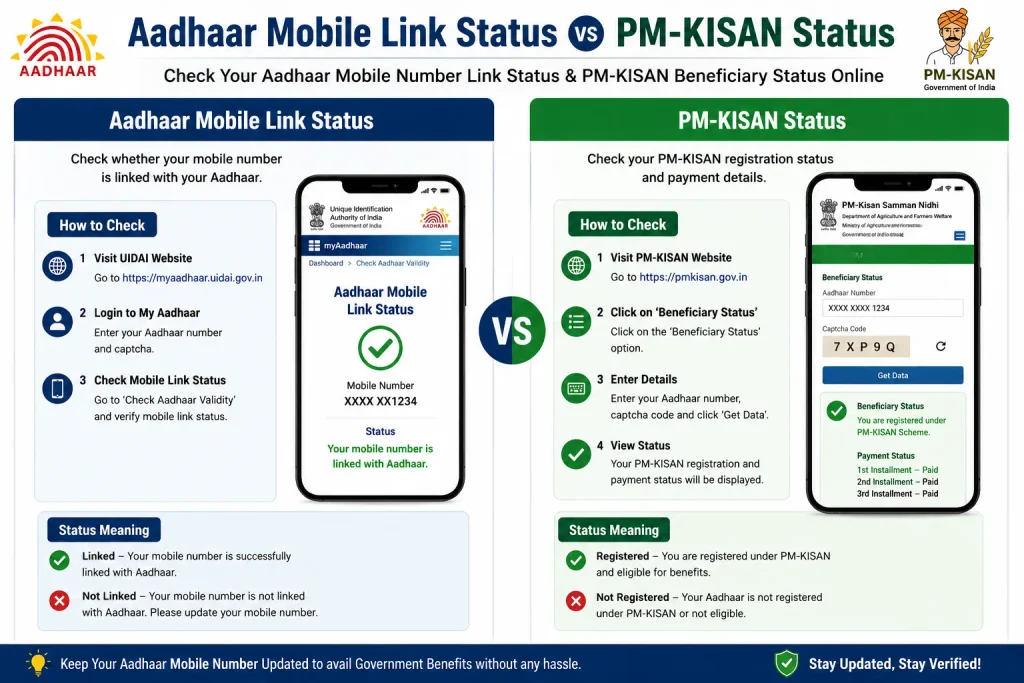
Aadhaar Mobile Link Status vs PM-KISAN Status
A common source of confusion is the assumption that Aadhaar mobile status can be used to check a government-scheme payment.
It cannot.
If you actually want to check PM-KISAN beneficiary or payment status, use the official PM-KISAN Know Your Status service. The PM-KISAN page asks for a Registration Number and sends an OTP to the registered mobile number. It displays information including payment status, bank name, UTR number, payment mode and whether the account was credited.
Therefore, aadhaar mobile link status check is not a substitute for PM-KISAN status checking.
Similarly, PM-KISAN e-KYC is part of the PM-KISAN system and should be checked through the official PM-KISAN process rather than an Aadhaar mobile-link page.
Discover More About: 👇
PVC Aadhaar Card: How to Order, Apply & Track Your Aadhaar Smart Card Online
How to Book an Aadhaar Appointment Online at UIDAI Enrollment/Update Centre
Which Official Method Should You Use?
| What You Want | Appropriate Official Route |
|---|---|
| Check whether a mobile number is registered with Aadhaar | UIDAI Verify Registered Mobile |
| Track a mobile-number update already submitted | Aadhaar App / Track my request |
| Update mobile number when the applicable app conditions are met | Aadhaar App |
| Update mobile number when old number is unavailable | Aadhaar Seva Kendra/authorised centre |
| Register a mobile number for the first time | Aadhaar Seva Kendra/authorised centre |
| Check PM-KISAN payment or beneficiary information | PM-KISAN Know Your Status |
UIDAI currently lists mobile-number update, authentication history, e-Aadhaar download and request tracking among the Aadhaar App’s services.
Aadhaar Mobile Number Link Status: Important Safety Tips
Be careful when searching for Aadhaar services online.
A genuine government service does not require you to hand your Aadhaar OTP to an unknown person.
Avoid websites or individuals claiming that they can:
- reveal private Aadhaar-linked information;
- provide a special “instant” mobile-link status;
- guarantee Aadhaar approval;
- speed up UIDAI processing for an unofficial payment.
Use only the official UIDAI website and Aadhaar App for Aadhaar services.
- Official UIDAI website:
uidai.gov.in - Official myAadhaar portal:
myaadhaar.uidai.gov.in - UIDAI helpline: 1947
- Official PM-KISAN portal:
pmkisan.gov.in
FAQs
How do I check Aadhaar mobile number update status?
If you have submitted a mobile-number update through the Aadhaar App, use Track my request and the relevant request/acknowledgement details. UIDAI currently lists request tracking as an Aadhaar App service.
How can I check whether my mobile number is linked with Aadhaar?
Use UIDAI’s official Verify Registered Mobile or Email ID service on the UIDAI website or myAadhaar portal. It is designed to verify the mobile number declared with Aadhaar.
Can I update my Aadhaar mobile number online?
Yes, but only in specified scenarios. If you have access to your existing registered mobile number, you can update it through the Aadhaar App . If you do not have access to your old number, or you are registering a mobile number for the first time, you must visit an Aadhaar Seva Kendra .
Can I update my Aadhaar mobile number without the old number?
No, not through the app. If you do not have access to the old registered number, UIDAI’s guidance says to visit an Aadhaar Seva Kendra or authorised Aadhaar enrolment and update centre .
How long does an Aadhaar mobile update take?
UIDAI says mobile-number and address updates made through the Aadhaar App can take up to 30 days . UIDAI also says normally 90% of update requests are completed within 30 days, but general Aadhaar updates can take up to 90 days .
What is SRN in Aadhaar?
SRN (Service Request Number) is a unique number generated when you submit an update request online. It is sent to your registered mobile number and can be used to track the status of your request.
What is URN in Aadhaar?
URN (Update Request Number) is a unique number provided on the acknowledgement slip when you submit an update request offline at an Aadhaar centre. It is used to track the status of your update.
Is Aadhaar mobile link status the same as Aadhaar authentication?
No. Checking a registered mobile number and checking Aadhaar authentication history are separate functions. The Aadhaar App provides authentication-history access as a separate service.
Is Aadhaar mobile status the same as PM-KISAN status?
No. PM-KISAN has its own Know Your Status system. Its status page uses the PM-KISAN Registration Number and OTP sent to the registered mobile number.
What should I do if my Aadhaar mobile update is rejected?
Check the official request/status information for the applicable reason or next instruction. Do not rely on unofficial agents claiming they can guarantee approval.
Final Takeaway
The easiest way to avoid confusion is to identify your actual task first.
- If you want to know whether a number is registered with Aadhaar, use UIDAI’s mobile-verification service .
- If you have already submitted a mobile-number update, track that request through the official Aadhaar App facilities .
- If you cannot access the old registered number, visit an Aadhaar Seva Kendra or authorised update centre .
- If your real goal is a PM-KISAN payment, beneficiary or e-KYC status, use PM-KISAN’s own official status system—not an Aadhaar mobile-link checker.
Disclaimer: This is an independent informational guide and is not affiliated with UIDAI or the Government of India. Always verify the latest process, fees, and availability on the official UIDAI portal.
