

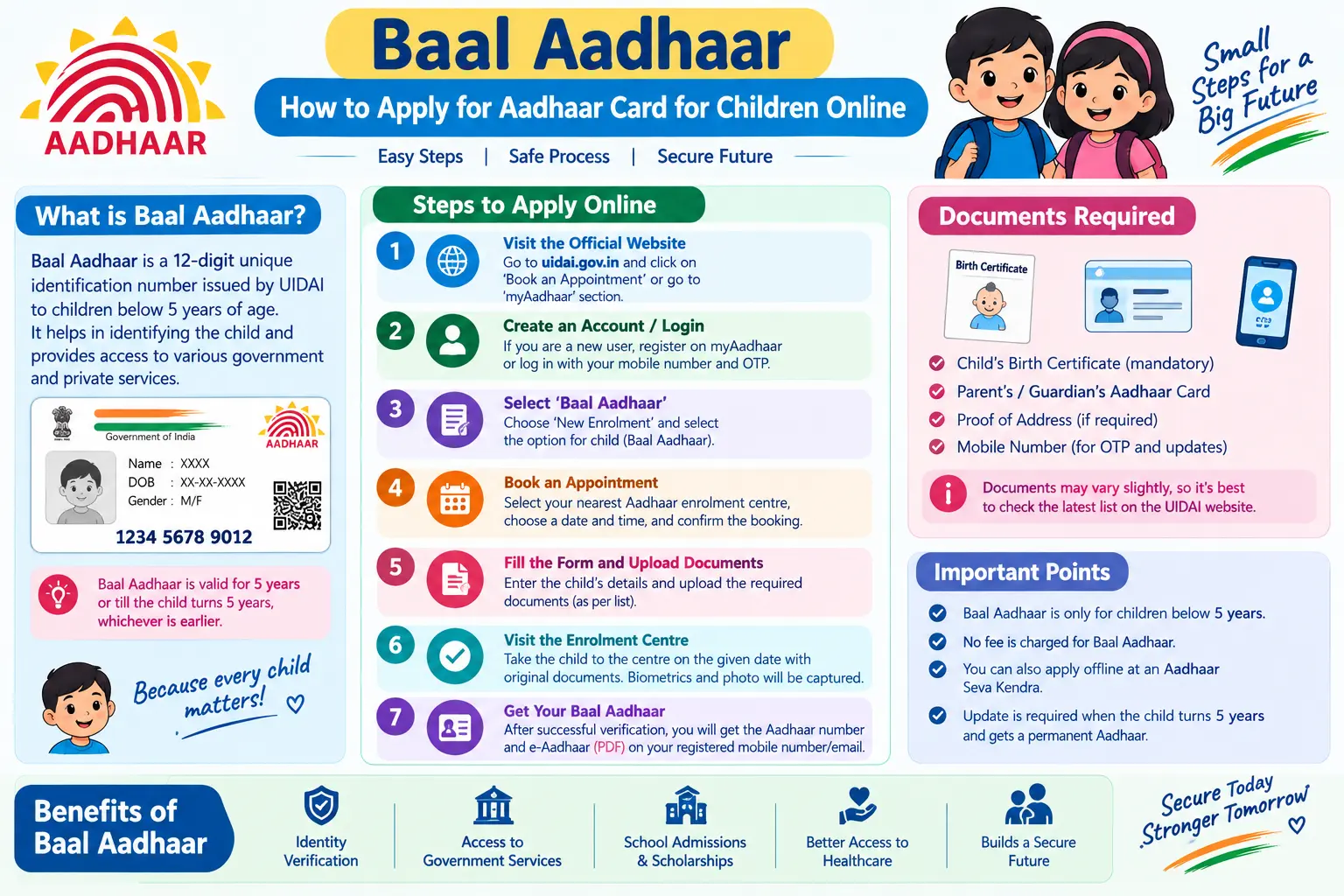
Your child’s school admission form asks for an Aadhaar number. The hospital wants it for the vaccination record. And the scholarship portal won’t let you proceed without it. If you have been putting off your child’s enrolment because the process seems confusing — or because you’re not sure whether you can apply aadhar card online for child without standing in a queue — you’re not alone. Most parents assume the entire thing happens on a website. It doesn’t. Here’s exactly what happens online, what happens at the centre, and what you should carry.
Baal Aadhaar is the Aadhaar number issued by the Unique Identification Authority of India (UIDAI) to children below five years of age. It looks different from the white card adults carry — it’s blue. It carries no fingerprint or iris data, only the child’s photograph, because a young child’s biometrics are still changing. Instead, the child’s identity is verified through the Aadhaar of a parent or legal guardian. That one design choice is why the enrolment process works the way it does.
What Makes Baal Aadhaar Different from Adult Aadhaar
The blue card is valid until your child turns five. At that point, a Mandatory Biometric Update (MBU) becomes compulsory — fingerprints, iris scans, and a fresh photograph are captured, and the card transitions to the standard format. A second MBU follows at age 15. Miss the five-year update, and the Aadhaar can be deactivated, which is why UIDAI has run school-based drives in recent years to catch children before the deadline.
Discover More About: 👇
E Shram Card Download by Mobile Number
How to Change Aadhaar Card Mobile Number Online (2026 Guide)
SSUP Full Form: What Is Self Service Update Portal in Aadhaar?
Two things parents often get wrong here. First, they assume the blue card expires — it doesn’t. It simply needs to be upgraded. Second, they assume they can walk in for the MBU at any centre at any time. In practice, appointment slots at Aadhaar Seva Kendras fill up, so book early once your child’s fifth birthday approaches. The MBU fee structure for children in the 5–17 age group has been revised periodically, so confirm the current charges and any applicable deadlines on the official UIDAI portal rather than relying on older information.
Read More About👇
Step-by-Step: Applying for Aadhaar for Your Child
The phrase “aadhar card online apply for child” is slightly misleading. You can book the appointment online and track the result online, but the enrolment itself requires your child to be physically present at an Aadhaar Seva Kendra or authorised enrolment centre.
Step 1: Book Your Appointment on the UIDAI Portal
Go to uidai.gov.in and open the “My Aadhaar” menu. Choose the option to book an appointment for new Aadhaar enrolment. You’ll enter a mobile number, receive an OTP, and select your nearest centre along with a date and time slot.
Common pitfall: The OTP often doesn’t arrive if your mobile number is on DND (Do Not Disturb). If you don’t receive it within a couple of minutes, try again after a short gap, or use a different number. Also note that the portal session can time out if you leave the page idle — have your documents and pincode ready before you start.
Step 2: Carry the Right Documents
For a child below five, you typically need the child’s original Birth Certificate and the Aadhaar card of one parent or guardian. For children born on or after 1 October 2023, the Birth Certificate is mandatory rather than optional. In some cases, the centre may ask for an additional Proof of Identity or Proof of Address from the approved UIDAI list — a hospital discharge slip or PDS card sometimes works. Carry originals plus a photocopy of each.
Step 3: Complete the Enrolment at the Centre
At the centre, the operator enters your child’s name, date of birth, gender, and address. Your child’s photograph is taken — no fingerprints or iris scan at this age. You then authenticate with your own fingerprint and iris to confirm you are the parent or guardian consenting to the enrolment.
Second common pitfall: Spelling errors in the child’s name or date of birth. These are hard to correct later and can cause problems during school admissions. Read the operator’s screen before you sign or thumbprint the acknowledgement.
Step 4: Keep the Enrolment ID Safe
You’ll receive an acknowledgement slip with a 14-digit Enrolment ID (EID). This is your only reference until the Aadhaar number is generated. Photograph the slip immediately — paper slips get lost, and without the EID you cannot track the application.
Step 5: Download the e-Aadhaar
Once the Aadhaar number is generated, download the e-Aadhaar from the UIDAI portal using the Aadhaar number, the EID, or the Virtual ID (VID) — a temporary 16-digit number you can generate to avoid sharing your actual Aadhaar number. A physical PVC card can be ordered separately for a fee that UIDAI revises from time to time; check the portal for the current amount.
Discover More About: 👇
How to Update Name, Date of Birth & Photo in Aadhaar Card (Demographic Update Guide)
EPFO UAN KYC Update Online: How to Link & Update KYC with Aadhaar
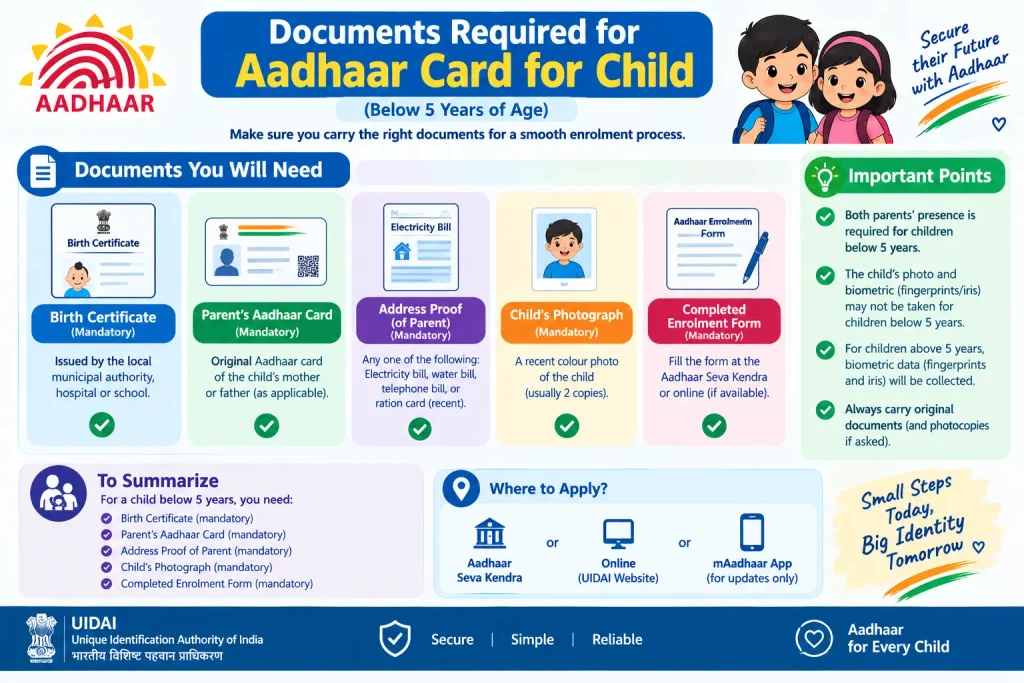
Documents Required for Aadhaar Card for Child
To summarise what actually goes in your folder:
- Child’s Birth Certificate — original and photocopy. Preferred Proof of Relationship; mandatory for children born on or after 1 October 2023.
- Aadhaar of one parent or guardian — original and photocopy, used for authentication and consent.
- Additional Proof of Identity/Address — only if the centre requests it. Hospital discharge slip, PDS card, or another document from the UIDAI-approved list may be accepted.
If you are applying for a child above five, the document list is similar but biometric capture is included, and the enrolment follows the standard Aadhaar process rather than the Baal Aadhaar route.
Common Questions Parents Ask
Is there an age limit for Aadhaar enrolment for a child?
No. Even a newborn can be enrolled. Children below five get Baal Aadhaar without biometrics; children above five go through standard enrolment with biometric capture.
Can I complete the whole application online without visiting a centre?
No. Appointment booking and status tracking are online, but photograph capture and parent authentication require an in-person visit. Any website claiming to enrol your child remotely is not an official UIDAI channel.
What is the fee for Baal Aadhaar enrolment?
New Aadhaar enrolment for children is free. UIDAI does not charge residents for enrolment. If a centre demands payment for this, treat it as unauthorised and report it.
At what ages are biometric updates mandatory?
At age five and again at age 15. Between those ages, no routine biometric update is needed unless there’s a specific data correction.
How long does it take for the Aadhaar number to be generated?
Timelines vary by centre and verification load — commonly a few weeks. You can check the status with your EID on the UIDAI portal. For delivery of the physical card, rely on the portal’s status tracker rather than estimates.
Is Baal Aadhaar accepted as valid ID for my child?
Yes, for school admission, hospital records, and most government schemes. Just remember it must be upgraded with biometrics at age five to stay active.
One Last Thing Before You Go
If your child’s enrolment status has been stuck at “under process” for longer than the usual window, don’t re-apply — that creates duplicate records and delays things further. Instead, check the status using your EID on the UIDAI portal, and if it still hasn’t moved, call the UIDAI toll-free helpline (1947) with the EID handy. For anything specific to your case — current fees, MBU deadlines, centre availability — the official UIDAI website is the only source worth trusting, since rules and charges are revised periodically.

2 Comments
Pingback: Aadhar Card Correction Online Guide
Pingback: Download Birth Certificate Online Maharashtra