

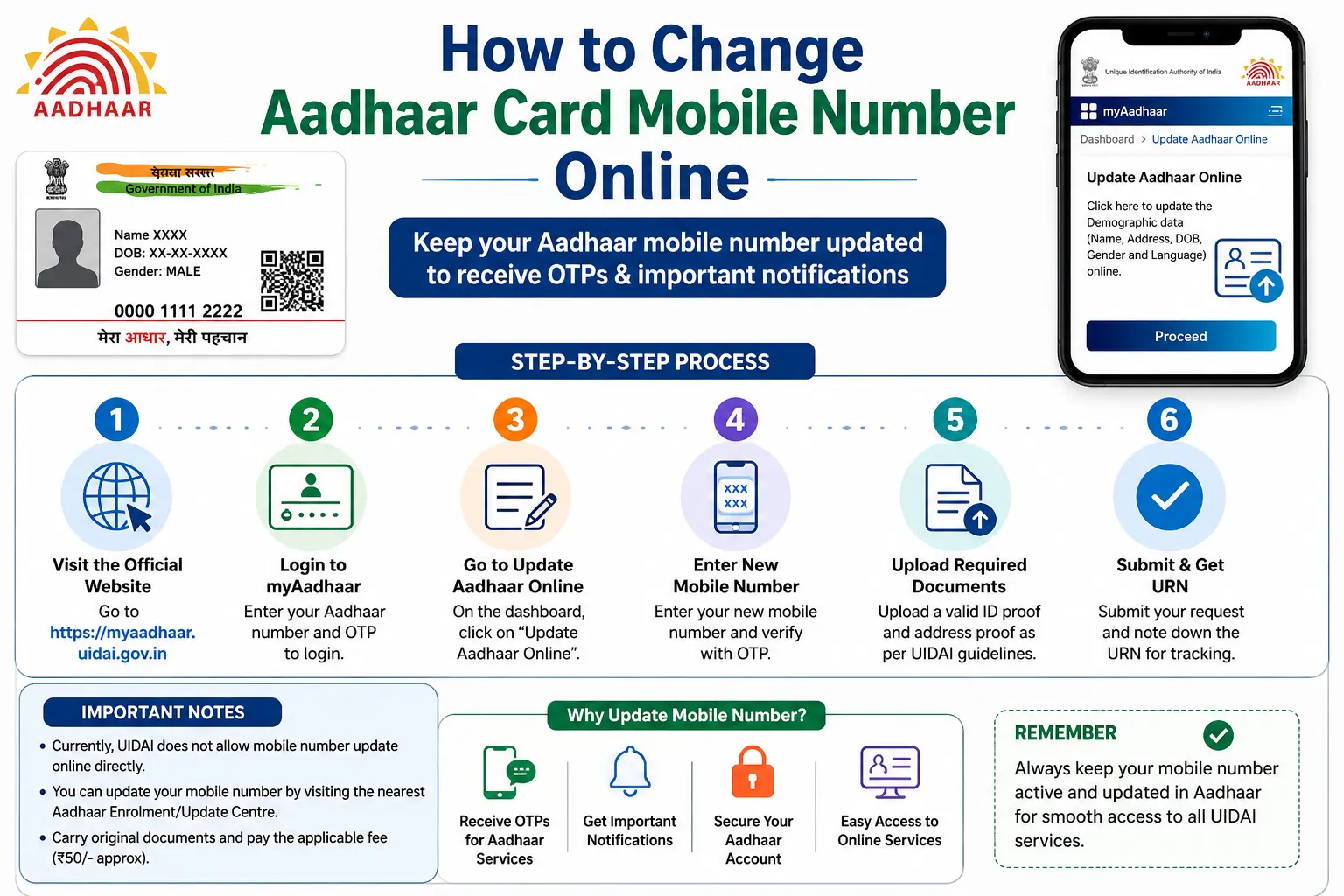
Lost your old SIM? Or is your Aadhaar still linked to a mobile number you no longer use? For years, users searching how to change aadhar card mobile number online were often told that a visit to an Aadhaar centre was the only option.
In 2026, UIDAI’s Aadhaar App supports mobile-number updates for eligible users. But there is an important catch: the method depends on whether you can access the mobile number currently registered with your Aadhaar. If the old number is unavailable, or if you are registering a mobile number with Aadhaar for the first time, UIDAI directs you to an authorised Aadhaar centre instead.
This guide explains the current options, the role of OTP and Face Authentication, the official fee, processing time, common problems, and the difference between changing your Aadhaar mobile number and updating a mobile number separately for services such as PM-KISAN.
Important: CheckAadharStatus.com is an independent informational website, not an official UIDAI service. Use UIDAI’s official website, myAadhaar portal, or official Aadhaar App for actual Aadhaar services.
Discover More About: 👇
Check Aadhaar Enrolment Status Online (2026) – EID/URN
SSUP Full Form: What Is Self Service Update Portal in Aadhaar?
How to Update Name, Date of Birth & Photo in Aadhaar Card (Demographic Update Guide)
Quick Facts
| Detail | Current information |
|---|---|
| Service | Aadhaar mobile-number update |
| Governing body | UIDAI |
| App-based update | Available for eligible cases |
| Old number unavailable | Visit an authorised Aadhaar centre |
| First-time mobile registration | Aadhaar centre required |
| Separate demographic update at centre | ₹75 |
| General processing benchmark | Normally 90% of update requests within 30 days |
| Aadhaar number | Does not change after a mobile update |
Can You Change Your Aadhaar Mobile Number Online?
Yes, but “online” does not simply mean the myAadhaar website.
UIDAI’s current guidance provides a mobile-number update facility through the official Aadhaar App. The app-based process uses verification steps such as OTP and Face Authentication, depending on the user’s situation.
So, if you are wondering can we change mobile number in aadhar online, the answer is yes for eligible cases through the Aadhaar App.
However, three situations need to be separated:
- Old Aadhaar-linked number is available: You may be able to use the Aadhaar App.
- Aadhaar App is registered with another number, but you can access the old Aadhaar-linked number: The app process can require verification of both numbers.
- Old registered number is unavailable: You need to visit an authorised Aadhaar centre.
- No mobile number was previously registered: First-time registration also requires an authorised centre.
This distinction is important because many older online guides still describe the process as completely offline.
How to Change Mobile Number in Aadhaar Using the Aadhaar App
If your situation is eligible for the app-based process, the official Aadhaar App is the first place to check.
1. Set up the official Aadhaar App
Install the official Aadhaar App and complete its registration process.
UIDAI’s current app guidance describes registration using your Aadhaar number, selection of the relevant SIM, Face Authentication and creation of a six-digit PIN.
Make sure you are using the official UIDAI app rather than an unrelated application claiming to provide Aadhaar services.
2. Select the mobile-number update service
After completing app registration, access the available Aadhaar update services and select the mobile-number update option.
Enter the new mobile number that you want to register with Aadhaar.
3. Complete OTP verification
The verification process depends on which mobile number is associated with your Aadhaar App registration.
If the app is registered using the same number currently registered with Aadhaar, UIDAI’s process requires verification of the new number through OTP.
If the app is registered using a different number, UIDAI says both the old Aadhaar-registered number and the new number may need OTP verification.
This is why a simple “enter new number and get OTP” explanation can be misleading.
4. Complete Face Authentication
The app-based mobile update also involves Face Authentication.
Follow the instructions displayed in the official app during authentication. If Face Authentication repeatedly fails, don’t use websites or people claiming to bypass UIDAI’s verification requirements.
5. Pay the applicable charge
Complete the payment shown by the official process and submit the request.
Keep your acknowledgement or request details after submission. They can be useful if you later need to check the progress of your update.
How to Change Mobile Number in Aadhaar Without the Old Number
This is one of the most common reasons people search how to change mobile number in aadhar card.
If your old Aadhaar-linked SIM has been lost, disconnected, or is otherwise unavailable, don’t waste time looking for an unofficial OTP-bypass method.
UIDAI’s current Aadhaar App guidance says that users who do not have access to their old registered mobile number should visit an Aadhaar Seva Kendra or authorised Aadhaar enrolment/update centre.
The same centre route applies when no mobile number was previously registered with Aadhaar.
What to do
- Visit an authorised Aadhaar Enrolment/Update Centre or Aadhaar Seva Kendra.
- Request a mobile-number update.
- Follow the centre’s identity-verification procedure.
- Pay the applicable official fee.
- Keep the acknowledgement/request details.
You do not need to find your original Aadhaar enrolment centre. UIDAI allows Aadhaar updates at authorised centres rather than requiring users to return to the original location.
What If You Are Registering a Mobile Number for the First Time?
Changing an existing number and adding a mobile number for the first time are not the same thing.
If your Aadhaar has never had a mobile number registered, the current Aadhaar App guidance does not provide an app-based first-time registration route. UIDAI directs such users to an authorised Aadhaar centre.
Therefore, searches such as how to change mobile no in aadhar card can actually represent two different needs:
- Replace an existing Aadhaar-linked number.
- Register a mobile number for the first time.
The correct method depends on which situation applies to you.
Discover More About: 👇
EPFO UAN KYC Update Online: How to Link & Update KYC with Aadhaar
Aadhaar Correction/Enrollment Form: Download, Fill & Submit Guide
Aadhaar Mobile Number Update Fee
UIDAI’s current fee schedule classifies mobile number as demographic information.
A separate demographic update costs ₹75 at an Aadhaar centre. Demographic information includes details such as name, gender, date of birth, address, mobile number and email.
Be cautious if someone claims that a much higher payment is an unavoidable “Aadhaar online fee.”
Do not treat unofficial service charges as government fees, and do not share your Aadhaar OTP with an agent or stranger.
How Long Does an Aadhaar Mobile Update Take?
An Aadhaar mobile-number update should not automatically be treated as an instant change.
UIDAI states that normally 90% of Aadhaar update requests are completed within 30 days. This is a general processing benchmark, not a promise that every request will be completed within exactly 30 days.
A request may also need verification and validation before the updated information is reflected.
If you have just submitted your request, avoid creating duplicate requests simply because the change is not visible immediately.
Aadhaar Mobile Update Not Working? Common Problems
OTP is not arriving
Check that the number entered for the update is correct and that the phone can receive SMS.
If the problem continues, use the official UIDAI support channels rather than relying on an online “OTP bypass” service.
Aadhaar App cannot verify the mobile number
App-based verification can involve SIM and mobile verification. If the app displays an error, follow the instructions provided within the official application.
Community reports have mentioned SIM-binding and verification problems, but these are user experiences rather than proof that the service is always unavailable.
Face Authentication keeps failing
Face Authentication is part of the app-based process. If it repeatedly fails, don’t assume that a third-party website can legitimately remove the requirement.
If you cannot complete the eligible app process, an authorised Aadhaar centre is the safer official route.
Your old number is no longer available
This is the clearest case for using an Aadhaar centre. Current UIDAI guidance does not tell users to bypass the old-number verification requirement through unofficial methods.
Your update is still pending
Don’t assume that a pending request means it has failed.
UIDAI’s general benchmark is that 90% of update requests are normally completed within 30 days. Keep your request details and check the official status information when available.
myAadhaar Website vs Aadhaar App
A major source of confusion is assuming that every Aadhaar online service is available on the same platform.
The myAadhaar website and the newer Aadhaar App do not provide identical services.
For mobile-number updates, current UIDAI material specifically identifies the Aadhaar App as an option for eligible users.
So, if you are asking how to change the mobile no in aadhar card, don’t rely on an old tutorial that tells you to search the myAadhaar website for a mobile-number-change form.
Always check the current UIDAI instructions for the service you need.
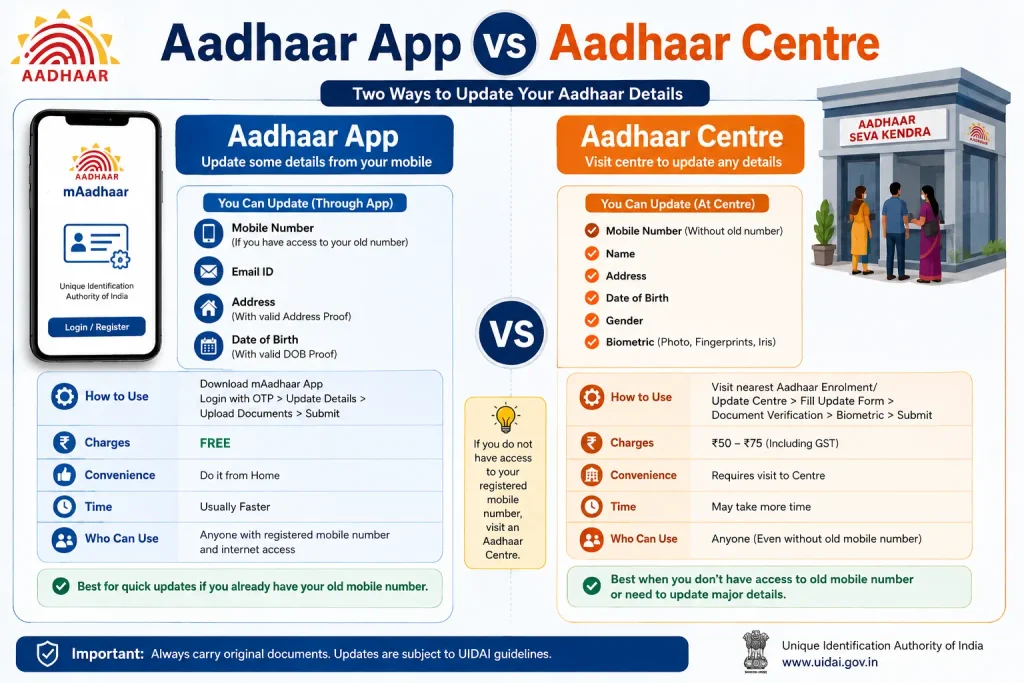
Aadhaar App vs Aadhaar Centre
| Feature | Aadhaar App | Aadhaar Centre |
|---|---|---|
| Existing mobile-number update | Yes, in eligible cases | Yes |
| Old registered number unavailable | Not the app route | Yes |
| First-time mobile registration | Not through app | Yes |
| Face Authentication | Part of app process | Centre-based verification |
| Separate demographic update | Applicable charge shown in official process | ₹75 |
| Physical visit | Not required for eligible app cases | Required |
Aadhaar Mobile Update vs PM-KISAN
Another important source of confusion is PM-KISAN.
Changing the mobile number registered with Aadhaar does not mean that the mobile number stored in PM-KISAN or another government service is automatically changed.
These are separate records and services.
For example, someone may need to update an Aadhaar mobile number because they want to complete an OTP-based verification or e-KYC process elsewhere. That does not turn the Aadhaar update into a PM-KISAN status-check procedure.
Similarly:
- Aadhaar mobile update concerns your UIDAI Aadhaar record.
- PM-KISAN registration/status/payment information belongs to the PM-KISAN system.
- e-KYC is a separate verification process.
If your actual goal is checking a PM-KISAN beneficiary or payment status, use the official PM-KISAN service rather than assuming an Aadhaar mobile-number update will show that information.
FAQs
Can I change my Aadhaar mobile number online?
Yes. Eligible users can use the official Aadhaar App for a mobile-number update. If the old registered number is unavailable, or if no mobile number was registered previously, UIDAI directs users to an authorised Aadhaar centre.
Can I change my Aadhaar mobile number without the old number?
If you don’t have access to the old Aadhaar-registered number, the current UIDAI route is to visit an Aadhaar Seva Kendra or authorised Aadhaar enrolment/update centre.
Can I change my Aadhaar mobile number through the myAadhaar website?
The current mobile-number update guidance points eligible users to the Aadhaar App rather than treating the traditional myAadhaar website as the mobile-update route.
Can I register a mobile number with Aadhaar for the first time online?
Not through the Aadhaar App. UIDAI’s current guidance directs first-time mobile registration to an authorised Aadhaar centre.
How much does Aadhaar mobile-number updating cost?
A separate demographic update at an Aadhaar centre currently costs ₹75 according to UIDAI’s fee schedule.
How long does an Aadhaar mobile update take?
UIDAI says normally 90% of Aadhaar update requests are completed within 30 days. Individual requests can take longer depending on processing and verification.
Does my Aadhaar number change after changing my mobile number?
No. Updating your mobile number does not mean that your Aadhaar number is replaced.
Will I receive a new Aadhaar letter after a mobile-number update?
UIDAI says a new Aadhaar letter is not sent for a mobile-number or email update. Notification is provided to the given contact details.
Is the new Aadhaar App the same as mAadhaar?
No. Don’t assume that an older mAadhaar tutorial describes the current Aadhaar App’s mobile-update process.
Final Takeaway
If you’re searching can i change mobile number in aadhar online, start by checking one thing: Do you still have access to the mobile number currently registered with your Aadhaar?
If yes, the current Aadhaar App may allow you to complete the update after the required verification. If the old number is unavailable, or if you’re registering a mobile number for the first time, the authorised Aadhaar centre remains the appropriate route.
And before paying anyone for an “instant Aadhaar update,” stop and verify the current process through UIDAI. Your Aadhaar update should be handled through official channels—not through an unofficial shortcut.
Disclaimer: This article is for informational purposes only and is not affiliated with UIDAI or the Government of India. Always verify current procedures on official government websites before taking action.

5 Comments
Pingback: E Shram Card Download by Mobile Number
Pingback: SSUP Full Form: Self Service Update Portal
Pingback: Update Photo in Aadhar Card: Name & DOB
Pingback: Baal Aadhaar: How to Apply for Aadhaar Card for Children
Pingback: SRN Number in Aadhar Card: How to Track Update Status