


You need MSME registration for a bank loan application, but every third-party website wants ₹500–₹1,000 to “process” it. Or you’re trying to download your old Udyog Aadhaar certificate and the portal won’t accept your UAM number. The good news: Udyam Registration — which replaced Udyog Aadhaar in 2020 — is genuinely free, entirely paperless, and can be completed in one sitting if your Aadhaar-linked mobile number works. This guide walks you through aadhar udyog registration, the udyog aadhar download process for your certificate, and the migration path for old UAM holders.
Discover More About: 👇
Pension, Labour and Beneficiary Status by Aadhaar: How to Check Government Scheme Status Online
Aadhaar Mobile Number Update Status: How to Check Mobile Link Status Online
What Changed: Udyog Aadhaar vs Udyam Registration
Udyog Aadhaar was a self-declaration system launched in 2015. You entered your Aadhaar number and business details, and a 12-digit Udyog Aadhaar Number (UAN) was generated. Nothing was verified against government databases — investment and turnover figures were accepted on trust.
Since July 2020, new registrations happen only through Udyam Registration. The critical difference: the portal now pulls your investment and turnover data directly from Income Tax and GST systems, validates your PAN against government records, and issues a permanent Udyam Registration Number. This makes the certificate far more credible with banks and government departments.
Old UAM certificates are no longer accepted for MSME benefits. If you hold one, migration — not fresh registration — is the correct route, and it takes minutes.
Read More About👇
Who Can Register and What Category You’ll Fall Under
Udyam Registration covers proprietorships, partnership firms, HUFs, private limited companies, LLPs, cooperative societies, societies, and trusts. Manufacturing, services, and trading businesses all qualify. Home-based businesses, online sellers, and freelancers are eligible too, provided they meet the classification thresholds.
The investment and turnover limits, revised effective April 1, 2025:
- Micro: Investment up to ₹2.5 crore, turnover up to ₹10 crore
- Small: Investment up to ₹25 crore, turnover up to ₹100 crore
- Medium: Investment up to ₹125 crore, turnover up to ₹500 crore
Your category is determined by whichever threshold is higher. Cross either the investment or turnover limit for your current category, and you move up to the next one. The portal calculates this automatically once your PAN and GST details are validated.
What You Need Before You Start
No documents are uploaded. But keep these details within reach — the registration will stall without them:
- Aadhaar number of the proprietor, managing partner, karta (for HUF), or authorised signatory
- Aadhaar-linked mobile number for OTP verification — this is the most common failure point
- PAN of the business or proprietor
- GSTIN, if your business is GST-liable
- Bank account details (account number and IFSC)
- NIC code for your primary business activity — a 5-digit code classifying your industry
The portal fetches investment and turnover figures from Income Tax and GST databases automatically in most cases. You won’t manually type these numbers unless the system has no data for your PAN.
Step-by-Step: Registering on the Udyam Portal
Step 1: Go directly to udyamregistration.gov.in. Ignore the sponsored results and look-alike domains that appear above it — they charge for something the government provides free.
Step 2: Click “New Registration” and enter your Aadhaar number. An OTP goes to your Aadhaar-linked mobile. If the OTP doesn’t arrive within a minute, don’t keep clicking resend. Check whether your mobile number is actually linked to Aadhaar — if it isn’t, the OTP will never come, and you’ll need to update your Aadhaar mobile number first at an Aadhaar Enrolment Centre.
Step 3: Enter your PAN. The portal validates it against government databases and pulls linked information. A mismatch between your PAN name and Aadhaar name can trigger a validation error here — check both before you begin.
Step 4: Fill in business details: name, type of organisation, address, bank account, and date of commencement.
Step 5: Select your business activity and add the relevant NIC code. Multiple activities can go under one registration.
Step 6: Review the Micro/Small/Medium classification the system has assigned.
Step 7: Submit with OTP verification. Your Udyam Registration Number generates instantly, and the certificate becomes available for download.
Two pitfalls worth knowing: The portal session can time out if you leave a page open too long — keep your PAN, GSTIN, and bank details ready so you can move through the form without pausing. And if you enter the wrong URN or EID (Enrolment ID — the 28-digit number on your Aadhaar acknowledgement slip) during any verification step, the portal will reject it without telling you which digit is wrong. Type carefully.
Discover More About: 👇
PVC Aadhaar Card: How to Order, Apply & Track Your Aadhaar Smart Card Online
How to Book an Aadhaar Appointment Online at UIDAI Enrollment/Update Centre
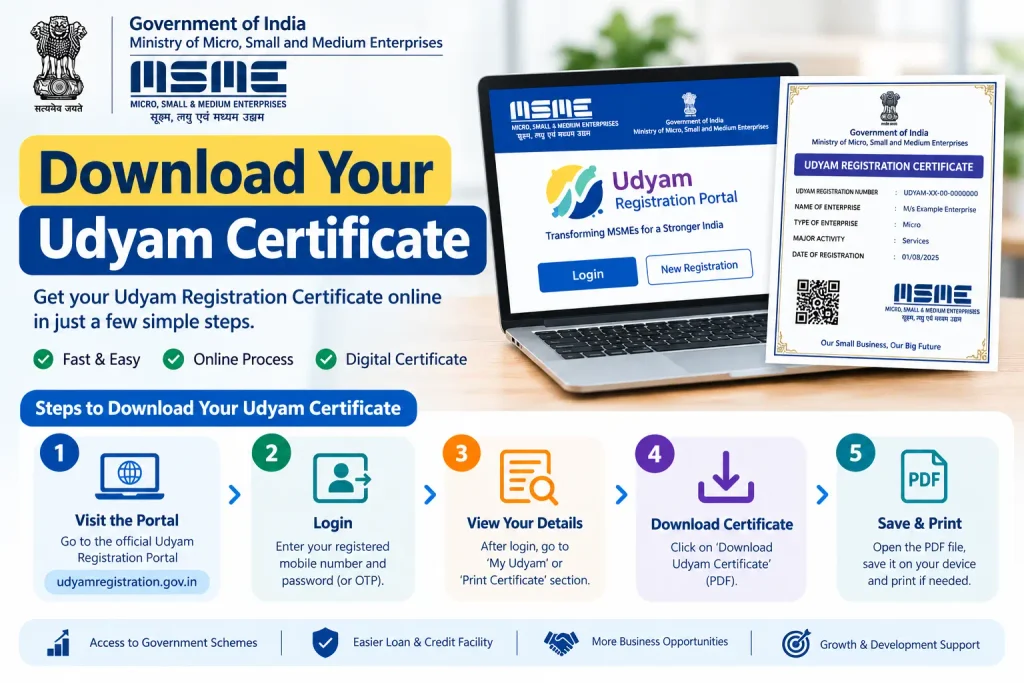
How to Download Your Udyam Certificate
The certificate is permanent — no renewal, no expiry. Download it whenever you need it:
- Go to the official Udyam portal
- Click the “Print/Verify” section
- Select “Print Udyam Certificate”
- Enter your Udyam Registration Number and registered mobile number
- Choose OTP verification via mobile or email
- Enter the OTP and click “Validate”
- Save the PDF or take a printout
The certificate carries a dynamic QR code. Anyone — a bank, a tender officer, a buyer — can scan it to verify your business details instantly against government records. This is why the Udyam certificate carries more weight than the old Udyog Aadhaar printout.
Migrating from an Old Udyog Aadhaar (UAM) Number
If you have a UAM number, don’t create a fresh registration. Migrate:
- Visit the Udyam portal and select the option for existing UAM/Udyog Aadhaar holders
- Enter your UAM number and verify with OTP
- Enter PAN and GST details as prompted
- Review the pre-filled business details and correct anything outdated
- Submit with OTP verification
- Download your new Udyam certificate
After migration, your business is recognised under the current framework and can access all MSME benefits. The old UAM number becomes a legacy reference.
Common Mistakes to Avoid
- Paying third-party websites: Registration, migration, and certificate download are all free on the official portal. No fee is legitimate.
- Aadhaar not linked to mobile: OTP verification fails silently. Update your mobile number at an Aadhaar Enrolment Centre before attempting registration.
- PAN–Aadhaar name mismatch: Even a middle name discrepancy can cause validation failure. Check both documents match.
- Wrong NIC code: Choosing a code that doesn’t match your actual operations can cause problems when claiming benefits later. Pick the closest match to your primary activity.
- Multiple registrations: One Udyam Registration per business. Duplicate attempts create confusion and may flag your PAN.
Frequently Asked Questions
Is Udyog Aadhaar still valid for MSME benefits?
No. It is no longer the active system. Old UAM certificates serve as legacy records only. Migrate to Udyam to access current benefits.
Is there any fee for Udyam registration or certificate download?
No. The government has explicitly stated that no fees apply at any stage. If a website asks for payment, it is not the official portal.
Can I download my Udyam certificate on mobile?
Yes. The portal works on any browser. Log in with your URN and Aadhaar, complete OTP verification, and download directly to your phone.
How do I find my Udyog Aadhaar number if I lost it?
Use the “Forgot Udyam/UAM Number” option on the official portal. Enter your registered mobile number or email, verify with OTP, and the number will be sent to you.
Does the Udyam certificate expire?
No. It has lifetime validity. But keep your turnover and investment details updated, since your MSME category may shift based on annual figures.
What if I don’t have GST registration?
GST is mandatory for Udyam Registration only if your business is liable under the CGST Act. If you’re not covered, you can register with PAN and Aadhaar. Check the official portal for your specific case.
Before You Close This Tab
Once your Udyam certificate is downloaded, save a copy somewhere you’ll find it in a hurry — bank loan officers and tender portals often ask for it at short notice, and re-downloading requires OTP verification each time. If your registration fails at the PAN validation step and the error message is unclear, wait 24 hours before retrying; the government databases sometimes need a day to sync updated PAN or GST details. For anything specific to your business structure or tax status, verify current requirements on the official Udyam portal rather than relying on a guide like this one.

4 Comments
Pingback: How to Apply FSSAI License Online (2026)
Pingback: Standup India Scheme
Pingback: Udyami Bihar Gov In
Pingback: PM Jan Aushadhi Kendra