

Your Aadhaar update has been stuck at “under process” for weeks. The mobile number linked to your Aadhaar is outdated, so the OTP never arrives. Your bank is pressing you to complete e-KYC before a deadline, and the enrolment centre that took your request has stopped answering calls. When the usual channels fail, the UIDAI grievance portal is where your complaint actually gets logged, tracked, and routed to someone accountable. This guide covers how to file that complaint online, how to check your Aadhaar grievance status afterward, when to use the 1947 helpline, and the mistakes that quietly delay resolution.
What the UIDAI Grievance System Handles
UIDAI (Unique Identification Authority of India) issues Aadhaar and runs an official grievance redressal system for complaints that cannot be sorted at the counter level. If you have already raised the issue at your enrolment centre or through the self-service portal and got nowhere, this is the next step. The system generally covers:
- Enrolment or update problems at an Aadhaar Seva Kendra or enrolment centre.
- Updates stuck “under process,” or an updated Aadhaar letter that never arrived.
- Errors in demographic details (name, address, date of birth) or biometric updates.
- Aadhaar-linked authentication or e-KYC failures — e-KYC being the digital verification of your identity by a bank, telecom operator, or other agency.
- Complaints against a centre, operator, or service quality.
Discover More About:👇
Aadhaar Complaint Status: Check Online in 2 Minutes
Aadhaar Complaint Status: How to Check UIDAI Grievance Status Online
What You Need Before You Start
Keep these within reach. Missing one of them is the most common reason people abandon the form halfway:
- Your Aadhaar number or EID — the 28-digit Enrolment ID printed on your enrolment or update acknowledgement slip.
- Your VID (Virtual ID), a temporary 16-digit number you can use in place of your Aadhaar number for some services.
- The URN (Update Request Number) or acknowledgement slip, if your complaint concerns an update.
- Your registered mobile number — OTP verification typically depends on it.
- A short written description of the problem, plus screenshots or receipts if you have them.
If your registered mobile number is the very thing that is outdated, note that OTP-based verification may not work for you. In that case, calling 1947 or visiting an Aadhaar Seva Kendra is usually the practical route.
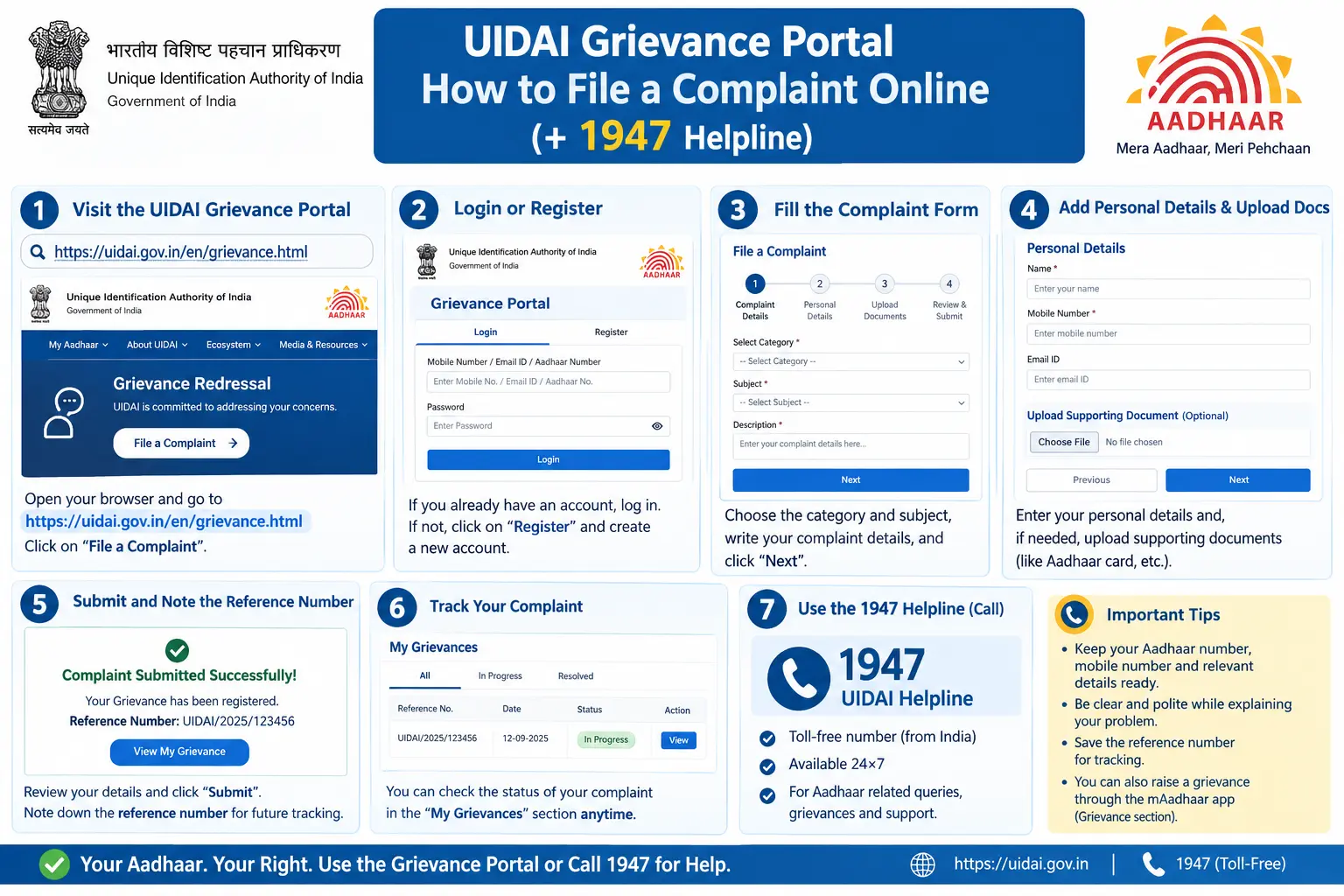
How to File a Complaint on the UIDAI Grievance Portal
Screen layouts change periodically, but the flow generally runs like this:
- Open uidai.gov.in in your browser. Type the address yourself or use your own bookmark — not a link forwarded on WhatsApp.
- Find the grievance section. Look under “Contact & Grievance” or “Help & Support,” then choose the option to file a complaint. On some versions of the site, this takes you to a separate grievance redressal page.
- Enter your Aadhaar number or EID. You will usually be asked to verify with an OTP sent to your registered mobile.
- Pick the complaint category that matches your issue — enrolment, update, centre-related, or online service.
- Describe the problem in plain terms. State what went wrong, the date, the centre or city, and the acknowledgement or URN. One issue per complaint works best; bundling three problems into one form slows everything down.
- Upload supporting documents if the form asks — acknowledgement slips, payment receipts, screenshots.
- Submit and save your reference number. You will typically receive a grievance or registration number. This is the only thing that lets you check your Aadhaar grievance status later, so screenshot it and write it down.
- Watch for the response. UIDAI or the concerned office usually replies by SMS, email, or through the portal. Timelines vary by case type — check the official portal for current guidance rather than assuming a fixed number of days.
Two pitfalls worth knowing. First, if the OTP does not arrive within a couple of minutes, do not keep hammering the resend button — sessions often time out and you lose whatever you typed. Check that your registered number is actually active, then retry. Second, a single wrong digit in your EID or URN attaches your complaint to the wrong record, and the rejection message you get back will not always make that obvious. Copy the number from your acknowledgement slip rather than typing it from memory.
Filing Through the mAadhaar App
The mAadhaar app carries Aadhaar services and, in some versions, complaint-related options. Where available, the steps mirror the website: log in, verify by OTP, choose a category, describe the issue, submit. If your version does not show the option, use the website.
Complaints About a Specific Centre
For complaints about an Aadhaar Seva Kendra or enrolment centre — refusal of service, overcharging, operator misconduct — name the centre, its location, and your visit date. That detail is what lets UIDAI route the complaint to the responsible office instead of bouncing it back to you for clarification.
Checking Your Grievance Status
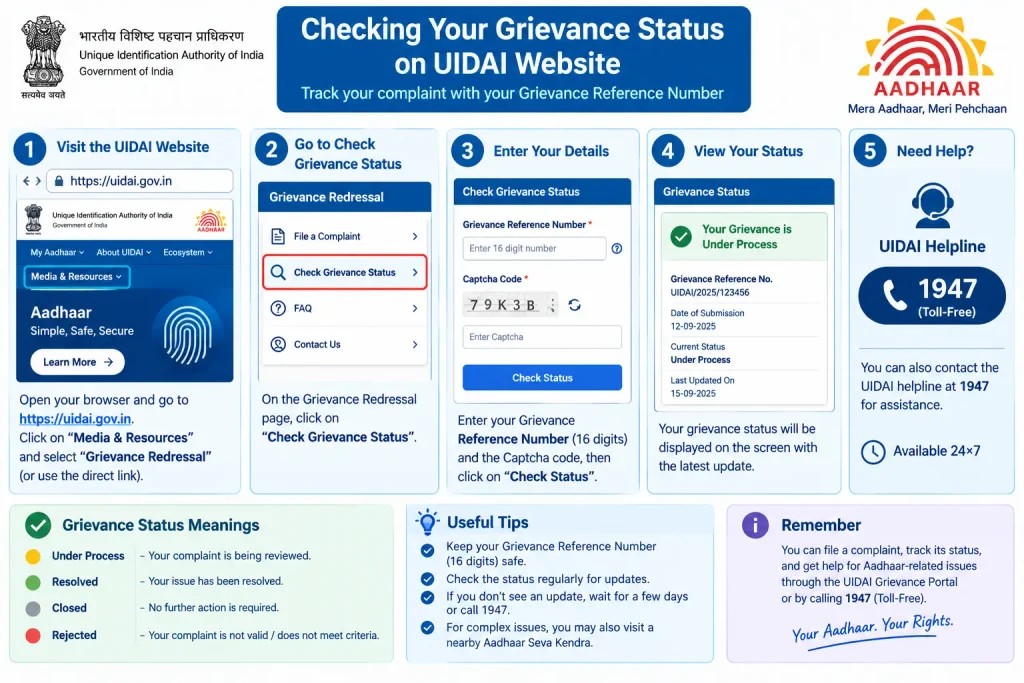
Tracking works much the same way as filing:
- Return to the grievance section of the UIDAI portal.
- Choose the complaint or grievance status option.
- Enter your grievance number along with the Aadhaar number or EID you used.
- Clear the OTP or captcha check.
- Read the current status and any response posted by UIDAI.
Updates may also land on your registered mobile or email. If the status reads “resolved” but nothing has actually changed, you can generally reopen the complaint quoting the original reference number, or file a fresh one that leads with the earlier grievance number. The same tracking flow is sometimes labelled UIDAI feedback status or Aadhaar card feedback status — both usually lead to the same system.
Discover More About:👇
UIDAI Aadhaar Helpline Number & Customer Care: Toll-Free Numbers, Email & Contact Details
How to Track Aadhaar Update/Correction Status Using SRN Number
UIDAI Helpline 1947 and Email
The UIDAI helpline number 1947 is toll-free and handles both queries and complaints. Have your Aadhaar number or EID ready and a one-line summary of the problem. The IVR typically lets you choose your language and issue type before connecting you to an agent.
For written complaints, UIDAI lists an official complaint email ID on its website. Contact details do change, so confirm the current UIDAI complaint email ID and helpline information directly on uidai.gov.in rather than trusting a forwarded message or a third-party site.
One caution that matters more than any step above: never share your Aadhaar OTP, Aadhaar number, or VID with anyone who calls claiming they will “fix” your Aadhaar for a fee. UIDAI does not ask for OTPs over the phone.
Common Mistakes That Delay a Complaint
- Vague descriptions. “My Aadhaar is not working” gives an officer nothing to act on. Say what failed, when, and where.
- A wrong digit in the Aadhaar number, EID, or URN. The complaint lands on someone else’s record and quietly dies there.
- Losing the reference number. Without it, follow-up means starting over.
- Filing the same complaint repeatedly. Duplicates slow the process rather than speeding it up.
- Using unofficial apps or paid “agents.” Stick to uidai.gov.in, the official mAadhaar app, or a recognised Aadhaar Seva Kendra.
- Ignoring SMS or email replies. When UIDAI asks for additional information, a prompt reply usually decides how fast the case closes.
Frequently Asked Questions
1. Can I file a UIDAI complaint without an Aadhaar number?
If you have an EID from enrolment or an update request, that generally works instead. With neither, call 1947 and explain your situation — they will tell you what is possible.
2. How do I check my Aadhaar grievance status?
Use the complaint status option on the official UIDAI portal. Enter your grievance number and Aadhaar/EID, clear the OTP or captcha, and the current status appears.
3. What is the UIDAI helpline number for complaints?
1947, toll-free. For written complaints, use the official UIDAI complaint email ID listed on uidai.gov.in.
4. Is there a fee to file a UIDAI complaint?
Filing a grievance is generally free. Some Aadhaar update or correction services carry prescribed fees that change periodically — check the official UIDAI portal for current fees.
5. How long does UIDAI take to resolve a complaint?
It depends on the issue type and complexity. Track the complaint online and check the portal for current guidance rather than relying on a fixed figure.
6. What if my complaint is closed but the problem is not solved?
Reopen it with the original reference number, or file a fresh complaint that clearly states the earlier grievance number and why the issue persists.
A Final Word
Give a filed complaint a reasonable window — check the status after a week or so rather than refreshing daily, since most movement happens after the case reaches the concerned office. If an update still fails after UIDAI’s stated timeline has passed, do not file the same complaint again; escalate by quoting your original grievance number, and if the problem concerns your biometrics or registered mobile number, an in-person visit to an Aadhaar Seva Kendra will usually resolve faster than any online channel.

2 Comments
Pingback: eJagriti Portal 2026: Consumer Complaint Online
Pingback: Toll Complaint Number 2026