

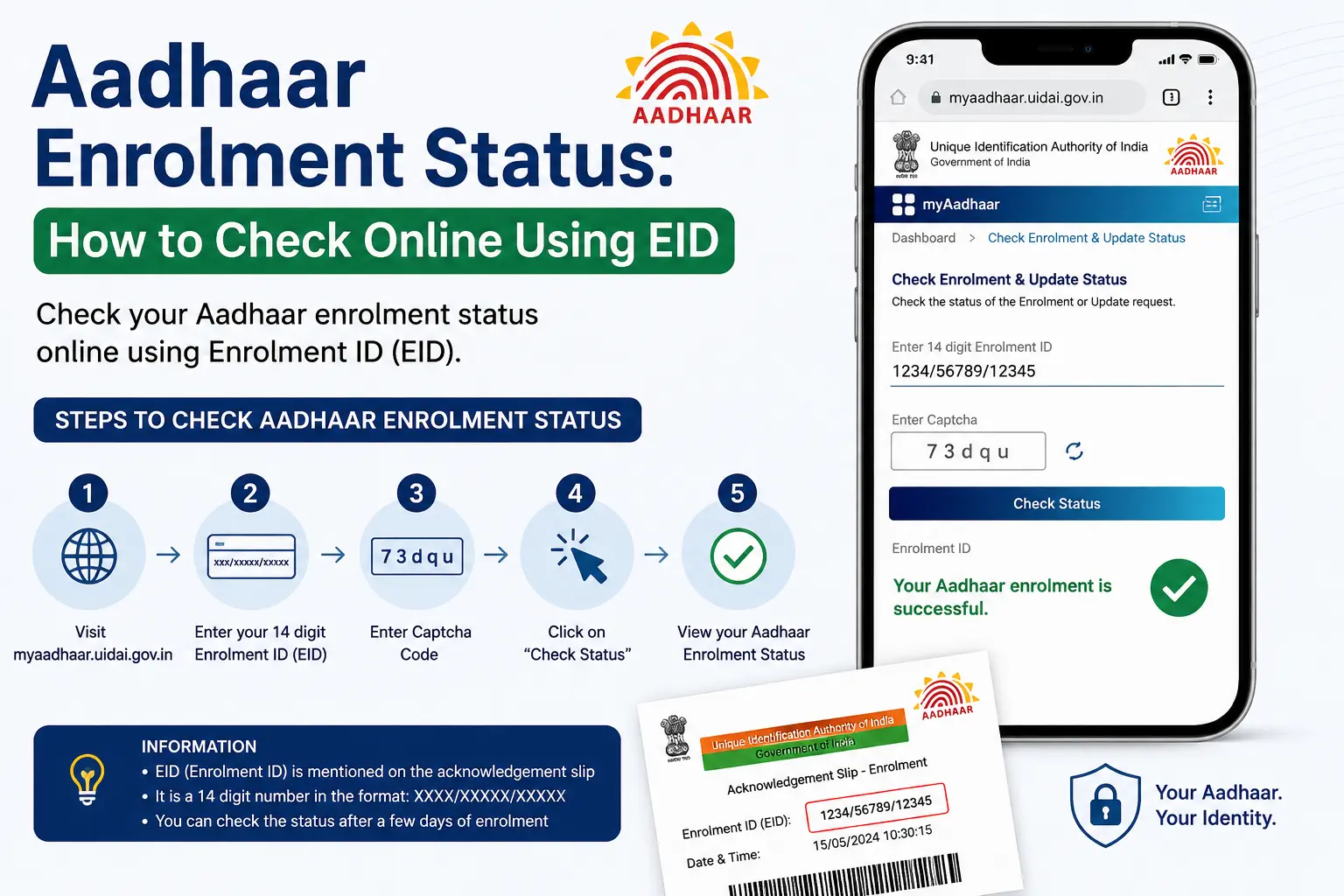
To check enrolment status, visit the official UIDAI/MyAadhaar portal and select “Check Enrolment & Update Status.” Enter your 28-digit Enrolment ID (EID) from your acknowledgement slip and submit the captcha. Your current Aadhaar enrolment status will then be displayed. You do not need your Aadhaar number to check the status because the EID is used before an Aadhaar number is generated.
Check Enrolment Status: Aadhar Enrolment Status
Aadhaar enrolment status tells you what has happened to your Aadhaar enrolment request after you submitted your details at an enrolment centre. It shows whether your Aadhaar number has been generated, is still being processed, or has been rejected.
When you enrol, you receive an acknowledgement slip containing your EID. This is different from your 12-digit Aadhaar number. The EID is particularly important when you want to check the status of an Aadhaar enrolment before an Aadhaar number has been generated.
Important distinction: Aadhaar enrolment status is different from:
- Aadhaar Update Status: Tracking changes to an existing Aadhaar (name, address, mobile number)
- Aadhaar Verification: Checking if an existing Aadhaar number is valid
What Is an EID in Aadhaar?
EID stands for Enrolment ID. It is the 28-digit reference associated with your Aadhaar enrolment transaction.
EID Format:
- 14-digit enrolment number (e.g.,
1234/56789/01234)- 14-digit date and time of enrolment (e.g.,
25/04/2026 14:30:12)
- 14-digit date and time of enrolment (e.g.,
- = 28-digit EID
You can find the EID on the top of the enrolment/update acknowledgement slip you received after enrolment. Keep this slip safely until your Aadhaar enrolment has been completed and you have access to your Aadhaar details.
Discover More About: 👇
E Shram Card Download by Mobile Number
SSUP Full Form: What Is Self Service Update Portal in Aadhaar?
How to Update Name, Date of Birth & Photo in Aadhaar Card (Demographic Update Guide)
EID vs Aadhaar Number
| EID | Aadhaar Number |
|---|---|
| Connected with the enrolment request | The Aadhaar identity number generated after successful enrolment |
| Found in enrolment/acknowledgement details | Issued after Aadhaar generation |
| Used for tracking enrolment | Used for Aadhaar-related services after generation |
| 28-digit temporary reference | 12-digit permanent number |
What You Need to Check Status
| What You Need | Why You Need It |
|---|---|
| Enrolment ID (EID) | 28-digit code from the top of your acknowledgement slip |
| Acknowledgement Slip | Received at the enrolment centre after submitting your application |
| Captcha | Security check on the UIDAI portal |
| No OTP Required | OTP is not needed for the basic status check |
How to Check Aadhaar Enrolment Status Online
The safest approach is to use the official UIDAI/MyAadhaar service rather than an unofficial website claiming to check Aadhaar status.
Step 1: Keep Your Acknowledgement Slip Ready
Find the acknowledgement slip you received when you enrolled for Aadhaar. Check the enrolment details carefully so that you have the correct EID available.
Step 2: Visit the Official UIDAI Portal
Go to the official UIDAI website
Avoid websites that imitate the UIDAI name or ask you to pay someone to check your status.
Step 3: Select “Check Enrolment & Update Status”
On the MyAadhaar portal, locate and select the option to check your enrolment and update status.
Step 4: Enter Your Enrolment ID (EID)
Enter the full 28-digit EID exactly as it appears on your acknowledgement slip. A small mistake in the reference details can prevent the system from finding the relevant enrolment record.
Step 5: Enter the Captcha
Type the security code shown on the screen. If you cannot read it, click “Try Another” for a new code.
Step 6: Submit and View Your Status
Click “Check Status” or “Submit.” The system will display your current enrolment status.
Always follow the labels shown on the current official UIDAI portal rather than relying on an old screenshot or tutorial.
Understanding Your Aadhaar Enrolment Status Results
The wording shown by UIDAI can vary depending on the stage of your enrolment. The important thing is to distinguish a request that is still being processed from one that has been successfully generated or rejected.
| Status | What It Means | What You Should Do |
|---|---|---|
| Aadhaar Generated / Completed | Your Aadhaar number has been successfully issued | Download your e-Aadhaar from the MyAadhaar portal |
| Under Process / Under Processing | Your application is still being verified by UIDAI through quality checks and deduplication | Wait and check again later. If status remains unchanged beyond 90 days, contact 1947 |
| Rejected | Your enrolment could not be approved | Visit an Aadhaar Enrolment Centre to re-enrol with clear, original documents |
| Invalid EID | The EID entered is incorrect or not in the system | Verify the EID on your acknowledgement slip; retrieve it if lost |
Important: Do not assume that every status phrase has the same meaning across every UIDAI service. If the exact message shown on your screen is unclear, use the official UIDAI help channels rather than relying on an unofficial explanation.
Discover More About: 👇
Baal Aadhaar: How to Apply for Aadhaar Card for Children Online
Aadhaar Correction/Enrollment Form: Download, Fill & Submit Guide
What If Your Aadhaar Status Is Still “Under Process”?
This is one of the most common concerns after Aadhaar enrolment.
If your enrolment is still under process, it does not automatically mean something has gone wrong. It simply means your application is in the verification queue, undergoing quality checks, validation, and deduplication.
How long does Aadhaar enrolment take?
UIDAI officially allows up to 90 days for processing. Most people receive their Aadhaar between 45 and 60 days.
What to do:
- Wait for the standard timeline before taking action
- Check status periodically
- If status does not change beyond 90 days, call the UIDAI helpline at 1947
What NOT to do:
- Do not re-enrol while a pending enrolment is “Under Process” — duplicate enrolments may be rejected
- Avoid relying on websites or agents that promise to “speed up” Aadhaar generation for a fee
What If My Aadhaar Enrolment Is Rejected?
A rejected enrolment requires attention, but it is fixable.
Common rejection reasons:
- Document quality issues (blurry, invalid, expired, or laminated documents)
- Biometric quality issues
- Duplicate enrolment detected
What to do:
- Visit the nearest Aadhaar Enrolment Centre or Aadhaar Seva Kendra
- Bring original, clear identification documents (not photocopies)
- Complete fresh enrolment
- No penalty, waiting period, or black mark applies
Important: Do not pay an unofficial “Aadhaar agent” claiming they can change or guarantee your status.
Aadhaar Enrolment Status Not Showing?
If your result is not appearing, work through these basic checks:
- Recheck the EID and other enrolment details entered
- Compare the information with your acknowledgement slip
- Make sure you are using the current official UIDAI/MyAadhaar service
- If you just enrolled, wait 24-48 hours for the system to update
- If there is a temporary technical issue, try the official service again later
- Do not repeatedly submit incorrect information
- If the problem continues, contact UIDAI through its official support options
What If I Lost My EID / Enrolment ID?
You can retrieve your EID online if your mobile number is registered with Aadhaar:
- Visit the UIDAI EID retrieval
- Select “Enrolment ID (EID)”
- Enter your full name, registered mobile number or email, and captcha
- Click “Send OTP”
- Enter the OTP received on your registered mobile
- Your EID will be sent via SMS
If your mobile is not registered or unavailable: Visit an Aadhaar Seva Kendra with identification proof. Staff can retrieve your EID.
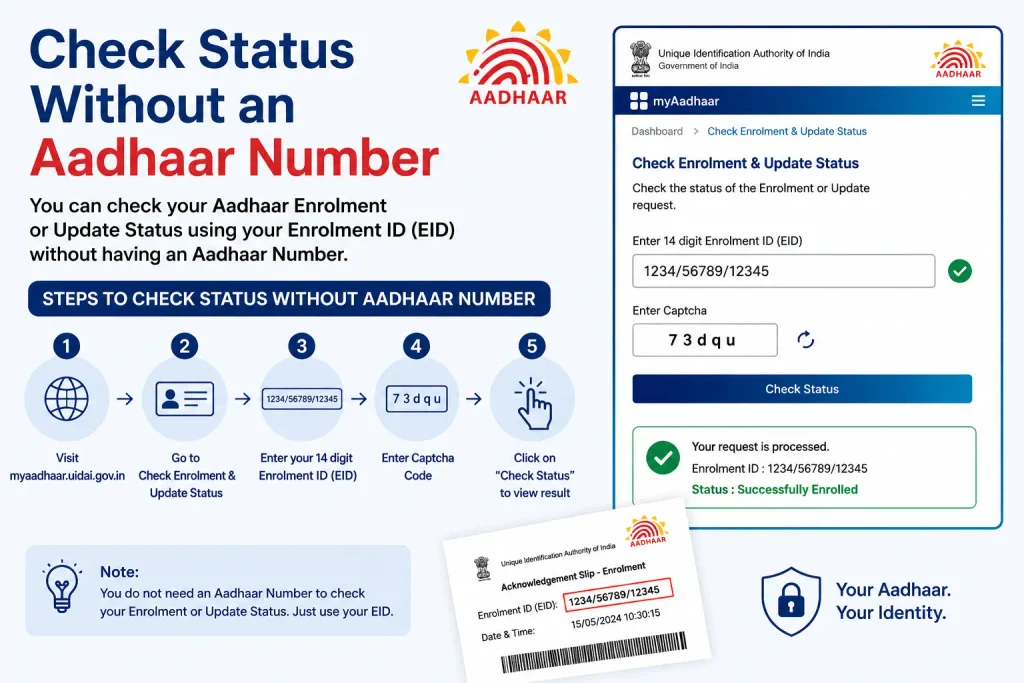
Can I Check Status Without an Aadhaar Number?
Yes. The EID is specifically designed for checking status before the Aadhaar number is generated. You do NOT need an Aadhaar number to check enrolment status.
Can I Check Status Without EID?
You cannot directly check status without an EID. However, you can:
- Retrieve your EID online using name + registered mobile/email
- Call 1947 for assistance
- Visit an Aadhaar Seva Kendra
Alternative Official Methods to Check Status
| Method | Best For | What You Need |
|---|---|---|
| MyAadhaar Website | Self-service, immediate check | EID + Captcha |
| UIDAI Helpline 1947 | Assistance, no internet | Name + EID/UID, registered mobile |
| Aadhaar Mitra Chatbot | Quick queries | EID, URN, or SRN |
| Aadhaar Seva Kendra | In-person assistance, mobile unavailable | Acknowledgement slip, ID proof |
The helpline 1947 is toll-free and available 24×7 via IVRS.
What to Do After Aadhaar Is Generated
Once your Aadhaar has been generated, you can:
- Download e-Aadhaar: Visit the MyAadhaar portal, select “Download e-Aadhaar,” enter your Aadhaar number or EID, and verify with OTP
- Physical Aadhaar Letter: Will be dispatched by India Post to your registered address
- e-Aadhaar is legally valid and can be used for all official purposes
Remember that Aadhaar enrolment status and e-Aadhaar download are two different tasks:
- Enrolment status → confirms the progress/result of enrolment
- e-Aadhaar download → lets you obtain your Aadhaar document after generation
Aadhaar Enrolment Status: Common Mistakes to Avoid
A few simple mistakes can make the process more confusing than it needs to be:
- Using an unofficial status-check website — always prefer UIDAI/MyAadhaar
- Confusing EID with Aadhaar number — they serve different purposes
- Entering incorrect enrolment details — check the acknowledgement slip before submitting
- Entering only 14 digits instead of the full 28-digit EID
- Trusting guaranteed processing promises — no private website should be treated as an authority over UIDAI processing
- Sharing OTPs — keep OTPs private
- Posting your EID or Aadhaar details publicly — treat identity-related information as private
Security Warning: Use Only Official UIDAI Services
- Only use the official UIDAI/MyAadhaar portal: https://myaadhaar.uidai.gov.in/
- Only call 1947 for UIDAI support
- Never share your OTP with anyone
- Never share your EID or Aadhaar number publicly
- Avoid unofficial Aadhaar-status websites
- Check the URL before entering any personal information
Frequently Asked Questions
How can I check my Aadhaar enrolment status?
Visit the official UIDAI portal select “Check Enrolment & Update Status,” and enter your 28-digit EID and captcha.
What is EID in Aadhaar?
EID stands for Enrolment ID. It is a 28-digit code (14-digit enrolment number + 14-digit date/time stamp) printed on the top of your acknowledgement slip.
Where can I find my EID?
Your EID is printed on the top of the enrolment/update acknowledgement slip you received at the Aadhaar enrolment centre.
How long does Aadhaar enrolment take?
Officially up to 90 days. Most people receive their Aadhaar between 45 and 60 days.
What does “under process” mean for Aadhaar?
It indicates that the enrolment is still being processed through quality checks and deduplication. It does not mean something has gone wrong.
Why is my Aadhaar enrolment status not showing?
First check that you entered the full 28-digit EID correctly and are using the official UIDAI/MyAadhaar service. If you just enrolled, wait 24-48 hours for the system to update.
What should I do if my Aadhaar enrolment is rejected?
Visit the nearest Aadhaar Enrolment Centre with original, clear documents and re-enrol. Rejection is fixable.
Can I check Aadhaar status before receiving my Aadhaar number?
Yes, use your EID from the acknowledgement slip. Enrolment-status checking is specifically relevant to people who have enrolled but are waiting for Aadhaar generation.
What should I do if I lose my EID?
Retrieve it online using name + registered mobile/email at myaadhaar.uidai.gov.in/retrieve-eid-uid, or call 1947.
Is checking Aadhaar enrolment status free?
Yes, the online status check is free. Never pay an unofficial website simply to “unlock” or “speed up” your Aadhaar status.
Q: What does “EID must be exactly 28 digits (14-digit EID + 14-digit date/time)” mean?
This error appears when the EID you entered is incomplete or incorrectly formatted. Your EID has two parts: a 14-digit enrolment number and a 14-digit date/time stamp, written together as one continuous 28-digit number with no spaces. Check your acknowledgement slip and re-enter both parts exactly as printed, including any leading zeros.
Q: What does “We have found more than 1 Aadhaar associated with the enrolment number that you provided” mean?
This message appears when your enrolment number matches multiple Aadhaar records in UIDAI’s system, usually because of a duplicate enrolment attempt. Re-enter your complete 28-digit EID (enrolment number + date/time) instead of just the enrolment number, so the system can match the exact record.
Q: What does “Your enrolment request submitted successfully” mean?
This confirms UIDAI has received your enrolment or update request and it has entered the processing queue. It does not mean your Aadhaar has been generated yet — processing typically takes a few days to a few weeks depending on the request type.
Q: What does “Should I tick Yes or No?” mean during Aadhaar enrolment?
This refers to the consent option shown during enrolment/update for sharing your Aadhaar details (e.g., for biometric or address verification). Tick “Yes” if you want to authorize the specific use case shown on screen; tick “No” if you don’t consent to that specific use. Read the exact consent line shown, since the answer depends on what’s being asked.
Q: What is an “enrolment number” vs a full “EID”?
The enrolment number is only the first 14 digits it’s not enough on its own to check your status. You need the full 28-digit EID (14-digit enrolment number + 14-digit date/time stamp from your acknowledgement slip) to check enrolment status successfully.
Final Takeaway
If you have recently enrolled for Aadhaar, keep your acknowledgement slip safe and use the EID when checking your Aadhaar enrolment status through the official UIDAI/MyAadhaar service.
If the status is still being processed, avoid unofficial promises about faster generation. If the result is rejected, unavailable, or confusing, rely on UIDAI’s official guidance rather than a paid intermediary.
For the safest experience, start and finish your Aadhaar-related work through official UIDAI channels.
Disclaimer: CheckAadharStatus.com is an independent informational website and is not affiliated with UIDAI or the Government of India. Always verify important Aadhaar information on the official UIDAI/MyAadhaar website.

10 Comments
Pingback: E Shram Card Download by Mobile Number
Pingback: How to Change Aadhar Card Mobile Number Online (2026)
Pingback: SSUP Full Form: Self Service Update Portal
Pingback: Update Photo in Aadhar Card: Name & DOB
Pingback: Baal Aadhaar: How to Apply for Aadhaar Card for Children
Pingback: SRN Number in Aadhar Card: How to Track Update Status
Pingback: EPFO KYC Update Online: Link Aadhaar with UAN
Pingback: Aadhaar Enrollment Form: Download & Fill Guide
Pingback: New Aadhar Card Apply Online Guide
Pingback: Aadhaar EID: “EID Must Be Exactly 28 Digits” Error