

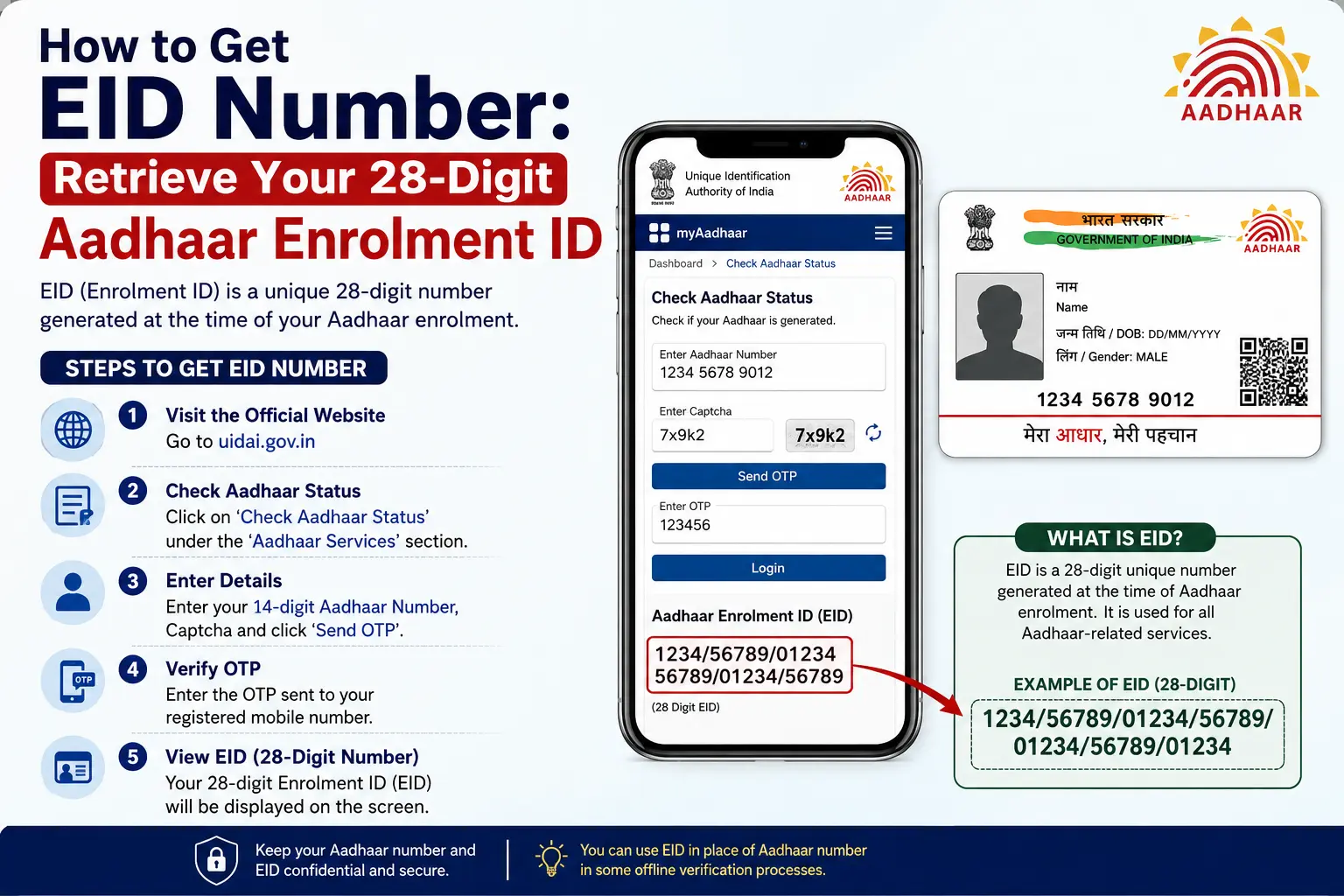
Lost your Aadhaar enrolment slip and now need the number printed on it? You may not need to visit an Aadhaar centre straight away. If you are searching how to get eid number, UIDAI provides an official way to retrieve a lost or forgotten EID online, provided you can use the required registered contact details.
The EID, or Enrolment ID, is connected to your Aadhaar enrolment and is different from the 12-digit Aadhaar number issued after successful generation. This distinction becomes especially important when you are checking enrolment status or trying to identify which number a government service actually requires.
This guide explains how to retrieve an EID, what the 28 digit enrolment id means, what to do if your enrolment slip is lost, and how EID differs from Aadhaar numbers, URNs and the PM-KISAN Registration Number.
Important: CheckAadharStatus.com is an independent informational website and is not affiliated with UIDAI or the Government of India. Use the official UIDAI website, MyAadhaar portal or UIDAI’s 1947 helpline for actual Aadhaar services.
Discover More About: 👇
Address Proof Documents List for Aadhaar: What Documents Are Accepted?
Quick Facts
| Detail | Information |
|---|---|
| Service | Retrieve UID/EID |
| Governing authority | UIDAI |
| EID length | 28 digits |
| EID purpose | Identifies Aadhaar enrolment |
| Online retrieval | Available through official UIDAI service |
| Verification | Registered mobile number or email, as applicable, and OTP |
| Online retrieval cost | Free |
| Alternative help | UIDAI 1947 and Aadhaar enrolment centres |
| Official portal | MyAadhaar |
How to Get Your EID Number Online
If you have forgotten your EID but still have access to the mobile number or email associated with your Aadhaar details, the official UIDAI retrieval service is the first option to try.
What you need before starting
Keep the following information available:
- Your full name as recorded with Aadhaar
- Your registered or linked mobile number or email, as applicable
- Access to receive the OTP
- CAPTCHA verification
UIDAI’s Retrieve UID/EID service uses these details to verify the request before providing the requested Aadhaar identifier.
Steps to retrieve your EID
- Open the official MyAadhaar portal.
- Find the Retrieve Lost or Forgotten UID/EID service.
- Select the option to retrieve your EID.
- Enter your name as requested.
- Enter the registered mobile number or email address.
- Complete the CAPTCHA.
- Request an OTP.
- Enter the OTP received through the official channel.
- Follow the instructions displayed by UIDAI to retrieve your EID.
The online retrieval service is free. If a website or individual asks you to pay simply to use UIDAI’s official EID retrieval facility, do not treat that as an official UIDAI requirement.
For the actual service, use the official MyAadhaar portal.
What Is a 28-Digit Enrolment ID?
A 28 digit enrolment id is the Enrolment ID, or EID, issued in connection with Aadhaar enrolment.
The complete EID consists of:
14-digit enrolment number + 14-digit date and time information
This is why the number associated with an Aadhaar enrolment can look much longer than the final 12-digit Aadhaar number.
The EID should therefore not be confused with the Aadhaar number. It identifies the enrolment record rather than replacing the Aadhaar number that may be generated later.
Where can you find the EID?
The enrolment acknowledgement slip given at the time of Aadhaar enrolment contains the relevant enrolment information. The enrolment number together with the date and time information forms the EID.
If you still have the acknowledgement slip, keep it safely until your Aadhaar enrolment has been completed and you have access to your Aadhaar details.
If the slip has been lost, you can try the official UIDAI retrieval route instead of assuming that the EID cannot be recovered.
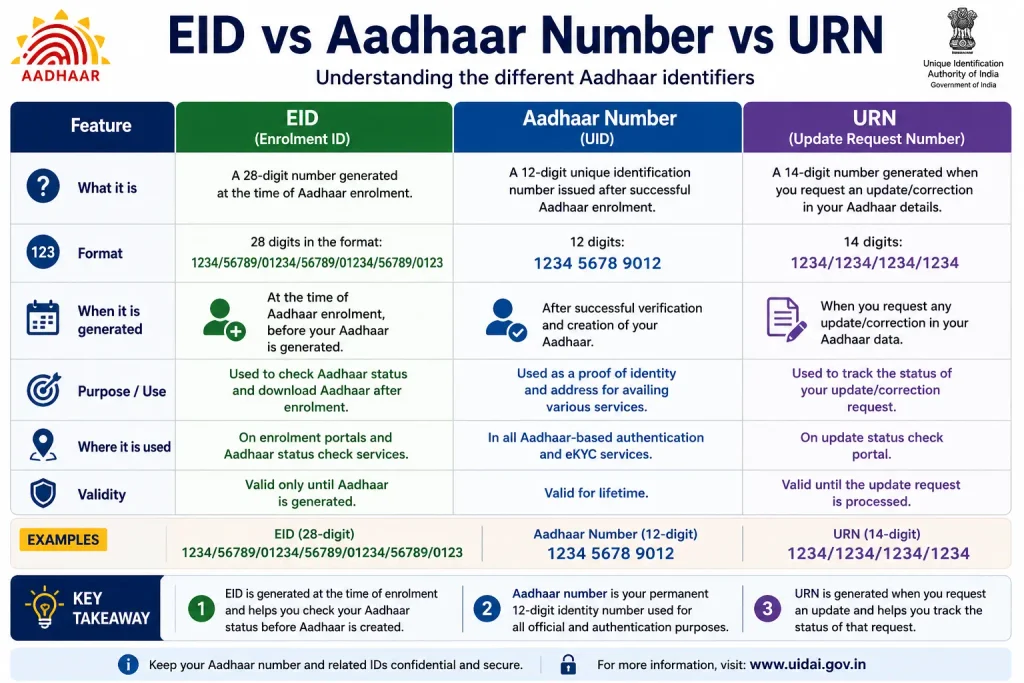
EID vs Aadhaar Number vs URN
Aadhaar services use several different identifiers. Knowing which one you have can prevent you from entering the wrong information on a government website.
| Identifier | What it represents | Where it is relevant |
|---|---|---|
| EID | Aadhaar Enrolment ID | Aadhaar enrolment and applicable status services |
| Aadhaar Number | 12-digit Aadhaar identifier | Aadhaar services after generation |
| URN | Update Request Number | Certain Aadhaar update requests |
| PM-KISAN Registration Number | PM-KISAN-specific registration identifier | PM-KISAN services |
EID vs Aadhaar number
The EID and Aadhaar number are not interchangeable.
The EID is associated with your enrolment. The Aadhaar number is the 12-digit number generated for you after successful Aadhaar generation.
So, if a form specifically asks for an Aadhaar number, do not enter the 28-digit EID simply because both numbers relate to Aadhaar.
Discover More About: 👇
What Is Masked Aadhaar Card? Meaning, Uses, Validity & How to Download
Aadhaar KYC Process: How to Complete Aadhaar-Based KYC
EID vs URN
A URN can be associated with an Aadhaar update request, while EID relates to Aadhaar enrolment.
If you recently submitted an Aadhaar update, look for the request details provided for that update rather than automatically searching for your old EID.
EID vs PM-KISAN Registration Number
This difference is particularly important for people searching for government beneficiary or payment information.
The PM-KISAN Registration Number is not the same as an Aadhaar EID.
If your goal is to check PM-KISAN information, use the relevant PM-KISAN service rather than trying to substitute the 28-digit EID.
How to Check Aadhaar Status Using EID
If you are waiting for Aadhaar generation after enrolment, your enrolment information can be used with the applicable UIDAI status service.
The acknowledgement slip contains the enrolment number and date/time information required for EID-based status checking.
If you no longer have the EID, retrieve it through the official UIDAI recovery service where available before attempting to use an EID-based status service.
Remember that Aadhaar enrolment status and Aadhaar update status are not necessarily the same type of status search. An update request can have separate request or reference information.
What to Do If Your Aadhaar Enrolment Slip Is Missing
A missing document can mean two different things: you may have lost the physical Aadhaar card, or you may have lost the enrolment acknowledgement slip.
These situations should not be treated as identical.
Lost Aadhaar card
If your Aadhaar has already been generated, losing the physical card does not necessarily mean losing access to your Aadhaar information.
UIDAI provides digital services such as e-Aadhaar.
Lost enrolment slip
If the enrolment slip is missing and you need the EID, try UIDAI’s official Retrieve UID/EID facility.
If you cannot complete the online retrieval process, UIDAI also provides assistance through its official helpline and Aadhaar enrolment centres.
Don’t enrol again just because the slip is lost
If an Aadhaar number has already been generated from an earlier enrolment, submitting another enrolment is not the appropriate solution simply because the acknowledgement slip is missing.
First try to retrieve your existing Aadhaar details through official UIDAI services.
Can You Get EID Without a Registered Mobile Number?
This is where many users get stuck.
The online retrieval route requires access to the contact details needed for UIDAI’s verification process. If you cannot use the online option because the required registered contact details are unavailable, UIDAI provides assisted alternatives.
Use UIDAI 1947
You can contact UIDAI through its official helpline number, 1947.
UIDAI documents a process for assisting users who have lost or forgotten Aadhaar details, including verification through demographic information in applicable cases.
Use only UIDAI’s official contact channels. Do not provide your OTP or other sensitive Aadhaar information to someone who contacts you privately claiming to be an “agent.”
Visit an Aadhaar enrolment centre
An Aadhaar enrolment centre can provide assisted services where applicable.
Some centre-based services may have prescribed charges. For example, UIDAI’s documented service information lists ₹30 for a Print Aadhaar service. That should not be confused with the online Retrieve UID/EID service, which is free.
Always check the current UIDAI service and fee information before visiting a centre.
PM-KISAN Status: Do You Need an Aadhaar EID?
If you searched for an EID because you actually want to check PM-KISAN beneficiary status, payment status or registration information, stop and identify the correct number first.
The Aadhaar EID is an Aadhaar enrolment identifier. It is not the PM-KISAN Registration Number.
The current official PM-KISAN Know Your Registration Number service provides options to search using a Mobile Number or Aadhaar Number.
The practical flow is:
Aadhaar Number / Mobile Number → Find PM-KISAN Registration Number → Use the applicable PM-KISAN status service
This means you should not assume that the 28-digit EID can be entered directly as a PM-KISAN Registration Number.
If your search intent is actually about PM-KISAN payments or beneficiary status, the PM-KISAN portal is the correct place to continue rather than an Aadhaar EID retrieval page.
Common EID Problems and How to Fix Them
OTP is not received
If the OTP does not arrive while using an official UIDAI service:
- Check that you entered the correct registered contact information.
- Wait and use the official retry option if it is provided.
- Avoid switching to unofficial websites that promise instant retrieval.
- Use UIDAI’s official support options if the online process remains unavailable.
Never share an OTP with another person who claims they can retrieve your EID for you.
Your details are not accepted
Check that the information you entered matches the details requested by UIDAI.
If the official service does not accept your details, do not repeatedly submit personal information to third-party websites. Use UIDAI’s official support channels instead.
You lost your enrolment slip
Losing the physical slip does not automatically mean that the EID is permanently unavailable.
Try the official Retrieve UID/EID service first. If you cannot use the online route, contact UIDAI at 1947 or seek assistance through an Aadhaar enrolment centre.
You are entering the wrong number
If you see a 12-digit Aadhaar number, 28-digit EID and an update-related reference number, do not assume they are interchangeable.
Before submitting a form, check the exact name of the field.
Is EID Required to Download e-Aadhaar?
Not necessarily.
Depending on the available service and your Aadhaar details, e-Aadhaar can be accessed through supported identifiers such as an Aadhaar number or EID.
Once your Aadhaar has already been generated, you may not need to recover the old EID merely to access your digital Aadhaar.
This is another reason to identify the actual task first: retrieving an EID is different from retrieving an Aadhaar number or downloading e-Aadhaar.
EID Retrieval Methods Compared
| Method | Best suited for | Key requirement | Cost |
|---|---|---|---|
| MyAadhaar Retrieve UID/EID | Users who can complete online verification | Required registered contact details and OTP | Free |
| UIDAI 1947 | Users needing official assistance | Verification as required by UIDAI | EID retrieval assistance is free |
| Aadhaar enrolment centre | Users needing in-person assistance | Applicable identity/demographic or biometric verification | Depends on service; some services have prescribed fees |
The online method is usually the most convenient starting point when you have access to the required contact information.
FAQs About Aadhaar EID
How can I get my EID number?
Use UIDAI’s official Retrieve UID/EID service through MyAadhaar. You will need to complete the requested verification process using your registered contact details. If the online method is unavailable to you, UIDAI also provides assistance through 1947 and enrolment centres.
What is a 28-digit enrolment ID?
It is the Aadhaar Enrolment ID, or EID. The 28 digits consist of the enrolment number and the associated date/time information from the enrolment record.
Is EID the same as an Aadhaar number?
No. EID is associated with Aadhaar enrolment, while the Aadhaar number is a separate 12-digit identifier issued after successful generation.
How can I retrieve my lost EID?
Start with UIDAI’s official Retrieve UID/EID service. If you cannot complete online verification, contact UIDAI through 1947 or use an appropriate Aadhaar enrolment-centre service.
Can I get EID without my enrolment slip?
Yes, losing the physical enrolment slip does not necessarily prevent EID retrieval. UIDAI provides an official online retrieval facility and assisted options.
Can I retrieve EID without a registered mobile number?
The online retrieval route may require access to the registered mobile number or email. If you cannot use that route, UIDAI provides official assistance through 1947 and enrolment centres for applicable cases.
Where is the EID on the Aadhaar enrolment slip?
The enrolment acknowledgement contains the enrolment number and date/time information that together form the EID.
Can I check Aadhaar status using EID?
Yes. The enrolment details from the acknowledgement slip can be used for applicable Aadhaar enrolment-status services.
What is the difference between EID and URN?
EID relates to Aadhaar enrolment, while URN can be associated with an Aadhaar update request. They are different identifiers.
Can I use Aadhaar EID for PM-KISAN status?
Do not assume that you can. PM-KISAN has its own Registration Number. Its official registration-number lookup currently allows searches using Aadhaar Number or Mobile Number.
How do I find my PM-KISAN Registration Number using Aadhaar?
Use the official PM-KISAN Know Your Registration Number service and select the Aadhaar Number option where available.
Verify Your EID Only Through Official UIDAI Services
If you have forgotten your Aadhaar enrolment ID, start with the official UIDAI route rather than a third-party website.
For online retrieval, use MyAadhaar. If you cannot complete the online process, UIDAI’s 1947 helpline and Aadhaar enrolment centres provide official alternatives for applicable cases.
The simplest way to avoid confusion is to remember what each identifier represents:
- EID: Aadhaar enrolment identifier
- Aadhaar Number: 12-digit Aadhaar identifier
- URN: Associated with certain Aadhaar update requests
- PM-KISAN Registration Number: Identifier used by the PM-KISAN system
So, if you are searching how to get eid number because your enrolment slip is lost, use UIDAI’s official retrieval options. If you are actually trying to find a PM-KISAN beneficiary or payment status, switch to the PM-KISAN process and look for its Registration Number instead.
Official sources: UIDAI — uidai.gov.in · MyAadhaar — myaadhaar.uidai.gov.in · PM-KISAN — pmkisan.gov.in
Disclaimer: CheckAadharStatus.com is an independent informational website and is not affiliated with UIDAI, the Government of India, or PM-KISAN. Government websites, procedures, fees and service availability may change. Always verify the latest information on the relevant official government portal before submitting personal information or making a payment.

4 Comments
Pingback: How to Change Aadhaar Address Online in 2026
Pingback: Aadhaar eSign: Digital Document Signing
Pingback: e Card Download: Download e-Aadhaar, XML & PVC Card
Pingback: Aadhaar EID: “EID Must Be Exactly 28 Digits” Error