

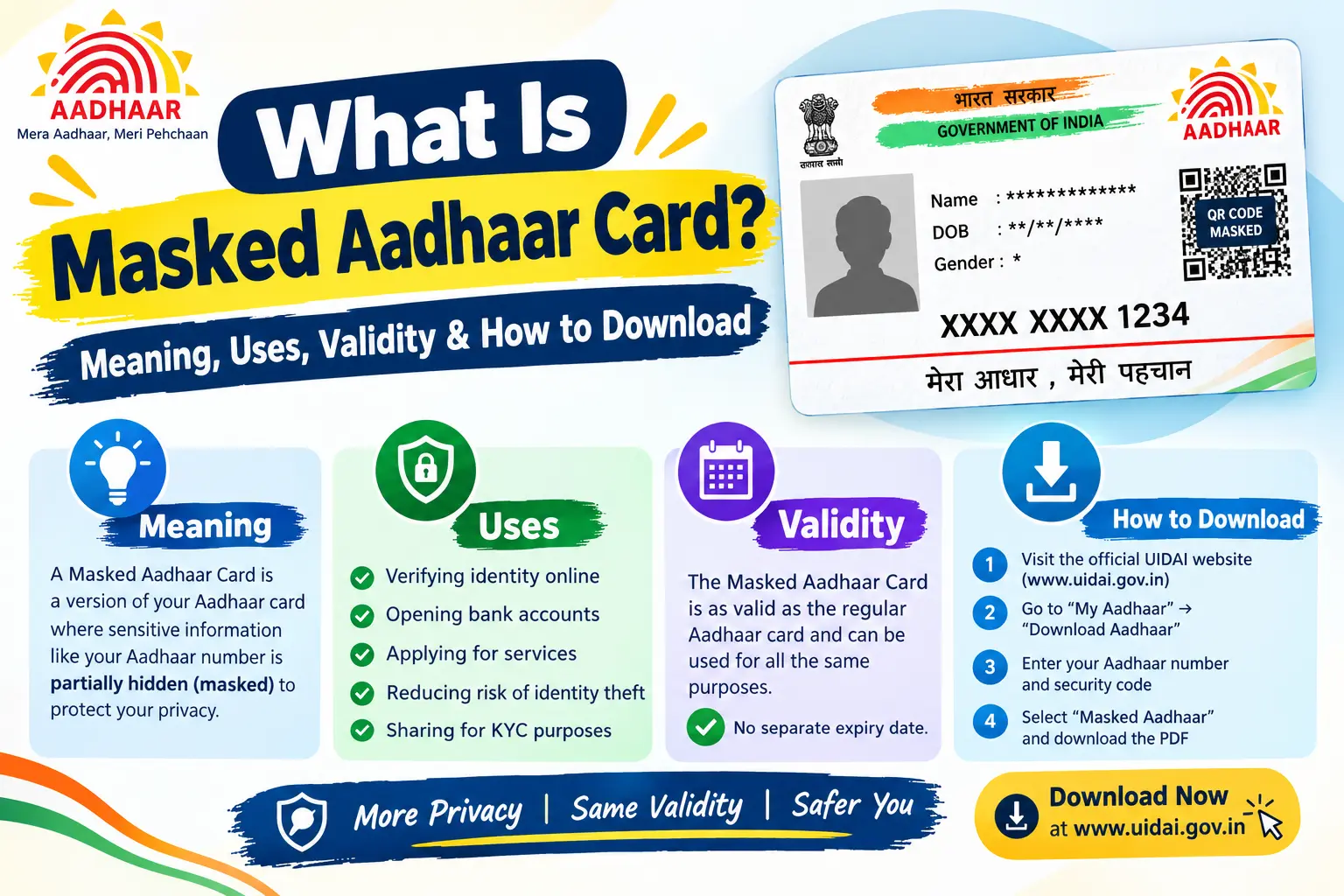
You may have opened an Aadhaar PDF and noticed something unusual: instead of a complete 12-digit number, it shows a format such as XXXX-XXXX-1234. If you are wondering what is Masked Aadhaar Card and whether you can use it, the answer is simpler than it first appears.
Masked Aadhaar is an official Aadhaar format in which the first eight digits of the Aadhaar number are replaced with XXXX-XXXX, while only the last four digits remain visible. The underlying Aadhaar number does not change. Only the way the number is displayed is different.
This format can help reduce unnecessary exposure of the complete Aadhaar number when a masked document is sufficient for a particular purpose. But it is important to understand what masking does—and what it does not do—before sharing the document.
In this guide, you will learn the Masked Aadhaar meaning, which digits are hidden, whether it is valid, where it may be used, how to download it from UIDAI, how it differs from e-Aadhaar and VID, and what precautions you should take.
Important: CheckAadharStatus.com is an independent informational website and is not affiliated with UIDAI. For actual Aadhaar downloads, updates and other transactions, always use official UIDAI channels.
Discover More About: 👇
How to Book an Aadhaar Appointment Online at UIDAI Enrollment/Update Centre
What is Aadhaar Number, VID (Virtual ID) & UIDAI Full Form – Complete Beginner’s Guide
mAadhaar App Download & Guide: Features, Face RD and AadhaarPay Explained
Quick Facts About Masked Aadhaar
| Detail | Information |
|---|---|
| Governing authority | UIDAI |
| Aadhaar digits visible | Last 4 digits |
| First 8 digits | Replaced with XXXX-XXXX |
| Download facility | Available through My Aadhaar |
| Download cost | Free on the current My Aadhaar service |
| OTP | Mobile OTP required |
| Main purpose | Reduce unnecessary exposure of the complete Aadhaar number |
UIDAI’s current My Aadhaar service lists Download Masked Aadhaar as a free service and states that only the last four digits are visible and mobile OTP is required.
What Is Masked Aadhaar?
So, what is Masked Aadhaar?
Masked Aadhaar is a version of Aadhaar in which the first eight digits of the 12-digit Aadhaar number are hidden. Only the last four digits are displayed. UIDAI officially defines Masked Aadhaar in this way.
For example, using a completely fictional number:
Full Aadhaar: 1234-5678-9012
Masked Aadhaar: XXXX-XXXX-9012
The Aadhaar number itself has not changed. Masking only changes how much of the number is displayed on the document.
What Does “Masked” Mean?
The word masked specifically refers to the Aadhaar number.
It does not mean that the entire document becomes anonymous or that every piece of information on the Aadhaar document disappears. The masking feature is primarily about hiding the first eight digits of the Aadhaar number.
That distinction matters when deciding whether a Masked Aadhaar is suitable for a particular service.
Which Digits Are Hidden in Masked Aadhaar?
The first eight digits are replaced with XXXX-XXXX, while the final four digits remain visible.
| Part of Aadhaar number | Masked Aadhaar |
|---|---|
| First 8 digits | Hidden |
| Last 4 digits | Visible |
| Underlying Aadhaar number | Unchange |
The number above is only a fictional example. Never publish or share your real Aadhaar number unnecessarily.
Why Is Aadhaar Number Masked?
The practical reason for using a Masked Aadhaar is to limit unnecessary exposure of the complete Aadhaar number.
If a service needs an Aadhaar document but does not require the complete number, a masked version may be appropriate when the recipient accepts it. It gives the recipient less of the Aadhaar number to handle or retain.
UIDAI’s regulations also contain requirements around masking Aadhaar numbers collected through physical forms or photocopies before storage, reflecting the broader importance of limiting unnecessary exposure of Aadhaar numbers.
However, masking should not be treated as a guarantee against every type of Aadhaar-related misuse. You should still check why a document is being requested and share it only with an appropriate recipient.
Benefits of Masked Aadhaar
A Masked Aadhaar can be useful because:
- The complete 12-digit Aadhaar number is not displayed.
- Only the last four digits remain visible.
- It can reduce unnecessary exposure of the full number.
- UIDAI provides an official download facility.
- It can be useful when the recipient accepts a masked Aadhaar for the particular purpose.
Is Masked Aadhaar Valid?
Yes, masked e-Aadhaar is recognised by UIDAI as one of the forms of Aadhaar. UIDAI’s official material lists masked e-Aadhaar alongside other recognised Aadhaar forms.
But there is an important distinction between validity and whether a particular service will accept a specific format for a particular transaction.
A service may have its own requirements. For example, it may require the complete Aadhaar number, Aadhaar authentication, or another verification method.
So, do not interpret “valid” as “automatically accepted for every purpose.”
Can Masked Aadhaar Be Used as ID Proof?
It can be used where the relevant organisation or service accepts the masked format for that purpose.
UIDAI states that e-Aadhaar is equally valid as a physical copy of Aadhaar for purposes covered by its guidance, and UIDAI has also recognised masked e-Aadhaar among the forms of Aadhaar.
If an organisation specifically asks for the full Aadhaar number or requires Aadhaar authentication, follow that service’s stated requirements instead of assuming a masked copy will be sufficient.
Where Can Masked Aadhaar Be Used?
There is no need to treat Masked Aadhaar as a universal replacement for every Aadhaar-related process.
It may be appropriate when:
- An Aadhaar document is requested.
- The recipient accepts Masked Aadhaar.
- The complete Aadhaar number is not specifically required.
- The particular process does not require a form of Aadhaar authentication that needs other information.
The safest approach is to check the exact requirement before submitting your document.
Discover More About: 👇
Udyog Aadhaar (Udyam) Registration: How to Register & Download Certificate
Aadhaar Card PDF Password: Format & How to Open e-Aadhaar
When Might the Full Aadhaar Number Be Required?
You may need the complete Aadhaar number when a service explicitly asks for it or when the process requires Aadhaar authentication or another verification method that cannot be completed with a masked document.
In other words, Masked Aadhaar is a privacy-conscious option, not a universal substitute for every Aadhaar service.
How to Download Masked Aadhaar Online
If you want to download a Masked Aadhaar, use the official My Aadhaar service rather than an unofficial website.
UIDAI currently lists Download Masked Aadhaar as a dedicated My Aadhaar service. It is shown as free and requires mobile OTP.
Official UIDAI My Aadhaar portal
Requirements for Downloading Masked Aadhaar
For the current online process, you need:
- The Aadhaar-related details requested by the UIDAI download service.
- Access to the mobile number registered with Aadhaar.
- The ability to receive the required OTP.
- An internet-connected device.
UIDAI states that the OTP used for downloading e-Aadhaar is received on the registered mobile number.
Steps to Download Masked Aadhaar
- Open the official My Aadhaar portal.
- Go to the Aadhaar download service.
- Enter the details requested on the current UIDAI page.
- Complete the verification process.
- Request the OTP.
- Enter the OTP received on your registered mobile number.
- Choose the Masked Aadhaar option where provided.
- Download the resulting PDF.
- Open the PDF using its password.
The exact layout and labels of the UIDAI website may change. For that reason, follow the options currently displayed on the official portal instead of relying on an old screenshot or third-party tutorial.
Is Masked Aadhaar Download Free?
Yes. UIDAI’s current My Aadhaar page lists Download Masked Aadhaar as a Free service.
You should not need to pay an unofficial intermediary simply to access this official download facility.
Is OTP Required for Masked Aadhaar?
Yes. The current My Aadhaar service specifically states that mobile OTP is required for Download Masked Aadhaar.
If you cannot receive the OTP on the registered mobile number, the online download process may not be available to you through the current OTP-based route. Check the latest options on official UIDAI channels rather than relying on unofficial workarounds.
What Is the Masked Aadhaar PDF Password?
The downloaded e-Aadhaar PDF is password protected.
UIDAI states that the e-Aadhaar password consists of:
First four letters of the name in CAPITAL letters + year of birth in YYYY format.
For example, if the name begins with RAHU and the year of birth is 1995, the password format would be:
RAHU1995
For names with fewer than four letters, UIDAI’s examples show that the available letters are used before adding the year of birth.
Keep your Aadhaar PDF and its password private. You should also never share an OTP simply because someone claims they need it to download or verify your Aadhaar.
Masked Aadhaar vs Regular Aadhaar
The key difference is how the Aadhaar number is displayed.
| Feature | Masked Aadhaar | Regular Aadhaar |
|---|---|---|
| First 8 digits | Hidden | Displayed |
| Last 4 digits | Displayed | Displayed |
| Aadhaar identity | Same | Same |
| Main difference | Number is partially hidden | Full number is displayed |
Masked Aadhaar does not create a separate Aadhaar identity or a new Aadhaar number.
Masked Aadhaar vs e-Aadhaar
These terms are related but do not mean exactly the same thing.
e-Aadhaar is the electronic form of Aadhaar. UIDAI describes it as a password-protected electronic copy of Aadhaar that is digitally signed by UIDAI.
Masked Aadhaar refers to the Aadhaar number being displayed with its first eight digits hidden.
So:
- e-Aadhaar: electronic Aadhaar document
- Masked Aadhaar: Aadhaar number with the first eight digits hidden
- Masked e-Aadhaar: an electronic Aadhaar document with the Aadhaar number masked
UIDAI’s official download information confirms that e-Aadhaar can be downloaded using an Enrollment Number, Aadhaar Number or VID, with OTP sent to the registered mobile number.
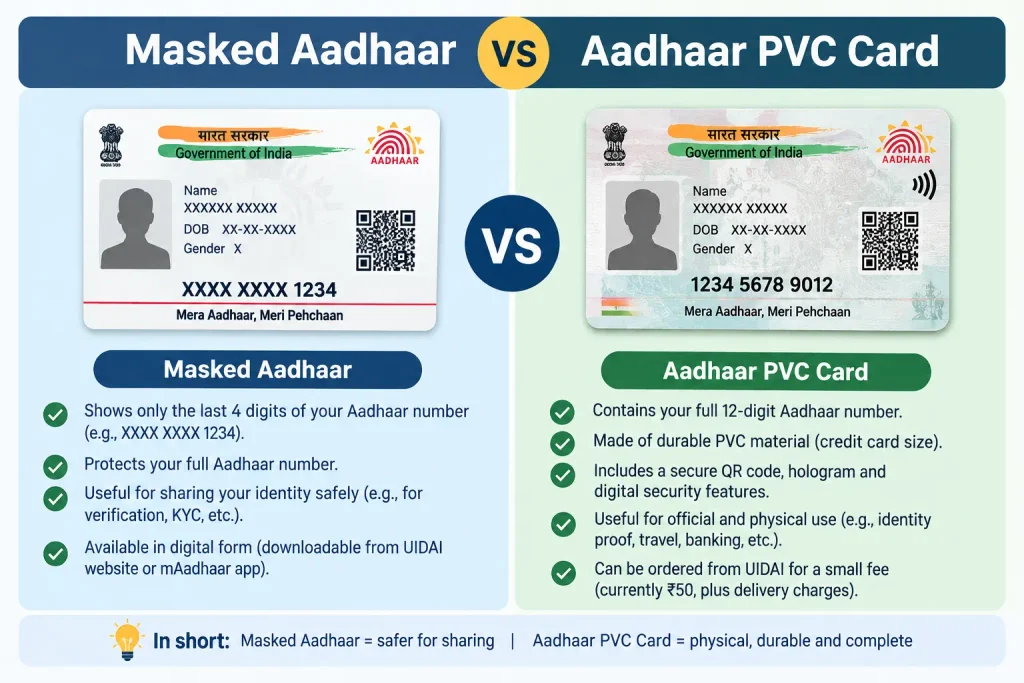
Masked Aadhaar vs Aadhaar PVC Card
Masked Aadhaar and an Aadhaar PVC Card describe different things.
Masked Aadhaar refers to how the Aadhaar number is displayed, while an Aadhaar PVC Card is a physical card format.
| Feature | Masked Aadhaar | Aadhaar PVC Card |
|---|---|---|
| Main concept | Aadhaar number masking | Physical card format |
| Typical format | Electronic document | PVC card |
| Aadhaar identity | Same | Same |
| Main distinction | First eight digits are hidden | Physical Aadhaar card format |
Therefore, “masked” and “PVC” are not two names for the same Aadhaar format.
Masked Aadhaar vs Virtual ID
Masked Aadhaar is also different from Virtual ID (VID).
Masked Aadhaar is an Aadhaar document in which the first eight Aadhaar digits are hidden.
VID, on the other hand, is a separate 16-digit virtual identifier associated with the Aadhaar number. UIDAI describes VID as a temporary, revocable number mapped to the Aadhaar number.
A simple way to remember the difference:
Masked Aadhaar = an Aadhaar document with the number masked
VID = a separate virtual identifier
UIDAI’s current My Aadhaar service also lists Generate Virtual ID separately from Download Masked Aadhaar, reinforcing that these are different services.
Common Masked Aadhaar Mistakes
1. Assuming Everything on the Document Is Hidden
Masking applies to the Aadhaar number. It does not mean that every other detail or feature on the document is automatically concealed.
2. Assuming Masked Aadhaar Is Accepted Everywhere
A service may have a specific requirement for the full Aadhaar number or authentication. Always check before submitting your document.
3. Confusing Masked Aadhaar With e-Aadhaar
e-Aadhaar describes an electronic Aadhaar document. “Masked” describes how the Aadhaar number is displayed.
4. Sharing the OTP
Your Aadhaar download OTP is sensitive. Do not disclose it to another person simply because they claim to be helping with an Aadhaar download or verification.
5. Using Unofficial Download Websites
The official UIDAI/My Aadhaar service is available for Aadhaar downloads. Use official channels rather than websites claiming to provide special or paid access to Masked Aadhaar.
Safety Tips When Sharing Masked Aadhaar
Masked Aadhaar reduces exposure of the complete Aadhaar number, but it should still be handled carefully.
Before sharing it:
- Confirm why the Aadhaar document is required.
- Check whether Masked Aadhaar is suitable for that specific purpose.
- Share it only with the appropriate recipient.
- Avoid posting your Aadhaar document publicly.
- Never share your Aadhaar OTP with another person.
- Keep your e-Aadhaar PDF password private.
- Download Aadhaar documents through official UIDAI channels.
- Do not alter an Aadhaar document to change its information.
- If a service specifically requires the full Aadhaar number, follow its stated requirements.
Good to Know About Masked Aadhaar
One of the most important points is that Masked Aadhaar does not create a new Aadhaar number.
The same Aadhaar identity remains associated with the holder. The difference is simply that the first eight digits are not displayed on the masked document.
Another useful distinction is between masking and a Virtual ID. Masking changes the way the Aadhaar number appears on a document. VID is a separate virtual identifier used in supported Aadhaar services.
UIDAI also continues to recognise multiple forms of Aadhaar. In a 2026 circular, UIDAI stated that Aadhaar Verifiable Credentials shared through the Aadhaar App are legally valid forms for establishing identity alongside forms including Aadhaar letter, e-Aadhaar, masked e-Aadhaar, Aadhaar Card and m-Aadhaar.
FAQs About Masked Aadhaar
What is Masked Aadhaar Card?
Masked Aadhaar is an Aadhaar format in which the first eight digits of the 12-digit Aadhaar number are replaced with XXXX-XXXX, while the last four digits remain visible.
What is Masked Aadhaar used for?
It can be useful when an Aadhaar document is required but the particular service accepts a masked format and does not require the complete Aadhaar number.
Which digits are hidden in Masked Aadhaar?
The first eight digits are hidden. Only the last four digits remain visible.
Why is the Aadhaar number masked?
Masking limits the display of the complete Aadhaar number and can reduce unnecessary exposure when a masked document is sufficient for the particular purpose.
Is Masked Aadhaar valid?
Yes, UIDAI recognises masked e-Aadhaar among the forms of Aadhaar. However, the requirements of a particular service determine whether the masked document is sufficient for that transaction.
Is Masked Aadhaar valid as ID proof?
It is a recognised Aadhaar form, but you should still check the requirements of the organisation or service. Do not assume that every transaction accepts the masked format in place of every other Aadhaar-related verification method.
How can I download Masked Aadhaar online?
Use the official My Aadhaar portal, complete the requested verification and mobile OTP process, and select the Masked Aadhaar option where provided. UIDAI currently lists the service as free.
Is Masked Aadhaar download free?
Yes. UIDAI’s current My Aadhaar service lists Download Masked Aadhaar as free.
Do I need a registered mobile number?
The current online Masked Aadhaar service requires mobile OTP. UIDAI also states that OTP for downloading e-Aadhaar is sent to the registered mobile number.
Is Masked Aadhaar the same as e-Aadhaar?
No. e-Aadhaar describes the electronic Aadhaar document, while “masked” describes how the Aadhaar number is displayed.
Is Masked Aadhaar the same as Aadhaar PVC Card?
No. Masked Aadhaar refers to masking the Aadhaar number, while Aadhaar PVC Card refers to a physical PVC card format.
What is the difference between Masked Aadhaar and VID?
Masked Aadhaar is a document with the first eight Aadhaar digits hidden. VID is a separate 16-digit virtual identifier mapped to the Aadhaar number.
When do I need the full Aadhaar number?
You may need it when a particular service explicitly requires the complete number or requires Aadhaar authentication. Check the exact requirements of that service before submitting your Aadhaar document.
What is the Masked Aadhaar PDF password?
For e-Aadhaar, UIDAI states that the password is the first four letters of the name in capital letters followed by the year of birth in YYYY format.
Conclusion
If you are asking what is Masked Aadhaar Card, remember one simple point: it is not a new Aadhaar number. It is a version of Aadhaar in which the first eight digits are replaced with XXXX-XXXX and only the last four digits remain visible.
Its main practical benefit is limiting unnecessary exposure of the complete Aadhaar number. UIDAI currently provides a free Masked Aadhaar download facility through My Aadhaar, with mobile OTP required.
Before using it, check what the particular organisation or service actually requires. And whenever you need to download or manage Aadhaar, stick to official UIDAI channels rather than unofficial websites or intermediaries.
My Aadhaar official portal

1 Comment
Pingback: e Card Download: Download e-Aadhaar, XML & PVC Card