

You filed an Aadhaar complaint, saved the reference number, and now you are back on the website wondering: “What happened to my complaint?” That is exactly where many Aadhaar users get stuck.
The first thing to know is that Aadhaar complaint status is different from Aadhaar update status, enrolment status, and authentication history. Using the wrong service—or the wrong reference number—can make it appear that your complaint is missing.
UIDAI provides an official Grievance & Feedback service for submitting Aadhaar-related complaints and tracking their status. You can also seek help through UIDAI’s toll-free number, 1947.
This guide explains how to check your aadhar card complaint status, what information you may need, what to do when the status is not visible, and how to handle searches involving a suspected fake Aadhaar. It also explains why PM-KISAN status should be checked separately.
Important: CheckAadharStatus.com is an independent informational website. It is not affiliated with UIDAI or the Government of India. For actual complaints, status checks, or Aadhaar transactions, use the official UIDAI website and authorised channels.
Quick Facts
| Detail | Information |
|---|---|
| Service | UIDAI Grievance / Complaint Status |
| Governing authority | Unique Identification Authority of India (UIDAI) |
| Main online route | UIDAI Grievance & Feedback |
| Phone support | 1947 |
| Status reference | Use the complaint/service-request reference provided by UIDAI |
| Normal grievance resolution standard | Normally within 30 days |
| Official website | UIDAI |
UIDAI’s current grievance page provides separate options to File a Grievance and check Grievance Status. Its support mechanism also lists 1947, web, email, chatbot, regional offices and other channels.
Discover More About: 👇
PVC Status Check Online – Aadhaar PVC Card Tracking (2026)
Aadhaar Verification: How to Check if an Aadhaar Is Genuine
NSEIT Login 2026: New UIDAI Certification Portal, Login & Password Help
Which Status Do You Actually Need?
Before you start, identify exactly what you are trying to track:
| If you… | You need… |
|---|---|
| Submitted a complaint/grievance to UIDAI | Complaint Status |
| Requested an Aadhaar update (name, address, etc.) | Update Status |
| Are waiting for your first Aadhaar card | Enrolment Status |
| Want to know about PM-KISAN beneficiary/payment status | Official PM-KISAN portal |
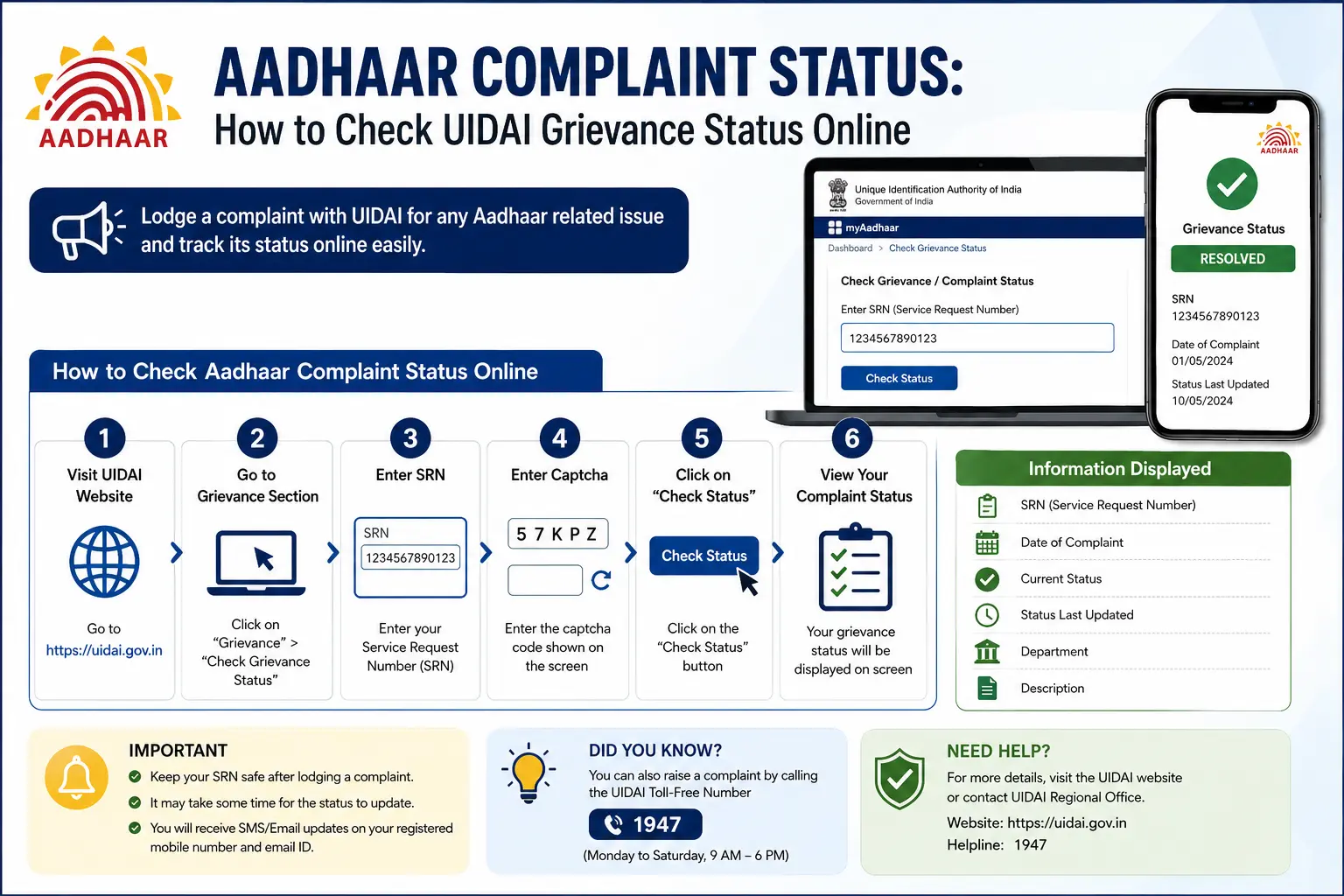
How to Check Aadhaar Complaint Status Online
If you have already submitted a UIDAI grievance, the simplest approach is to use the official grievance-status service.
Step 1: Open the official UIDAI website
Go to the official UIDAI Grievance & Feedback status page:
https://resident.uidai.gov.in/check-complaintstatus
Step 2: Choose Grievance Status
UIDAI’s current grievance page provides a dedicated option for tracking a submitted grievance, complaint or feedback.
Step 3: Enter the requested reference
Use the complaint or service-request reference supplied by UIDAI when you submitted the grievance.
Do not automatically assume that your 12-digit Aadhaar number is the number required for complaint tracking. UIDAI’s grievance documentation specifically refers to checking complaint status using the Service Request Number (SRN).
Step 4: Complete the verification shown
Follow the verification requirements displayed by the official UIDAI service.
Step 5: Review the result
The official system will display the available information for your grievance.
If you saved the original confirmation SMS, email, receipt or screenshot, keep it nearby while checking. It can help you identify the correct reference if you have used several Aadhaar services.
Official service: UIDAI Grievance & Feedback
Which Number Do You Need for an Aadhaar Complaint?
Aadhaar users can encounter several different identifiers during different services. This is one reason searches such as “complaint number kaha milega” or “SRN number kya hota hai” are common.
UIDAI’s grievance documentation says residents should keep relevant identifiers such as EID, URN and SRN handy when seeking support, while its IVRS specifically refers to using the Service Request Number for complaint-status checking.
The safest rule is simple:
Use the reference number shown in the confirmation or official communication for the particular complaint you are tracking.
Do not substitute your Aadhaar number, EID or an unrelated update reference unless the official service specifically asks for it.
What Does Aadhaar Complaint Status Mean?
A grievance-status result tells you about the complaint or feedback you submitted to UIDAI. It is not the same as the status of the Aadhaar transaction that originally caused the problem.
For example, imagine you submitted an address update and the request did not go as expected.
You may have:
Aadhaar update request → Update Status
and separately:
Complaint about the issue → Grievance Status
These are related, but they are not the same record.
Common Aadhaar status types users confuse
| What you want to check | Correct service |
|---|---|
| Aadhaar enrolment application | Enrolment Status |
| Aadhaar demographic/biometric update | Update Status |
| Complaint submitted to UIDAI | Grievance / Complaint Status |
| Aadhaar authentication activity | Authentication History |
| PVC card request | PVC Card Status |
This distinction is especially important if your search for complaint status began after an Aadhaar update was rejected.
What If Aadhaar Complaint Status Is Not Showing?
A missing result does not automatically mean that your complaint was never registered.
Try the following checks:
- Recheck the reference number against your original confirmation.
- Make sure you are using the UIDAI grievance-status service, not an update-status or enrolment-status page.
- Check the digits carefully for typing mistakes.
- Look through the SMS or email you received after submitting the grievance.
- If you still cannot identify the complaint, contact UIDAI through 1947.
- Keep your original complaint details available when contacting support.
Do not pay an unofficial person simply to “check” your UIDAI complaint. Use UIDAI’s own website and official support channels.
Complaint Resolved but Problem Not Fixed?
If your complaint status shows “Resolved” or “Closed” but your underlying Aadhaar issue remains, review the response provided by UIDAI carefully. If the resolution does not address your concern, you can:
- Respond to the official communication (if a reply mechanism is provided).
- Contact 1947 for clarification.
- Escalate through CPGRAMS if the matter remains unresolved.
Do not assume that “Closed” always means your problem has been fixed from your perspective.
How to Check Aadhaar Complaint Status Through 1947
UIDAI’s toll-free number 1947 provides Aadhaar-related support.
According to UIDAI, its IVRS self-service facility is available 24×7 and includes complaint-status checking using the Service Request Number. The contact-centre executive service operates Monday to Saturday from 7 AM to 11 PM and Sunday from 8 AM to 5 PM, except the three national holidays specified by UIDAI.
UIDAI also says complaints received through its support mechanism can be assigned to the concerned divisions or regional offices for examination and resolution.
Official support: UIDAI Contact & Support
How Long Does an Aadhaar Complaint Take to Resolve?
UIDAI’s Citizen Charter states that grievance resolution is normally within 30 days from the date the grievance is received. The charter also gives a 90% performance indicator for this service.
“Normally within 30 days” should not be read as a guarantee that every complaint will be resolved within exactly 30 days.
If your complaint has remained unresolved, check its current status and use UIDAI’s official support channels for further assistance.
How to File an Aadhaar Complaint Online
If you have not yet submitted a grievance, UIDAI provides an online File a Grievance option.
The grievance mechanism covers concerns relating to Aadhaar enrolment, updates and other Aadhaar services. UIDAI also provides grievance support through phone, email, chat, web portal, walk-in facilities, post and social media.
When submitting a complaint:
- Describe the problem clearly.
- Provide the information requested by the official service.
- Submit the grievance through UIDAI’s authorised channel.
- Save the reference or service-request information provided after submission.
Fake Aadhaar Card Complaint Online: What Should You Do?
The search fake aadhar card complaint online can represent more than one situation.
You may be trying to:
- check whether an Aadhaar document is genuine;
- report suspected impersonation;
- report suspected misuse of Aadhaar information; or
- complain about an Aadhaar-related service or incident.
These should not automatically be treated as the same process.
If you suspect an Aadhaar-related security or misuse issue, use UIDAI’s official support channels. UIDAI’s Aadhaar guidance also advises residents with concerns about unauthorised use of Aadhaar to contact UIDAI through its official channels.
If you suspect fraud, forgery, impersonation or another criminal offence, UIDAI grievance handling and law-enforcement reporting are separate processes. Do not assume that filing a UIDAI grievance automatically replaces a police complaint or other appropriate legal report.
Fake Aadhaar verification is different from filing a complaint
Someone searching fake aadhar card complaint may actually want to know whether a document is genuine.
That is primarily a verification question.
A complaint is different: it reports a problem or suspected misuse that needs attention.
Before sharing Aadhaar details, documents or personal information, make sure you are using an official government service. Avoid websites or individuals promising instant verification, guaranteed resolution or special access for a fee.
Aadhaar Complaint Status vs Aadhaar Update Status
This is one of the most important distinctions on this topic.
Suppose your Aadhaar address update is still being processed. You should check the update status.
Suppose the update has caused a problem and you then submit a complaint to UIDAI about that issue. You should track the grievance status.
So:
Update request → Update Status
Complaint about the update → Grievance Status
Searching for aadhar card complaint status does not mean that the underlying Aadhaar update will appear automatically on the same page.
Discover More About: 👇
UIDAI Aadhaar Helpline Number & Customer Care: Toll-Free Numbers, Email & Contact Details
How to Check Which Mobile SIM Cards Are Linked to Your Aadhaar Card
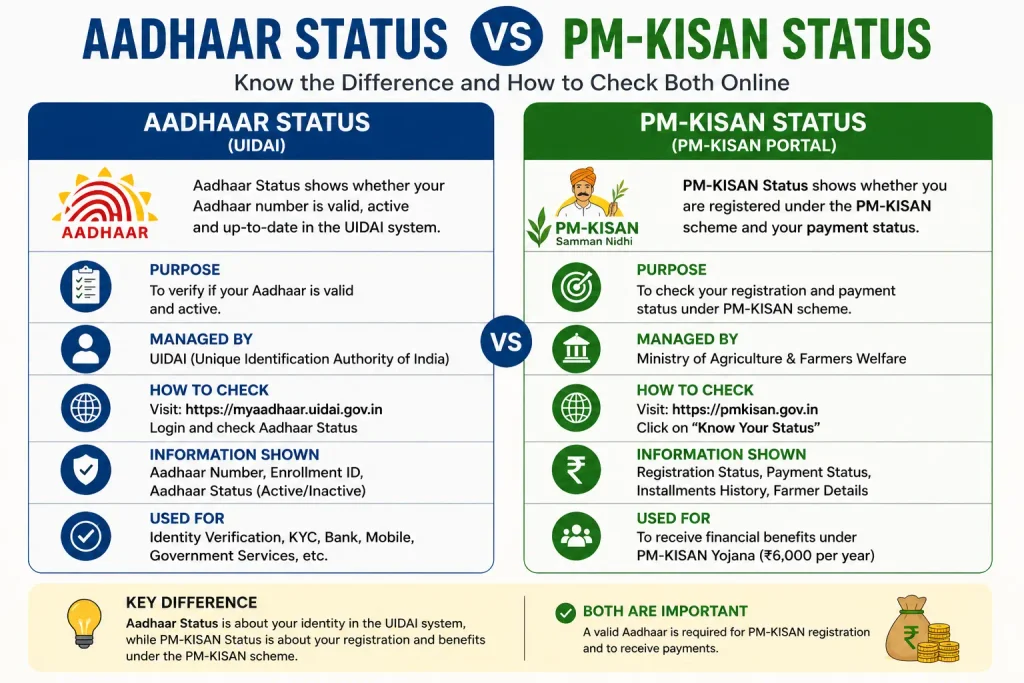
Aadhaar Status vs PM-KISAN Status
Aadhaar-related searches sometimes overlap with PM-KISAN because Aadhaar can be relevant to farmer registration and e-KYC. But the two systems should not be confused.
The official PM-KISAN Know Your Status service is maintained separately by the Department of Agriculture and Farmers Welfare. Its current status page includes fields such as payment status, bank name, UTR number, payment mode, account credited information and financial-year-wise e-KYC.
Therefore, if you are actually searching for:
- PM-KISAN beneficiary status
- PM-KISAN payment status
- PM-KISAN e-KYC status
- whether a PM-KISAN payment was credited
- PM-KISAN registration information
use the official PM-KISAN system rather than the UIDAI grievance-status service.
Official PM-KISAN portal: PM-KISAN
This is especially important because a user may search for an Aadhaar-based PM-KISAN check without actually wanting an Aadhaar complaint status. The official PM-KISAN status page is the appropriate place for beneficiary and payment information.
Other Ways to Get Help With an Aadhaar Complaint
If online tracking does not answer your question, UIDAI provides several support channels.
These include:
- 1947 toll-free support
- UIDAI’s online grievance portal
- UIDAI chatbot
- Regional offices
- Post/letter
- Official social-media channels
- CPGRAMS for public grievances
UIDAI’s current support information confirms that grievances can be handled through multiple channels and that complaints can be routed to the concerned UIDAI division or regional office.
If you use CPGRAMS, remember that it is a separate government grievance system. Its registration reference and status should not be confused with your UIDAI complaint reference.
Aadhaar Complaint Status FAQs
How can I check my Aadhaar complaint status?
Open UIDAI’s official Grievance & Feedback section and choose the grievance-status option. Enter the reference or Service Request Number requested by the official service.
Can I check Aadhaar complaint status through 1947?
Yes. UIDAI states that its 1947 IVRS provides complaint-status checking using the Service Request Number.
Is UIDAI 1947 available 24×7?
The IVRS self-service is available 24×7. Contact-centre executive assistance has specific hours: Monday to Saturday 7 AM–11 PM and Sunday 8 AM–5 PM, excluding three national holidays.
What should I do if my complaint status is not showing?
Check that you have entered the correct complaint/service-request reference and are using UIDAI’s grievance-status service. If you still cannot find the record, contact UIDAI through 1947.
How long does UIDAI take to resolve a complaint?
UIDAI’s Citizen Charter states that grievance resolution is normally within 30 days of receipt. This is a service standard, not a guarantee for every individual case.
Is Aadhaar complaint status the same as Aadhaar update status?
No. An Aadhaar update request and a grievance about that request can have separate status records.
What is the Aadhaar complaint number?
It is the reference associated with the relevant grievance or service request. Use the number supplied by UIDAI in your confirmation or official communication rather than assuming your Aadhaar number is the complaint number.
How can I report a fake Aadhaar?
If you suspect a fake or misused Aadhaar, use appropriate official UIDAI verification and support channels. Where you suspect criminal activity, law-enforcement reporting may also be appropriate.
Is PM-KISAN status the same as Aadhaar status?
No. PM-KISAN has its own beneficiary, payment and e-KYC status system. Use the official PM-KISAN portal for PM-KISAN-related information.
Final Takeaway
If you have already complained to UIDAI, start with the Grievance Status service and the reference provided when you submitted the complaint. If you cannot find the record, 1947 is the official support route to try next.
And before checking any “Aadhaar status,” identify exactly what you need: complaint status, update status, enrolment status, authentication history, or PM-KISAN status. Choosing the right service is often the difference between finding the information quickly and ending up on the wrong page.
Last reviewed: 4 September 2026. For the most current information, always refer to the official UIDAI website at https://uidai.gov.in/

10 Comments
Pingback: PVC Status Check Online – Aadhaar PVC Card Tracking (2026)
Pingback: NSEIT Login 2026: UIDAI Certification Portal
Pingback: Aadhaar Complaint Status: Check UIDAI Grievance Status Online
Pingback: Fake Aadhar Card Maker: Check if an Aadhaar Is Genuine
Pingback: Aadhaar Seva Kendra Near Aadhaar Enrollment/Update Centre
Pingback: Aadhar Card Customer Care Number: UIDAI Helpline
Pingback: Smart Card Status Check 2026: TNPDS, Aadhaar & Ammavodi
Pingback: UIDAI Grievance Portal: File a Complaint Online
Pingback: Fake Aadhar Card Complaint Online
Pingback: Quality Check of Submitted Documents: Aadhaar Update Status