

You may have entered your Aadhaar details, waited for an OTP, and still wondered: “Is my KYC actually complete?” That confusion is common because Aadhaar authentication and KYC are related, but they are not always the same thing.
The Aadhaar KYC process generally involves an organisation requesting Aadhaar-based verification through an authorised authentication workflow. Depending on the service, verification may use OTP or biometric authentication. The organisation may also ask for additional information or documents before marking its KYC process as complete.
This guide explains how Aadhaar KYC works, what you need, how OTP and biometric verification differ, what happens after authentication, what documents are required, and what to do when verification fails.
Important: CheckAadharStatus.com is an independent informational website. For actual Aadhaar transactions, use the official UIDAI website, myAadhaar portal or official Aadhaar app.
Discover More About: 👇
Pension, Labour and Beneficiary Status by Aadhaar: How to Check Government Scheme Status Online
Aadhaar Mobile Number Update Status: How to Check Mobile Link Status Online
Quick Facts
| Detail | Information |
|---|---|
| Service | Aadhaar-based KYC / e-KYC |
| Governing authority | UIDAI |
| Common authentication methods | OTP and/or biometric |
| Main requirement | Aadhaar details and the requirements of the requesting organisation |
| OTP requirement | Registered mobile access may be required for OTP-based verification |
| Additional documents | May be required by the service provider |
| Official support | UIDAI helpline 1947 |
UIDAI’s current e-KYC dashboard reports both biometric and OTP e-KYC transactions, confirming that these are active e-KYC authentication modes.
What Is Aadhaar-Based KYC?
KYC (Know Your Customer) ek process hai jisme koi organisation (bank, financial institution, telecom company, etc.) apne customer ki identity verify karta hai taaki fake identity ya fraud se bacha ja sake.
Aadhaar-based KYC allows an authorised organisation to use Aadhaar authentication as part of its customer or identity-verification process.
The important point is that you do not simply “complete KYC on UIDAI” for every service. The organisation that needs to verify you generally initiates the relevant authentication process through the Aadhaar ecosystem.
UIDAI supports authentication using different methods, including OTP and biometrics. The method available to you depends on the service and the requesting organisation.
Aadhaar Authentication vs Aadhaar e-KYC
These terms are often used interchangeably, but there is a difference.
| Feature | Aadhaar Authentication | Aadhaar e-KYC |
|---|---|---|
| Purpose | Identity verification (Yes/No) | Complete identity verification with data |
| Response | Yes/No only | Digitally signed e-KYC data |
| Use Case | Simple identity checks | Bank KYC, financial services, telecom |
| Authentication Modes | OTP, Biometric, Demographic, Multi-factor | OTP and/or Biometric only |
So, an “authentication successful” message does not necessarily mean that every part of a bank, telecom, financial or other organisation’s KYC process has been completed.
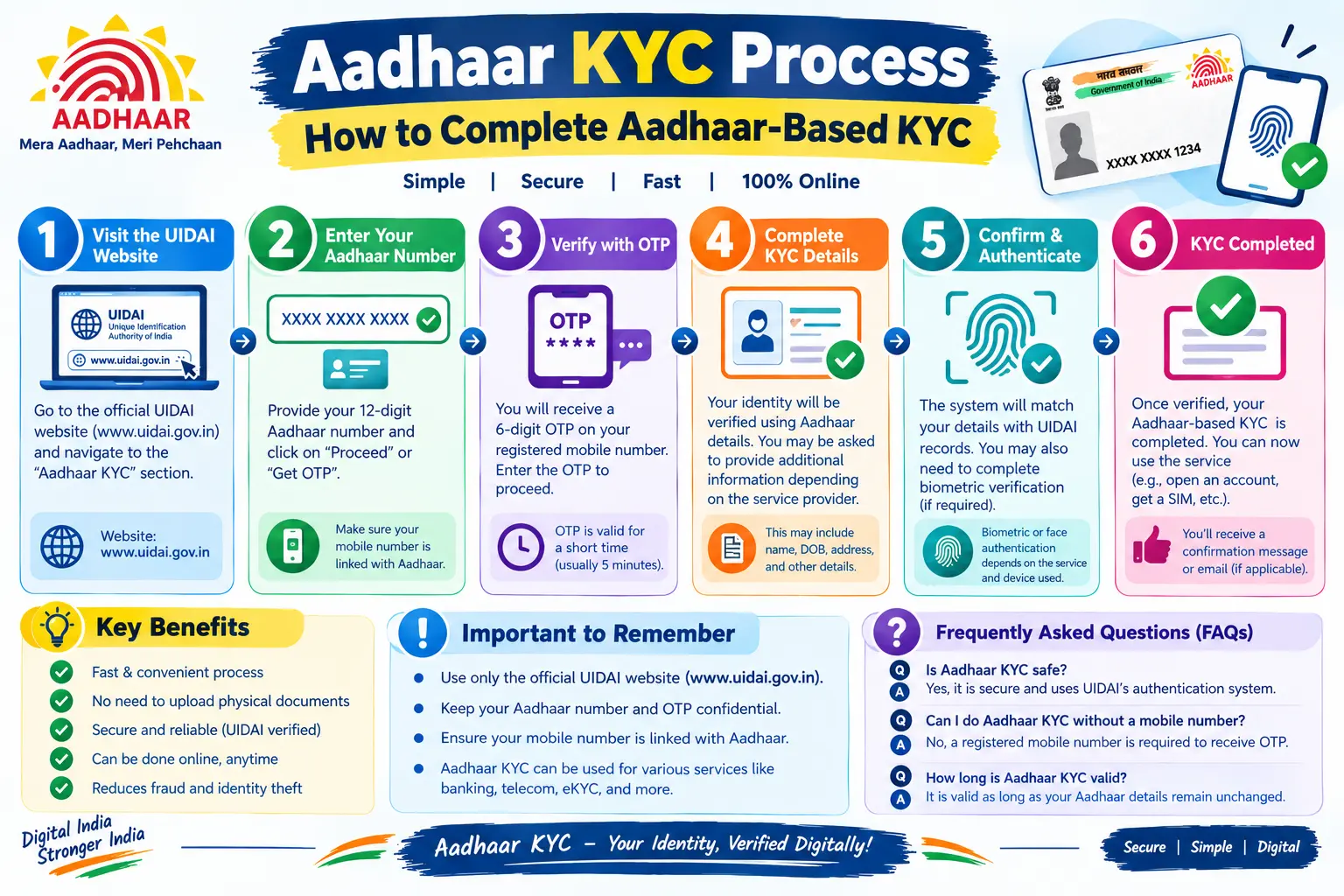
Aadhaar KYC Process at a Glance
The exact screens vary between services, but the general journey is:
- Start KYC with the organisation providing the service.
- Select the Aadhaar-based verification option if available.
- Enter the requested Aadhaar details.
- Complete the supported authentication method, such as OTP or biometric verification.
- Receive the authentication result.
- Complete any additional KYC requirements requested by the organisation.
- Confirm that the organisation has marked the KYC process as complete.
What You Need Before Starting
Keep the following ready:
- Your Aadhaar number or another supported Aadhaar identifier
- Access to your registered mobile number if the process uses OTP
- Any information specifically requested by the service provider
- Additional KYC documents, if required
Do not assume that every Aadhaar KYC process has identical requirements.
Documents Required for Aadhaar KYC
KYC ke liye documents ki requirement service provider aur KYC type par depend karti hai. Aadhaar-based e-KYC mein electronic verification hoti hai, isliye physical documents ki zaroorat kam ho sakti hai, lekin kuch services additional documents maang sakti hain.
Common KYC Documents
Depending on the organisation and purpose of KYC, commonly accepted documents can include:
| Document Type | Examples |
|---|---|
| Proof of Identity (POI) | Aadhaar, Indian passport, Voter ID, PAN/e-PAN, Driving licence |
| Proof of Address (POA) | Aadhaar, Passport, Voter ID, Utility bills (electricity, water, gas, telephone), Bank passbook, Rent agreement |
| Proof of Date of Birth | Aadhaar, Passport, Birth certificate, School leaving certificate |
| Other Documents | Income proof, Signature, Photograph (as per service provider) |
Is Aadhaar Enough for KYC?
Aadhaar can be used for Aadhaar-based authentication and e-KYC where the requesting organisation supports that method. However:
- Aadhaar KYC ≠ automatic completion of every provider’s KYC process
- Service provider may require additional documents (PAN, address proof, etc.)
- Some services may use document-based KYC instead of Aadhaar e-KYC
What If Your KYC Documents Are Rejected?
Common rejection reasons:
- Document not on approved list
- Document expired or invalid
- Name does not match applicant’s details
- Address mismatch
- Poor-quality or unclear document image
- Additional document required by service provider
Solution: Check the reason, verify document validity, and resubmit with correct details.
How to Complete Aadhaar KYC Online
If a bank, financial service, telecom provider or another authorised organisation offers Aadhaar-based KYC, its own website or app normally starts the verification flow.
Step 1: Start KYC With the Service Provider
Open the official website or app of the organisation requesting KYC and find its KYC or identity-verification section.
Do not use an unofficial website offering to “complete Aadhaar KYC” for you.
Step 2: Choose Aadhaar-Based Verification
If Aadhaar verification is available, select the relevant Aadhaar or e-KYC option.
The exact wording and screen layout can differ between organisations.
Step 3: Enter the Requested Details
Provide the Aadhaar information requested by the service.
Check the details carefully before submitting them.
Step 4: Complete Authentication
Depending on the service, verification may involve an OTP or biometric authentication.
For OTP-based verification, the OTP is used to authenticate the request. For biometric authentication, the supported biometric method is used through the authorised verification setup.
Step 5: Check the Result
The authentication response tells the requesting organisation whether the authentication request succeeded or failed.
A successful authentication is an important step, but the service provider may still have additional KYC requirements.
Step 6: Complete Any Remaining Requirements
If the organisation asks for additional documents, declarations or information, complete those requirements through its official channel.
This is why “KYC verified” and “Aadhaar authentication successful” should not automatically be treated as identical messages.
How OTP-Based Aadhaar KYC Works
OTP-based verification is one of the methods used for Aadhaar e-KYC authentication.
When OTP KYC Is Used
- Remote/digital KYC – ghar baithe complete kar sakte hain
- Bank account opening (digital accounts)
- Financial services (mutual funds, insurance, etc.)
- Telecom SIM verification (where Aadhaar e-KYC accepted)
- Government services (subsidies, benefits, etc.)
OTP Verification Process
- Service provider Aadhaar authentication request UIDAI ko bhejta hai.
- UIDAI registered mobile number par OTP generate karta hai.
- OTP aapke mobile par aata hai (SMS / mAadhaar app).
- Aap OTP service provider ke portal par enter karte hain.
- UIDAI OTP verify karta hai.
- Successful authentication par e-KYC response service provider ko milta hai.
Why Is the Registered Mobile Number Important?
OTP-based verification depends on the relevant mobile-verification setup. If you do not have access to the mobile number associated with Aadhaar, the particular OTP-based flow may not work.
If your old mobile number is lost or no longer working and you need to update it in Aadhaar, UIDAI currently directs residents to visit an Aadhaar Seva Kendra for the mobile-number update.
OTP Not Received?
If your OTP does not arrive:
- Check whether you entered the correct Aadhaar details.
- Check your mobile network and SMS delivery.
- Wait briefly before requesting another OTP.
- Check whether the service itself is experiencing a technical issue.
- If the problem continues, use the organisation’s official support channel.
Avoid repeatedly entering expired or incorrect OTPs.
How Biometric Aadhaar KYC Works
Some Aadhaar authentication processes use biometrics instead of, or in combination with, OTP authentication.
What Happens During Biometric Verification
- Aap service provider ke authorised KYC centre/branch par jate hain.
- Aadhaar number provide karte hain.
- Authorised device par fingerprint/iris/face scan hota hai.
- Biometric data UIDAI ke CIDR (Central Identities Data Repository) mein stored data se match hota hai.
- Match successful → e-KYC response service provider ko milta hai.
What If Biometric Authentication Fails?
| Problem | Solution |
|---|---|
| Fingerprints worn out | Alternate finger try karein |
| Aadhaar biometric lock active | mAadhaar app/myAadhaar portal par unlock karein |
| Device issue | Authorised device par hi ho |
| Internet connectivity issue | Retry, alternative method poochhein |
| Biometric mismatch | Check karein ki biometric update karwaya hai ya nahi |
If biometric authentication fails, do not immediately assume that your Aadhaar is invalid. Authentication can fail for different reasons, and the service provider may have another supported authentication route.
For a persistent Aadhaar-related problem, use official UIDAI support rather than paying an unofficial person to “fix” the verification.
Aadhaar Paperless Offline e-KYC
Online authentication is not the only Aadhaar e-KYC-related option.
What Offline e-KYC Is
Yeh privacy-focused alternative hai – full Aadhaar number expose kiye bina KYC share kar sakte hain. Offline XML UIDAI ke digitally signed format mein hota hai.
How to Generate the Offline e-KYC XML
- myAadhaar portal par jayein: https://myaadhaar.uidai.gov.in/offline-ekyc
- Aadhaar number ya VID + security code enter karein.
- “Send OTP” click karein – OTP registered mobile par aayega.
- OTP enter karein.
- Share Code create karein – ZIP file ka password (remember karein).
- Download karein – ZIP file milega jisme digitally signed XML hai.
What the Share Code Does
- Share Code encryption key hai – XML ko decrypt karne ke liye.
- Sirf intended verifier ko batayein – kisi aur ke saath share na karein.
- Service provider ZIP extract karne ke liye Share Code maangega.
How the XML Is Used for Verification
- User XML ZIP + Share Code service provider ko deta hai.
- Service provider Share Code se ZIP extract karta hai.
- XML digitally signed by UIDAI – authenticity verify hoti hai.
- XML contains: Name, Address, Photo (Base64), Gender, DOB, Hashed mobile/email.
- Full Aadhaar number expose nahi hota – Reference ID use hota hai.
Offline XML Structure
| Field | Format |
|---|---|
| Name | Plain text |
| Address | Plain text |
| Photo | Base64 encoded |
| Gender | Male/Female/Other |
| DOB/YOB | Date/Year |
| Mobile Number | Hashed (not plain) |
| Hashed (not plain) | |
| Reference ID | Last 4 digits of Aadhaar + timestamp |
This can be useful where a verifier supports offline e-KYC rather than live online authentication.
What Happens After Aadhaar Verification?
This is where many users get confused.
Successful Aadhaar Authentication
- UIDAI ne identity verify kar li hai.
- Service provider ko e-KYC data mil gaya hai (if e-KYC mode used).
- Authentication successful ka matlab hai ki aapne UIDAI ke records ke against identity prove kar di.
When the Service Provider Still Needs Additional KYC
Service provider additional requirements rakh sakta hai:
- PAN Card – Income tax/identity verification
- Address proof – Rental agreement, utility bill, etc.
- Income proof – Salary slip, ITR, etc.
- Signature – Physical or digital signature
- Video KYC – For complete account opening
- KRA validation – For mutual funds/demat accounts (3-5 days)
Why “Authentication Successful” Does Not Always Mean “KYC Complete”
| Status | Meaning | Action |
|---|---|---|
| Aadhaar authentication successful | Identity verified by UIDAI | Next step: provider’s KYC |
| e-KYC data received | Service provider has your data | Provider may need more info |
| KYC pending | Provider’s internal process ongoing | Wait/contact provider |
| KYC complete | All provider requirements fulfilled | Account/service active |
So if your screen says “authentication successful” but your account still shows “KYC pending,” check the service provider’s own instructions before assuming that something is wrong with Aadhaar.
Aadhaar KYC Verification: Common Problems and Fixes
| Problem | What to check | Next Action |
|---|---|---|
| OTP not received | Registered mobile number | Update mobile number via Aadhaar centre / Retry |
| OTP verification failed | Entered OTP, validity | Request fresh OTP if needed |
| Authentication failed | Details, method | Check Aadhaar number/VID, retry |
| Biometric verification failed | Supported method | Try alternate finger / alternative method |
| KYC still pending | Provider’s requirements | Contact service provider |
| Aadhaar details don’t match | Name/DOB/address on Aadhaar | Update via myAadhaar or Aadhaar centre |
| Aadhaar number is locked | Aadhaar lock status | Use VID instead of Aadhaar number |
| Service unavailable | Provider’s status | Check provider’s official status/support |
| KYC documents rejected | Document validity/quality | Check document list, resubmit clear copy |
Authentication Failed
An authentication failure does not automatically mean your Aadhaar is invalid.
The issue could relate to the information submitted, authentication method, OTP, biometric verification or the service provider’s technical system.
If the same problem continues, record the exact error message and contact the official service provider or UIDAI support where appropriate.
Error Codes
| Error Code | Meaning | Solution |
|---|---|---|
| 102 | Authentication failed | Retry with correct details |
| 103 | Biometric mismatch | Try alternate finger |
| 104 | Demographic mismatch | Update Aadhaar details |
| 105 | OTP not generated | Check mobile number |
| 106 | Aadhaar locked | Use VID |
| 107 | Invalid Aadhaar number | Check Aadhaar number/VID |
KYC Is Still Pending
If Aadhaar authentication succeeded but KYC remains pending, first check whether the organisation requires additional verification.
The organisation—not UIDAI alone—may control the final KYC status for that particular service.
Is Aadhaar KYC Safe?
Aadhaar-based verification involves sensitive identity information, so basic security precautions matter.
OTP and Authentication Security
- OTP time-limited hota hai.
- OTP sirf registered mobile par aata hai.
- OTP kisi ko share na karein – UIDAI/bank kabhi OTP nahi maangta.
- Authentication request authorised entities hi bhej sakte hain.
Offline e-KYC Privacy
- XML digitally signed by UIDAI – tamper-proof.
- XML encrypted with Share Code – sirf intended verifier access kar sakta hai.
- Full Aadhaar number expose nahi hota – Reference ID use hota hai.
- Mobile/email hashed format mein – plain nahi.
Safe Aadhaar KYC Practices
| Do ✅ | Don’t ❌ |
|---|---|
| Use official UIDAI/myAadhaar portal | Use unofficial KYC agents |
| Share OTP only on official platforms | Share OTP with unknown persons |
| Keep Share Code private | Share Share Code publicly |
| Check authentication history | Ignore unfamiliar authentication |
| Use VID when possible | Share Aadhaar number unnecessarily |
| Download XML from myAadhaar | Download XML from third-party sites |
| Use masked Aadhaar for sharing | Share full Aadhaar card publicly |
Where to Get Help
UIDAI provides official support and grievance channels for Aadhaar-related concerns. Its current support information lists 1947 as the toll-free helpline and provides online grievance facilities.
Aadhaar KYC Methods Compared
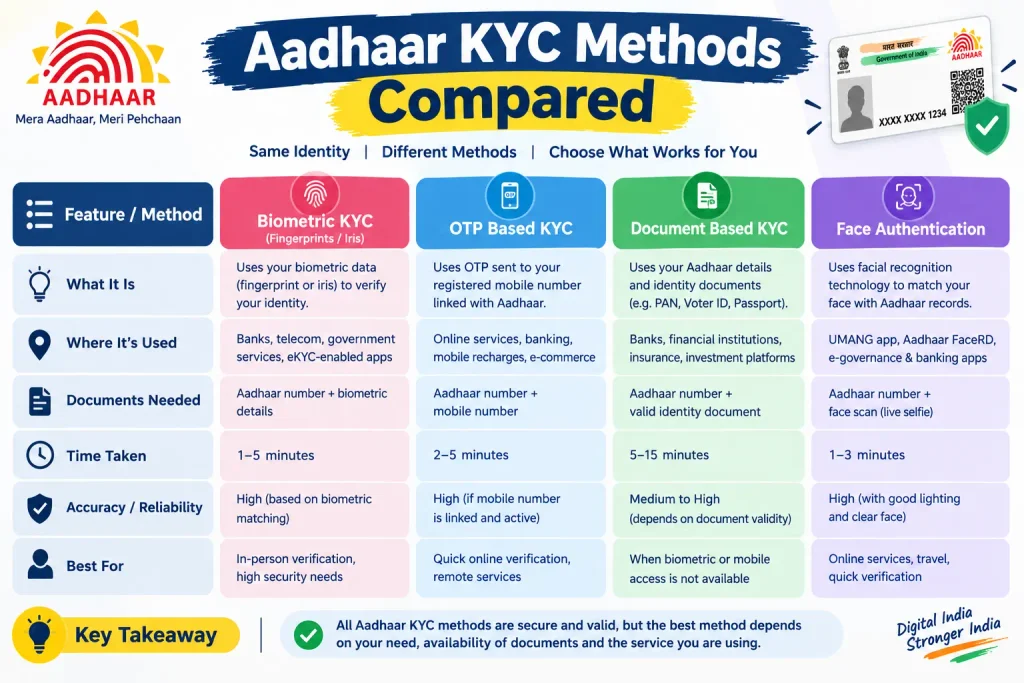
| Method | How it works | When it may be used | Privacy Level |
|---|---|---|---|
| OTP authentication | Uses OTP-based Aadhaar authentication | When the service supports OTP verification | Medium |
| Biometric authentication | Uses supported biometric authentication | When the requesting service supports biometrics | High |
| Offline e-KYC | Uses digitally signed offline KYC information | When the verifier supports offline e-KYC | Very High |
| Additional document KYC | Uses documents requested by the organisation | When the provider requires additional proof | Varies |
| Secure QR verification | Scan Aadhaar QR → Verify offline | Quick offline verification | Medium |
The exact method available depends on the requesting organisation and its authentication setup.
Aadhaar KYC vs Document-Based KYC
Aadhaar-based KYC can use electronic authentication to verify identity information.
Document-based KYC relies on documents specified by the organisation.
In practice, a service may use Aadhaar authentication and still ask for additional information or documents. Therefore, “Aadhaar KYC” should not be understood as a universal replacement for every other KYC requirement.
Discover More About: 👇
PVC Aadhaar Card: How to Order, Apply & Track Your Aadhaar Smart Card Online
How to Book an Aadhaar Appointment Online at UIDAI Enrollment/Update Centre
What to Do If Aadhaar KYC Keeps Failing
Use this simple order:
- Read the exact error message.
- Check the Aadhaar details you entered.
- If OTP is involved, check your registered mobile access.
- If biometric authentication is involved, check whether another supported method is available.
- Check the service provider’s own KYC requirements.
- Try again later if the provider indicates a temporary technical issue.
- For persistent Aadhaar-related problems, contact UIDAI through its official support channels.
UIDAI currently provides grievance submission and tracking through its website, along with phone, email, chatbot and other support options.
FAQs
What is Aadhaar KYC verification?
Aadhaar KYC verification is an identity-verification process in which an authorised organisation uses Aadhaar-based authentication or e-KYC as part of its KYC workflow. The exact process depends on the organisation and service.
How do I do Aadhaar KYC?
Start the KYC process with the organisation requesting verification. If Aadhaar-based KYC is supported, follow its Aadhaar verification flow and complete the available authentication method, such as OTP or biometric verification.
How is KYC done?
KYC can involve identity verification through Aadhaar authentication, documents or other methods permitted by the organisation and applicable requirements. There is no single process that is identical for every service.
Can Aadhaar KYC be done online?
Yes, Aadhaar-based authentication can be used in online KYC workflows where the requesting organisation supports it. The organisation’s website or app normally initiates the process.
What documents are required for KYC?
There is no universal document list for every KYC process. The organisation may request identity, address or other documents depending on the service. Aadhaar-based e-KYC may reduce the need for separate physical documents where that method is supported.
Is Aadhaar enough for KYC?
Not necessarily. Aadhaar authentication can form part of the KYC process, but the organisation may have additional requirements.
Is a registered mobile number required for Aadhaar KYC?
A registered mobile number may be required when the particular KYC flow uses OTP-based Aadhaar authentication. Requirements vary by authentication method and service.
Is PAN card mandatory for Aadhaar KYC?
Not necessarily. PAN requirements depend on the particular service and its applicable rules. Do not assume PAN is universally required for every Aadhaar-based KYC process.
What if Aadhaar KYC verification fails?
Check the exact error, verify the information submitted, check OTP or biometric requirements, and follow the service provider’s troubleshooting instructions. A failed authentication does not automatically mean that your Aadhaar is invalid.
Does successful Aadhaar authentication mean KYC is complete?
Not always. Successful Aadhaar authentication can be one step in the organisation’s overall KYC process. The organisation may still need additional information or documents before marking KYC as complete.
Is Aadhaar e-KYC the same as Aadhaar authentication?
No. Aadhaar authentication is the verification mechanism, while e-KYC is a specific service that can provide permitted KYC information to an authorised requesting entity.
Where can I get help with an Aadhaar-related verification problem?
Use official UIDAI support channels. UIDAI currently provides the 1947 toll-free helpline and online grievance facilities.
Final Takeaway
The easiest way to understand Aadhaar KYC verification is to separate two things: Aadhaar authentication and the organisation’s complete KYC process.
If OTP or biometric authentication succeeds, that is an important verification step—but it may not be the final step for the service you are using. Check the provider’s requirements, protect your OTP and Aadhaar-related information, and use only official UIDAI channels when you need help.
For current Aadhaar services, requirements and support options, always verify the latest information on UIDAI or the official myAadhaar portal before completing a transaction.

4 Comments
Pingback: Aadhaar Voter Link Status: How to Check Voter ID Aadhaar Link Status Online
Pingback: Download Aadhaar XML: Offline eKYC & ZIP Password
Pingback: NSAP Beneficiary Status by Aadhaar Number: Check Online
Pingback: Mukhyamantri Ladki Bahin Yojana eKYC 2026