

You need a PAN for a bank account, a mutual fund investment, or a high-value cash transaction — and the application form asks for a number you don’t have yet. The old route meant printing Form 49A, finding a photographer, paying a processing fee, and waiting a week or more. The pan card download by aadhaar number route skips almost all of that. If you have never been allotted a PAN and your Aadhaar has a working mobile number linked to it, you can generate a digitally signed PAN in one sitting, from a browser, at no cost. This guide covers who actually qualifies, the exact steps on the Income Tax e-filing portal, the pitfalls that trip people up, and what to do when the OTP simply refuses to arrive.
What the Instant e-PAN Facility Actually Does
An e-PAN is the electronic version of your Permanent Account Number, issued by the Income Tax Department and digitally signed, which means it carries the same legal standing as the physical card. Banks, brokers, and employers accept it for KYC. You can use it to file returns. What it is not is a replacement card service for people who already hold a PAN.
That distinction matters more than most articles admit. The instant facility runs a pre-login check against your Aadhaar: if a PAN already exists against that Aadhaar number, the request will be rejected at the validation stage. There is no workaround, because holding two PANs is not permitted. If you already have a PAN and simply want a fresh copy, you need the e-PAN download option available after logging into the e-filing portal — not the “Get New e-PAN” flow described below.
The technical backbone here is Aadhaar-based e-KYC (electronic Know Your Customer), where UIDAI — the Unique Identification Authority of India, which issues Aadhaar — confirms your identity details to the tax department without any paper changing hands.
Read More About👇
Who Qualifies — and Who Doesn’t
Run through this list before you start, because the portal will not warn you gently if you fall outside it.
You can use the instant facility if you are an individual who has never been allotted a PAN, you hold a valid Aadhaar, your Aadhaar-linked mobile is active, and you were not a minor on the date of the request.
You cannot use it if you are an NRI, a Hindu Undivided Family, a company, a trust, or any non-individual entity. You also cannot use it if you already hold a PAN — even if you have misplaced the card and cannot recall the number.
One more thing worth checking first: your name, date of birth, and gender as recorded in Aadhaar. These are pulled automatically and cannot be edited on the e-PAN screen. If your Aadhaar shows a spelling error or an old date of birth, correct it through the UIDAI portal or at an Aadhaar Seva Kendra before applying. Trying to fix it afterwards means your PAN inherits the same error, and correcting a PAN later is a far more tedious process than correcting an Aadhaar.
Discover More About: 👇
mAadhaar App Download & Guide: Features, Face RD and AadhaarPay Explained
Udyog Aadhaar (Udyam) Registration: How to Register & Download Certificate
Aadhaar Card PDF Password: Format & How to Open e-Aadhaar
Step-by-Step: Generating Your e-PAN on the E-Filing Portal
The entire process runs on the Income Tax Department’s e-filing website. Keep your Aadhaar number and the phone linked to it within reach.
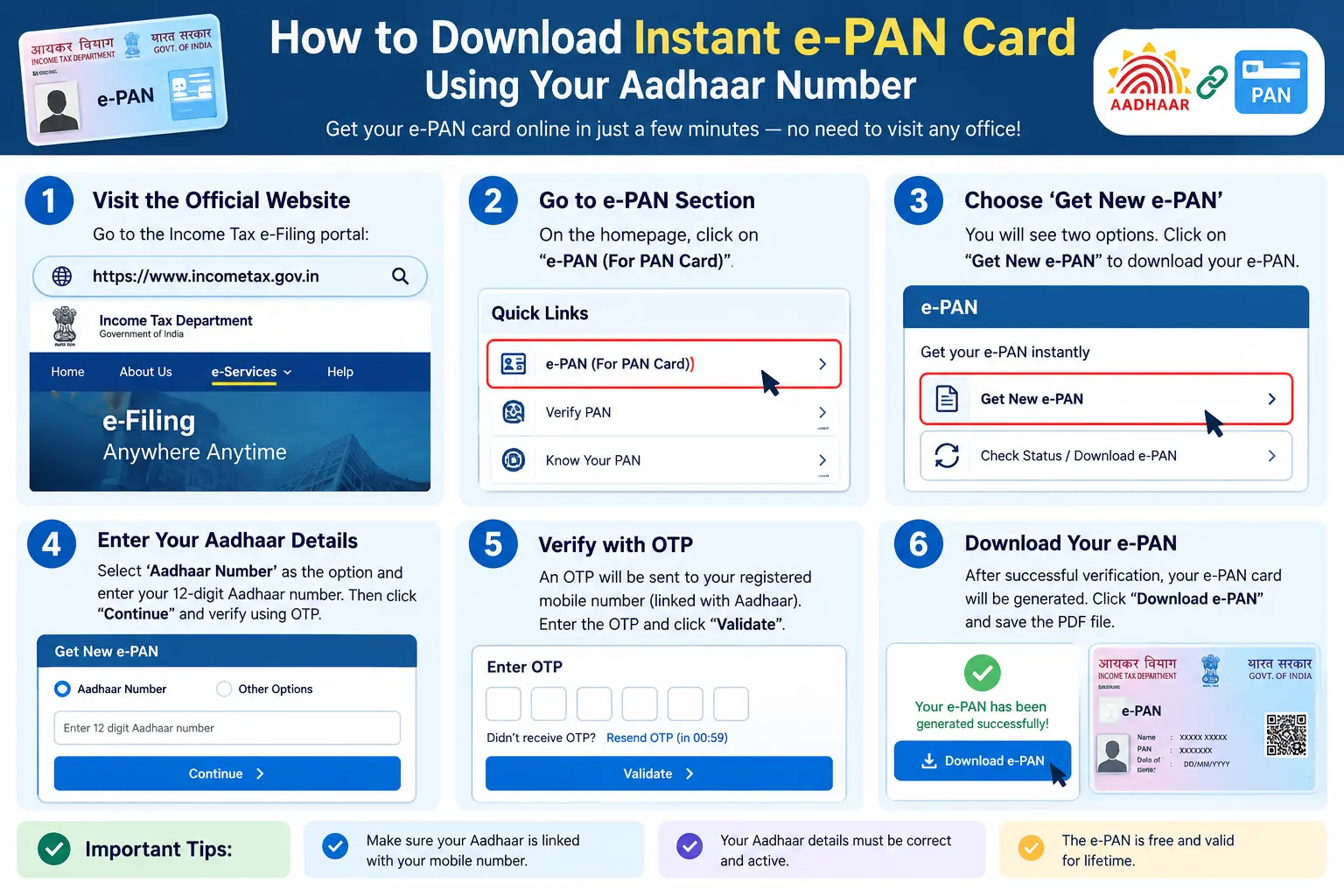
Step 1: Open the Instant e-PAN Section
Go to the Income Tax e-filing portal and find “Instant e-PAN” under the Quick Links section on the homepage. This is a pre-login service — you do not need an existing account or password.
Step 2: Choose “Get New e-PAN”
The page offers two paths: generating a new PAN, or checking the status of a request you already submitted. Select “Get New e-PAN.”
Step 3: Enter Your Aadhaar Number and Give Consent
Type your 12-digit Aadhaar number. You will be asked to tick a consent box allowing your Aadhaar details to be validated with UIDAI. Nothing proceeds without this.
Step 4: Verify the OTP
A six-digit OTP goes to the mobile number registered with your Aadhaar. Enter it on the validation screen. The OTP has a short validity window, and the portal allows only a limited number of attempts before you have to restart — so type carefully rather than repeatedly guessing.
Pitfall to watch: if no OTP arrives, do not keep clicking resend. Confirm first that your mobile is actually linked to Aadhaar. Plenty of people discover at this exact moment that their number was never updated after a SIM change.
Step 5: Review the Auto-Fetched Details
Your name, date of birth, and gender appear as recorded in Aadhaar. Read them line by line. You will also be asked to validate an email address, which is optional but worth doing — it gives you a second channel for receiving the e-PAN.
Step 6: Submit and Save the Acknowledgement Number
Accept the declaration and submit. The portal generates an acknowledgement number. Screenshot it or write it down immediately. If the download link does not appear right away, this number is your only way to retrieve the request later, and it is also what you would quote in any follow-up.
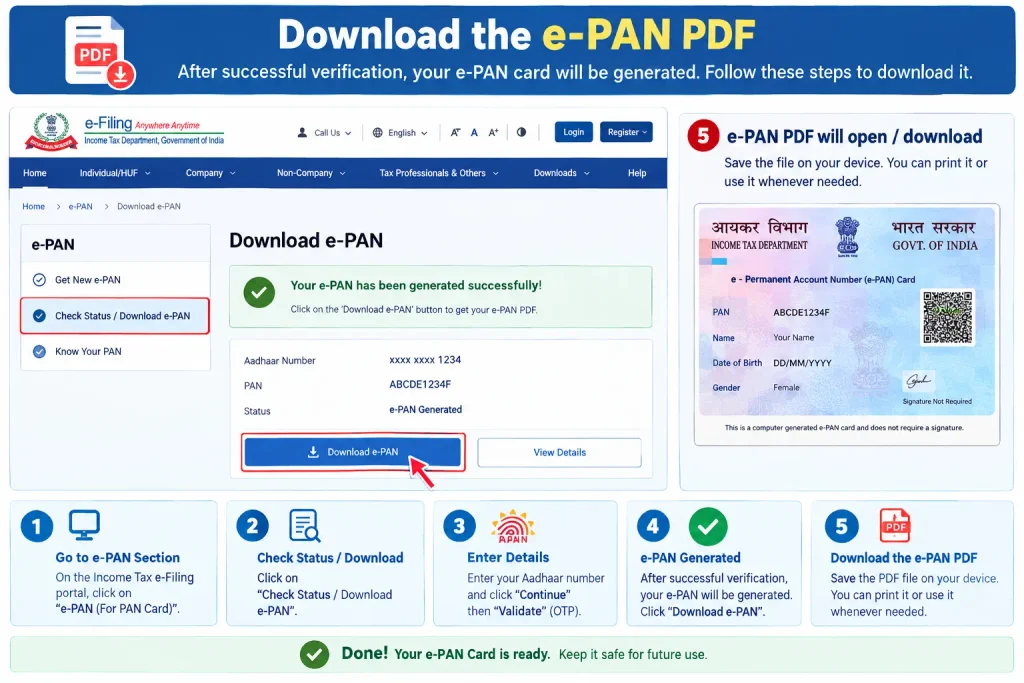
Step 7: Download the e-PAN PDF
Once generated, a “Download e-PAN” option appears. The PDF is password-protected, and the password is your date of birth in DDMMYYYY format. Pitfall to watch: this is the single most common point of failure. People type the year first, or use separators, or assume the password is the acknowledgement number. Enter it exactly as eight digits with no slashes or dashes.
Documents and Prerequisites
There is no document upload in this process, which is precisely why instant pan through aadhaar is faster than a traditional application. What you need instead is accurate data in the right places:
- Aadhaar number, active, with your current mobile linked to it
- Date of birth proof — the system may fetch this from DigiLocker, drawing on documents such as a Class X marksheet, birth certificate, or driving licence already stored there
- A working email address, for optional validation and receiving the e-PAN
If your mobile is not linked, or your DigiLocker has no date-of-birth document available, fix those first. The UIDAI portal and Aadhaar Seva Kendra handle mobile linking and detail updates; there is no way to bypass those steps from the e-PAN screen.
Discover More About: 👇
PVC Aadhaar Card: How to Order, Apply & Track Your Aadhaar Smart Card Online
How to Book an Aadhaar Appointment Online at UIDAI Enrollment/Update Centre
Common Mistakes That Cause Rejections
Applying with an Aadhaar that already has a PAN linked. The validation will fail and the portal will not tell you why in plain language. If you suspect a PAN exists, check before starting rather than after.
Using a mobile number that was linked months ago but has since changed. Aadhaar does not update automatically when you get a new SIM. Visit the UIDAI portal or an Aadhaar Seva Kendra to re-link.
Assuming an incorrect Aadhaar detail can be overridden. It cannot. The e-PAN form is read-only on name, date of birth, and gender.
Losing the acknowledgement number. Without it, retrieving a stalled request becomes considerably harder.
Entering the PDF password wrong repeatedly. Some PDF readers lock the file after a few failed attempts. Open it in a standard reader and type the eight digits slowly.
Frequently Asked Questions
Can I find my PAN number using only my Aadhaar?
There is no public lookup that returns a PAN from an Aadhaar number, and any third-party site claiming to offer one should be treated with suspicion. If you have forgotten your PAN, the safer route is the “Know Your PAN” or profile services on the Income Tax e-filing portal, which require you to already know some of your own details.
Aadhaar se PAN card kaise nikale — is the instant route the only option?
For first-time applicants, it is the fastest and the only fully paperless one. If you fall outside the eligibility list — NRIs, for instance — you apply through the regular process using Form 49A, which involves submitting supporting documents and paying the applicable fee.
Is the instant e-PAN really free?
As per current Income Tax Department guidelines, yes — there is no charge for generating or downloading an e-PAN through this specific facility. Fees for other PAN services, including corrections and reprints, are separate and can change, so verify on the official portal before paying anything to a third party.
The OTP isn’t coming. What now?
Check that your mobile is linked to Aadhaar and has signal. Wait a few minutes before requesting a new OTP, since repeated requests can invalidate earlier ones. If it still fails, the issue is almost always the Aadhaar-mobile link, and that has to be fixed through UIDAI channels first.
Can I apply for a PAN online with Aadhaar if I’m an NRI?
Generally no. The instant facility is built for resident individuals holding an Indian Aadhaar. NRIs typically apply through the regular PAN route, which has its own documentation requirements.
How long does the e-PAN take to generate?
Often within minutes, but the acknowledgement stage is not always instant. If the download link has not appeared, wait and re-check with your acknowledgement number rather than submitting a second request — duplicate applications against the same Aadhaar will not produce a second PAN.
A Final Word on Timing
If your e-PAN does not appear immediately after submission, give it a few hours before re-checking, and use the acknowledgement number rather than starting over. Most delays at this stage trace back to a mismatch between Aadhaar records and what you entered, or to a mobile number that was linked once but no longer receives messages. Sorting out the Aadhaar side first — mobile link, spelling, date of birth — is what makes the PAN step genuinely instant. Skip it, and you will spend far longer on the portal than the process was ever designed to take.

1 Comment
Pingback: What Is CKYC Number? How to Check, Download & Register